What the repair shop software does
A day in a repair shop from intake to payment — and every part of the software that day runs on.

ServiceCenterSoft carries a repair from the minute a customer puts a device on the counter to the minute they collect it and pay. Below is what the software does along that path, with links to the detail, and an honest list of what it does not do.
A day in a repair shop
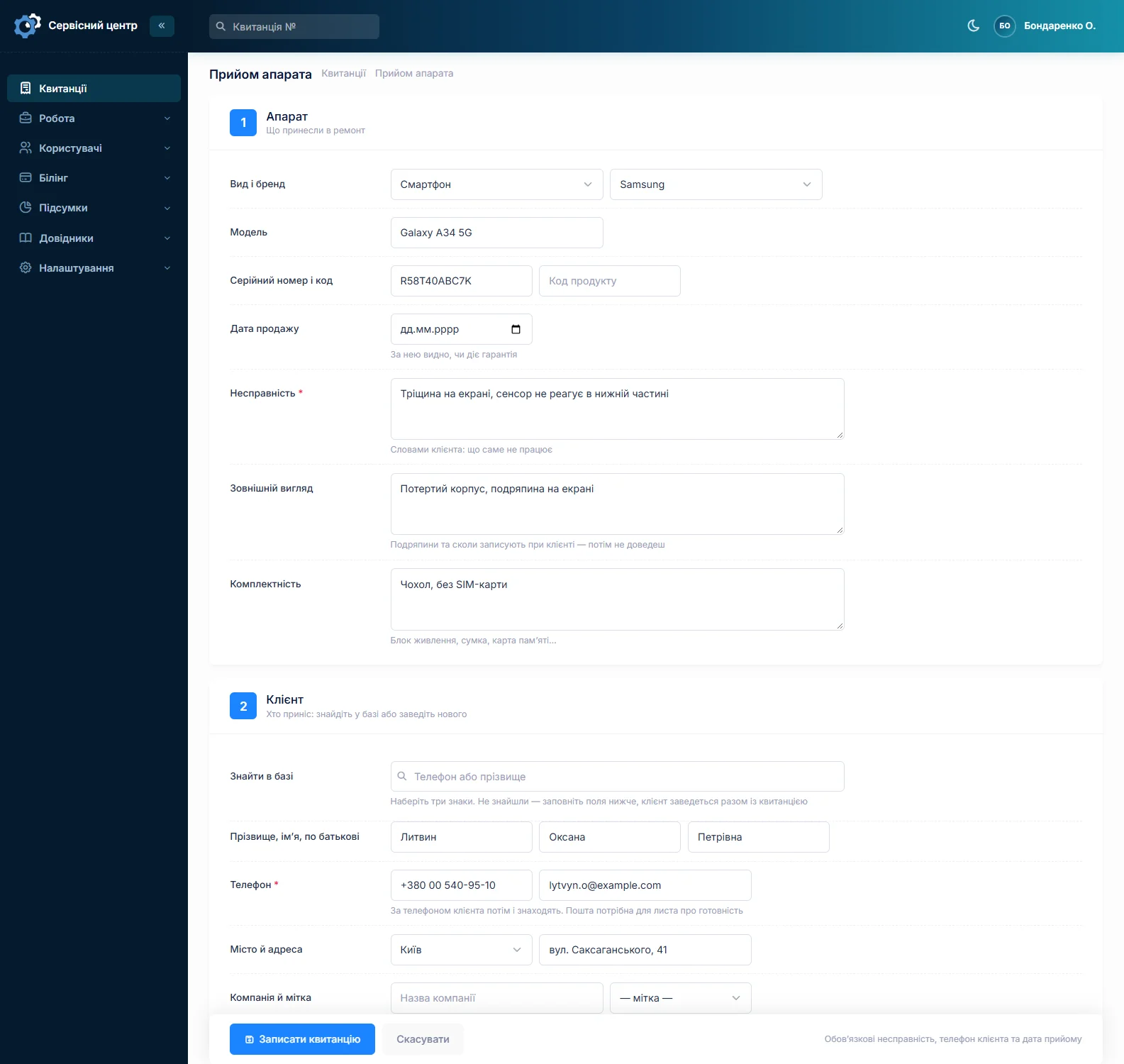
9:10. The first customer arrives with a phone. The front desk fills in one form: model, the fault in the customer's words, the state of the case, what came with it, serial number, due date. Prints the job sheet, the customer signs and leaves.
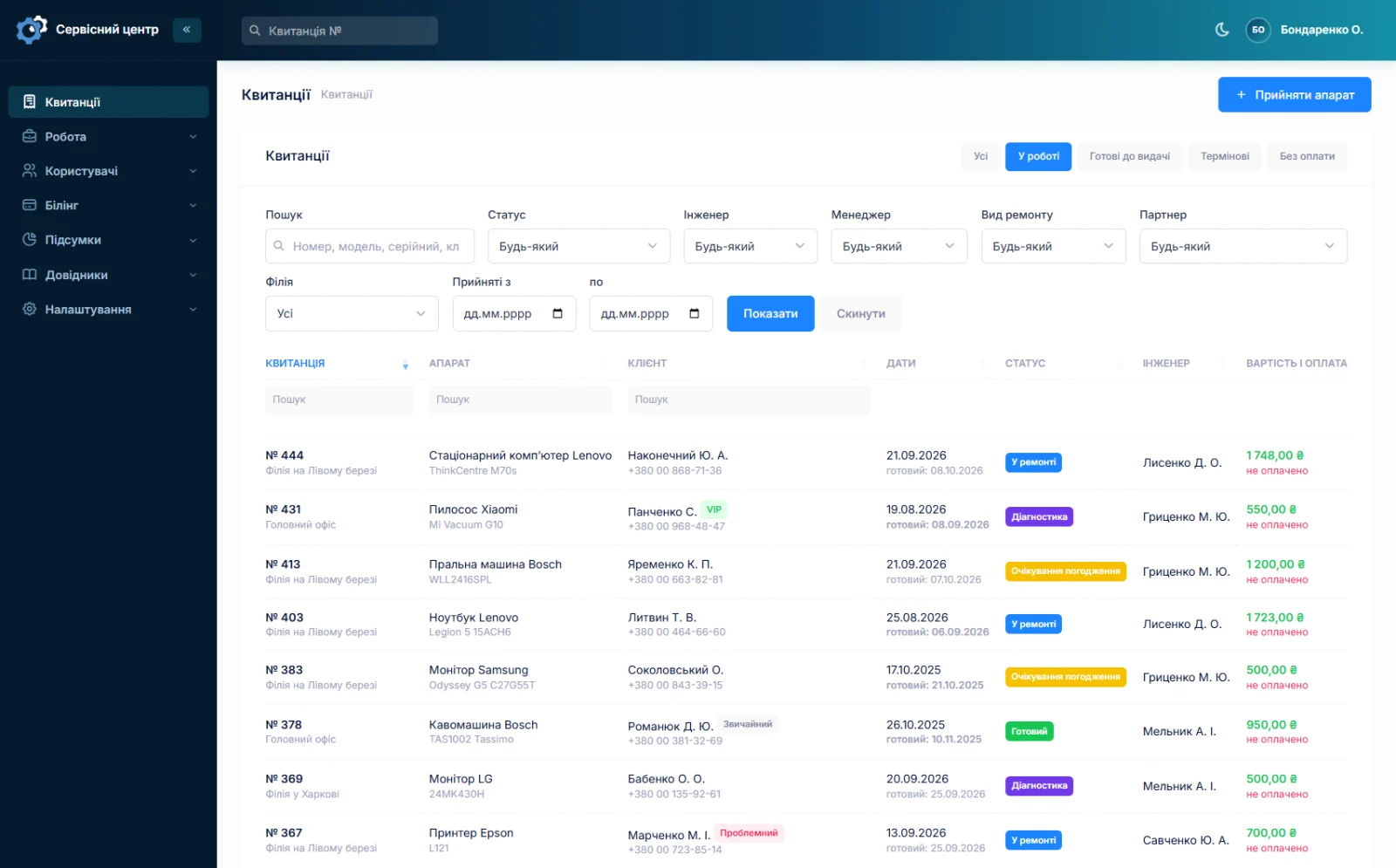
10:30. A technician opens the list, sees what is on them and takes the most urgent one. Opens it up, adds a line to the work log, sets the status to "waiting for a part" — a flex cable is needed (repair workflow).
11:00. The request for the cable is emailed to the supplier from inside the software. Now it is not "waiting for a part" but a specific repair held up since a specific date (spare parts).
14:20. Yesterday's laptop is finished. A button sends the customer an email with the amount, the address and the opening hours. The "any news?" call never happened (notifications).
17:45. The customer collects the laptop and pays by card. The front desk marks the payment and sets a closing status — the handover date fills itself in.
At month end. The owner opens the report and sees what was handed over, how much of it was received and what each technician is owed (reports).
None of that is typed twice: each step takes its data from the one before.
Intake and documents
One form on one screen, the customer found by any digits of their phone, a new one created on the spot. "Copy the last one" books an identical repair in seconds. Job sheets and certificates print on A4 with your logo and the details of the branch that took the device in, and you edit the form yourself. More about the intake form →
Repair workflow
Your own statuses in your own colours, a work log with author and time, internal comments, overdue dates in red, quick filters and a filter that lives in the page address. Change history across eleven fields answers "who did this". More about the workflow →
Spare parts
A log of deliveries: when, what, how many, at what price and from whom; a text record of usage that search covers; the amount of money tied up in parts. Requests are tied to a job, supplier emails go from the software. More about stock →
Customers
A ready email in the customer's language rather than yours. Their own portal showing only their repairs, read-only. The mail log shows what failed to send, and why. More about notifications →
Money, people and branches
Output per technician for any period, share based on money received, separate accounting for technician and manager. Branch statistics: taken in, handed out, in progress. Permissions are checkboxes, and each person sees exactly what they should. Reports → · Branches and rights →
Reference lists: the software adapts to you
Almost everything other systems hard-code is a reference list here, maintained by you. There are eleven of them, built on one mechanism: statuses, repair types, repair categories, devices, brands, payment types, partners, customer labels, rates, cities.
Which means the software does not impose somebody else's workflow. If your status is called "queued for diagnosis", that is what it will be called. If you have five repair types rather than three, you create five. A new brand is a line in a list, not an email to the developer.
An entry that jobs still refer to cannot be deleted: otherwise old repairs would show blanks where the status or the device used to be.
Which kind of service
The core is the same but the work differs, so each case has its own page with the detail: phone repair, home appliance service, computer repair, authorised service centre.
What the software does not do
Collected in one place so you do not go hunting, and do not feel let down after paying:
- No SMS — they cost money. The email, a Telegram "ready" message and the customer portal are what works.
- No automatic stock balances — usage is recorded as text, not as a quantity.
- No Excel export and no charts, and no net profit calculation: the software does not know your rent and taxes.
- No exchange with manufacturers' portals.
- No mobile app — though everything works in a phone browser.
- No callout planner with a map and a route.
- No on-screen signature and no sending the job sheet to a messenger.
- The ready email does not go out by itself on a status change — it is sent with a button.
Some of this will appear, some will not. If one of them is what you need, write to us — it counts as custom work.
Who this is not for
Better said now than refunded in a month.
- Chains of dozens of locations with separate legal entities, consolidated reporting and full stock accounting by balances. This is built for a shop with one to five locations.
- Anyone who needs integration with a manufacturer portal, an accounting package or a till. There is no data exchange.
- Field teams who need an app with routing and technician geolocation.
- Businesses that are not repair. A salon, a clinic, a tailor — those have their own entities, while everything here is built around a device, a job sheet and a serial number.
If your case is on that list, do not spend time on the demo. If it is not, the demo takes ten minutes and costs nothing.
What you need to start
A browser and an internet connection. The software runs on our server: nothing to install, update or administer, and we handle the backups. It opens on the front desk computer, on the owner's laptop and on a phone.
What it costs
One price for the whole shop: no charge per employee, per seat or for a second location.
Monthly
Paid every month, cancel whenever you like.
Yearly
Cheaper than paying monthly. Invoice or card payment.
Custom work
Changes tailored to the way you work — hourly, by agreement.
You can try everything listed here by hand in the demo — no registration needed.
Frequently asked questions
Where do we start if everything is in a notebook?
With intake. Create a branch, a few statuses and a print form, then start booking new devices into the software without migrating the old ones. Within two weeks there is enough in the database for the list and the reports to be useful. Copying history out of a notebook is rarely worth it.
How long does the switch take?
Setup is an evening: branches, statuses, repair types, the device catalogue and a print form. The front desk gets used to it in a day, because intake is one form and a print button. Fully giving up the notebook usually takes two to three weeks.
Does it suit a one-person workshop?
Yes, and half the sections simply will not be needed. One branch, one role, technician and manager being the same person. What remains is what people install it for: the job sheet, the job list, device history and knowing what the month brought in.
What happens to our data if we leave?
The data is yours. On request we hand over a full copy of the database in a form you can open or pass to another developer. Nothing is locked inside: the subscription ends, the data stays yours. Details are in the privacy policy.
Can the software be adapted for us?
Yes, and that is routine: there is one developer, so changes happen without committee approval. They are charged separately by the hour, with the amount and the timescale agreed before we start. Some requests end up in the common version and become available to everyone.
How are you different from the big systems?
In two ways. First, the price: one amount for the whole shop, with no charge per employee or per second location. Second, we write on the site what the software cannot do — so you see it before paying rather than after. We have fewer big features; we also have fewer unpleasant surprises.
See also
Repair intake form
What a job sheet must contain, how it prints from the software and how to adapt the form to your own rules.
Read moreRepair workflow: statuses, work log, certificate
A job from intake to handover: who is responsible, due dates and overdue work, change history, payment.
Read moreSpare parts accounting
A log of parts in and out, the money sitting in stock, requests tied to a job and an email to the supplier.
Read moreCustomer notifications when a repair is ready
A ready email and a Telegram message with branch details in the customer's language, plus a portal where they check the status themselves.
Read moreReports and statistics
Output per technician for any period, share calculated on money actually received, and branch statistics.
Read moreSeveral branches and access rights
Each location with its own address, stock and statistics; permissions as checkboxes rather than fixed roles.
Read moreCRM for a repair service centre
A customer database with the history of every repair, labels, companies and partners, a ready-for-collection email and a customer portal. Without a sales pipeline, which a workshop does not need.
Read moreCertificate of completed repair work
What a repair completion certificate should contain, when you really need one, and how to have it build itself from the work log instead of being written from memory at the end.
Read moreSee how it works
The demo is open — go in and try it. Ask us anything by email, Telegram or the form on this site.