Certificate of completed repair work
What a repair completion certificate should contain, when you really need one, and how to have it build itself from the work log instead of being written from memory at the end.

A certificate of completed work is the second document of a repair, after the job sheet. The job sheet records that the device was booked in and in what condition. The certificate records what was done to it, who did it, what it cost and what the customer should know next. In ServiceCenterSoft the certificate prints from the same job sheet, and its content comes from the work log the technician keeps during the repair.
The job sheet and the certificate are not the same thing
They are often confused because both print on the workshop’s letterhead. The difference lies in timing and content:
- The job sheet is given at intake: who brought what, in what condition, with what fault, and when it was promised. It protects both customer and workshop before the repair.
- The certificate is given at collection: what work was done, what it costs, whether it is paid, who was responsible, and any advice. It sums up the repair and protects you afterwards.
A private customer with a small repair often does not need a certificate — the job sheet marked as collected is enough. But there are cases where you cannot do without one.
When a certificate is really needed
- The customer is a company or a sole trader. Their accounts department will not process payment without a document for the work done. For these customers the certificate is not a formality but the condition for getting paid.
- Warranty repair paid by the manufacturer. The manufacturer or its agent pays against the certificate and usually wants it in its own format. More on software for authorised service centres.
- A dispute about quality. The customer comes back a month later saying the repair did not help. The certificate shows exactly what was done — and it becomes clear whether this is the same fault or a new one.
- An expensive repair. When the amount is noticeable, the customer wants to see what they are paying for. A list of work answers “why so expensive?”.
What the certificate should contain
Whether you print it from the software or fill in a form by hand, it should include:
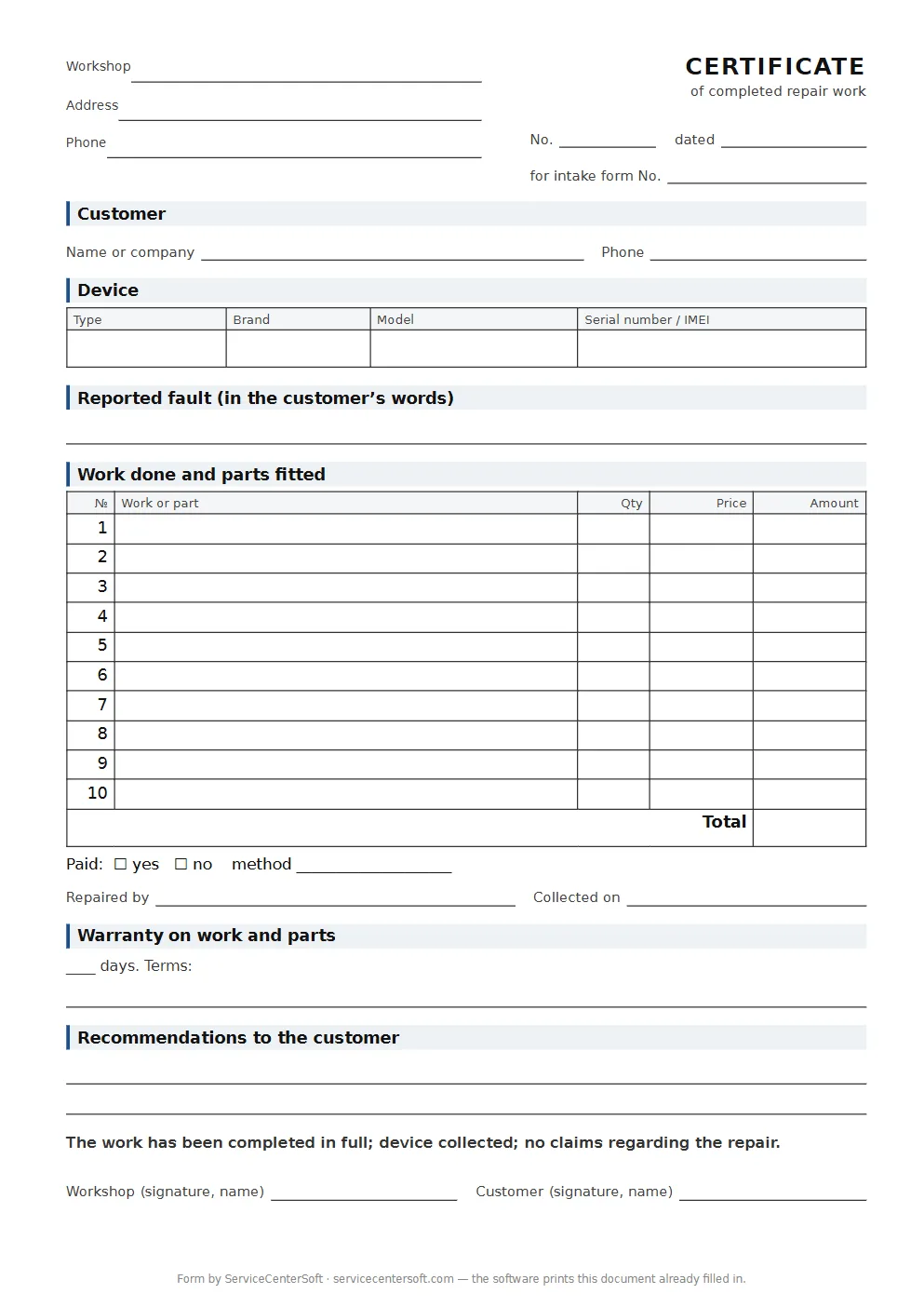
- the workshop’s name, address and phone number;
- the number of the certificate or of the job sheet it belongs to, and the date;
- the customer — name or company name, and phone;
- the device: type, brand, model, serial number;
- the reported fault — so it is clear what the device came in with;
- a list of the work done and the parts fitted;
- the price and a note of payment;
- who carried out the repair;
- the date collected;
- the warranty on the work — period and terms;
- advice to the customer, if any;
- signatures of the workshop and the customer.
We deliberately say nothing about legal requirements: they change, and quoting them without a lawyer is unreliable. If your business customers need a particular form of certificate, ask their accounts department — and set up the printed form to match.
If you still fill in the certificate by hand, take the blank form with these twelve points: a table for ten jobs and parts with a total, a payment mark, the warranty, recommendations and both signatures.
A certificate that builds itself
The weakest part of a paper certificate is the list of work. It is written at the end, from memory, and says “board repair” rather than “replaced the capacitors in the power supply, tested under load”.
In the software, the technician records each piece of work in the repair log as soon as it is done: one action, one entry, with the date and their name. When the device is collected, the certificate prints from the job sheet at the press of a button, and the whole log goes into it by itself.
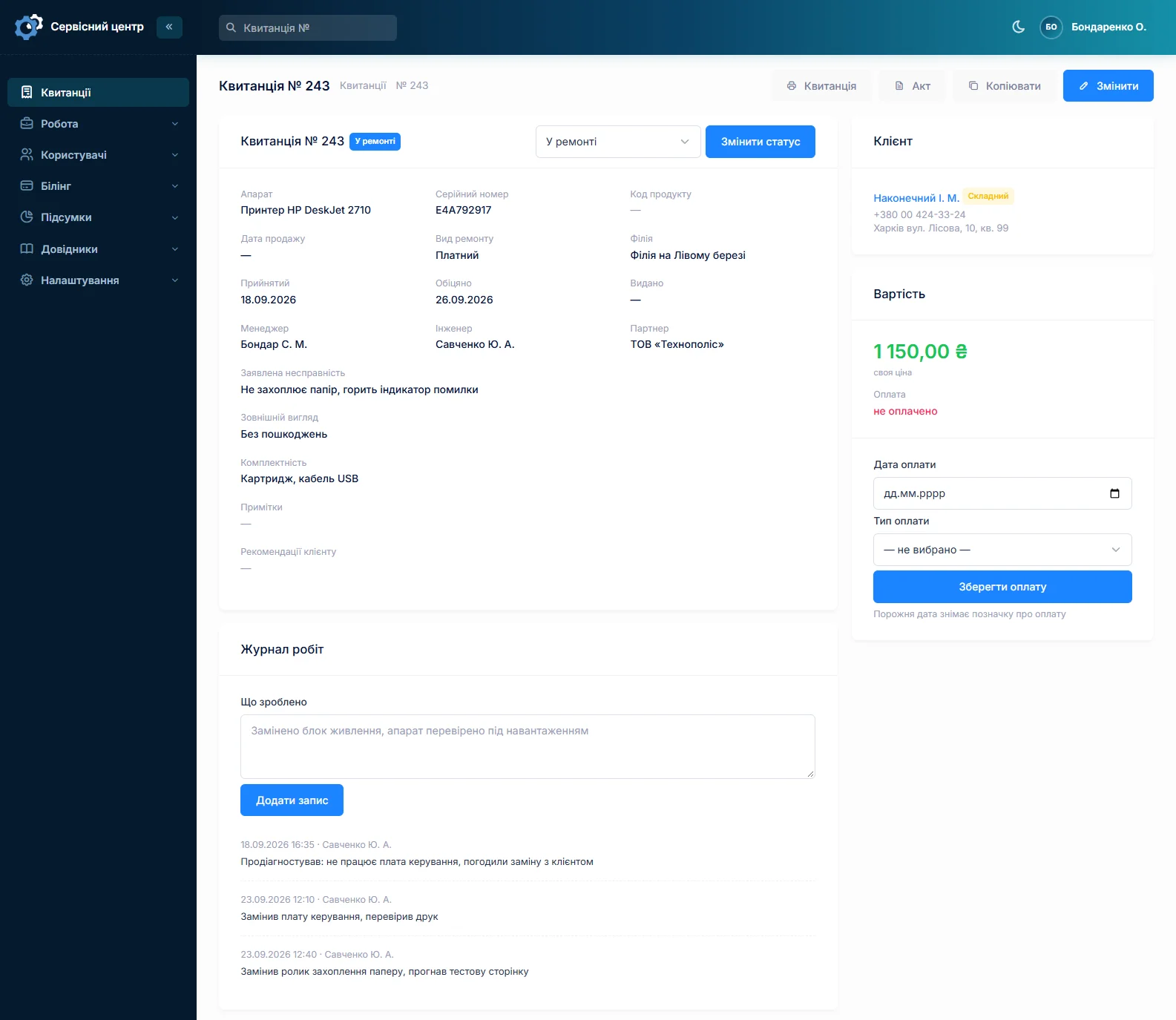
To make the certificate readable, agree a few rules for the log in your workshop: write what was done, not what was “tried”; name parts the way a customer would; record the post-repair test as a separate entry.
What the printed certificate looks like
The certificate prints on an A4 sheet. The standard form has the branch details, the customer, the device and serial number, the dates booked in and collected, the work log, advice, the amount due, who did the work and space for the customer’s signature. The reported fault, the payment date and warranty text can be added to the form — the software has fields for them.
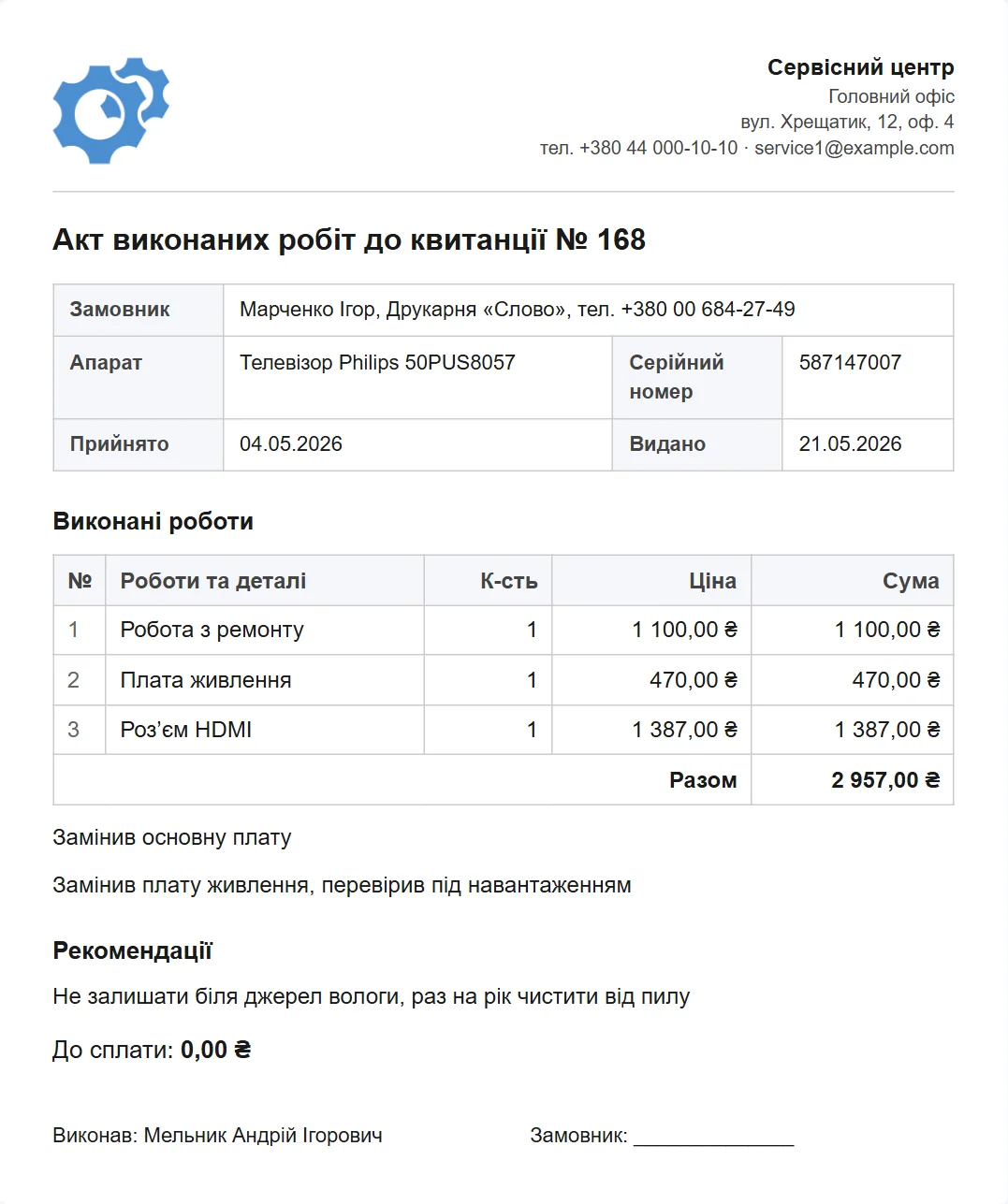
You edit the certificate form yourself: your logo, your warranty text, your order of fields. With several locations there is one form, and the details come from the branch where the repair was done. The document language is set separately from the software language — a Ukrainian customer gets the certificate in Ukrainian even if the technician works in the software in another language.
What the certificate does not include
- A price for each piece of work. The certificate lists the work and the total for the repair. The software does not produce a line-by-line estimate.
- A separate parts list. Parts appear on the certificate when the technician has written them into the work log.
- On-screen or electronic signatures. The certificate is signed on paper.
- Several certificates for one repair. There is one certificate per job sheet; if the work was done in stages, they all appear on the same certificate.
What you get
- The certificate prints from the job sheet at the press of a button — nothing is rewritten.
- The list of work comes from the technician’s log, not from memory at the end of the day.
- Every entry has a date and a name: you can see who was responsible for the repair.
- A form of your own: logo, warranty, order of fields, document language.
- Branch details fill in by themselves.
- For business customers — a document their accounts department can pay against.
What it costs
The certificate, the job sheet and the work log are all part of the software — nothing is bought separately. One price for the whole workshop.
Monthly
Paid every month, cancel whenever you like.
Yearly
Cheaper than paying monthly. Invoice or card payment.
Custom work
Changes tailored to the way you work — hourly, by agreement.
You can print a certificate from any job sheet in the demo. What belongs on the job sheet at intake is on the intake job sheet page.
Frequently asked questions
Can I email the certificate to the customer?
There is no separate “send certificate” button — the certificate is printed. If the customer needs an electronic copy, choose “Save as PDF” in the browser’s print dialog and email the file as usual.
How do I add a repair warranty to the certificate?
You write the warranty text into the certificate form once, in the print forms section. For example: “Work is guaranteed for 30 days from collection; the guarantee does not cover physical damage or liquid ingress.” From then on it prints on every certificate by itself.
Who in the workshop can print certificates?
Whoever you give the “print job sheets and certificates” permission to. Usually that is the front desk person who hands the device back. A technician does not need it: they keep the work log, and whoever hands the device over does the printing.
What happens to the certificate if the work log is changed after collection?
The certificate is not stored as a separate file: it is built from the job sheet every time it is printed. Change the log and the next print shows the new list. So the document is the signed paper copy, and the job sheet’s change history shows who changed what and when.
What language is the certificate printed in?
In the document language you chose in the workshop settings — regardless of the language staff use in the software itself. The certificate form exists in Ukrainian, English, German and Russian, and you can edit each one separately.
Can I put a stamp on the certificate?
The software prints the form; if you have a company stamp, you apply it on paper. A space for the stamp and the workshop’s signature can be added to the certificate form, just like the logo and terms.
See also
What the repair shop software does
A day in a repair shop from intake to payment — and every part of the software that day runs on.
Read moreRepair intake form
What a job sheet must contain, how it prints from the software and how to adapt the form to your own rules.
Read moreRepair workflow: statuses, work log, certificate
A job from intake to handover: who is responsible, due dates and overdue work, change history, payment.
Read moreSee how it works
The demo is open — go in and try it. Ask us anything by email, Telegram or the form on this site.