CRM for a repair service centre
A customer database with the history of every repair, labels, companies and partners, a ready-for-collection email and a customer portal. Without a sales pipeline, which a workshop does not need.

ServiceCenterSoft is repair-tracking software with a customer database built in. Each customer is one card showing all their devices and repairs, phone numbers, company, a "regular" or "difficult" label and your own notes. There is no separate CRM to buy and keep in sync with your job records: a customer appears in the database the moment they bring in a device.
The CRM a workshop needs — and the one it does not
"CRM" usually means sales software: a pipeline, deals, calls, reminders for the salesperson to ring back. A repair centre hardly needs any of that. There is no "deal" to close — the customer has already come in and the device is already on the counter. The cycle is different: you book it in, repair it, hand it back, and a year later the same person brings in another phone or a washing machine.
So what a workshop wants from a CRM comes down to three things:
- find the customer quickly while they stand at the counter, without creating them twice;
- see at a glance what this customer has brought in before and how it went;
- tell them the device is ready, instead of answering "any news?" calls.
That is exactly what the software does. What it does not do is listed honestly below.
One card, every repair the customer has had
The customer card holds the name, phone number and a second phone number, email, company, town and address, and internal notes. Below them is a list of all their job sheets — number, device, date booked in, status and price — with the total number of repairs above the list.
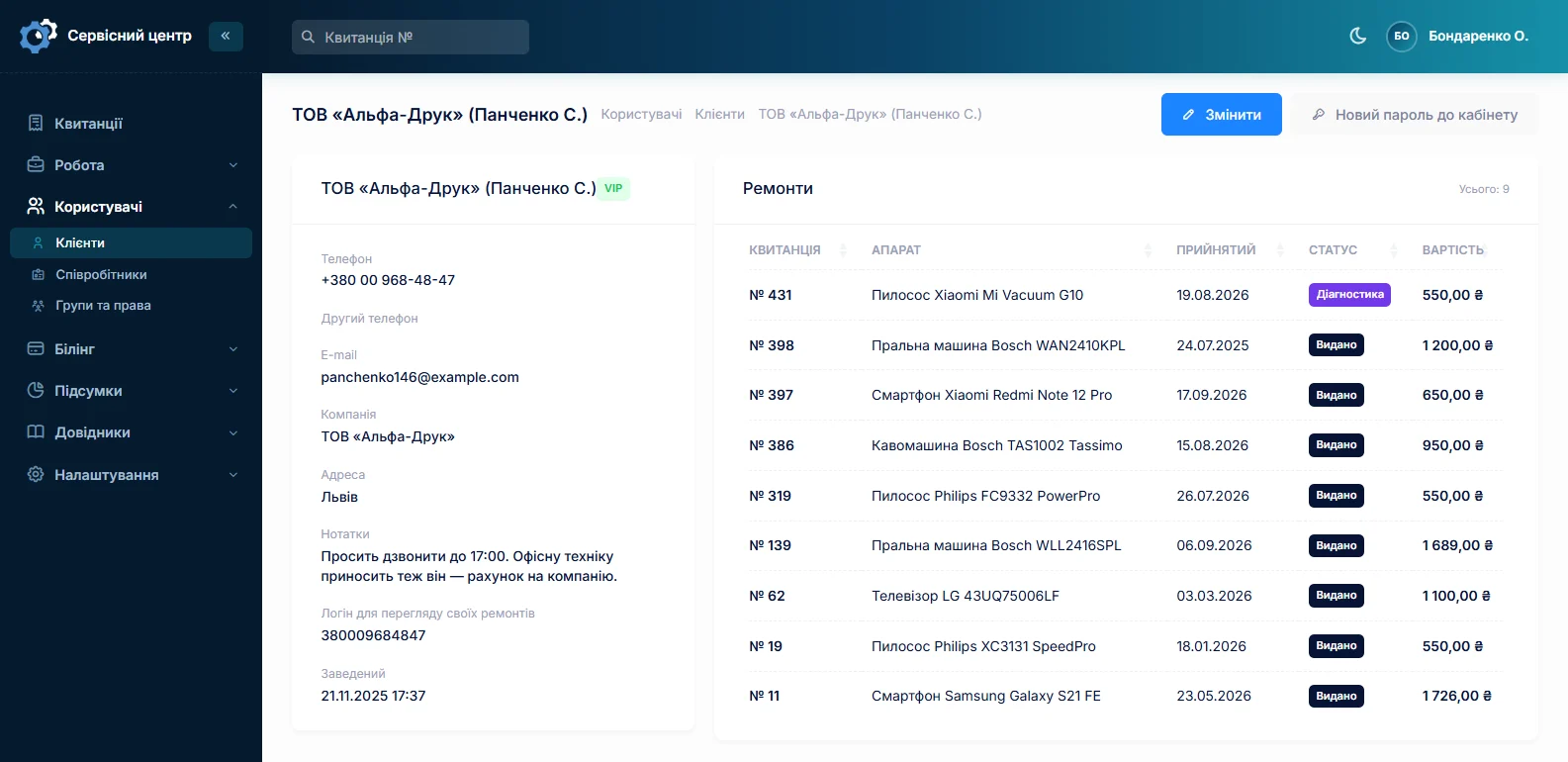
This shows what usually only the owner remembers. The customer is back for the third time with the same laptop — perhaps it is time to suggest a replacement rather than another repair. There was an argument at collection last time — the notes say what about. The card opens in one click from any job sheet, and any job sheet opens from the card.
Find a customer by any digits
Everyone writes phone numbers differently: with a country code, with a leading zero, with dashes or spaces. The search matches on the digits, so "067 123" finds the customer however the number was typed. You can also search by surname, company name or email.
There is no separate step for adding a new customer: the intake form searches the database, and if the person is not there, the fields for a new card are right on the same page. The job sheet and the customer are saved together. The database grows by itself, with no separate chore of "putting customers into the CRM".
Labels: regular, VIP, difficult
Each customer can be given a label from your own list. The label shows in colour next to the surname in the job list, so the front desk notices it before even opening the card. You choose the names and colours: some shops want "regular" and "VIP", others "difficult" and "prepayment only".
A label is not about a discount at the till but about how to deal with the person: a regular can be promised a date without a deposit, while with a difficult customer it pays to record the condition of the device especially carefully.
Companies and partners
When a device comes from an organisation, the customer card has a "company" field, and the search finds the customer by it too. For those who send you repairs regularly — electronics shops, office suppliers, other workshops — there is a separate partner list. The partner is set on the job sheet, and the job list can be filtered by it: you see how much equipment came from each partner and where it stands now.
Keeping the customer informed: email and portal
When the device is ready, the front desk presses a button and the customer receives a ready-for-collection email. You edit the wording yourself. The email is sent deliberately rather than automatically on a status change, so the customer does not get one if the status was set by mistake. The same email can be resent no more than once a day.
You can also switch on the customer portal. The login is the phone number; the front desk hands out the password at intake. In the portal the customer sees only their own repairs, read-only: status, dates, price and whether it is paid. They do not see the work log, the technicians' names or internal notes. The portal stays off until you switch it on in the settings. More on customer notifications.
Who can see the customer database
Customers' phone numbers and addresses are what an employee can take with them when they leave. That is why viewing customer cards and editing them are two separate permissions. A technician can see job sheets without access to the customer database, and the front desk can see and add customers without seeing reports or stock. Permissions are checked on the server, not just by hiding buttons (branches and permissions).
What our CRM does not have
Better to find out here than after paying:
- A sales pipeline or deals. A workshop does not need one; if you also sell equipment, use separate software for sales.
- Telephony. The software does not make calls or record them.
- SMS. Not sent and not planned: they cost money. Email, a Telegram "ready" message and the portal work.
- Bulk mailings. You cannot send a promotion to all customers from the software — emails go out only about a specific repair.
- Loyalty points, discount cards or birthday greetings.
- Export of the database to Excel. If you need it, it is custom work at the hourly rate.
What you get
- A customer database that fills itself — with every intake.
- The history of each customer: all devices, repairs and amounts on one card.
- Search by any digits of the phone number — no duplicates in the database.
- Labels the front desk sees before opening the card.
- A record of the companies and partners who send you repairs.
- A ready-for-collection email and a customer portal instead of "any news?" calls.
- Customer contacts visible only to the people who need them.
What it costs
The CRM is not sold separately — the customer database is already part of the software. One price for the whole workshop, with no extra charge for staff or branches.
Monthly
Paid every month, cancel whenever you like.
Yearly
Cheaper than paying monthly. Invoice or card payment.
Custom work
Changes tailored to the way you work — hourly, by agreement.
You can try the customer card and search without signing up — in the demo. How a technician works through a repair is described on repair workflow.
Frequently asked questions
How is your CRM different from HubSpot or Pipedrive?
Those are built for sales: pipelines, deals, calls, tasks for salespeople. Ours is repair tracking in which the customer database is part of intake: a customer appears in the database together with the job sheet, and their card shows every repair. If you also sell equipment you can use both, but there is no link between them — the data is not synchronised.
Can you bring over our customer list from a spreadsheet or old software?
Often, yes. If the customers can be exported to a spreadsheet, we will estimate the work and move them over — with phone numbers, addresses and, where it exists, repair history. Tell us what you have now and we will say what can be done.
Can every employee see all customers' phone numbers?
Only if you give them that permission. Viewing customer cards and editing them are two separate permissions, and you can withhold them from, say, a technician who only needs to see job sheets. Permissions are checked on the server: opening a card by its direct address will not get around a hidden button.
Can we send customers a promotion or a service reminder?
No. The software has no bulk mailings: an email goes out only about a specific repair — to say the device is ready. That is deliberate, so the software never becomes a source of spam in your name. If you need a mailing from the software's database specifically, that is custom work — get in touch.
What if a customer has been added twice?
It rarely comes to that: at intake the search matches on the digits of the phone number, so an existing customer shows up straight away. If a duplicate does appear, there is no button to merge two cards yet. A job sheet can be moved to the right card — the job sheet form has "choose another customer" — and the spare card deleted afterwards.
Will the customer see their earlier repairs in the portal?
Yes. The portal shows every repair linked to the customer's card — current and past — with dates, price and whether it was paid. They will not see anyone else's repairs, even by direct address, and in their own they will not see the work log or internal notes.
See also
Certificate of completed repair work
What a repair completion certificate should contain, when you really need one, and how to have it build itself from the work log instead of being written from memory at the end.
Read moreWhat the repair shop software does
A day in a repair shop from intake to payment — and every part of the software that day runs on.
Read moreRepair intake form
What a job sheet must contain, how it prints from the software and how to adapt the form to your own rules.
Read moreSee how it works
The demo is open — go in and try it. Ask us anything by email, Telegram or the form on this site.