Technician commission and payouts
Commission for each technician from the estimate lines they actually did, a share for the front desk from paid jobs, payouts in instalments and the balance still owed at the end of the month.
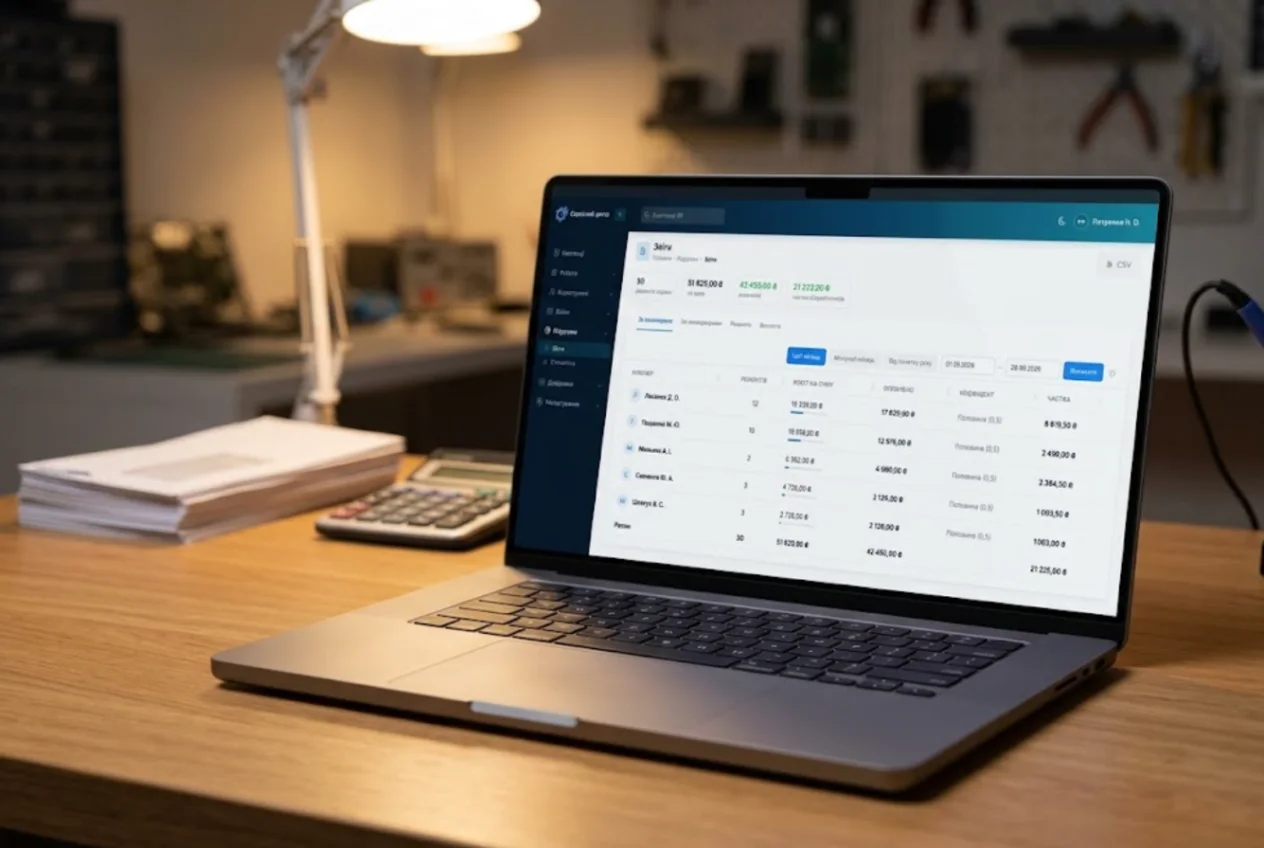
It is the end of the month. A technician looks at the figure and asks: "Why so little?" If the answer lives in a notebook, a calculator and the owner's memory, the conversation ends badly for both sides. ServiceCenterSoft works out each technician's and manager's share from the repairs they actually did, shows the breakdown line by line, records payouts and keeps the balance owed — no separate spreadsheet.
How repair shops pay their technicians
There are three common models. A fixed wage is calm and predictable, but it makes no difference to the technician whether they finished twenty jobs or forty. Commission — a share of every repair — rewards people who work fast and well, and hurts in a quiet month. Base plus commission covers the quiet months and still pays for effort; most shops with more than one bench end up there. How to choose a model and what to calculate the commission from is covered in how to pay repair technicians.
The software takes care of the commission part — the part that is hard to work out by hand. It does not hold a fixed wage: you pay and track the base amount as you do today.
Where "why so little?" comes from
Pay disputes are rarely about the size of the number. They are about the rules: what the percentage was taken from, whether a job handed over on credit counted, whether last week's advance was deducted, who gets paid for a repair two people worked on. When those rules live in the owner's head, they have to be argued again every month. When the software applies the same rules to everyone and shows where every euro came from, there is nothing left to argue about.
Commission on the lines a technician did
Each technician has a rate: 0.40 means 40 %. Rates are kept in a short list with names — "Senior technician", "Trainee" — and assigned on the employee's form. The share is calculated from the repair estimate:
- the base price of the repair goes to the technician assigned to the job;
- each estimate line goes to whoever is set as the person who did it (by default, the job's technician);
- labour counts in full, while a part taken from stock counts only by its markup — nobody earns commission on money that went to the supplier.
An example. A laptop repair: base price €60, connector replacement €45, and a part from stock sold for €120 that cost €80. The technician's commission base is 60 + 45 + 40 = €145; at 0.40 that is €58. If a colleague did a €30 firmware job and is set on that line, those €30 count towards the colleague, at the colleague's rate.
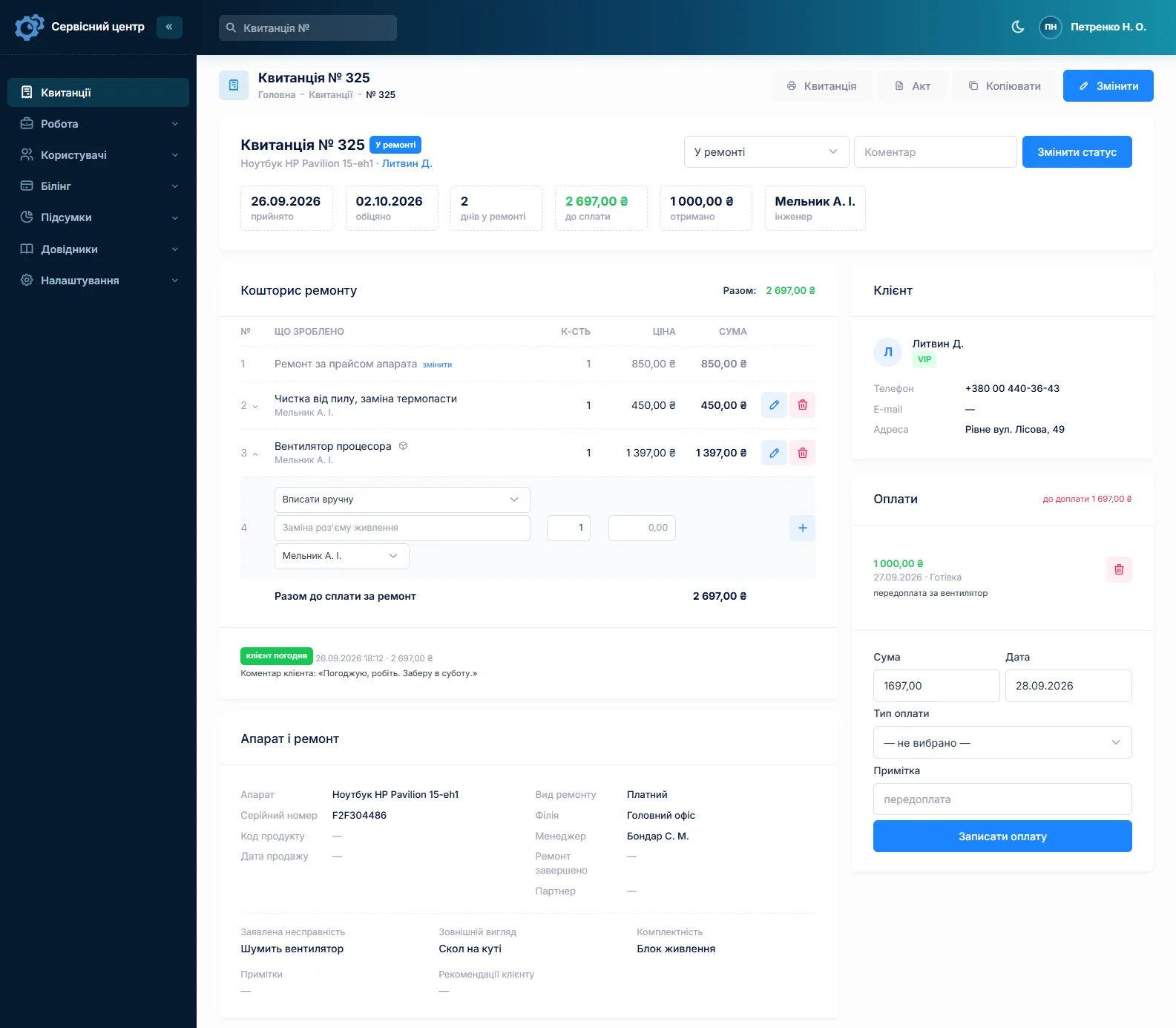
A part typed in by hand, without stock, counts in full — the software does not know what it cost. If technicians should earn only on the markup, run parts through stock.
When a repair counts as earned
Commission is credited for repairs handed back to the customer in the period and paid in full. A device released on credit shows up greyed out in the breakdown, but it is not added to the total. Once the customer pays the rest, the repair counts and the technician's balance goes up. Nobody earns a share of money the shop has not received, and the owner no longer has to remember what has already been paid on.
Front desk share of paid jobs
A manager — the person at the front desk — earns their own rate on the paid total of the jobs they handled. One person can be both: a technician who books devices in on Saturdays has two rates, one per role, and in the payouts both are added up into one figure.
Technicians can see what they were paid for
The technician report for a period shows repairs, amount, how much of it has been paid, the rate and the share. Click a name for the breakdown: every job, every line, its amount, the cost of the part, what counted and what was credited. A technician opens the same report but sees only their own figures — and can answer "why so little?" before asking anyone.
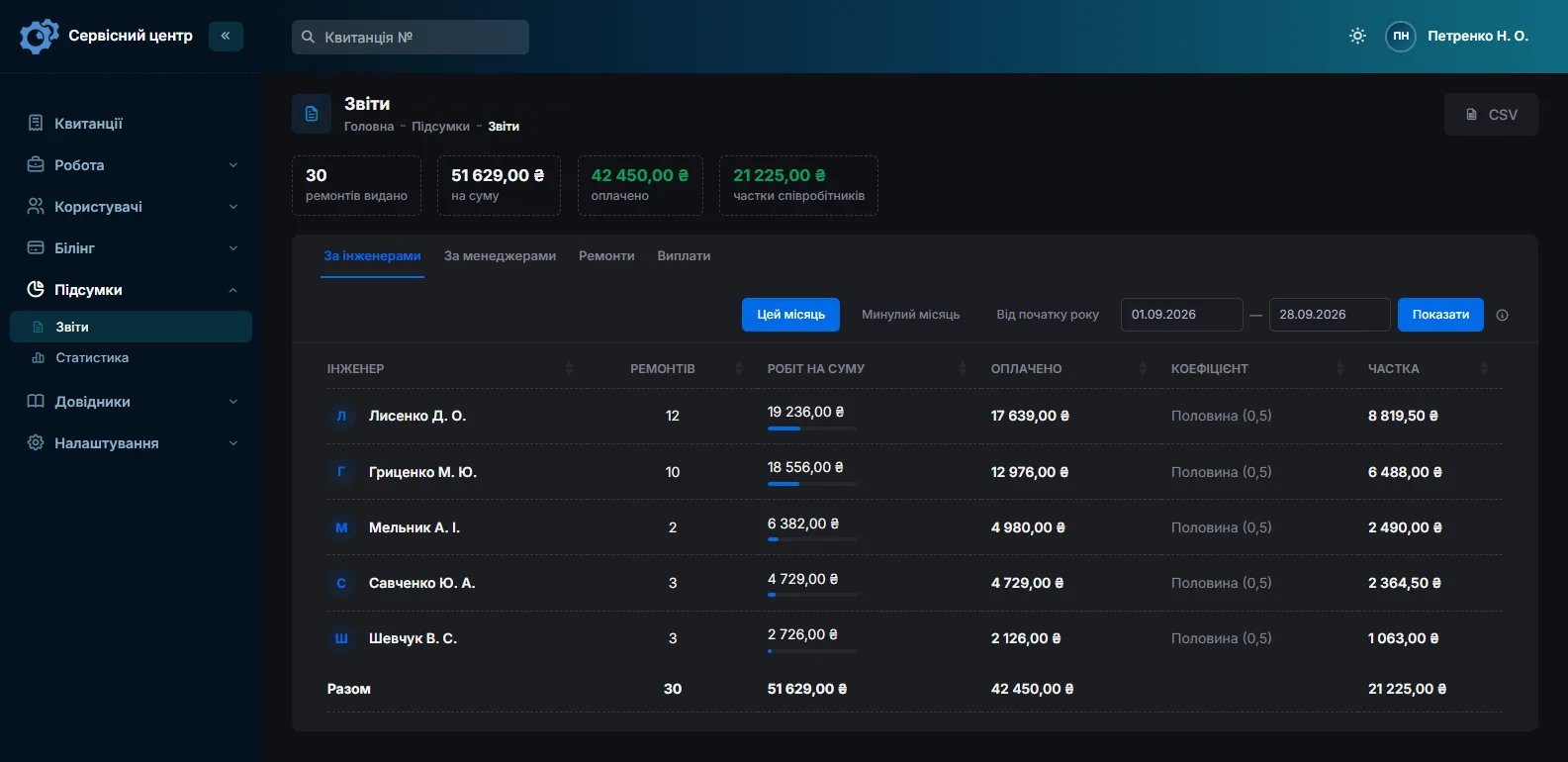
How the reports and branch statistics work in general is on the reports page.
Instalments, advances and the balance owed
The "Payouts" tab shows each person's credited amount for the period, what was paid out in the period and the balance owed at the end of the period. That balance is everything earned so far minus everything paid so far, so a shortfall in September does not disappear — it is still there in October. A payout is recorded on the same screen: who, how much, the date and a note such as "advance" or "for September". The "Pay out" button fills in the balance. An advance larger than what has been earned shows as a negative balance until new repairs cover it.
Below the table is the list of payouts for the period: who, how much, when and who recorded it. Recording or deleting a payout is written to the activity log.
Who sees what, and who pays
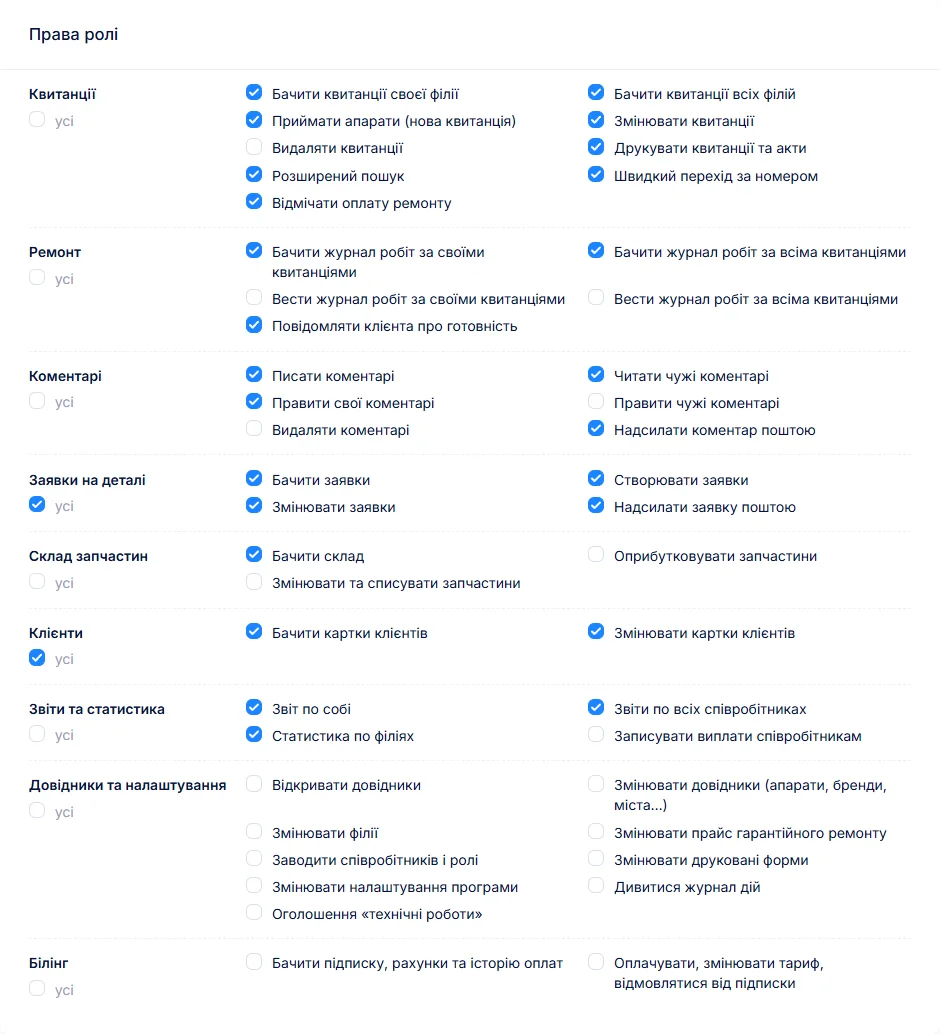
There are three separate permissions: "Own report", "Reports on all employees" and "Record staff payouts". A technician sees only their own share and payouts. You can let an administrator see everyone and leave recording payouts to the owner alone. Permissions are ticked per role (branches and permissions).
What the software does not do
- No taxes, social contributions or payslips. Credited and paid amounts export to CSV for your accountant or your own sheet.
- No fixed wage, bonuses or deductions as separate entries — only the share of repairs and the payouts.
- No timesheets or working-hours tracking.
- One rate per role: there is no separate percentage per type of work. There is no rate history either — a new rate recalculates past months too, so change it once you have settled up.
The software runs in the browser, on a phone as well; there is no separate app.
What you get
- Each technician's share for any period — from the lines they did, and only the markup on parts.
- A front desk share of paid jobs.
- A breakdown technicians can open themselves.
- Payouts in instalments and a balance that carries over from month to month.
- CSV export for your accountant.

I tried the ServiceCenterSoft demo and came away with a good impression. The program is simple and easy to understand, yet it has everything you need for the job: customers, repairs, devices, spare parts, statuses and statistics.
I especially liked the dark theme and the responsive design — working from a phone is perfectly comfortable. Another plus is the instant search that works as you type, so you don't have to press a separate "Search" button every time.
You can tell the program was built specifically for service centers rather than being a generic CRM adapted for the repair business. The interface has no unnecessary frills; everything is logical and to the point.
A good, practical tool for the day-to-day work of a service center.

I liked that you get a free 14-day trial and that they are willing to handle my special requests — setting things up exactly the way I need them.
I also liked how payment works. You can simply pay the monthly fee by card online — basically the same as a regular Spotify subscription or any other service. No separate contracts to sign and no invoices to pay manually.
And there's no feeling of strict limits on the number of employees. One service center is one account, and inside it you can organize the work of your technicians and run several branches.
For me this is far more convenient than plans where you have to pay for every single user or keep counting how many employees are working today.

My business is fairly specific, so the program's standard features weren't enough — I needed my own custom fields, my own sorting options and search by additional parameters. The work completion certificate and the printed repair receipt also needed some changes to fit the way we work.
I contacted technical support. To be honest, I expected changes like these to take a long time, but everything was done within a single day. The team quickly understood exactly what we needed, suggested the right solution and did everything properly.
I'd especially like to mention the support: they get straight to the point, with no unnecessary bureaucracy, and they genuinely help instead of just sending you off to read the documentation.
For me this is a big advantage of the program: it isn't just sold "as is" — it can be adapted to how you actually work. Thanks to the team for the quick response and for treating the customer right.
Highly recommended!
What it costs
Technician pay is part of the subscription. The price is per workshop, with no extra charge per employee.
Monthly
Paid every month, cancel whenever you like.
Yearly
Cheaper than paying monthly. Invoice or card payment.
Custom work
Changes tailored to the way you work — hourly, by agreement.
Off-the-shelf not enough — your own forms, roles, reports or workflow? We will build a program for you. How it works
See how the share is calculated in the demo: open the technician report and click any name.
Frequently asked questions
We pay a base wage plus commission. Can the software handle that?
The commission part, yes: the software works out each technician’s share of repairs and tracks the payouts against it. It does not hold a fixed wage, so pay and track the base amount separately. Do not record the base wage here as a payout — the balance owed would go negative.
Can a technician get one percentage for labour and another for parts?
There is no separate percentage for parts: each technician has one rate. But a part from stock only counts by its markup — the difference between the selling price and what it cost — so in practice a technician earns less on parts than on labour. Different percentages per type of work are not available either.
A device went out on credit. When does the technician get paid for it?
When the customer has paid for the repair in full. Until then the repair shows greyed out in the technician’s breakdown but is not credited. As soon as the payment is recorded, the repair counts and the balance owed goes up.
Can technicians see each other’s pay?
No, unless you give them the “Reports on all employees” permission. Without it a person sees only their own share, repairs and payouts. The default manager role has this permission — untick it if the front desk does not need to see what others earn.
Does it calculate taxes or print payslips?
No. It calculates earnings from repairs and tracks payouts; taxes, contributions and paperwork stay with your accountant. Earned and paid amounts for any period export to CSV and open in Excel.
How do I record an advance?
As an ordinary payout: amount, date and “advance” in the “For” field. The balance owed drops straight away. If the advance is more than has been earned so far, the balance shows as negative until the next repairs cover it.
See also
Several branches and access rights
Each location with its own address, stock and statistics; permissions as checkboxes rather than fixed roles.
Read moreCRM for a repair service centre
A customer database with the history of every repair, labels, companies and partners, a ready-for-collection email and a customer portal. Without a sales pipeline, which a workshop does not need.
Read moreCertificate of completed repair work
What a repair completion certificate should contain, when you really need one, and how to have it build itself from the estimate and the work log instead of being written from memory at the end.
Read moreSee how it works
The demo is open — go in and try it. Ask us anything by email, Telegram or the form on this site.