Phone repair shop software
Intake in a minute, screens and batteries tracked, a ready-for-pickup email, output per technician.
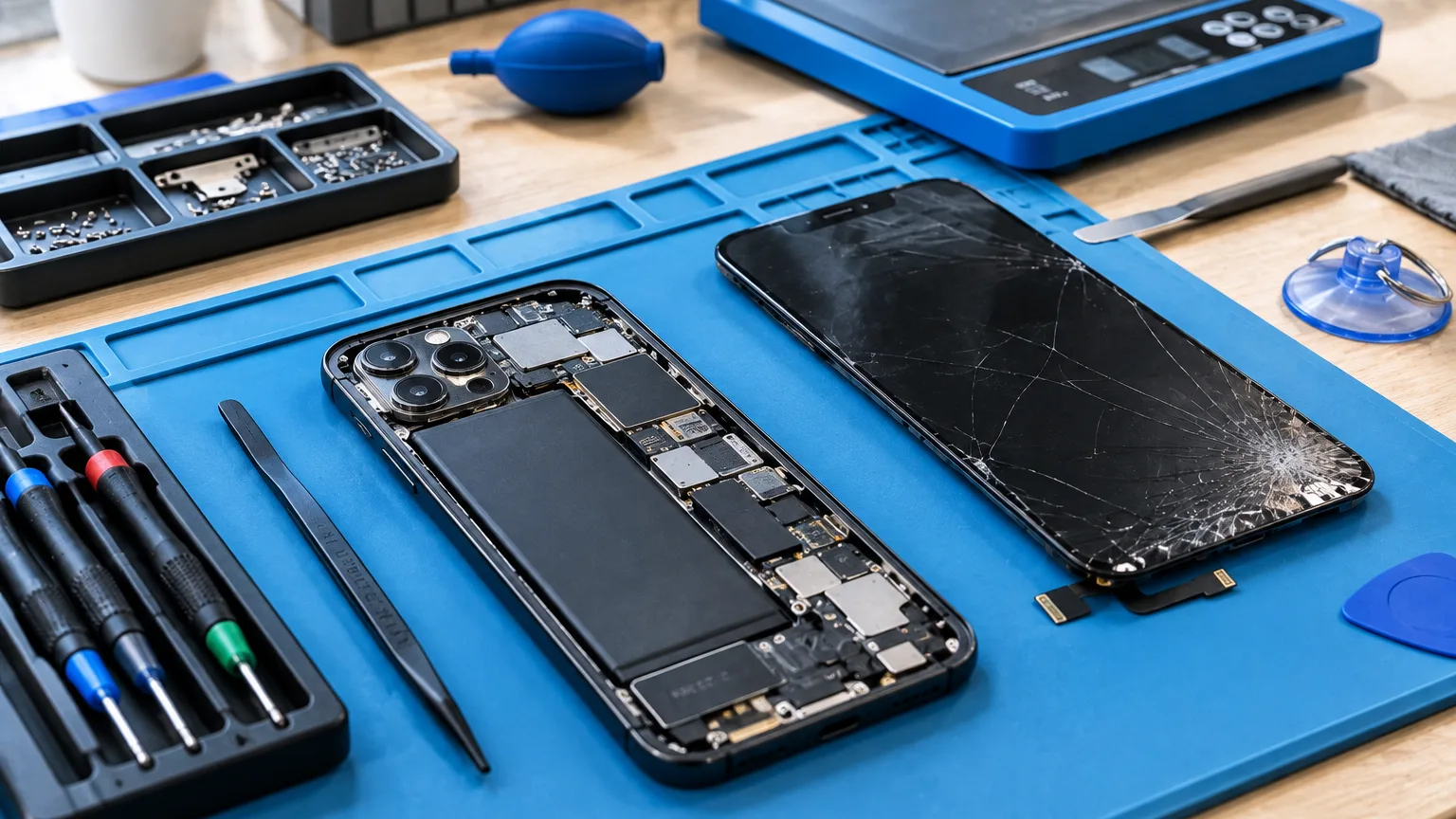
ServiceCenterSoft is software for a shop that repairs phones and tablets. Intake in a minute at the counter, a printed job sheet, screens and batteries tracked, output per technician. It runs in the browser: on the front desk computer, on the owner's laptop and from a phone.
What usually gets lost in a phone shop
A phone shop works differently from an appliance workshop. It is thirty devices a day, not five. The customer does not go home to wait — they stand at the counter and watch you fill in the form. A repair often takes an hour, and the whole history of the device ends up living only in the technician's head.
The same things go missing every time:
- nobody wrote down that the screen already had a crack in the corner — and you argue about it at pickup;
- nobody wrote down the passcode — the repair is finished and there is no way to test it;
- three identical screens were bought as spares, and no one remembers which one went into which job;
- the customer calls for the third time today, and a technician stops work to say "not yet";
- at the end of the month you have to work out the technicians' pay — from a notebook.
None of these costs much on its own. Together they eat an hour or two every day and now and then cost you the price of a screen.
Intake in a minute, while the customer waits at the counter
The intake form is a single screen: model, reported fault, condition, what came with the device, serial number or IMEI, due date and an estimate. The customer is found by surname or by phone number — and by any digits of it, because everyone writes numbers differently. If the customer is new, they are created in the same form: there is no time to walk through other sections at the counter.
For identical jobs there is "copy the last one": customer, device and branch carry over from the previous job sheet, the rest is filled in fresh. A screen swap on the same model takes seconds to book in.
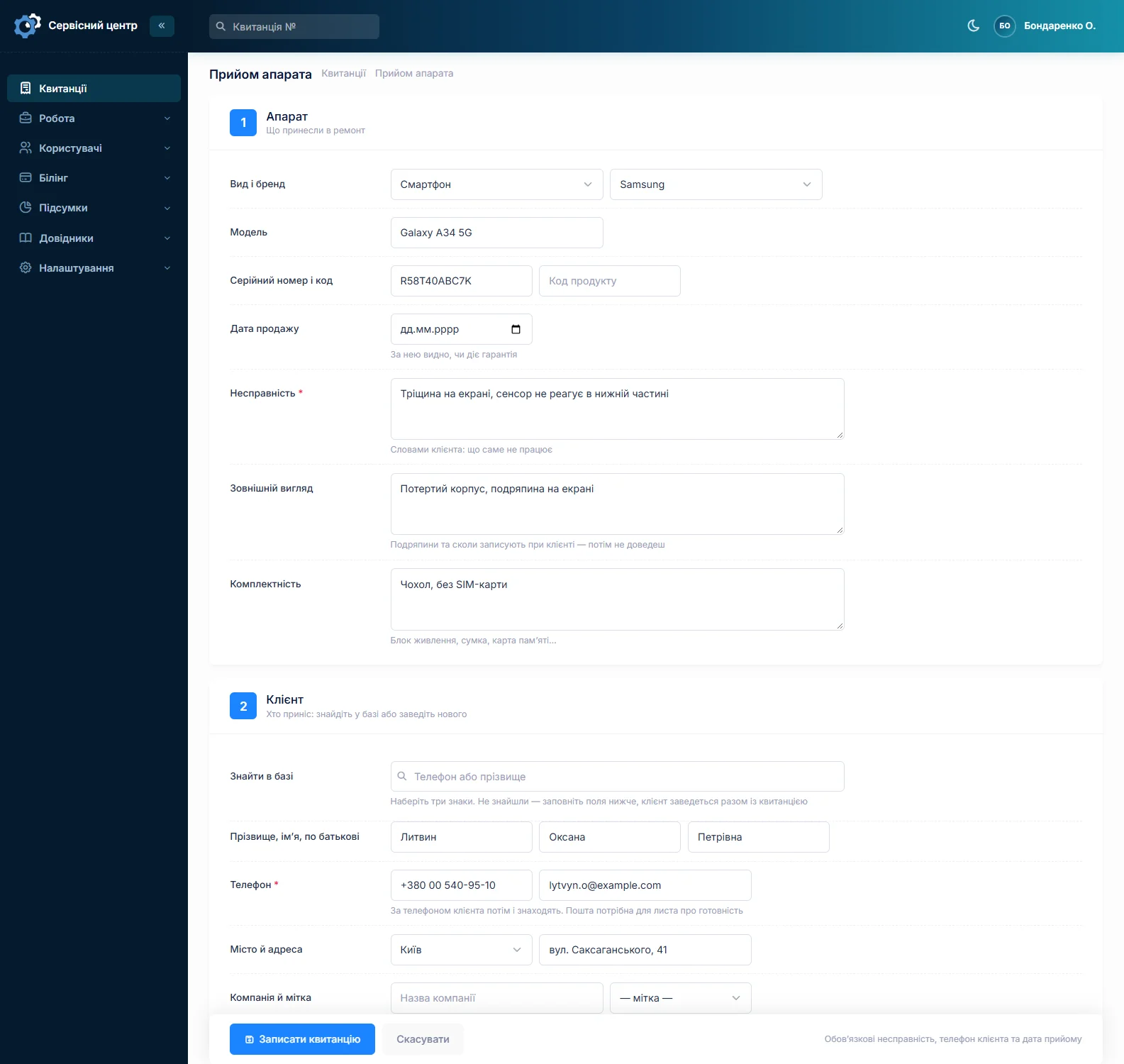
The "condition" and "contents" fields are not paperwork, they are your protection. A scratch, a dented frame, a missing tray or cracked camera glass, recorded before the repair, remove almost every argument at pickup.
The job list shows what is on fire
The main screen is the list of job sheets. An overdue date shows in red, the status is colour-coded, urgent jobs are marked separately. One button and you see only what matters right now: in progress, ready for pickup, urgent, unpaid.
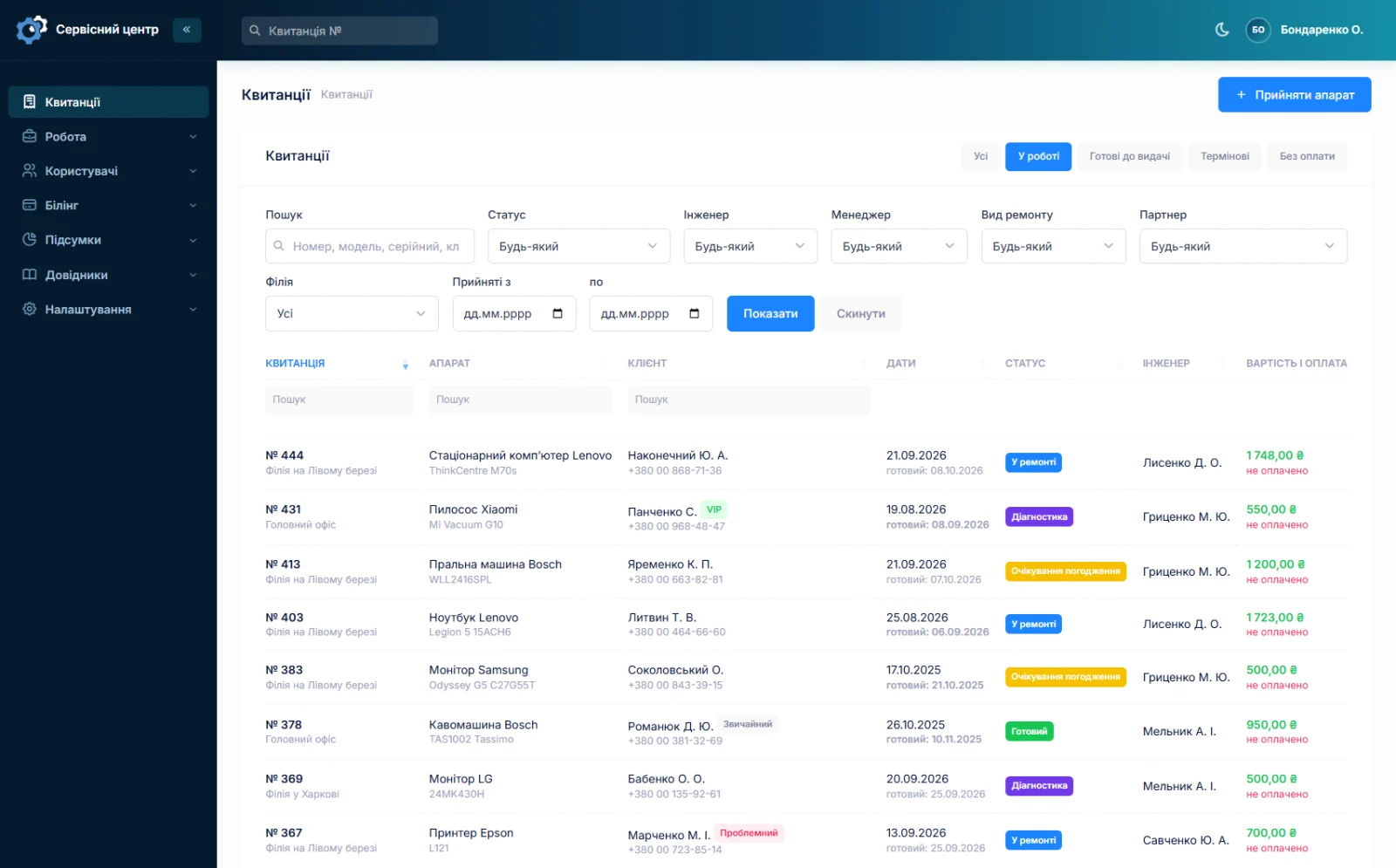
Detailed filters cover status, technician, manager, repair type, branch and intake dates. The filter lives in the page address, so a link to a filtered list can simply be sent to a technician in chat.
A device can be found by serial number or IMEI — and you immediately see that this phone was already here six months ago, and what for.
Screens, batteries and flex cables: what was bought and where it went
Every delivery is recorded separately: date, name, quantity, unit price and who you bought it from. Where the part went is its own field, and search covers it too: type "A52 screen" and you see every delivery and what became of it. Below the list there is a total — how much of your money is sitting in parts right now.
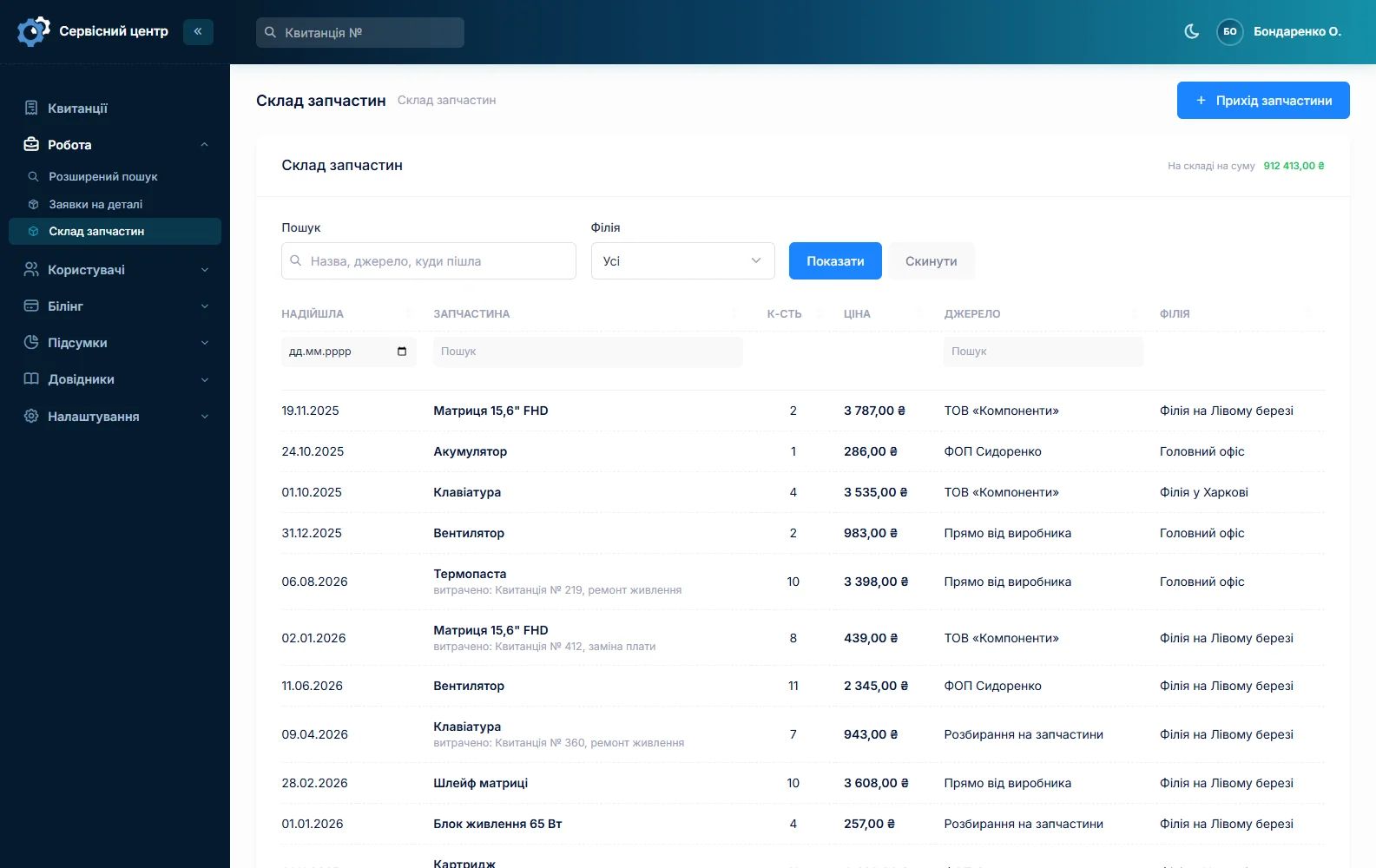
Parts requests are kept separately. A request is tied to a specific job sheet, so you always see which repair is waiting on a supplier rather than just "waiting for a part". The request can be emailed to the supplier straight from the software, and marked as received when the part arrives. See spare parts accounting.
The customer stops calling
When a repair is done, the software emails the customer. You edit the wording yourself — nothing needs adapting.
The customer also has their own portal: they log in and see their repairs — only theirs, and read-only. Together this removes most of the "any news on my phone?" calls.
Honestly about SMS. The software does not send SMS and will not — they cost money per message. Instead there are a free ready email and a free Telegram message: the customer subscribes by scanning the QR code on the ticket. The customer portal works too. See customer notifications.
Who did what, and what they earned
A report per technician for any period: how many repairs, for what amount, how much of it was paid, and the technician's share by their rate. That is a ready basis for output-based pay — no more counting from a notebook.
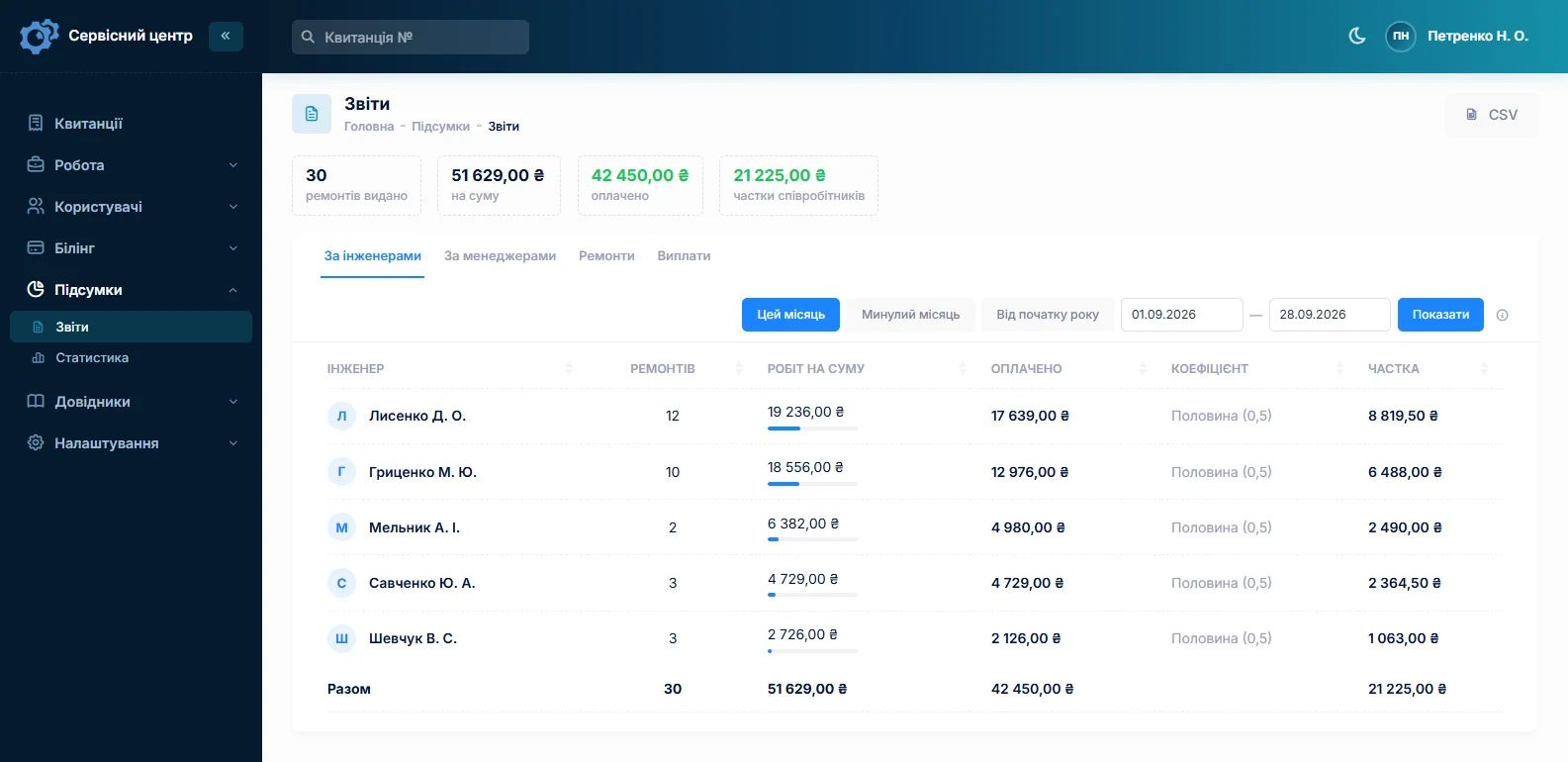
Next to it, statistics per branch: taken in, handed out, and how much is in progress right now. See reports and statistics.
Job sheets and completion certificates print from the software
The intake job sheet and the completion certificate print on a plain A4 sheet. You edit the form yourself: your logo, your terms, your warranty wording. Address, phone and opening hours come from the branch — two locations get different sheets from one form.
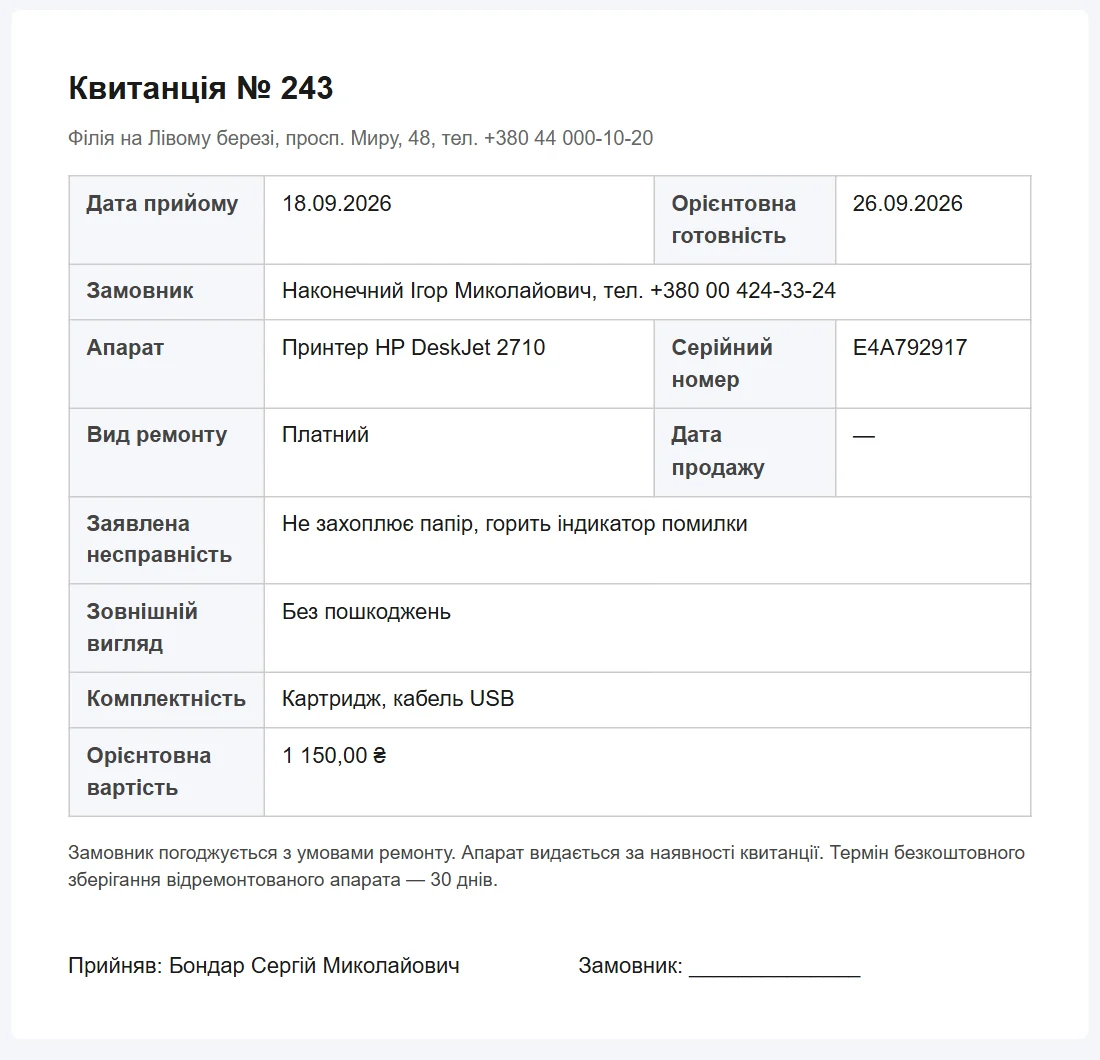
Sizes are in millimetres, so the sheet lands the same way on Windows and on macOS, and on a phone the same document simply reads on screen. What a job sheet must contain is on the repair intake form page.
The front desk sees only its own work
Permissions are checkboxes per section. The front desk can be given intake and the job list, while reports, stock and till totals stay closed. A new employee sees two buttons on day one and cannot break anything. With several locations each runs its own jobs and its own stock, while the owner sees everything together (branches and access rights).
What you get
- A device booked in within a minute, with a printed job sheet and no notebook.
- The device's condition recorded before the repair, which ends arguments at pickup.
- A clear view of which repair is overdue and which is waiting on a part.
- Every screen and battery delivery written down, and a supplier request straight from the software.
- Fewer "any news?" calls: the ready email and the customer portal.
- A finished output calculation per technician for any period.
- Device history by serial number — you can see this phone has been here before.
What it costs
One price for the whole shop: no charge per employee, no charge for a second location, and no "call us for a quote". Custom work for your way of working is charged separately, by the hour.
Monthly
Paid every month, cancel whenever you like.
Yearly
Cheaper than paying monthly. Invoice or card payment.
Custom work
Changes tailored to the way you work — hourly, by agreement.
You can look at the software without registering, in the demo. The full list of features is on the features page.
Frequently asked questions
How long does it take to book a device in?
About a minute if the customer is already in the database, a little longer if they need creating — the new customer form is built into the same intake page. For identical jobs there is "copy the last one": customer, device and branch carry over from the previous job sheet.
Can I find a device by IMEI or serial number?
Yes. The serial number is recorded at intake, and searching by it works both in the job list and in advanced search. You see the whole history of the device: when it was here before, what was done and what it cost.
Is there a mobile app?
There is no separate app, and we will not pretend otherwise. The software opens in a phone browser and adapts to a small screen: you can look through the job list, change a status or find a customer from your phone. Booking devices in is still easier at a computer with a printer.
Can the job sheet print on a receipt printer?
We do not ship a ready receipt-printer template: the standard job sheet is designed for an A4 sheet. But you edit print forms yourself, inside the software, so a narrow roll template can be built — sizes are set in millimetres.
What happens if the shop loses its internet connection?
The software runs on our server, so without a connection it will not open — that is the honest answer. What helps is that it works the same from a phone: share the connection from mobile data and carry on booking devices in. Your data is safe either way: it lives on the server, not on the computer in the shop, so it does not burn with it.
Does the software calculate technicians' pay?
It calculates the basis for it. Each technician has their own rate, and the report for a period shows how many repairs they did, for what amount, how much of it was paid and what their share is. All that is left is to carry the total into your payroll — no counting from a notebook.
See also
TV repair software
For a workshop repairing TVs and monitors: diagnosis and price approval before ordering a panel, a description of the screen at intake, and refusals that do not turn into disputes.
Read morePower tool repair software
For a workshop repairing electric and petrol tools: building firms and hire shops as customers, tools arriving in batches, brushes and armatures in stock, and each drill’s history by serial number.
Read moreCar electronics repair software
For a workshop repairing car electronic units: ECUs, instrument clusters, ABS modules, starters and alternators. Units from owners and garages, the part number on the job, price approval after diagnosis, chips and donor units in stock.
Read moreSee how it works
The demo is open — go in and try it. Ask us anything by email, Telegram or the form on this site.