Several branches and access rights
Each location with its own address, stock and statistics; permissions as checkboxes rather than fixed roles.

While there is one location, permissions are unnecessary: everyone sees everything, and that is fine. A second location breaks that within a week. ServiceCenterSoft separates branches so each runs its own work while the owner sees all of it together.
What breaks when there are two locations
- Job sheets print the wrong address. One template, two locations, and the customer goes to collect from the wrong one.
- Stock becomes communal. A screen bought for one location disappears at the other, and nobody is to blame.
- Lists stop being readable. The front desk sees forty jobs from elsewhere and hunts for their own five.
- The money mixes. "How much did the second location earn?" has to be worked out by hand.
- Pay becomes public. Somebody opens the report and sees what their colleague earns.
A branch is more than an address
A branch has a name, address, phone, email and opening hours — and, if it is registered as a separate business, its own logo and company details. All of it is substituted into the printed forms: a job sheet issued at the east-side shop prints the east-side details, even though you keep one template (about the intake form).
Beyond that, a branch owns the things that must not mix:
- Its own stock. Every parts delivery belongs to its location (spare parts accounting).
- Its own statistics. Taken in, handed out, in progress and amounts — per branch (reports).
- Its own staff. Each person belongs to a location.
The database stays single: a customer who brought a phone to one location and a fridge to another remains one customer with one history.
Who sees which jobs
The key permission is "see all branches". Without it a person opens the list and sees only their own location's jobs. Not "other branches greyed out", not "collapsed" — simply absent: not in the list, not in search, not by a direct link.
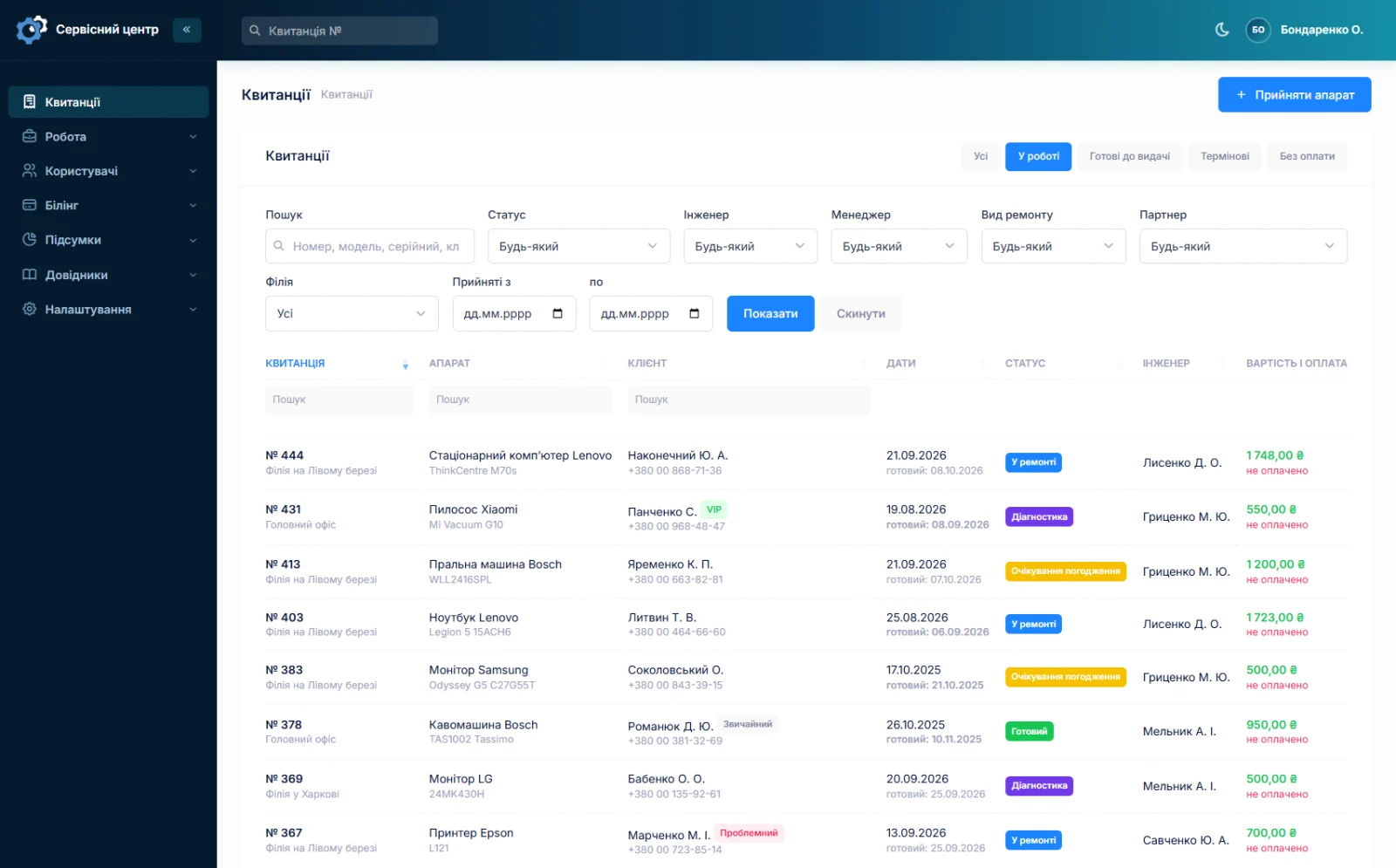
The owner has that permission and switches between locations or looks at everything at once.
You can work on your own job, not somebody else's
The second separation is finer and more useful. One permission allows editing your own jobs — those where you are the technician or the manager. Another, separate one allows editing other people's.
The result is a natural order: a technician handles what they are doing and cannot accidentally overwrite someone else's job; a senior technician or the owner can edit anything. Without that split you either give everybody everything, or spend the day changing statuses on other people's behalf.
Permissions as checkboxes, not fixed roles
A role is a set of checkboxes per section, and you decide what goes in it. Four roles come ready as a starting point: administrator, manager, technician, observer. After that you build your own.
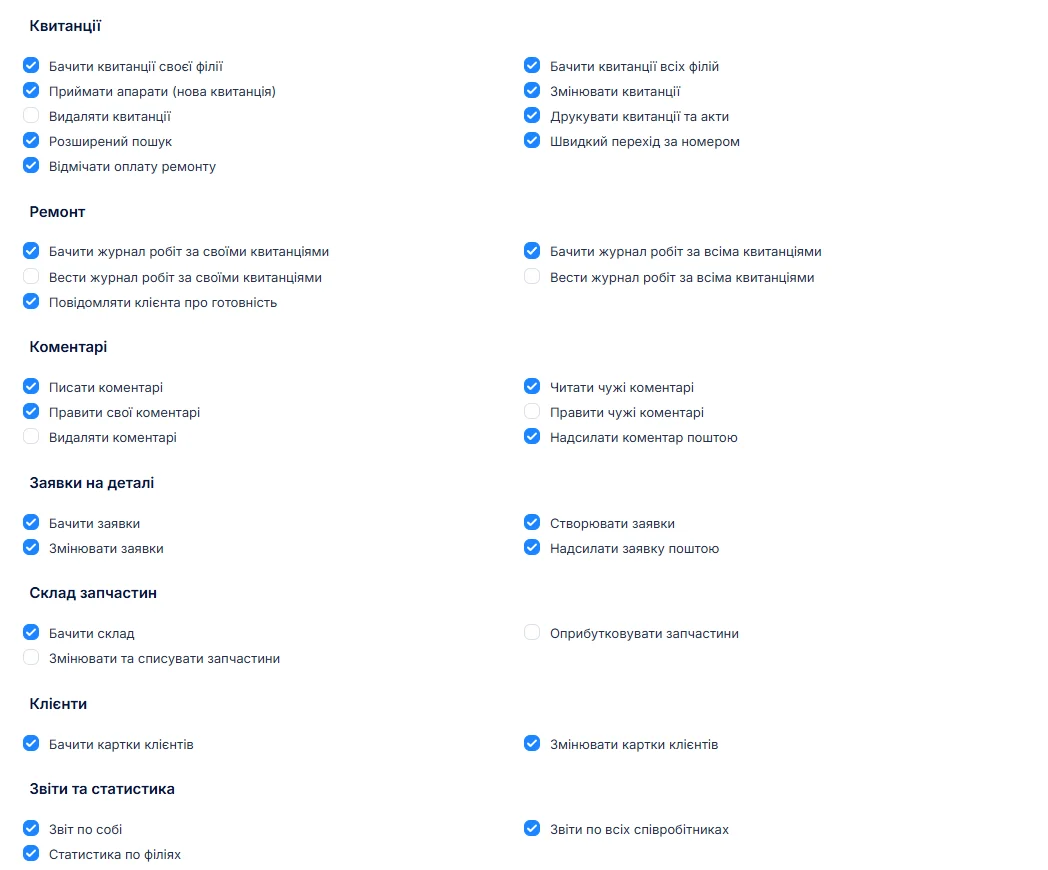
A typical front desk set: intake and the job list yes; stock view-only; reports, rates and settings no. A new employee sees two buttons on day one and cannot break anything.
One role always stays complete: the software will not let you restrict the last role with full access — otherwise nobody would get in, including you.
A new employee: what to set up
Five things are set up for everyone who works in the software, all on one form: a login and password, a role (that is, a set of permissions), a branch, what the person works as — technician, manager, or both — and the rate used in the payout calculation.
The last two are the ones most often skipped, after which people wonder why someone is missing from the report. No "technician" marking and there is nowhere to record their repairs; no rate and their share comes out as zero. Five fields once save a month of arguing at the end of the quarter.
Colleagues' pay is not common property
Reports have their own permission. Without it an employee opens the section and sees only their own rows: what they did and what they are owed. What the person at the next bench earns is not shown.
This is not paranoia but ordinary hygiene: in a five-person service an open report on other people's percentages damages relations faster than any mistake at work.
A hidden button is not protection
The thing nobody thinks about until it is too late. If a section is closed to an employee, the button is not merely hidden — the action is checked on the server. Typing the address by hand, substituting another job's number or posting a form around the interface will not work: what is checked is not what is drawn on screen but what the person is allowed to do.
The difference becomes visible exactly once — when somebody curious decides to test it.
Who else can log into your system
Honestly, because it concerns access. Our support can log into your copy — but only through a one-time link from your own account area, valid for a minute. While that is happening, a red bar reading "support is working in the system" sits on every page, and the login itself is written into the action log with a timestamp.
So nobody can come in unnoticed: either you see the bar, or you find the entry in the log.
What is not there
- No separate databases per branch. All locations share one — otherwise a customer and their history would split in two.
- No "transfer" of a job between branches as a separate action. The branch field simply changes, and the change goes into the history: who, when, from which to which.
- No time-based permissions. Rights do not switch off after a shift or at weekends.
What you get
- The right details for each location on the printed job sheet, from one template.
- Own stock and own statistics per branch, with a single customer database.
- A list where staff see their location and the owner sees them all.
- A "my job / someone else's job" split without going to extremes.
- Roles assembled around your way of working rather than fixed bundles.
- A report that does not expose other people's earnings.
What it costs
A second location costs nothing. The price is for the whole shop, however many locations and employees it has.
Monthly
Paid every month, cancel whenever you like.
Yearly
Cheaper than paying monthly. Invoice or card payment.
Custom work
Changes tailored to the way you work — hourly, by agreement.
You can look at it in the demo. Related pages: reports and statistics and repair workflow.
Frequently asked questions
Do I pay extra for a second location?
No. The price covers the whole shop, however many locations and employees it has. There is no charge per branch, per seat or per technician.
Will staff at one location see the other location's jobs?
Only if you grant the "see all branches" permission. Without it, other branches' jobs are not in the list, not in search and not reachable by a direct link — not greyed out, simply absent.
Can a technician be limited to their own jobs?
Yes, those are two separate permissions. One allows editing jobs where the person is the technician or manager, the other allows editing anyone's. A technician handles their own work without accidentally overwriting somebody else's, while a senior or the owner can edit anything.
Can I build my own role instead of using a preset?
Yes. A role is a set of checkboxes per section and you decide what goes in. The four ready roles (administrator, manager, technician, observer) are only a starting point. One limit: the last role with full access cannot be restricted, otherwise nobody could get in.
Can an employee bypass a restriction by typing the address?
No. A closed section does not merely hide a button — every action is checked on the server. Typing the address, substituting someone else's job number or posting a form around the interface will not work: what is checked is what the person is allowed to do.
Can your support log into our system?
Yes — but only through a one-time link from your own account area, valid for a minute. While support is working, a red bar saying so sits on every page, and the login is written into the action log with a timestamp. Nobody can come in unnoticed.
See also
CRM for a repair service centre
A customer database with the history of every repair, labels, companies and partners, a ready-for-collection email and a customer portal. Without a sales pipeline, which a workshop does not need.
Read moreCertificate of completed repair work
What a repair completion certificate should contain, when you really need one, and how to have it build itself from the work log instead of being written from memory at the end.
Read moreWhat the repair shop software does
A day in a repair shop from intake to payment — and every part of the software that day runs on.
Read moreSee how it works
The demo is open — go in and try it. Ask us anything by email, Telegram or the form on this site.