Power station and inverter repair software
For a shop that repairs portable power stations, solar inverters and UPS units: the rush after power cuts with urgent jobs flagged, battery condition and accessories on the job sheet, module numbers in the product code, estimates sent for approval, BMS boards and cells in stock, businesses and residential buildings as customers.
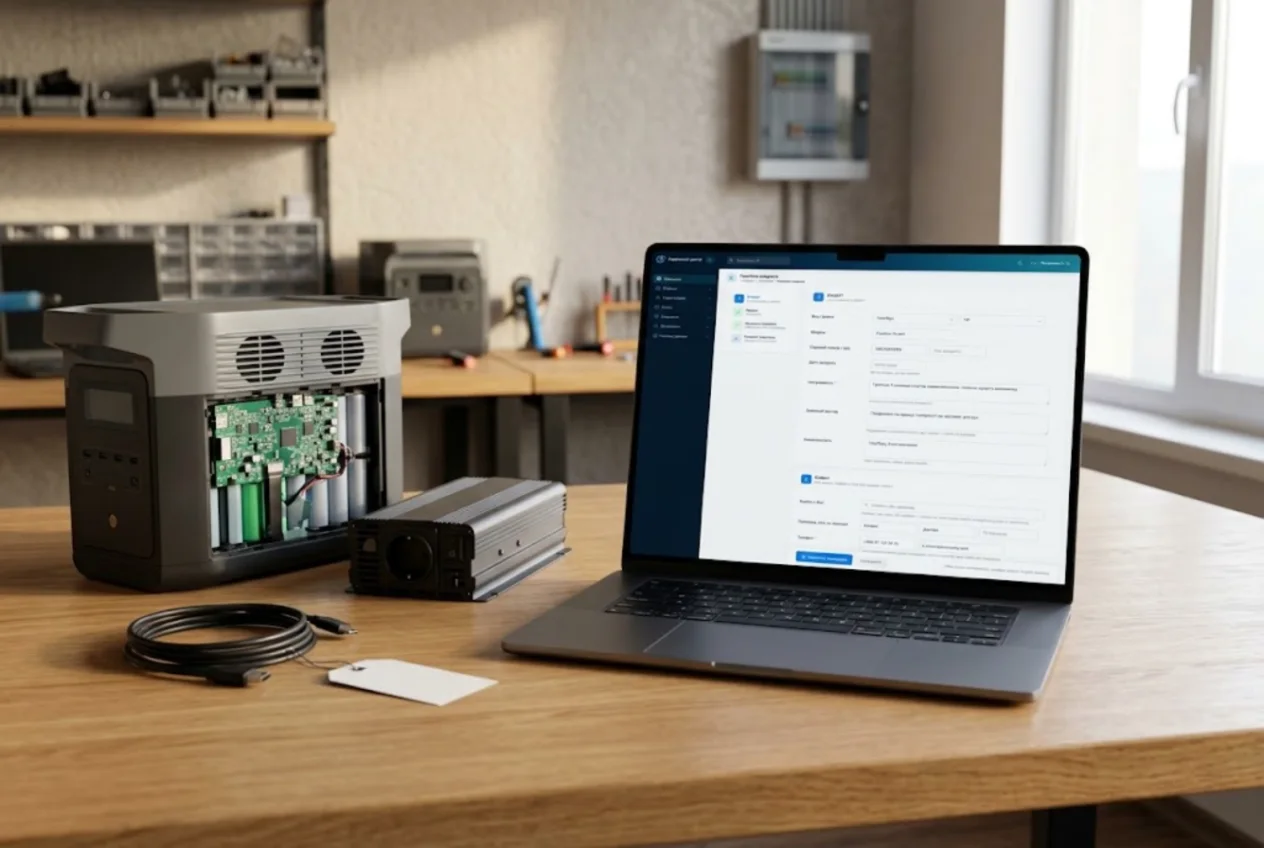
ServiceCenterSoft is repair tracking software for shops that fix portable power stations, solar and hybrid inverters, UPS units and LiFePO4 battery modules: the rush after a power cut, battery condition on a job sheet the customer signs, approval before an expensive replacement, BMS boards and cells in stock, and businesses and residential buildings as customers.
When the grid goes down, everyone needs it yesterday
Demand in this trade comes in waves: a storm or a run of outages hits, and within a week the shelves hold twenty power stations, a pile of small UPS units for home routers and an inverter taken off the wall of a house. Every owner needs theirs back yesterday: children at home, remote work, a building pump that has stopped.
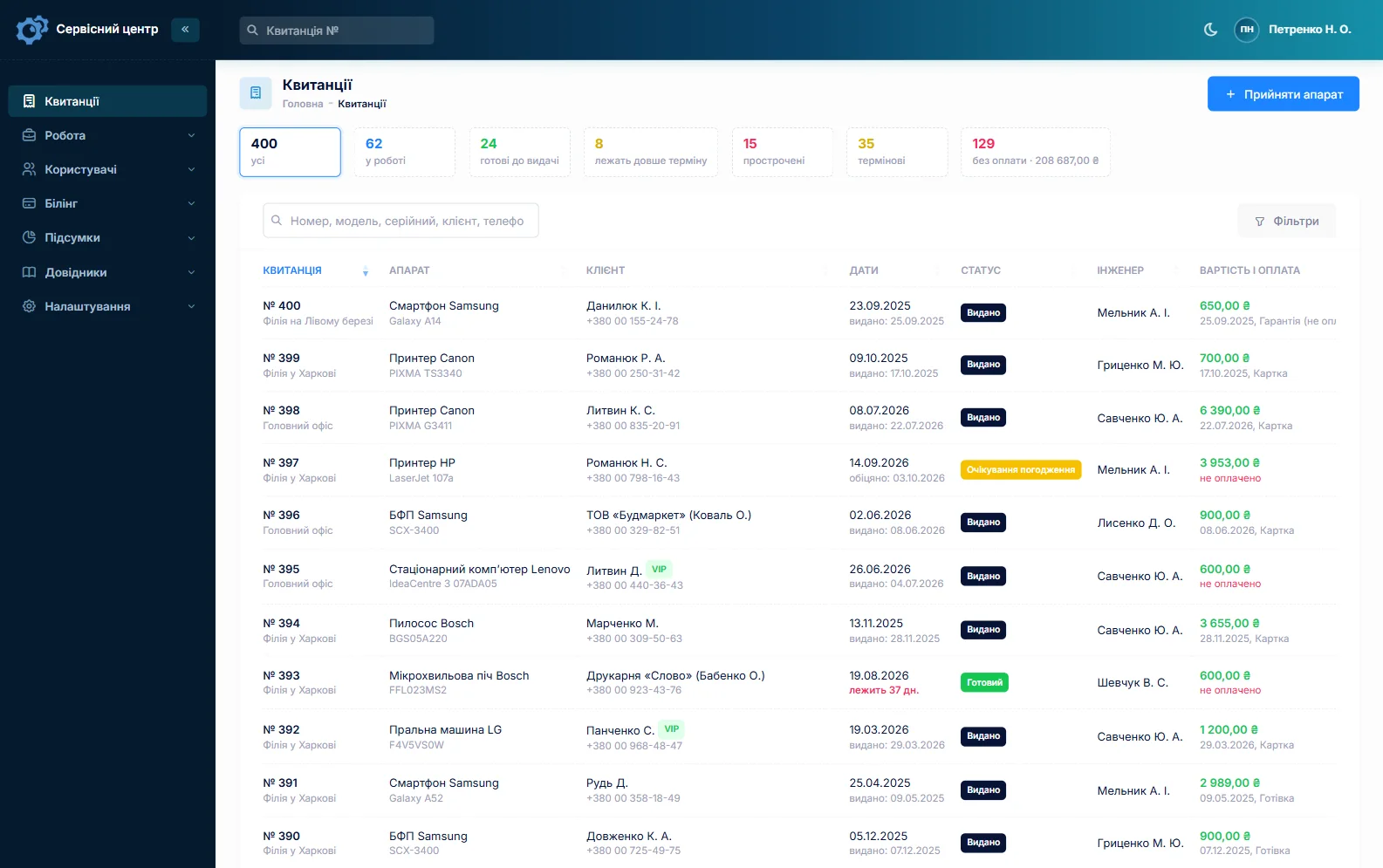
Every job carries a promised date, and overdue ones turn red. Counters above the list show open, ready, overdue, urgent and unpaid jobs. A repair that genuinely cannot wait is flagged urgent: it stands out in the list, and the “Urgent” filter brings all such jobs together. You name the statuses yourself, and any status can get its own counter above the list — “Waiting for cells”, for example, so you see at a glance how many units are held up by a part.
Intake: heavy, expensive and full of cables
A large power station weighs as much as a packed suitcase and costs as much as a good laptop, and it arrives with cables, adapters, a car charger and sometimes a folding solar panel. An inverter comes with a remote, a Wi-Fi dongle and sensors. A week later nobody remembers whether the panel cable was in the bag, unless someone wrote it down.
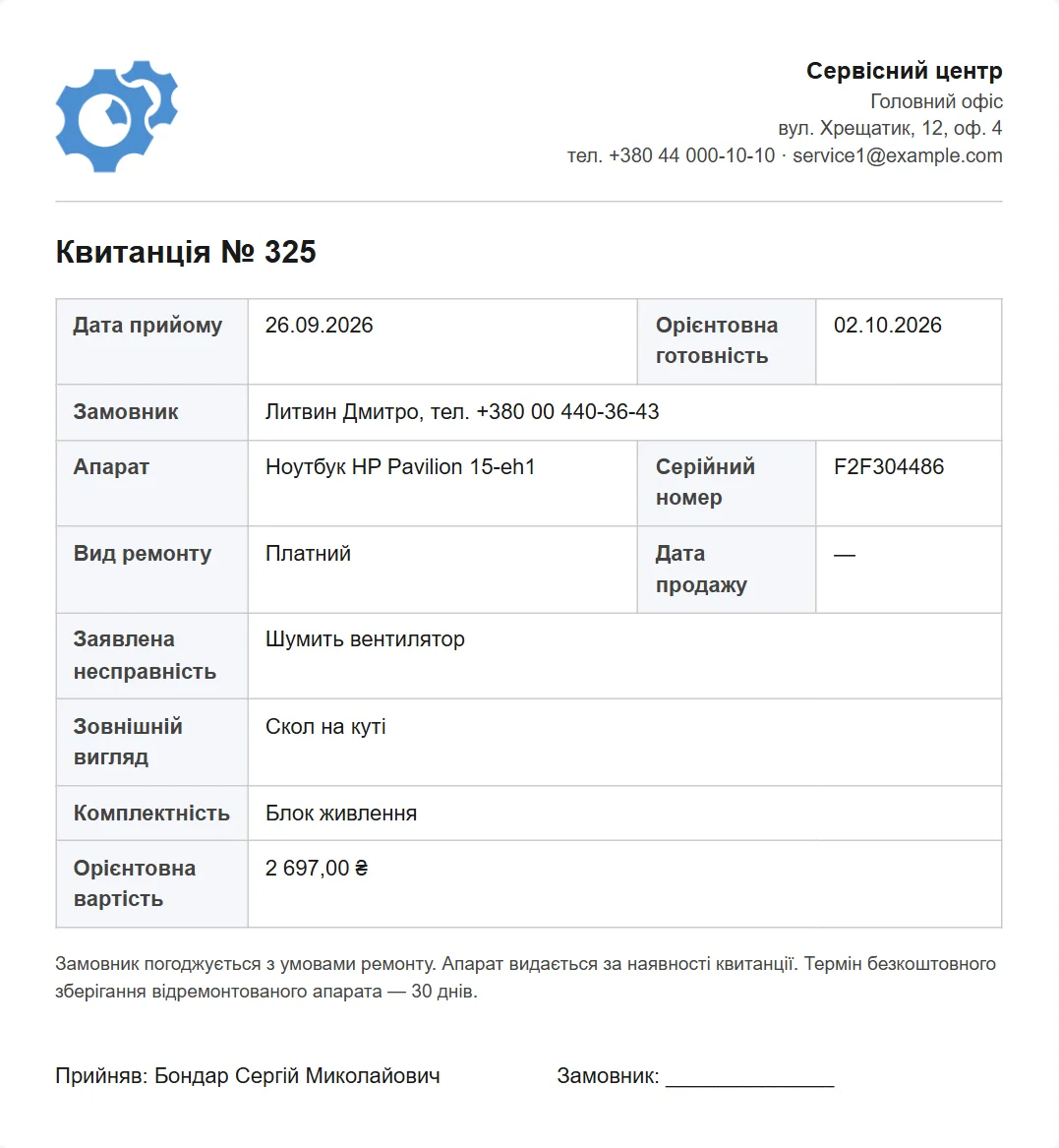
The intake form has fields for accessories, condition and fault, plus the serial number and a “Product code”. What you record in front of the customer is printed on the job sheet they sign (repair intake form).
The battery: the most expensive part and the biggest risk
The battery pack is most of what a power station costs, and most disputes start with it: “it worked when I brought it in”, “it never got this hot before”. A swollen pack, one that has overheated or one that smells of electrolyte is also a hazard in the shop. So its condition is recorded with the customer present: a bulging case, heat marks, smell, whether it holds a charge, where the unit has been kept.
The unit’s serial number goes into “Serial number” and the battery module number into “Product code”. Advanced search finds jobs by model, serial number and product code, even from part of a number.
Diagnosis: charged, free, or free if you go ahead
You set up device types — “Power station”, “Inverter”, “UPS”, “Battery module” — each with its own repair price and diagnosis price. If the customer goes ahead, the repair price applies and diagnosis is not charged separately. If they decline, you switch the job to “Diagnostics only” and the diagnosis price becomes what they pay. If you never charge for diagnosis, set it to zero. Petrol generators, if people bring those too, are just another device type with their own prices.
No expensive replacement without a “yes”
A new control board, BMS module or battery is a price the customer should hear first. The estimate is built line by line: labour from your “Labour” list at your prices and parts from stock, each with quantity and price. “Send for approval” sends it by email or Telegram; the customer accepts or declines via the link. The answer, with its date, shows on the job card and in its history.
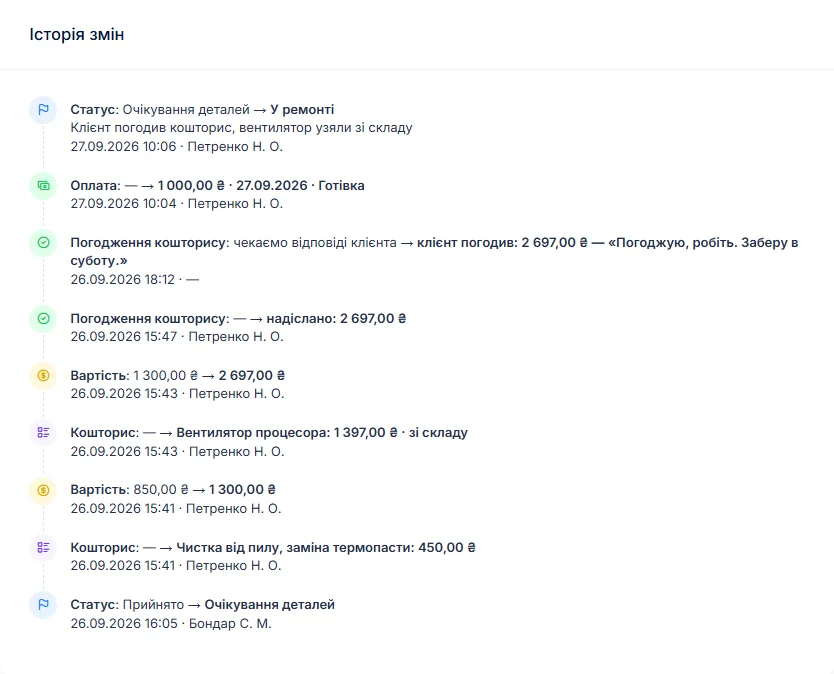
Battery capacity measured before and after the repair goes into the work log, which prints on the completion certificate together with your advice — how to store the unit between outages, when to bring it back.
MOSFETs, capacitors, fans, BMS boards and cells
Power transistors, capacitors, fans and connectors are bought ahead; BMS boards and cells are kept for the models you see most. Each delivery goes into stock with quantity, purchase price and supplier, and cells are counted individually. Add a part to the estimate “From stock” and the stock level drops by itself; the item card shows which job it went into. A minimum quantity and the “running low” filter tell you to reorder before the next wave of outages.
A missing board is ordered straight from the job, and the order can be emailed to the supplier; when it arrives, it is booked into stock. More on spare parts tracking.
Warranty jobs from the dealer who sold the unit
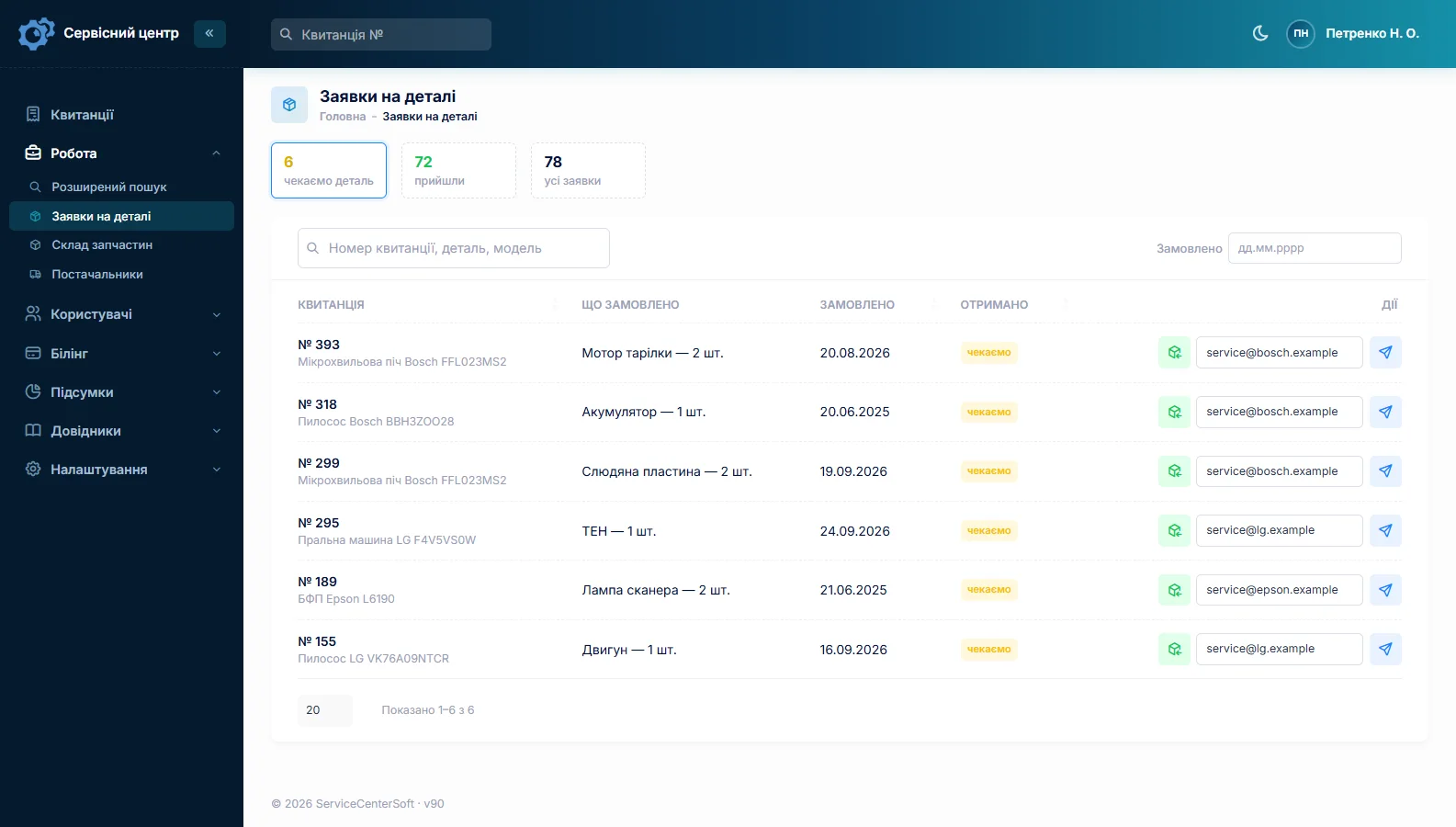
Some units come in under warranty: the buyer returned it to the dealer, and the dealer sends it to you. The repair type is “Warranty”, the date of sale has its own field, and the dealer is set as the partner. The job list filters by partner, so you see what came from each dealer. If you also repair for a manufacturer on their price list, see software for an authorised service centre.
Businesses and residential buildings: several units, one customer
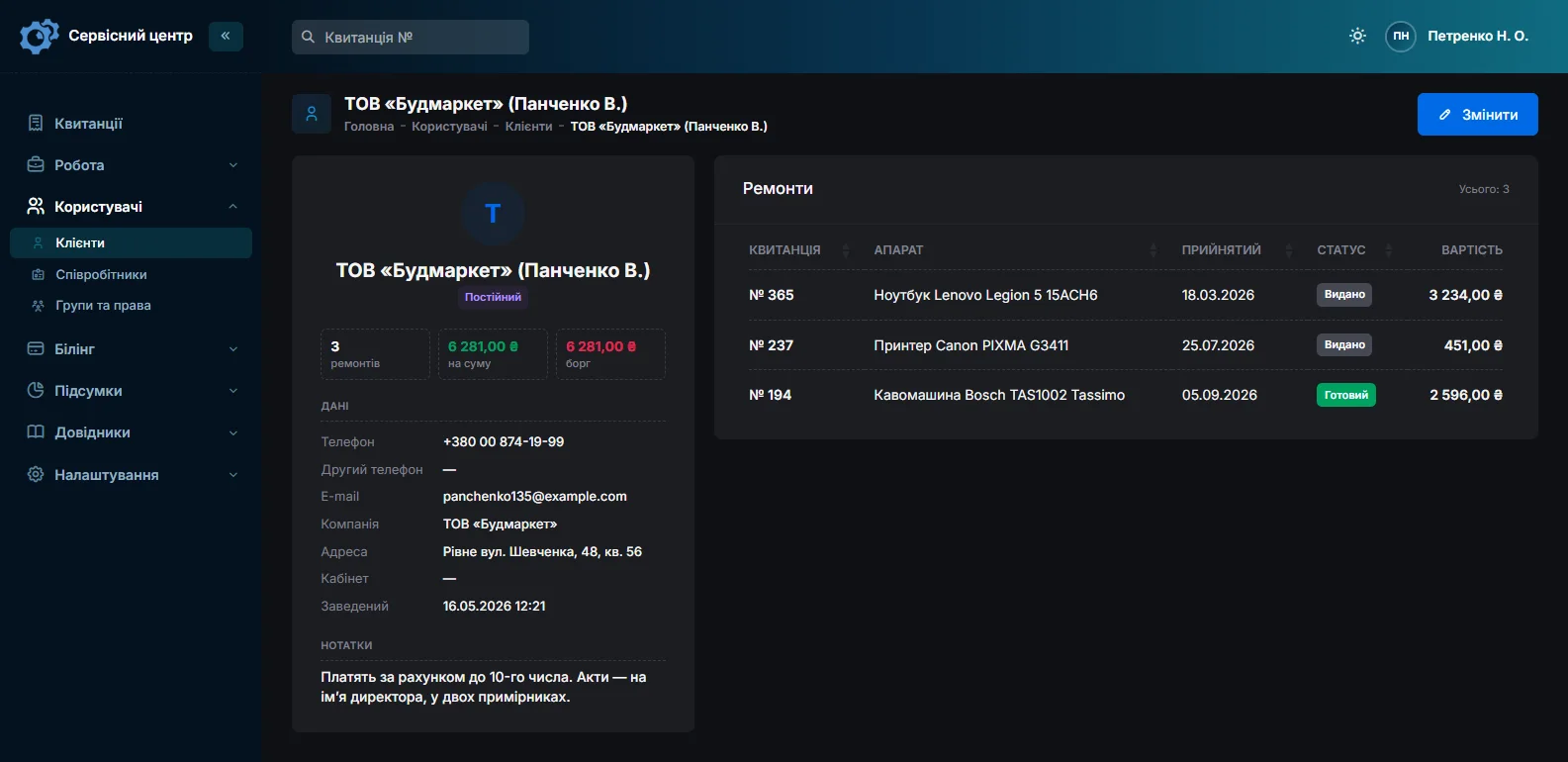
A residents’ association brings the UPS units from the lift and the pump room, an office brings three inverters, a shop brings the power station from behind the till. The customer card has a “Company” field and gathers all of the firm’s repairs, their total and what is still unpaid. Notes hold what the front desk must know: “pays on invoice”, “release only to the building manager”. Where each unit is installed — entrance, floor, site — goes into the job’s notes, and advanced text search finds those too.
A finished unit takes up shelf space
A phone goes in a drawer; twenty finished power stations fill a rack. For every finished job not yet collected, the card and the list show how many days it has been waiting. Set the free storage period in the settings; once it is over, the counter turns red and a “past free storage” filter appears above the list.
The owner is told the unit is ready by email or Telegram, with one button on the job card; Telegram works once they have scanned the QR code on their job sheet (customer notifications).
What it does not have
- Photos or files on the job. You cannot attach a photo of a swollen pack. Describe the condition in words and keep pictures separately, with the job number in the file name.
- A field-service module. An inverter repaired on site is booked with its own repair type and a “Call-out” line from the labour list; there is no visit calendar or route planning.
- Online booking, SMS, a mobile app or online payment by the customer. Notifications go by email and Telegram; the software runs in the browser, including on a phone.
- Barcodes, supplier integrations or a till. Orders go to suppliers by email. It tracks repairs; it does not sell power stations.
What you get
- Promised dates, plus urgent and overdue jobs at a glance when the outage rush hits.
- Battery condition and accessories — cables, adapters, panel — on a job sheet the customer signs.
- A unit’s history by serial number and battery module number.
- Diagnosis charged or free, the way you work.
- Estimates sent for approval by email or Telegram before an expensive replacement.
- BMS boards, cells and power transistors in stock with minimum levels.
- Businesses and residential buildings with every repair on one card, partner dealers in their own filter.

I tried the ServiceCenterSoft demo and came away with a good impression. The program is simple and easy to understand, yet it has everything you need for the job: customers, repairs, devices, spare parts, statuses and statistics.
I especially liked the dark theme and the responsive design — working from a phone is perfectly comfortable. Another plus is the instant search that works as you type, so you don't have to press a separate "Search" button every time.
You can tell the program was built specifically for service centers rather than being a generic CRM adapted for the repair business. The interface has no unnecessary frills; everything is logical and to the point.
A good, practical tool for the day-to-day work of a service center.

I liked that you get a free 14-day trial and that they are willing to handle my special requests — setting things up exactly the way I need them.
I also liked how payment works. You can simply pay the monthly fee by card online — basically the same as a regular Spotify subscription or any other service. No separate contracts to sign and no invoices to pay manually.
And there's no feeling of strict limits on the number of employees. One service center is one account, and inside it you can organize the work of your technicians and run several branches.
For me this is far more convenient than plans where you have to pay for every single user or keep counting how many employees are working today.

My business is fairly specific, so the program's standard features weren't enough — I needed my own custom fields, my own sorting options and search by additional parameters. The work completion certificate and the printed repair receipt also needed some changes to fit the way we work.
I contacted technical support. To be honest, I expected changes like these to take a long time, but everything was done within a single day. The team quickly understood exactly what we needed, suggested the right solution and did everything properly.
I'd especially like to mention the support: they get straight to the point, with no unnecessary bureaucracy, and they genuinely help instead of just sending you off to read the documentation.
For me this is a big advantage of the program: it isn't just sold "as is" — it can be adapted to how you actually work. Thanks to the team for the quick response and for treating the customer right.
Highly recommended!
What it costs
One price for the whole shop, with no extra charge per employee or branch.
Monthly
Paid every month, cancel whenever you like.
Yearly
Cheaper than paying monthly. Invoice or card payment.
Custom work
Changes tailored to the way you work — hourly, by agreement.
Off-the-shelf not enough — your own forms, roles, reports or workflow? We will build a program for you. How it works
Try it without signing up in the demo. Book in a power station the way you do at your shop, with the battery described and every cable listed, and take it through the estimate to collection. If you also repair cordless tools or e-scooters, see power tool repair software and e-scooter repair shop software.
Frequently asked questions
After a power cut the queue is two weeks long. How do I keep track of what cannot wait?
Flag the job as urgent: it stands out in the list, and the “Urgent” filter brings all such jobs together. Every job has a promised date, and overdue ones show in red and under their own counter above the list. If some units are waiting for cells or a board, tick “Tile above the receipts list” for the “Waiting for parts” status (or one of your own), and its count appears above the list, so you see how many repairs are held up by a part.
The power station comes with two extra battery modules. Where do their numbers go?
The station’s own serial number goes into “Serial number” and the module numbers into “Product code” next to it, separated by commas; the field holds up to 100 characters. List the modules themselves under “Accessories” so they appear on the job sheet the customer signs. Advanced search by device also matches part of a number, so the job turns up from any module’s number.
Where do I record battery capacity measured before and after the repair?
There are no dedicated fields for capacity, voltage or cycle count. What the customer reports, such as “lasts one hour instead of five”, goes under “Fault” and prints on the job sheet. What you measure goes into the work log, which prints on the completion certificate, so the customer sees what capacity the unit left with. Advanced search by text also covers the work log.
Diagnosis is free if the customer goes ahead and charged if they decline. How do I set that up?
Through the device type: each one — “Power station”, “Inverter”, “UPS” — has its own repair price and diagnosis price. While the job is priced from the price list, the base is the repair price and diagnosis is not added on top. If the customer declines, switch the base to “Diagnostics only”, and the amount due becomes that device type’s diagnosis price. Prices for a particular unit are adjusted on the estimate lines.
A customer leaves a swollen battery with us and does not take it back. How do I record that?
There is no separate register of batteries left for disposal. Note it in the job’s notes or as a comment when you change the status; the comment goes into the job’s history with the date and the name of whoever left it. If you charge for disposal, add it as an estimate line. Such a battery is not booked into stock: stock is for parts you fit in repairs.
A residential building sends in several UPS units from different entrances. How do I keep them apart?
Each UPS is its own job with its own serial number. Where it was installed (entrance, floor, pump room) goes into the job’s notes, and advanced search by text covers the notes too. The next job is filled in by copying the previous one: customer, model, accessories, notes and product code carry over, while the serial number is entered fresh, because the software deliberately does not copy it; adjust the notes and product code. All of the building’s repairs sit on its customer card with the “Company” field, together with the total and the balance owed.
See also
Drone repair shop software
For workshops that repair camera drones, FPV quads and agricultural drones: controller, goggles and batteries listed on a signed job sheet, drone and controller serial numbers, estimates sent for approval after diagnosis, motors and props in stock, businesses with several drones.
Read moreSoftware for home appliance service
Contents recorded at intake, warranty at the brand price list, callouts, slow parts and partner shops.
Read morePhone repair shop software
Intake in a minute, screens and batteries tracked, a ready-for-pickup email, output per technician.
Read moreSee how it works
The demo is open — go in and try it. Ask us anything by email, Telegram or the form on this site.