Drone repair shop software
For workshops that repair camera drones, FPV quads and agricultural drones: controller, goggles and batteries listed on a signed job sheet, drone and controller serial numbers, estimates sent for approval after diagnosis, motors and props in stock, businesses with several drones.
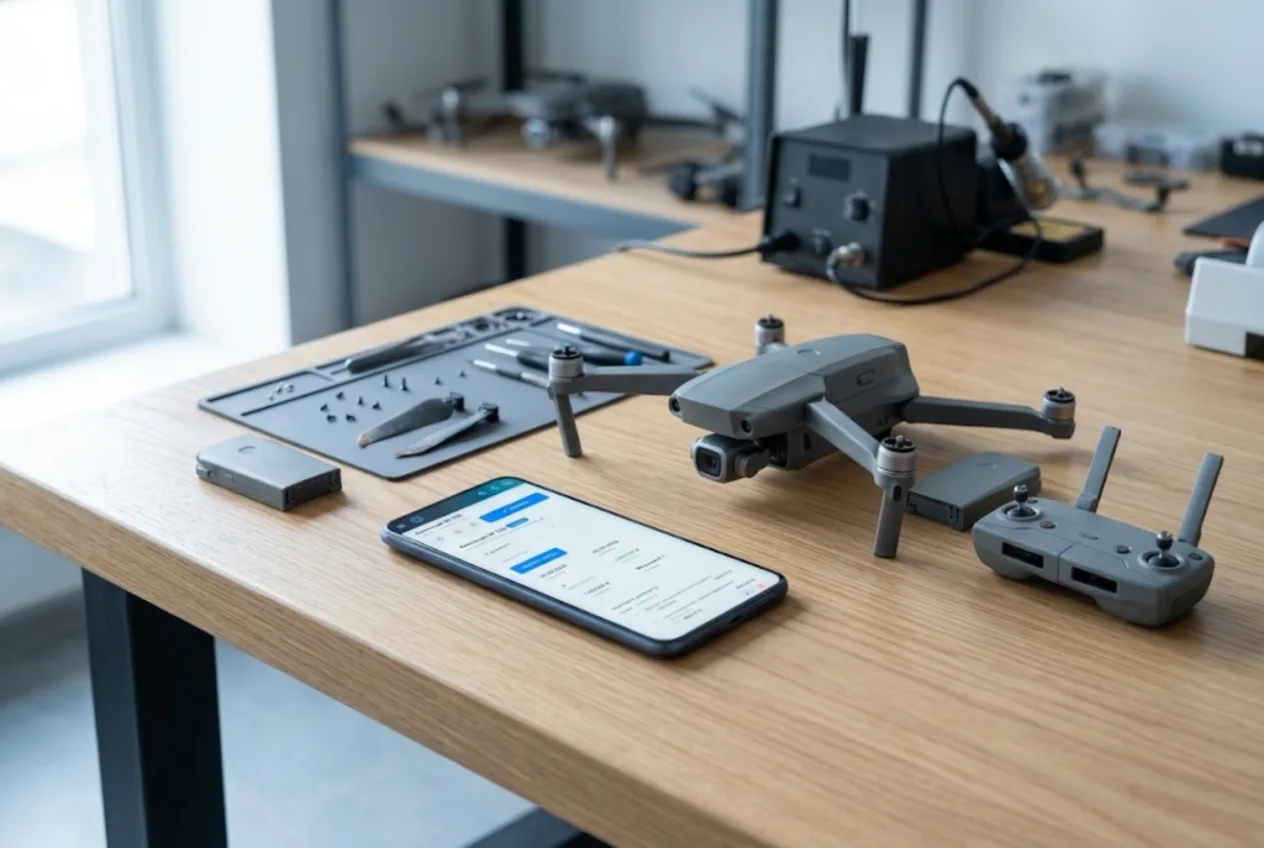
ServiceCenterSoft is repair tracking software for workshops that fix camera drones, FPV quads and agricultural drones, along with their controllers, goggles and batteries: accessories and condition on a job sheet the customer signs, drone and controller serial numbers, estimates approved after diagnosis, and motors and props in stock.
A crashed drone never comes in alone
A drone arrives with company: the controller, goggles, two or three batteries, spare props, a case, a memory card still in the slot. A week later nobody remembers how many batteries there were or whether the card was in the drone, and the argument starts on collection day.
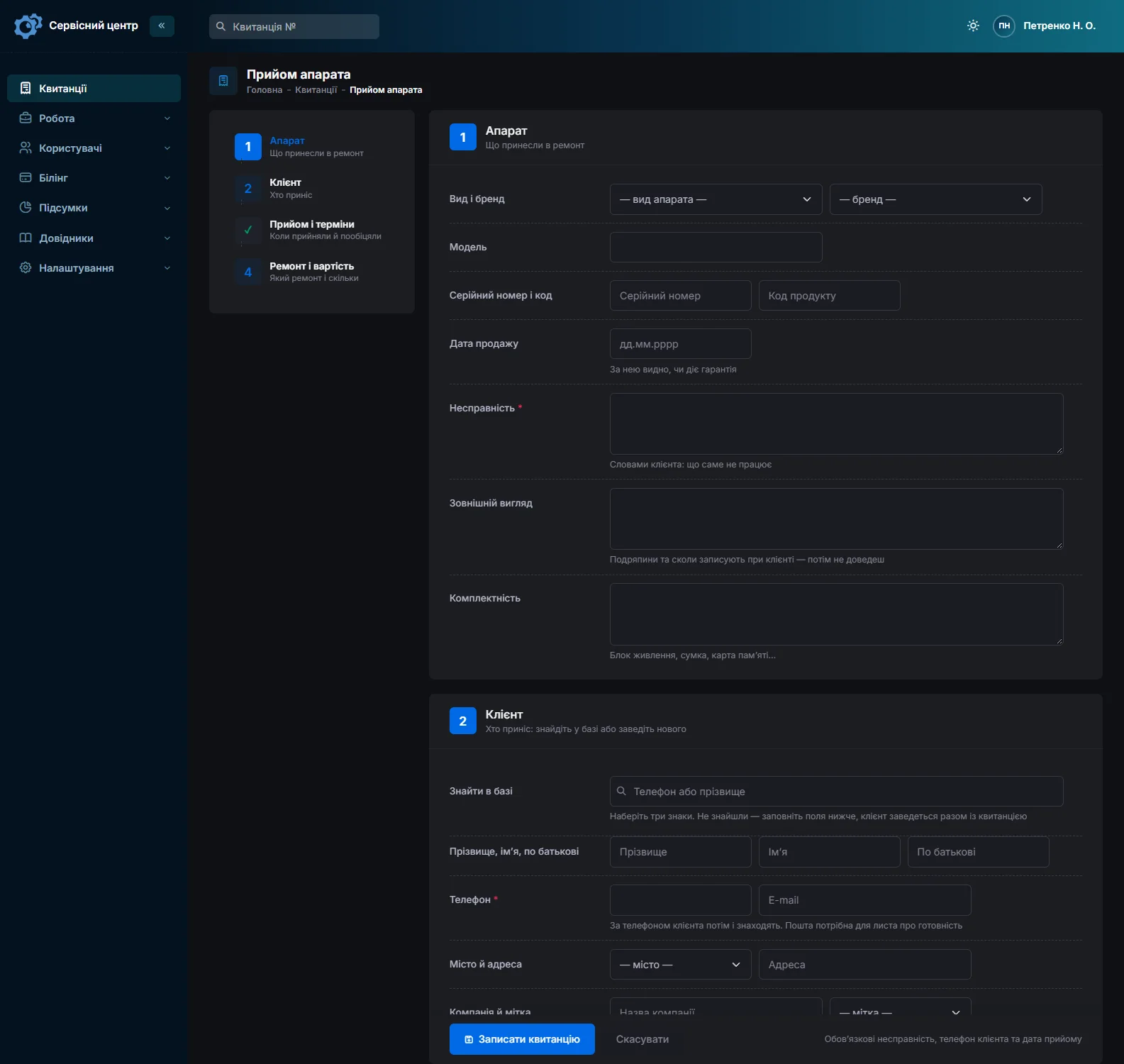
So everything left with you goes into the “Accessories” field while the customer is there: “controller, goggles, 3 batteries, 4 props, case, memory card in drone”. The job sheet prints with that list and the customer signs it (repair receipt); at collection you check against the same list.
Record the frame and gimbal in front of the customer
After a crash you see a cracked shell, a bent arm or a gimbal that will not hold the horizon. Visible damage goes into “Condition” with the customer present: “crack on front arm, scratches on camera glass”. Their account of the crash — the height, what it hit, whether it went into water — goes into “Fault”. If anyone later asks what was wrong before the repair, the answer is on a signed job sheet.
A battery that has taken a hit is a separate risk: swollen or cracked, it is a hazard in the workshop too, so its condition gets a line of its own.
Drone and controller serial numbers
The drone and its controller each have a serial number, and identical controllers are easy to mix up. The drone’s number goes into “Serial number”, and next to it is “Product code”, a handy place for the controller’s number. Advanced search finds jobs by model, serial number and product code, so a drone’s history — when it came in, what was replaced, what it cost — comes up in a minute.
The goggles’ number goes into the notes, which search also covers. The product code does not print on the standard job sheet, so add the controller’s number to the accessories as well.
Diagnosis finds more than the customer expected
The customer brings in a drone with “a broken prop”, and diagnosis shows the gimbal no longer stabilises, a motor runs hot and the board is cracked. The repair costs several times what they expected, and replacing a camera or a board without their go-ahead is a risk for both of you.
The estimate, labour and parts with quantity and price, goes out by email or Telegram with “Send for approval”. The customer accepts or declines via the link, optionally with a comment, and the answer shows with its date on the job card and in the history. Meanwhile the job sits in “Waiting for approval”; if only part is agreed, remove the declined line and send it again.
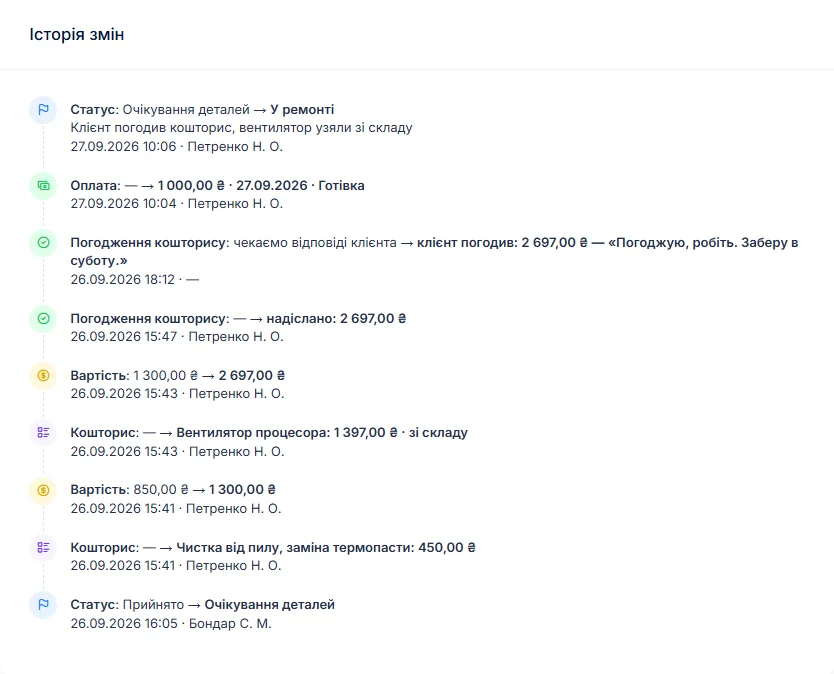
If they decline the repair, close the job with the “Repair declined” status and set the cost to “Diagnostics only”. The diagnosis price is set per device type, so create “Camera drone”, “FPV drone” and “Agricultural drone” as separate types, each with its own repair and diagnosis price.
Motors, props, frames and gimbals
Props and motors go out every week, frames and arms after crashes; flight controller boards, ESCs and gimbal ribbon cables less often but at a higher price, and agricultural drones add nozzles and pumps. Each delivery goes into stock with quantity, purchase price and supplier. Put a motor into a repair as a “From stock” line and the stock level drops by itself; the item card shows which job it went into.
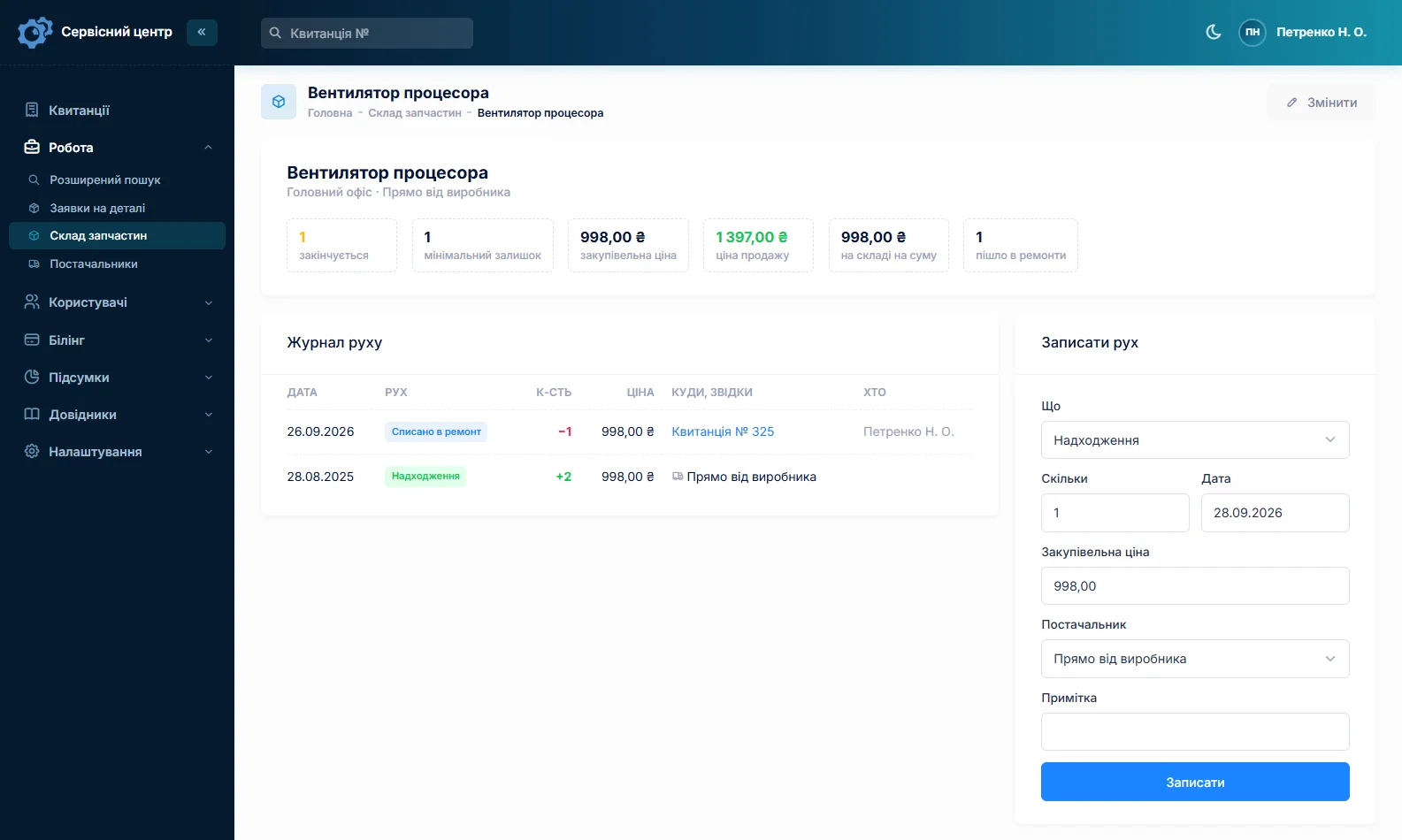
Give props and motors for popular models a minimum quantity, and the “running low” filter tells you when to reorder. A missing part is ordered from the job and the order can be emailed to the supplier. There are no barcodes: parts are picked by name. More on spare parts tracking.
“I need it by tomorrow” — and the drone nobody collects
A drone is often needed by a date: a shoot at the weekend, a field to spray while the weather holds. Flag the job as urgent and it gets a flame icon in the list, and the “urgent” counter above the list gathers all such jobs. Every job carries a promised date, overdue ones turn red, and the list works on your phone too.
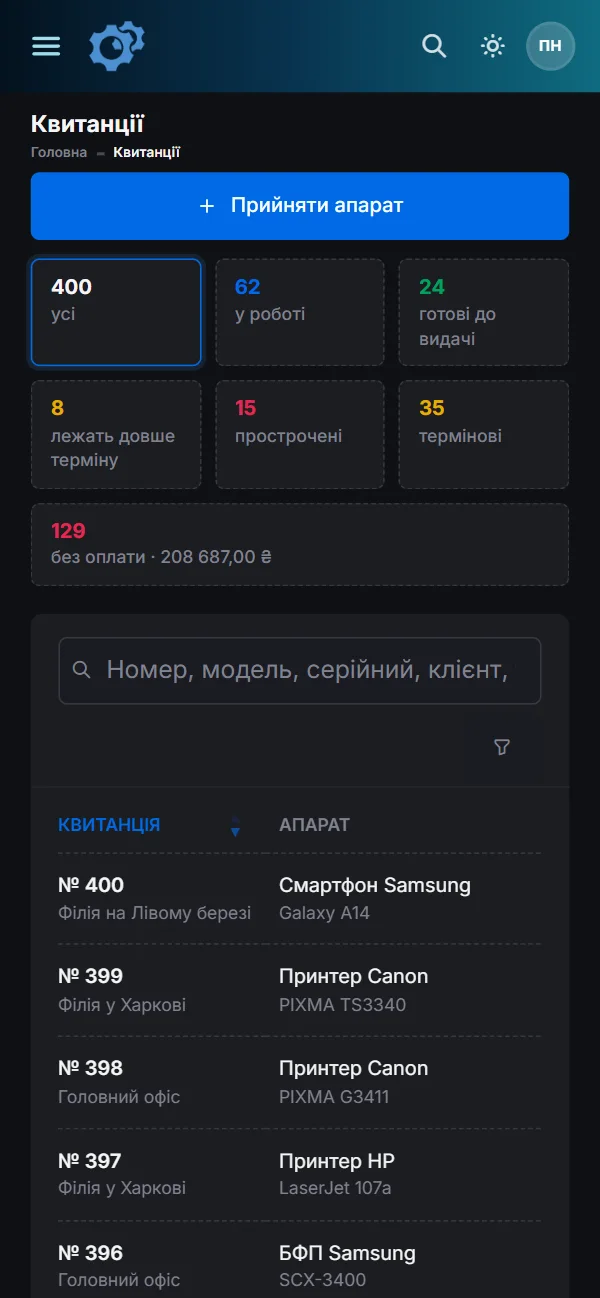
Sometimes the drone is ready and the owner does not turn up. A finished job not yet collected shows how many days it has been waiting; once the free storage period from the settings has passed, the counter turns red and a “past free storage” filter appears. The customer hears the drone is ready by email or Telegram, with one button on the job card (customer notifications).
Businesses with several drones
Some customers are companies and organisations — a farm, a photo and video studio, a construction or surveying firm — with two or three drones each. The customer card has a “Company” field and gathers all of the organisation’s repairs: how many, for how much and what is still unpaid. Notes hold what the front desk must know, such as “pays monthly”.
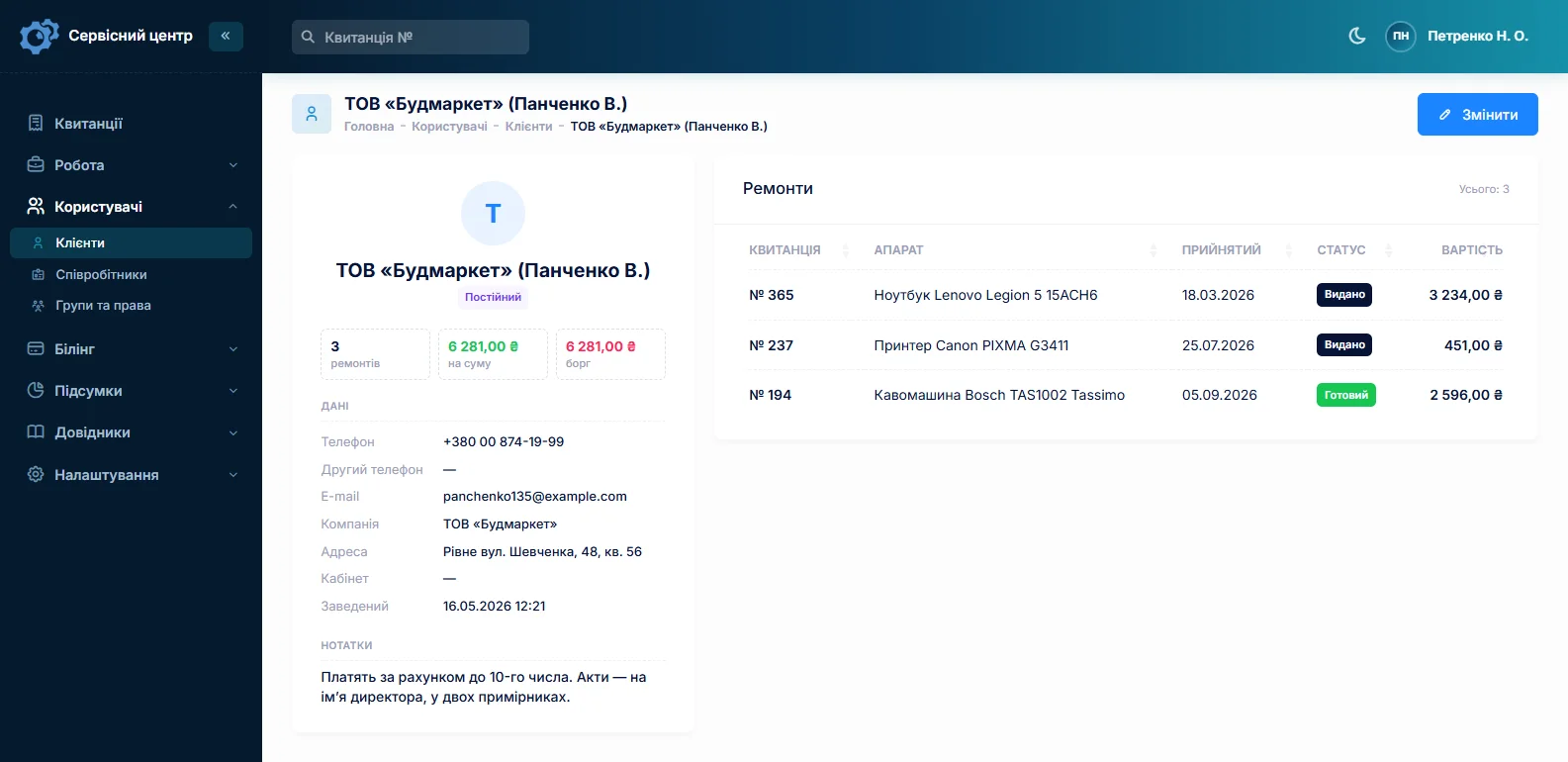
Three identical drones are booked in by copying the previous job: customer, model, fault and accessories carry over. The serial number does not, deliberately, so nobody forgets to enter the right one; the product code does, so correct the controller’s number. A shop that sells drones and passes warranty repairs on to you is set as the partner, with the “Warranty” repair type and the date of sale in its own field.
What it does not have
- Photos, video or files on the job. You cannot attach crash footage or flight logs. Describe what matters in the “Fault” field and keep the files separately, with the job number in the file name.
- Online booking. A job is opened once the drone is in the workshop.
- SMS, a mobile app or online payment by the customer. Notifications go by email and Telegram, and the software runs in the browser, including on the technician’s phone. You record payments on the job card yourself.
- Barcodes or supplier integrations. Parts are picked by name, and an order goes to the supplier as an ordinary email.
- A till. It tracks repairs. It does not sell drones or accessories.
What you get
- Controller, goggles, batteries and memory card listed on a job sheet the customer signs.
- The condition of the frame, gimbal and batteries recorded before the repair.
- A drone’s history by drone and controller serial number.
- Estimates sent for approval by email or Telegram before costly parts are replaced.
- Motors, props and frames in stock with minimum levels.
- Urgent jobs and finished drones still waiting for collection at a glance.
- Businesses with several drones and partner shops, each with their own filter.

I tried the ServiceCenterSoft demo and came away with a good impression. The program is simple and easy to understand, yet it has everything you need for the job: customers, repairs, devices, spare parts, statuses and statistics.
I especially liked the dark theme and the responsive design — working from a phone is perfectly comfortable. Another plus is the instant search that works as you type, so you don't have to press a separate "Search" button every time.
You can tell the program was built specifically for service centers rather than being a generic CRM adapted for the repair business. The interface has no unnecessary frills; everything is logical and to the point.
A good, practical tool for the day-to-day work of a service center.

I liked that you get a free 14-day trial and that they are willing to handle my special requests — setting things up exactly the way I need them.
I also liked how payment works. You can simply pay the monthly fee by card online — basically the same as a regular Spotify subscription or any other service. No separate contracts to sign and no invoices to pay manually.
And there's no feeling of strict limits on the number of employees. One service center is one account, and inside it you can organize the work of your technicians and run several branches.
For me this is far more convenient than plans where you have to pay for every single user or keep counting how many employees are working today.

My business is fairly specific, so the program's standard features weren't enough — I needed my own custom fields, my own sorting options and search by additional parameters. The work completion certificate and the printed repair receipt also needed some changes to fit the way we work.
I contacted technical support. To be honest, I expected changes like these to take a long time, but everything was done within a single day. The team quickly understood exactly what we needed, suggested the right solution and did everything properly.
I'd especially like to mention the support: they get straight to the point, with no unnecessary bureaucracy, and they genuinely help instead of just sending you off to read the documentation.
For me this is a big advantage of the program: it isn't just sold "as is" — it can be adapted to how you actually work. Thanks to the team for the quick response and for treating the customer right.
Highly recommended!
What it costs
One price for the whole shop, with no extra charge per employee or branch.
Monthly
Paid every month, cancel whenever you like.
Yearly
Cheaper than paying monthly. Invoice or card payment.
Custom work
Changes tailored to the way you work — hourly, by agreement.
Off-the-shelf not enough — your own forms, roles, reports or workflow? We will build a program for you. How it works
Try it without signing up in the demo. Book a drone in the way you do at your workshop, with the controller, batteries and condition written down, and take it through the estimate to collection. If you repair phones or e-scooters alongside drones, it is the same software.
Frequently asked questions
Where do I record the controller and goggles serial numbers?
The drone’s number goes into “Serial number”, the controller’s into the “Product code” field next to it. Advanced search in “device” mode finds the job by either. The goggles’ number goes into the notes, which “text” mode searches. The product code does not print on the standard job sheet, so if the controller’s number should be on the paper the customer signs, add it to “Accessories” as well, or put the product code tag into the template under “Print forms”.
Both the drone and the controller are broken — one job or two?
Whichever suits you. A controller that came in with the drone can be repaired on the same job: its number goes into “Product code”, its labour and parts into separate estimate lines, and the customer approves one total. If another technician works on the controller, or it will wait for a part longer than the drone, open a separate job for it with a “Controller” device type and its own serial number, so each has its own status, promised date and technician.
The customer approved new motors but not the camera — how do I handle that?
The customer accepts or declines the estimate as a whole, but can leave a comment such as “motors yes, camera no”. Remove the camera line and press “Send again”: the customer gets the estimate with the new total at the same link, and the previous answer is reset. Answers with their date and comment show on the job card and in its history.
The customer needs the drone by the weekend — how do I make sure it is not missed?
Tick “Urgent repair” on the job and set the promised date you gave the customer. The job gets a flame icon in the list, and the “urgent” counter above the list gathers all urgent jobs together. If the date passes and the repair is not finished, the date turns red and the job appears under “overdue”. The software does not send reminders, so it is worth opening these filters every morning.
I am copying a job for a second drone from the same organisation — what should I change?
A copy carries over the customer, partner, device type, brand, model, product code, date of sale, repair type, pricing method, fault, condition, accessories, notes and the urgent flag. The serial number is not copied, deliberately, so that nobody forgets to enter the right one. The product code is copied, though, so if it holds the controller’s number, correct it. Check the condition and accessories too: another drone has other scratches and a different number of batteries. Dates, status, estimate and payments are the new job’s own.
Should I keep props in stock as pairs or as single pieces?
The way you fit them. Stock is counted in whole numbers and you choose the unit: name the item, say, “5-inch prop (pair)” and put the number of pairs into a repair as a “From stock” line. If props are replaced both singly and in pairs, keep them as single pieces and write off a pair as a quantity of 2. The minimum level is set in the same unit, and the “running low” filter shows when it is time to reorder.
See also
Software for home appliance service
Contents recorded at intake, warranty at the brand price list, callouts, slow parts and partner shops.
Read morePhone repair shop software
Intake in a minute, screens and batteries tracked, a ready-for-pickup email, output per technician.
Read moreTV repair software
For a workshop repairing TVs and monitors: diagnosis and price approval before ordering a panel, a description of the screen at intake, and refusals that do not turn into disputes.
Read moreSee how it works
The demo is open — go in and try it. Ask us anything by email, Telegram or the form on this site.