E-scooter repair shop software
For an e-scooter and e-bike repair shop: the spring rush with promised dates, a day counter for finished scooters waiting to be collected, battery condition on the job sheet, tubes and controllers in stock, partner dealers, rental and delivery fleets as customers.
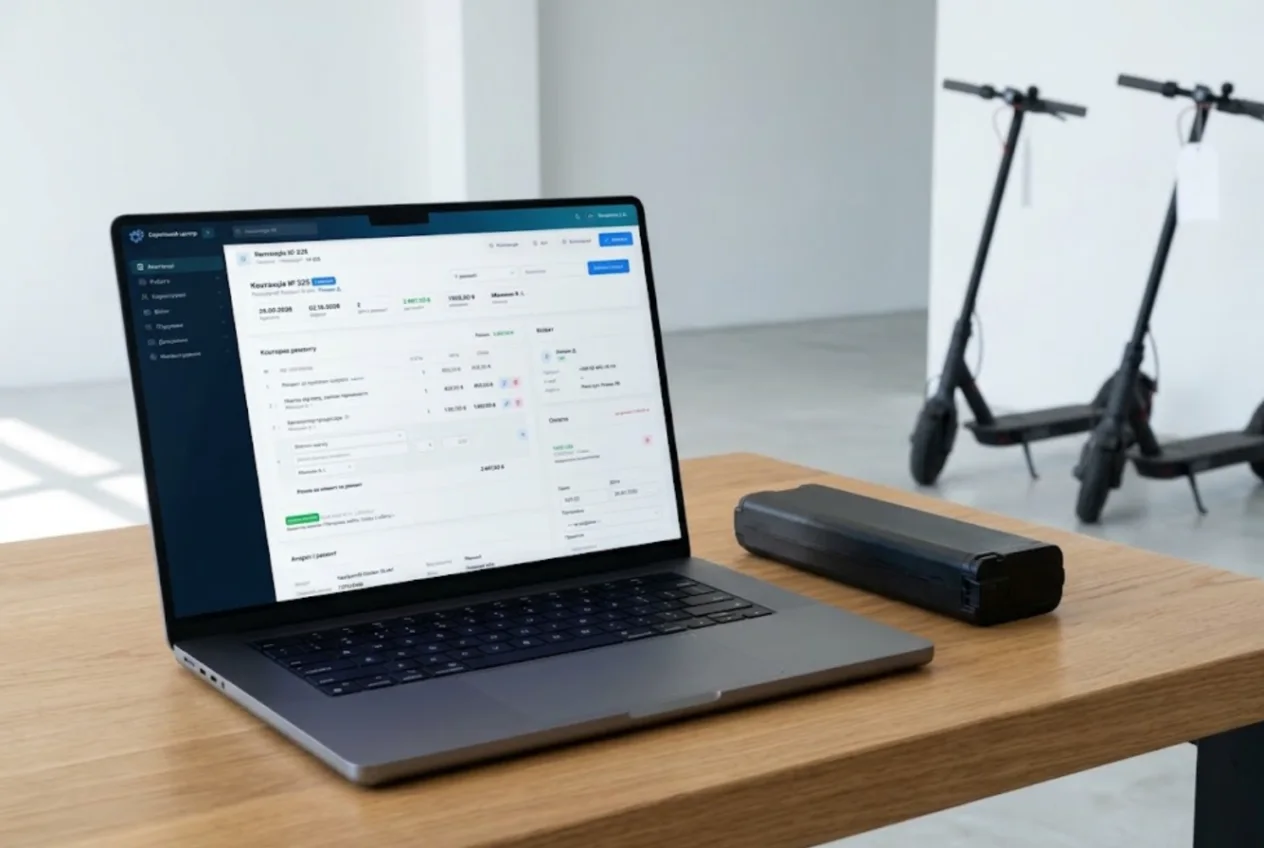
ServiceCenterSoft is repair tracking software for shops that fix e-scooters, e-bikes and electric unicycles: battery condition on a signed job sheet, frame and battery numbers, tubes and controllers in stock, dealer warranty jobs, and rental fleets as regular customers.
A quiet winter, then the spring rush
E-scooter repair is seasonal. In March everyone wheels their scooter out of storage: flat batteries, punctured tubes, a grinding hub motor, a controller that will not wake up. Within a week you have thirty scooters in the shop and thirty owners asking when theirs will be ready.
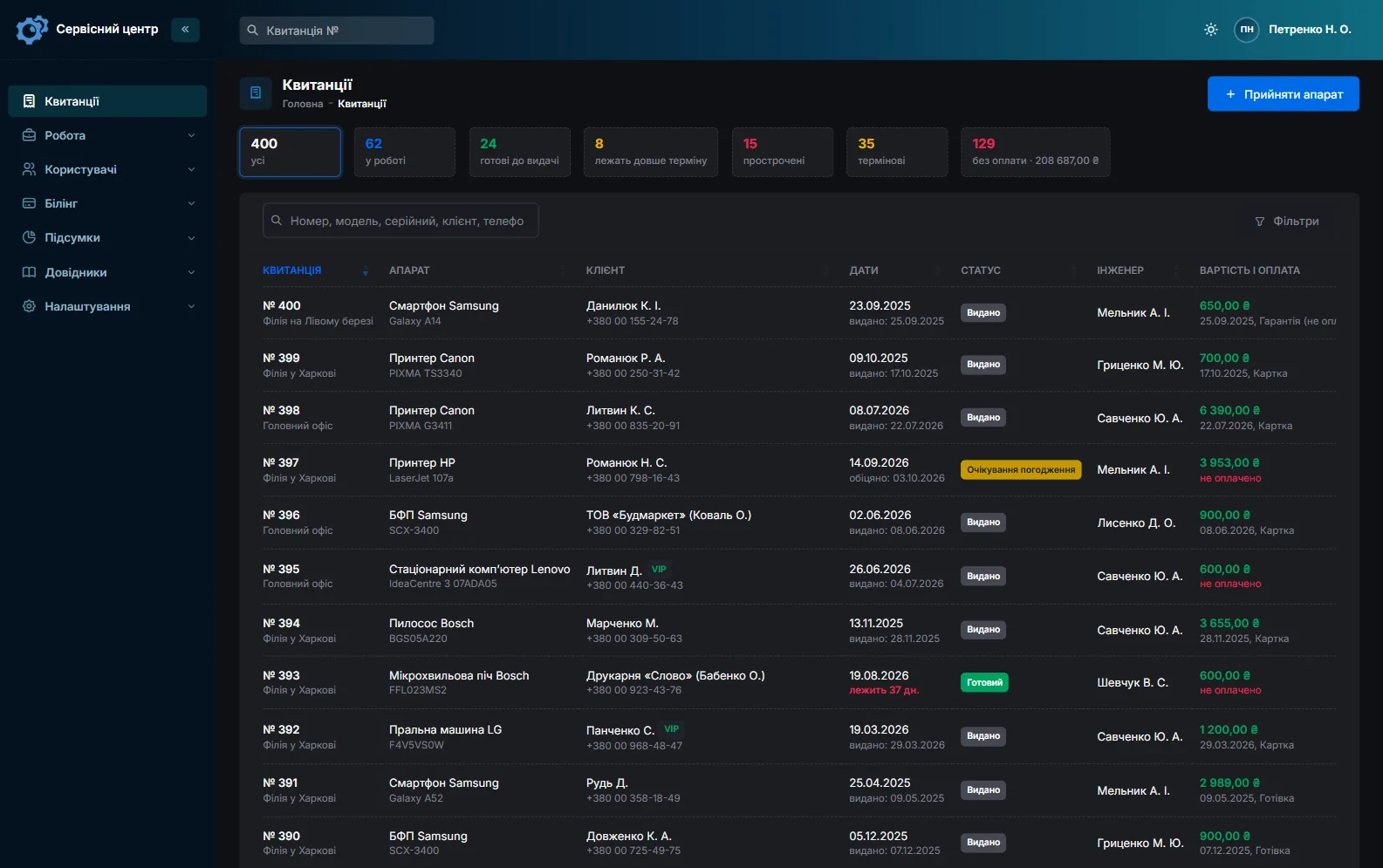
Every job carries a promised date, and overdue ones turn red. Counters above the list show open, ready, overdue, urgent and unpaid jobs. A courier earns a living on their scooter, so their repair can be flagged urgent and stands out in the list. The statuses are yours to define.
A finished scooter takes up floor space
A phone goes in a drawer; a scooter takes up half a metre of floor, and twenty finished ones leave no room to work. For every finished job not yet collected, the card and the list show how many days it has been waiting. Set the free storage period in the settings — say, 14 days — and after that the counter turns red and a “past free storage” filter appears above the list. The storage terms printed on the job sheet are text you edit yourself, so keep the two in line.
The owner is told the scooter is ready by email or Telegram with one button on the job card; Telegram works once they have scanned the QR code on their job sheet (customer notifications). Storage fees are not charged automatically: if you charge them, add an estimate line.
The battery: the most expensive part and the biggest risk
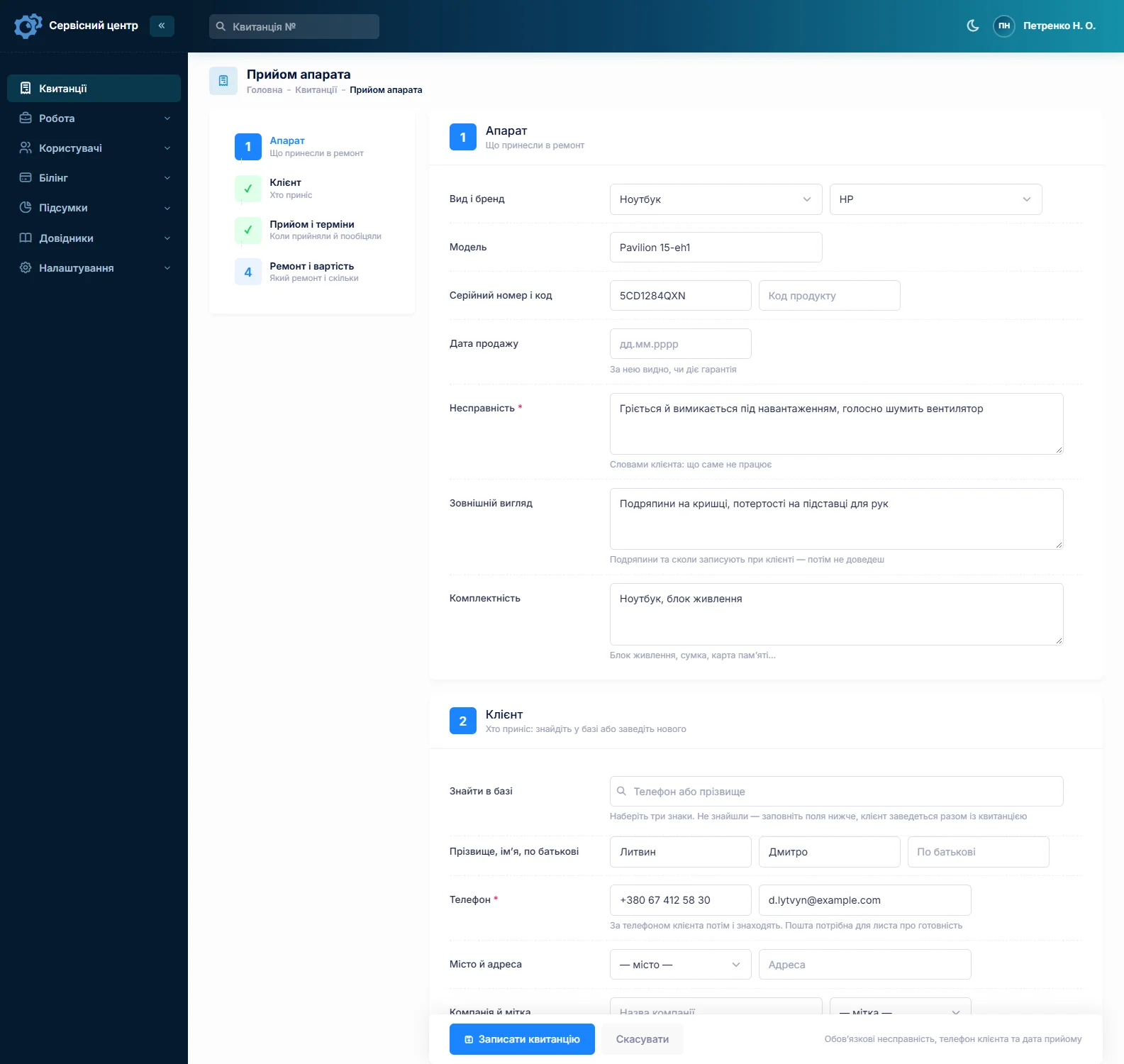
A battery can cost a third of the scooter, and most disputes start with it: “it worked when I brought it in”, “that’s not my battery”, “it swelled after your repair”. A swollen or water-damaged pack is also a hazard in the shop. So its condition is recorded with the customer present: swelling, water marks or corrosion on the connector, smell, whether it holds a charge. The intake form has fields for condition, fault and accessories (charger, key, phone mount), and whoever brought the scooter signs the job sheet (repair receipt).
Advice such as “don’t charge it straight in from the cold” or “store it half-charged over winter” is printed on the completion certificate.
Frame number and battery number
Scooters of one model look identical; only the serial number tells them apart. It has its own field, and next to it is “Product code” — a handy place for the battery number when packs get swapped between frames. Advanced search finds jobs by model, serial number and product code, so a scooter’s history comes up in a minute. If a controller has burned out for the third time this year, the real cause is probably not the controller.
Controllers, hub motors, tyres and tubes
Tubes, tyres, brake pads and throttles are bought by the box before the season; controllers and hub motors are kept for the popular models. Each delivery goes into stock with quantity, purchase price and supplier. Put a tube into a repair as an estimate line and the stock level drops by itself; the item card shows which job it went to. Give tubes and tyres a minimum quantity, and the “running low” filter tells you to reorder before the rush.
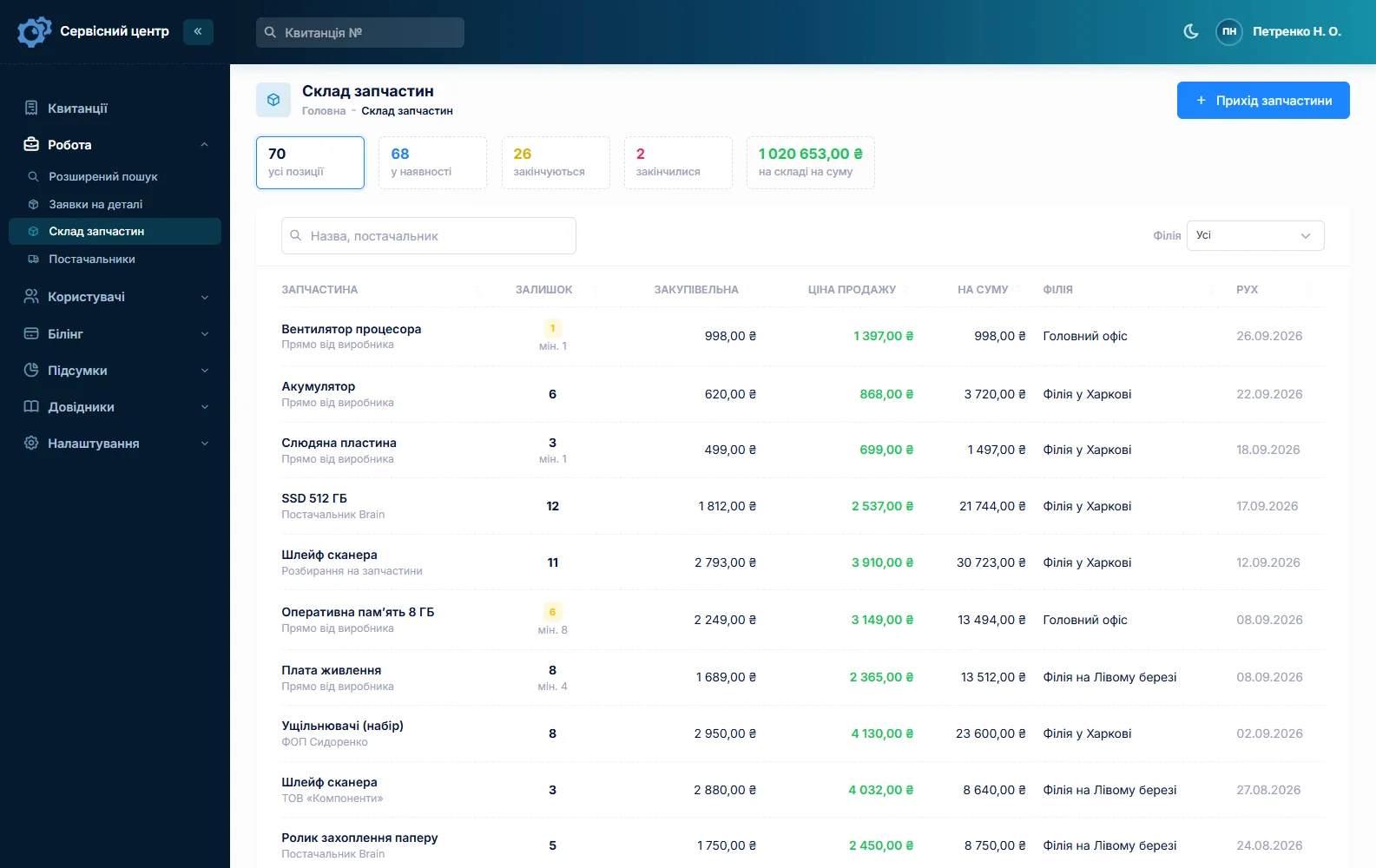
A missing controller is ordered straight from the job, and the order can be emailed to the supplier. There are no barcodes: parts are picked from the list by name. More on spare parts tracking.
Get approval before an expensive repair
A new battery or controller is a price the customer should hear first. The estimate — labour and parts, each with quantity and price — goes out by email or Telegram with “Send for approval”; the customer accepts or declines via the link, and the answer shows on the job card.
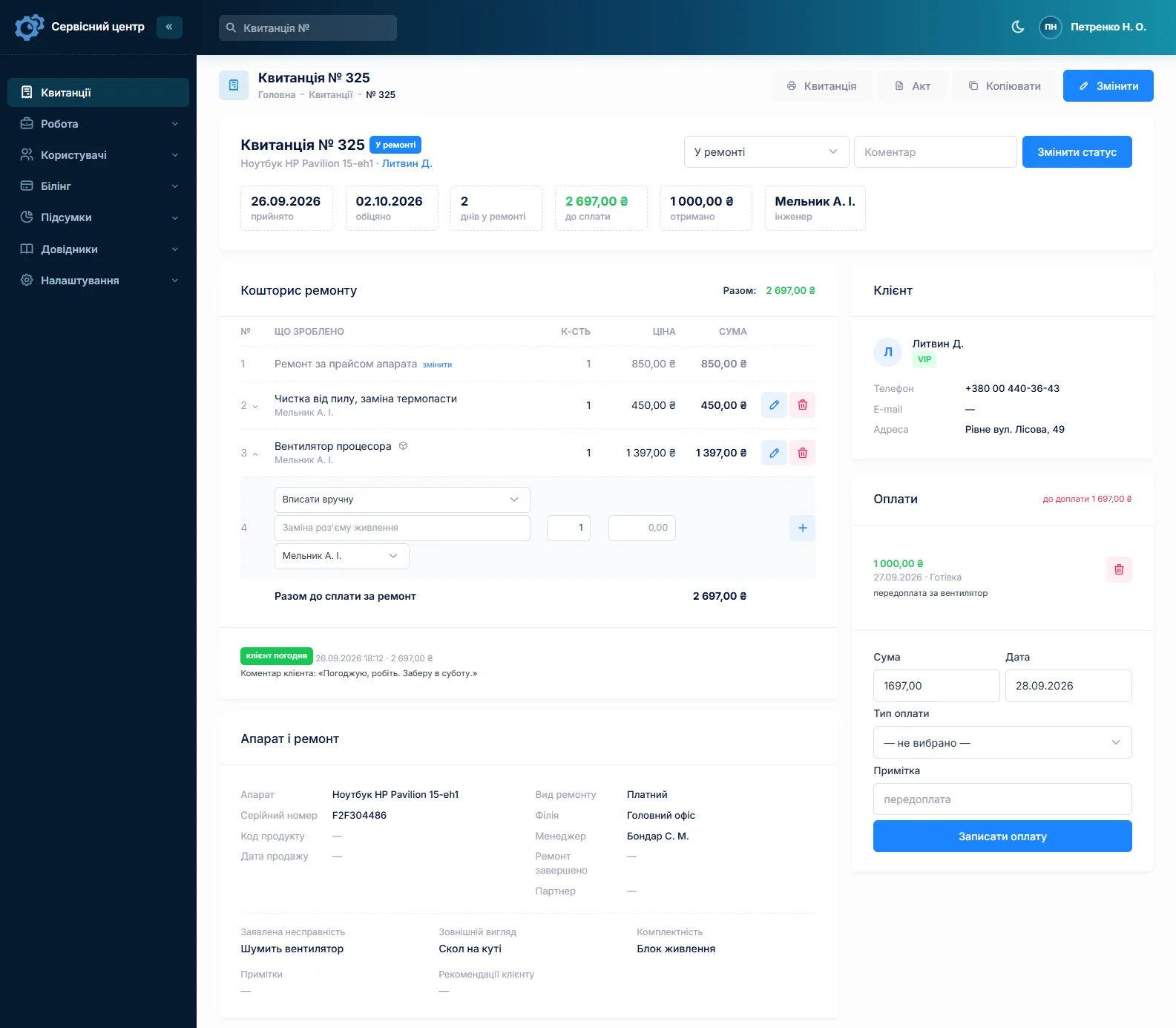
Warranty jobs from the dealer who sold the scooter
Some repairs are under warranty: the scooter was bought from a dealer, and the dealer sends it to you. The repair type is “Warranty”, the date of sale has its own field, and the dealer is set as the partner. The job list filters by partner: how many scooters came from each dealer and where they stand.
Rental and delivery companies: customers with a fleet
A rental or delivery company brings five scooters at once, every month. The customer card has a “Company” field and gathers all of the firm’s repairs, their total and what the firm still owes. Notes hold what the front desk must know: “pays monthly”, “release only to their mechanic”.
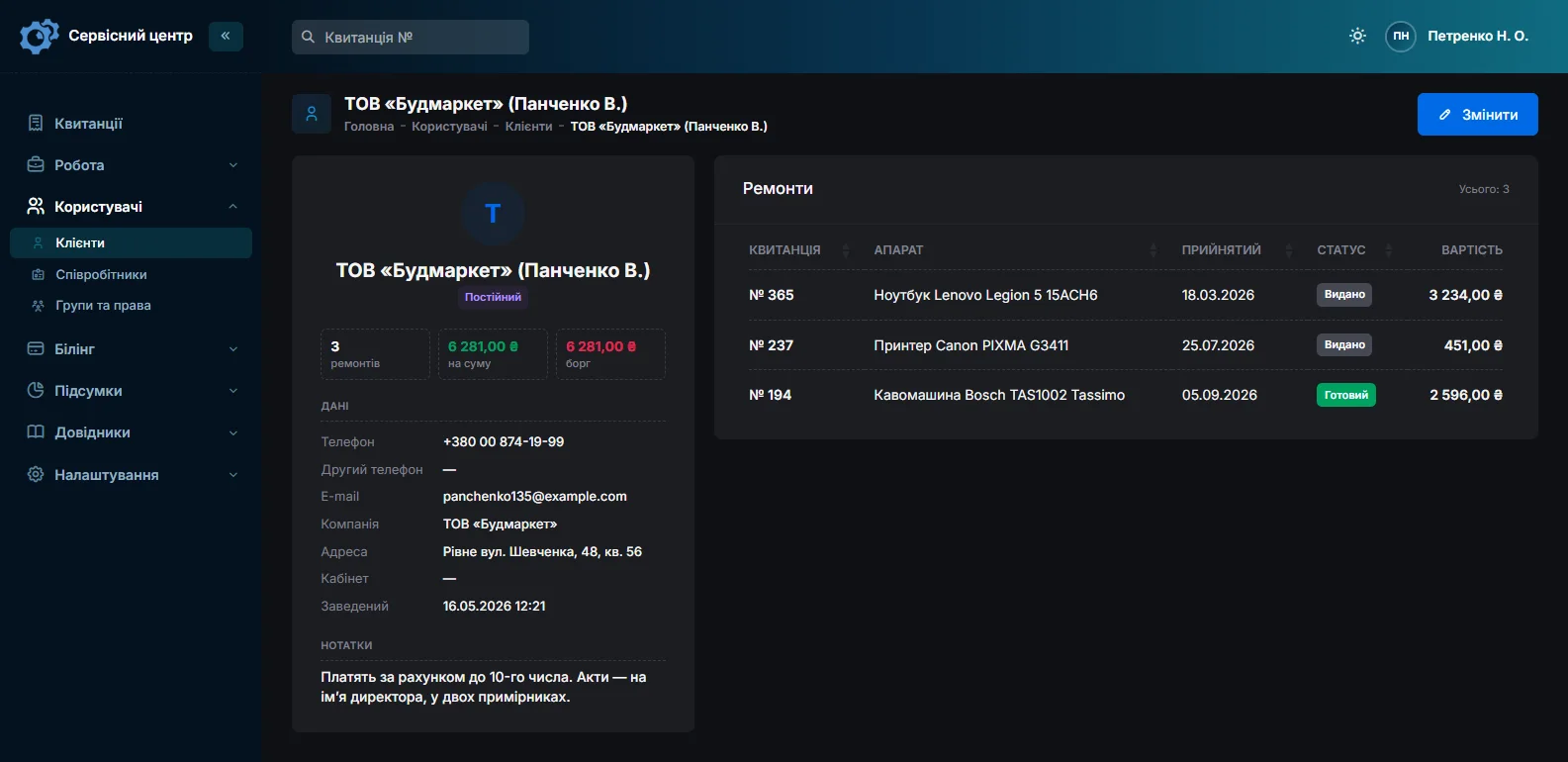
Five identical scooters are booked in by copying the previous job and changing the serial number.
What it does not have
- Photos or files on the job. You cannot attach a photo of a swollen battery. Describe the condition in words and keep pictures separately, with the job number in the file name.
- Fleet records. There is no separate list of a rental company’s scooters. Each scooter shows up through its jobs on the customer card and in a serial-number search.
- Online booking. A job is opened once the scooter is in the shop.
- SMS, a mobile app or online payment by the customer. Notifications go by email and Telegram, and the software runs in the browser, including on the technician’s phone. You record payments on the job card yourself.
- A till or an online shop. It tracks repairs. It does not sell scooters or accessories.
What you get
- Promised dates, plus urgent and overdue jobs at a glance in high season.
- A day counter for finished scooters still waiting to be collected.
- Battery condition and accessories on a job sheet the customer signs.
- A scooter’s history by frame and battery number.
- Tubes, tyres and controllers in stock with minimum levels.
- Estimates sent for approval by email or Telegram.
- Partner dealers and fleet customers, each with their own filter.

I tried the ServiceCenterSoft demo and came away with a good impression. The program is simple and easy to understand, yet it has everything you need for the job: customers, repairs, devices, spare parts, statuses and statistics.
I especially liked the dark theme and the responsive design — working from a phone is perfectly comfortable. Another plus is the instant search that works as you type, so you don't have to press a separate "Search" button every time.
You can tell the program was built specifically for service centers rather than being a generic CRM adapted for the repair business. The interface has no unnecessary frills; everything is logical and to the point.
A good, practical tool for the day-to-day work of a service center.

I liked that you get a free 14-day trial and that they are willing to handle my special requests — setting things up exactly the way I need them.
I also liked how payment works. You can simply pay the monthly fee by card online — basically the same as a regular Spotify subscription or any other service. No separate contracts to sign and no invoices to pay manually.
And there's no feeling of strict limits on the number of employees. One service center is one account, and inside it you can organize the work of your technicians and run several branches.
For me this is far more convenient than plans where you have to pay for every single user or keep counting how many employees are working today.

My business is fairly specific, so the program's standard features weren't enough — I needed my own custom fields, my own sorting options and search by additional parameters. The work completion certificate and the printed repair receipt also needed some changes to fit the way we work.
I contacted technical support. To be honest, I expected changes like these to take a long time, but everything was done within a single day. The team quickly understood exactly what we needed, suggested the right solution and did everything properly.
I'd especially like to mention the support: they get straight to the point, with no unnecessary bureaucracy, and they genuinely help instead of just sending you off to read the documentation.
For me this is a big advantage of the program: it isn't just sold "as is" — it can be adapted to how you actually work. Thanks to the team for the quick response and for treating the customer right.
Highly recommended!
What it costs
One price for the whole shop, with no extra charge per employee or branch.
Monthly
Paid every month, cancel whenever you like.
Yearly
Cheaper than paying monthly. Invoice or card payment.
Custom work
Changes tailored to the way you work — hourly, by agreement.
Off-the-shelf not enough — your own forms, roles, reports or workflow? We will build a program for you. How it works
Try it without signing up in the demo. Book a scooter in the way you do at your shop, with the battery described and the accessories listed, and take it through the estimate to collection.
Frequently asked questions
Where do I record the frame number and the battery number?
The frame number goes into “Serial number” and the battery number into the “Product code” field next to it. Advanced search finds jobs by either, so you can pull up the history of a scooter or a battery even after the pack has moved to another frame.
The scooter is ready but nobody collects it. How do I keep track?
For a finished job that has not been collected, the card and the list show how many days it has been waiting. You set the free storage period in the settings. Once it is over, the counter turns red and a “past free storage” filter appears above the list. You can remind the customer by email or Telegram with the button on the job card. Storage fees are not charged automatically: if you charge them, add an estimate line.
Can I attach a photo of a swollen battery to the job?
No, photos and files cannot be attached to a job yet. Describe the battery in the “Condition” field (swelling, water marks, corrosion on the connector), and the customer signs the job sheet with that description on it. Keep the pictures separately, with the job number in the file name.
A rental company drops off ten scooters. Is each one a separate job?
Yes: one job per scooter, each with its own serial number, condition, estimate and price. To keep that quick, there is copying: the new job is filled in from the previous one (customer, model, fault, accessories), and you only add the serial number. All of the rental company’s repairs sit on its customer card with the “Company” field, and the “Unpaid” filter shows what has been collected but not yet paid for.
How do I book in a warranty scooter sent by the dealer who sold it?
Set the repair type to “Warranty”, enter the date of sale in its own field and set the dealer as the partner, so you can filter repairs by dealer. Whoever pays is the customer: if the dealer pays for the repair, put the dealer down as the customer. If nobody pays, there is a “Warranty (not charged)” payment type for that.
Will the software tell me when to reorder tubes and tyres?
It will not message you, but it will show you. Each stock item can have a minimum quantity, and once stock falls to it, the item appears in the “running low” filter, which gives you a ready list of what to order before the season. A part for a specific repair is ordered from the job, and the software can email the order to the supplier.
See also
Coffee machine repair software
For a coffee machine service: home bean-to-cup machines and the commercial machines of cafés and offices. Urgent jobs, descaling and brew group work from a labour price list, estimates sent for approval, site visits, seals and pumps in stock.
Read moreSoftware for home appliance service
Contents recorded at intake, warranty at the brand price list, callouts, slow parts and partner shops.
Read morePhone repair shop software
Intake in a minute, screens and batteries tracked, a ready-for-pickup email, output per technician.
Read moreSee how it works
The demo is open — go in and try it. Ask us anything by email, Telegram or the form on this site.