Power tool repair software
For a workshop repairing electric and petrol tools: building firms and hire shops as customers, tools arriving in batches, brushes and armatures in stock, and each drill’s history by serial number.
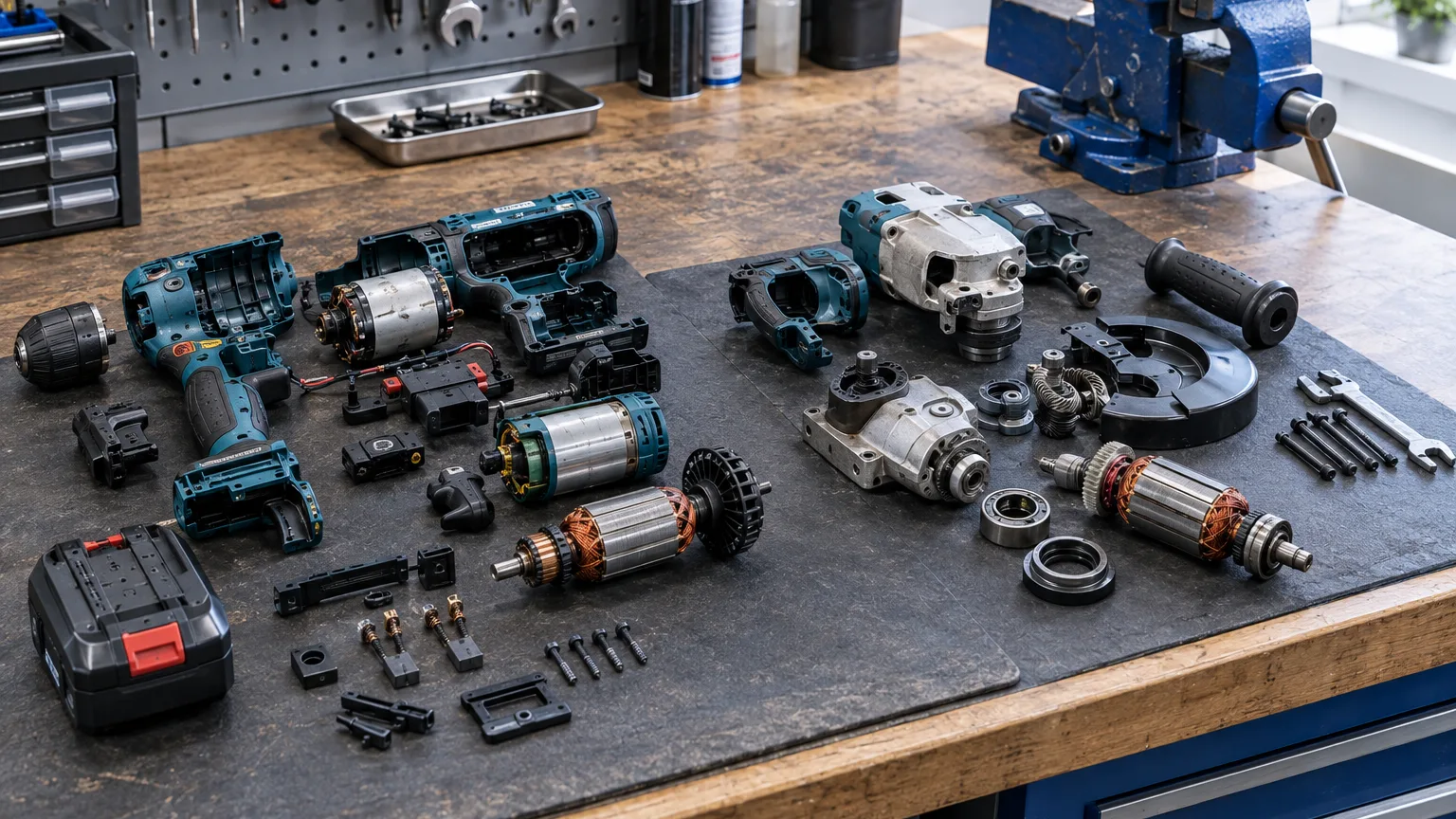
ServiceCenterSoft is repair-tracking software for a workshop that repairs electric and petrol tools: rotary hammers, drivers, angle grinders, saws, generators. Business customers and hire shops, tools that arrive in batches and come back again, consumable parts in stock, and each tool’s history by serial number.
How a tool workshop is different
A phone is brought in by its owner. A rotary hammer is usually brought in by a foreman, a driver or a building firm’s office manager — and not one at a time, but three to five at once. The firm pays, while the person who dropped it off asks when it will be ready. The same tool comes back every few months: brushes, bearings, cable, gearbox. And the key question at intake is not “what broke” but “whose is it and who pays”.
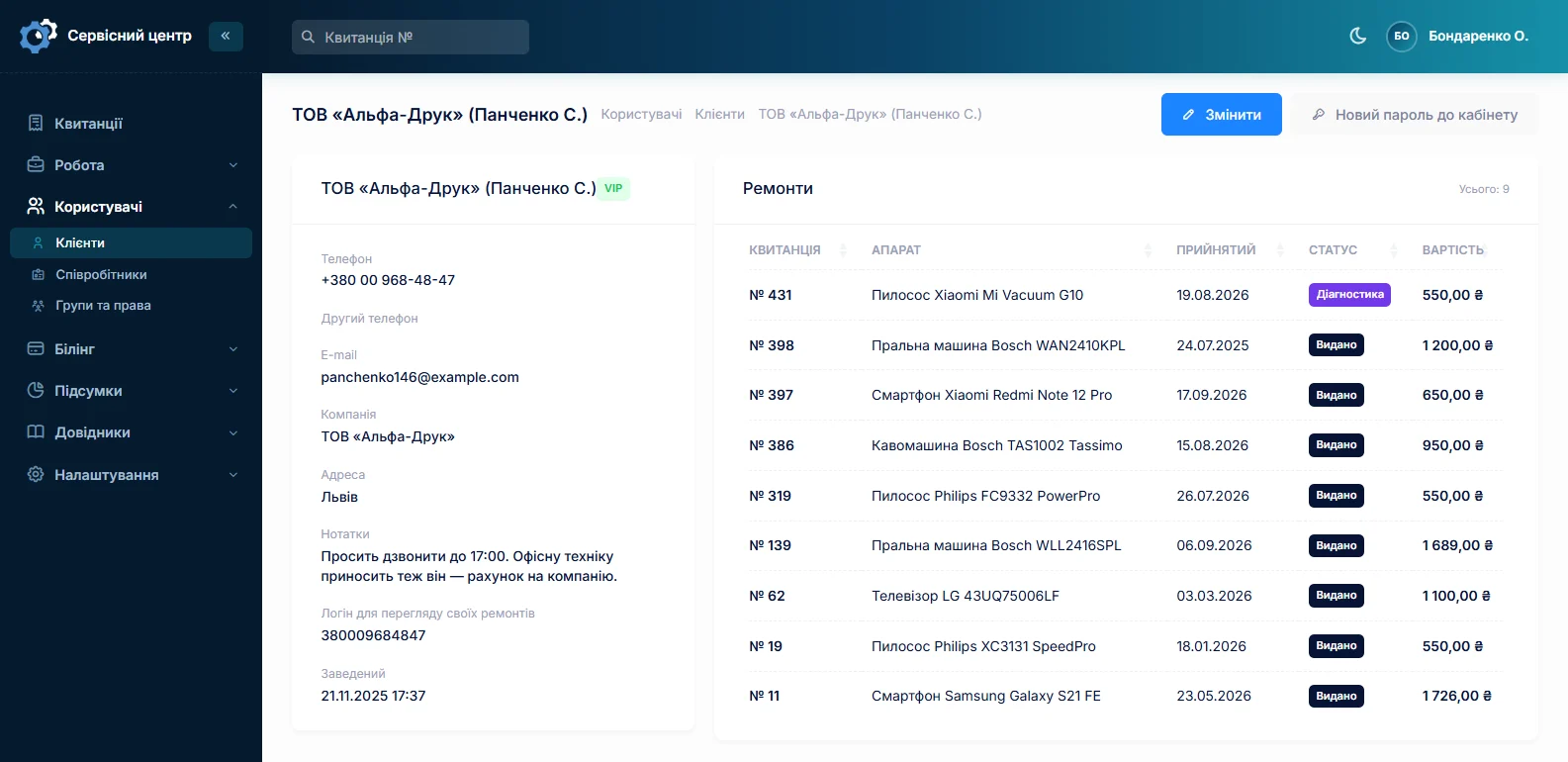
A firm is one customer, however many people bring the tools
The customer card has a “company” field, and the search finds the customer by company name too. All of a firm’s repairs are on one card: you can see how many tools it sent in a year and for what amount. The notes on the card hold what the front desk needs to know: “pays by invoice”, “hand over only to foreman Petrenko”.
Hire shops and retailers who pass tools to you for repair are kept as partners. The partner is set on the job, and the job list can be filtered by it: you see how much came from each and where it stands now.
Five rotary hammers at once
One job, one device: that way every tool has its own number, condition, work log and price. So that a batch does not take half an hour, there is “copy”: a new job is filled in from the previous one — customer, partner, type, brand, model, branch and price — and you only change the serial number and the fault. Five identical hammers are booked in within a few minutes.
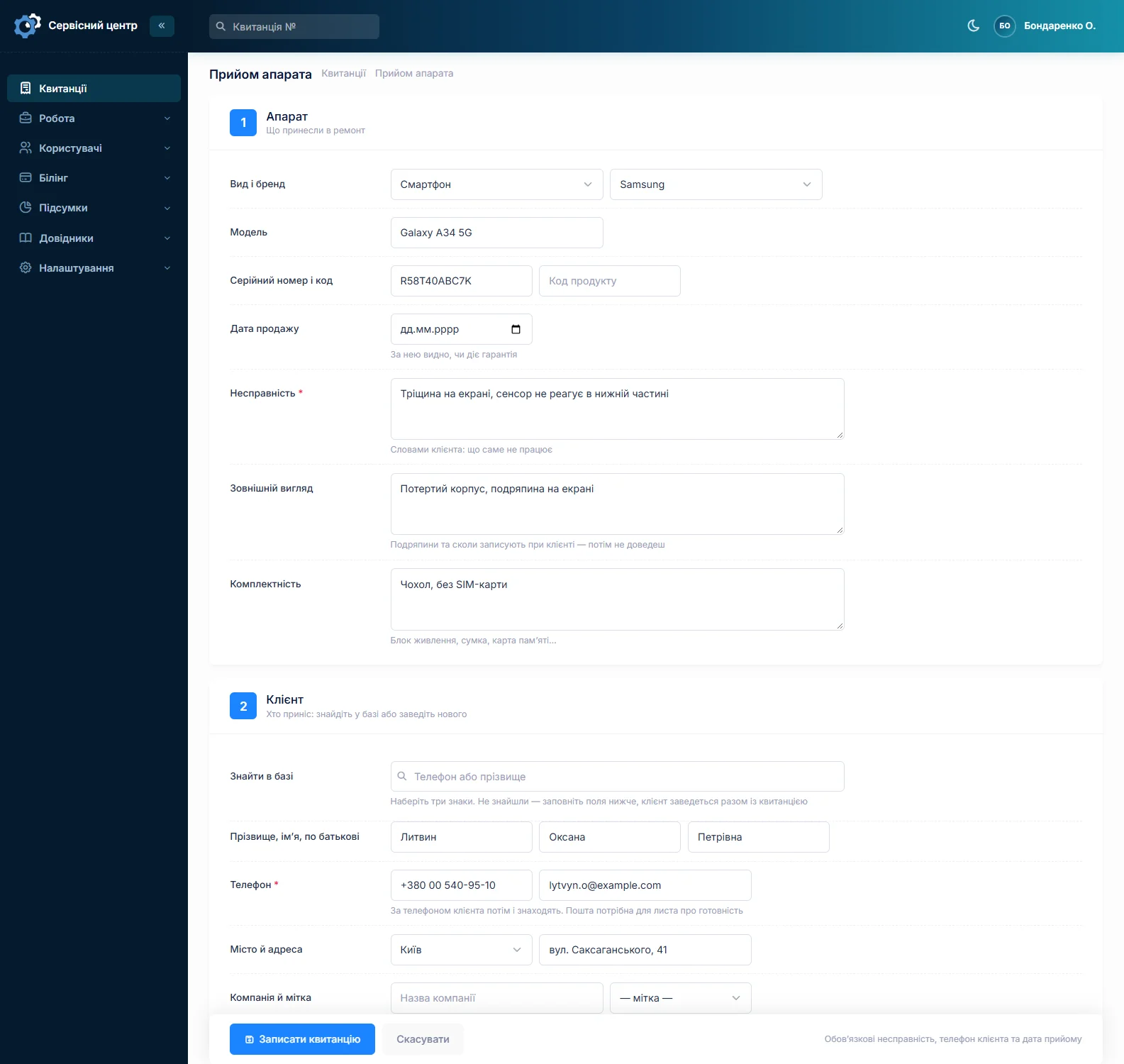
For tools, the contents matter as much as the screen condition does for a phone: case, batteries, charger, side handle, depth stop. Everything written at intake appears on the job sheet signed by whoever brought it in.
Brushes, armatures, bearings — what was bought and where it went
A tool workshop buys consumables in advance: brushes, bearings, cables, switches, and armatures and stators for the common models. Each delivery is recorded separately: what, how many, at what price and from whom. Where a part went is a separate field, and the search covers it too. Under the list is the total — how much money is currently tied up in stock.
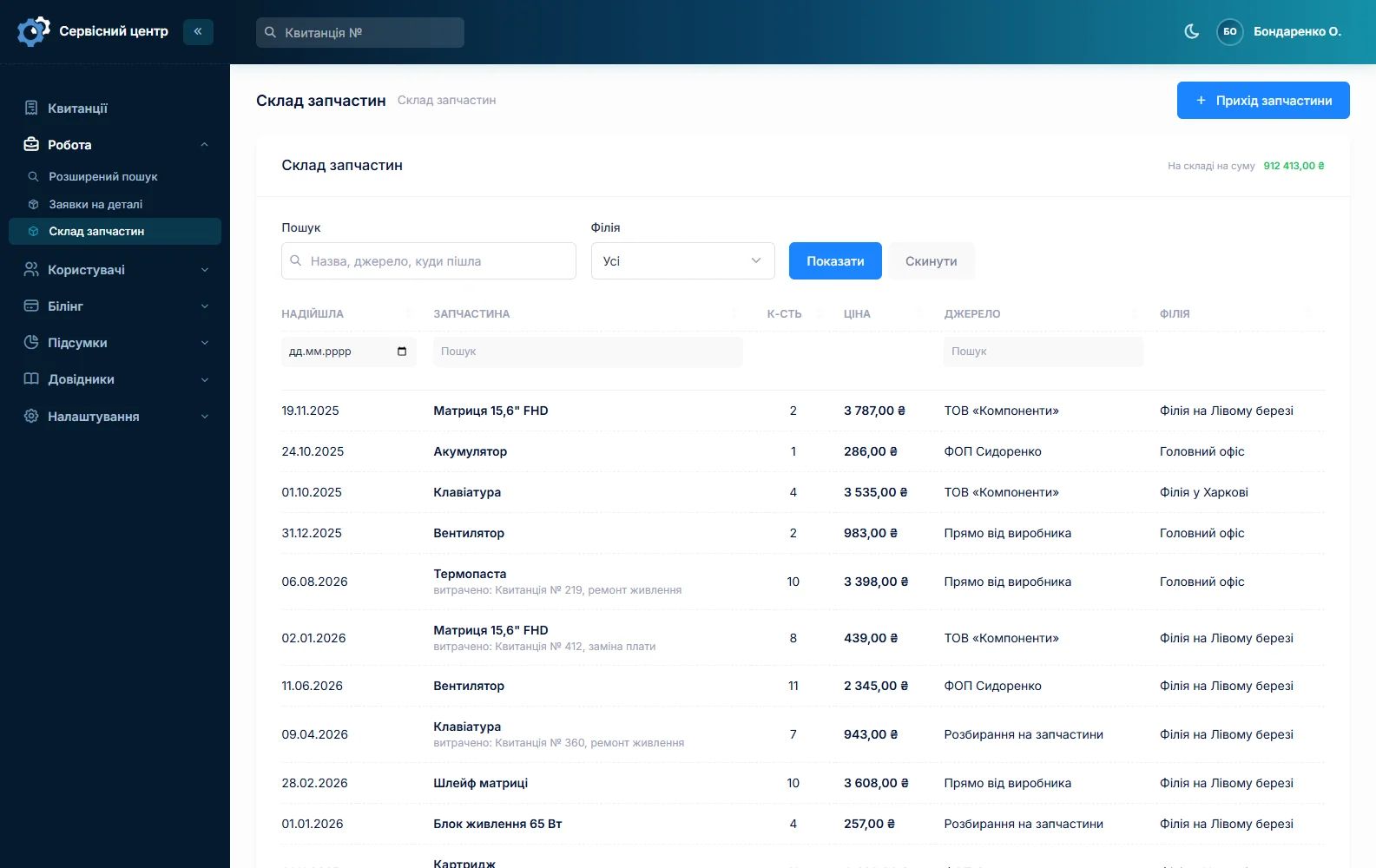
Honestly: stock in the software is a log of deliveries, not an inventory with balances. The quantity does not go down when a part is fitted, and there are no barcodes. If you want to know how many brushes are left on the shelf, bear that in mind. More on spare parts tracking.
Tools that keep coming back
The serial number finds a tool even if it was here a year ago, and you can see its whole history: what was replaced, when and at what cost. If a hammer comes back for the third time in six months with the same problem, it is worth telling the customer that the issue is not the repair but how the tool is used — and showing them the history.
Warranty repairs for brands you are authorised by are charged at the manufacturer’s price list, with the date of sale and a certificate in the brand’s format (authorised service).
When the person collecting is not the one who dropped it off
For firms that is normal: one person brings it, another collects it, accounts pays. The ready-for-collection email goes to the customer’s address on the card, so a firm does well to give a shared mailbox. Payment is marked separately from collection, and the “unpaid” filter shows which firms still owe for tools already handed back.
What is not here
- Booking in a batch on one job. Each tool is a separate job; a batch is booked in by copying.
- Stock balances and barcodes. Stock is a log of deliveries.
- Invoices to firms. The software works out the repair price and records payment, but does not issue accounting invoices.
What you get
- All of a firm’s repairs on one card, whoever brings the tools.
- A batch of identical tools booked in within minutes.
- Contents on the job sheet, signed by the person who brought them.
- A record of every delivery of brushes, armatures and bearings.
- A tool’s history by serial number.
- Hire shops and retailers as partners, with a filter by partner.
- A list of firms that have not yet paid for tools already collected.
What it costs
One price for the whole workshop — no extra charge for staff or branches.
Monthly
Paid every month, cancel whenever you like.
Yearly
Cheaper than paying monthly. Invoice or card payment.
Custom work
Changes tailored to the way you work — hourly, by agreement.
Try it without signing up in the demo: book in several identical devices using “copy”.
Frequently asked questions
How do I quickly book in several identical tools from one firm?
Book in the first one as usual, then press “copy” on its job for the rest. The new job fills in the customer, partner, type, brand, model and price from the previous one — you only change the serial number and the fault. Each tool gets its own numbered job.
Can I see all of a building firm’s repairs together?
Yes. The firm is one customer with its company name on the card, and the card lists all its repairs with amounts, whoever brought the tools in. The search finds the customer by company name too.
Does the software count how many brushes are left in stock?
No. Stock is a log of deliveries: what, how many, at what price and from whom, and where it went. The quantity does not go down when a part is fitted. How many are left on the shelf you check on the shelf. If balance tracking is critical for you, get in touch — that is custom work.
Does the software issue invoices to firms?
No. The software works out the repair price, prints the job sheet and completion certificate, and records when it is paid. Issue the accounting invoice for a firm in your accounting software. The completion certificate from the software usually satisfies the customer’s accounts department as the record of the repair.
How do I handle tools from a hire shop?
Set the hire shop up as a partner and put it on the job. The job list filters by partner: you see how many tools came from the hire shop and where they stand. If the hire shop pays for the repairs itself, it can also be the customer on the job.
Does it suit petrol tools and garden machinery too?
Yes. You set up the device types yourself — generators, chainsaws, trimmers, tillers — with their brands and usual repair price. Tracking from intake to collection is the same as for electric tools.
See also
Car electronics repair software
For a workshop repairing car electronic units: ECUs, instrument clusters, ABS modules, starters and alternators. Units from owners and garages, the part number on the job, price approval after diagnosis, chips and donor units in stock.
Read moreSoftware for a small repair shop
For a workshop run by one or two people: intake with a printed job sheet, a list of repairs, the month’s takings. Set up in an evening.
Read moreComputer repair shop software
Diagnosis in the work log, agreeing the price after opening the device, your own statuses, recommendations for the customer.
Read moreSee how it works
The demo is open — go in and try it. Ask us anything by email, Telegram or the form on this site.