Thermal imaging camera repair software
For workshops repairing thermal imaging cameras, night vision devices and laser rangefinders: serial number history, manufacturer warranty by date of sale, paid diagnosis, quotes approved online and calibration on the job record.
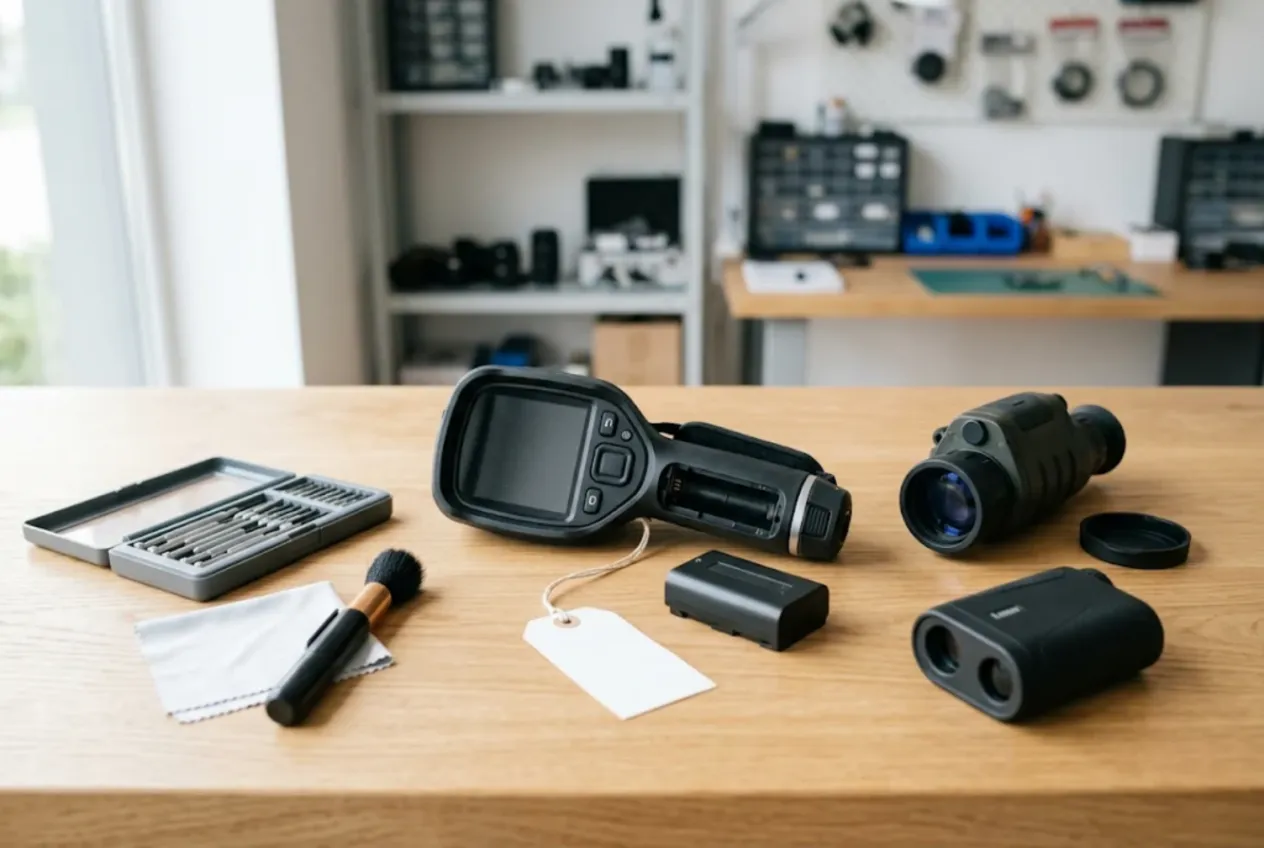
ServiceCenterSoft is repair-tracking software for workshops that service thermal imaging cameras, night vision devices, thermal and digital riflescopes, monoculars and laser rangefinders. Hunting optics, building-inspection cameras used for energy audits, industrial cameras for electrical and mechanical inspections — all go through the same intake form and the same job list. It runs in the browser on a PC, a laptop or a phone.
Not a camera repair shop
A thermal imager looks like a camera: housing, lens, screen, battery. But a camera repair bench deals with sensor dust, lens fungus and autofocus adjustment — we cover that on a separate page, camera repair software. Thermal devices have different economics. The microbolometer core can be worth half the unit, a germanium lens alone costs as much as a decent phone, and many units come in while still under the manufacturer’s warranty.
So every job starts with two questions: is this a warranty repair or a paid one, and is it worth repairing at all? Your customers are different too — a hunter who needs his scope back before the season opens, or a contractor or plant maintenance team sending in several cameras and expecting a written record of what was done.
Where it usually goes wrong
- the serial number lives on a paper tag, so a year later nobody can tell what was done to that scope;
- no date of sale on file, so warranty is decided by guesswork;
- at collection: “that scratch on the lens window wasn’t there”;
- a display replacement was agreed on the phone, and the customer remembers a different figure;
- a part takes three weeks, and the deposit for it is written down somewhere nobody can find;
- before the season, the shelf of finished units grows and owners don’t know they’re ready.
Intake: serial number, date of sale, condition
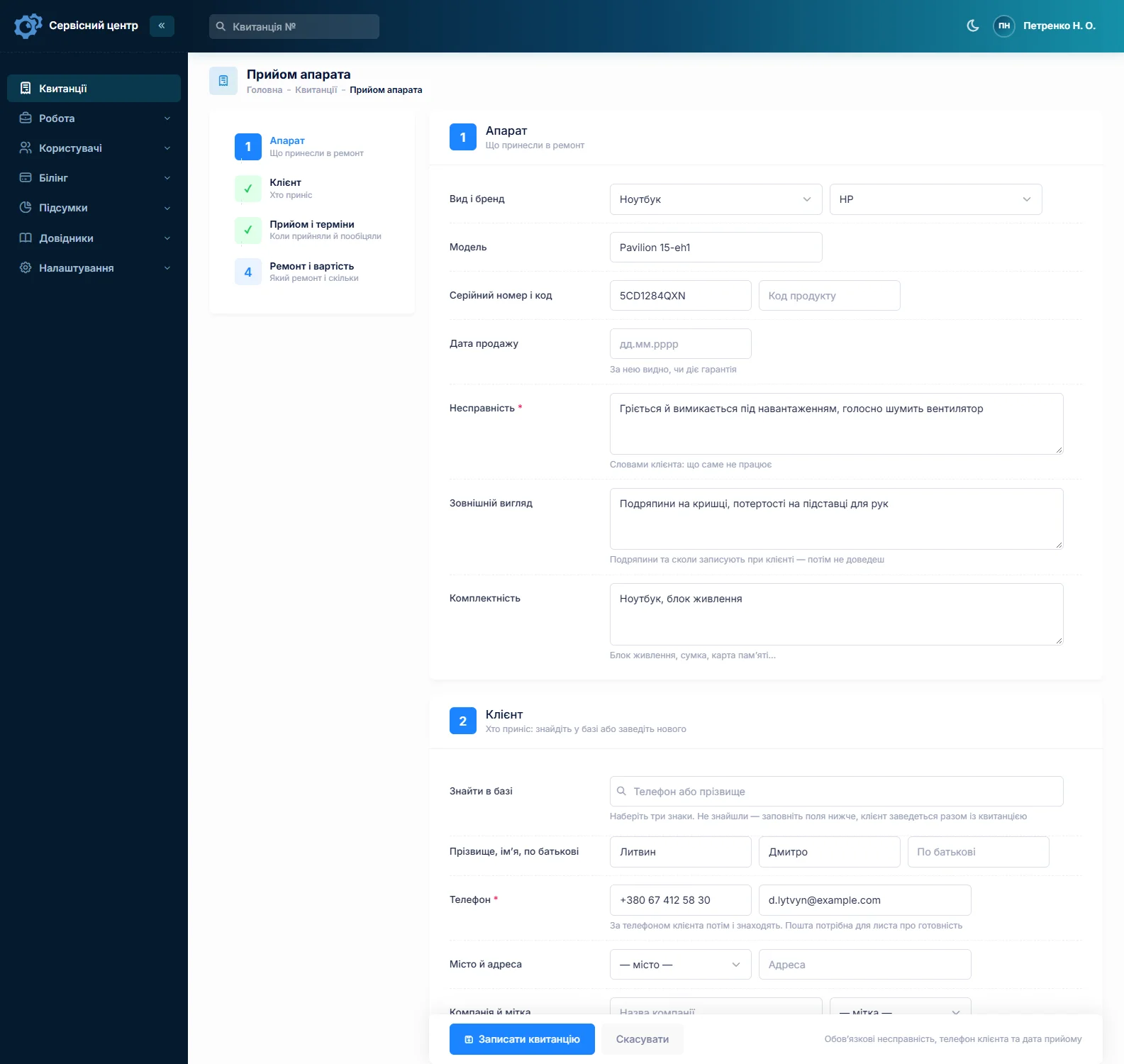
The ticket has a serial number field, plus an optional product code field. The search box in the job list matches part of a serial number, so when a unit comes back you see its previous repairs in seconds. The date of sale goes next to it and tells you at once whether the warranty still applies.
Condition and accessories are recorded with the customer present and printed on the ticket they sign: scratches on the lens window, a torn eyecup, impact marks, whether the warranty seals are intact; batteries, charger, cable, case, lens cap, rail mount. You can’t attach photos to a ticket — if you take pictures on your phone, keep them yourself and note on the ticket that photos exist.
Manufacturer warranty or paid repair
The repair type is set at intake: warranty, paid, out-of-warranty, repeat. Keeping “repeat” separate shows which units come back after your own repair. If you are an authorised service centre for a brand, warranty jobs are priced from the manufacturer’s price list — brand × category × device — and the price fills in automatically. More on the authorised service centre software page.
What the warranty covers, and whether opening the housing voids it, depends on the manufacturer’s and seller’s terms, not on the software. What the software does is keep the date of sale, repair type and seal condition on a document the customer has signed.
Diagnostic fee and quote approval
In the device list, a thermal imager can have two prices: diagnosis and repair. If the customer is undecided, switch the ticket to “diagnosis only” and the fee is on the ticket from day one, not a surprise at collection.
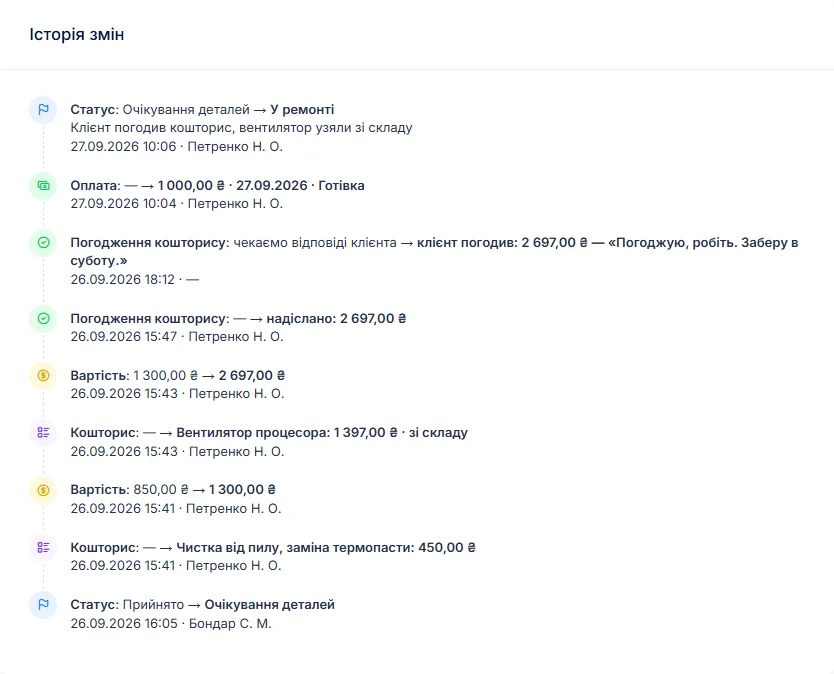
After diagnosis the ticket moves to “Awaiting approval”, and all units waiting for an answer are visible in the list. The quote is built line by line — “OLED display × 1”, “display replacement”, “calibration and test” — and sent by email or Telegram. The customer opens the link, sees every line and clicks “Approve” or “Decline”; the answer and date go into the ticket history. Approved only part of it? Remove the line and send again. If the repair costs more than a new unit, close the ticket as “Repair declined” or “Beyond repair” — such units are counted separately in the statistics.
Calibration on the record
After a display, core or lens replacement the unit is tested and calibrated: image alignment, zeroing settings on a scope, rangefinder accuracy at known distances. Calibration is its own quote line with its own price, and the result goes into the work log — “calibrated; rangefinder within tolerance at 100 m and 300 m” — which prints on the completion report. A separate “Recommendations” field covers storage and battery care.
There is no separate calibration certificate with measurement tables. If a business customer needs one, prepare it outside the software; the ticket keeps the record of what was done and when.
Parts, stock and deposits
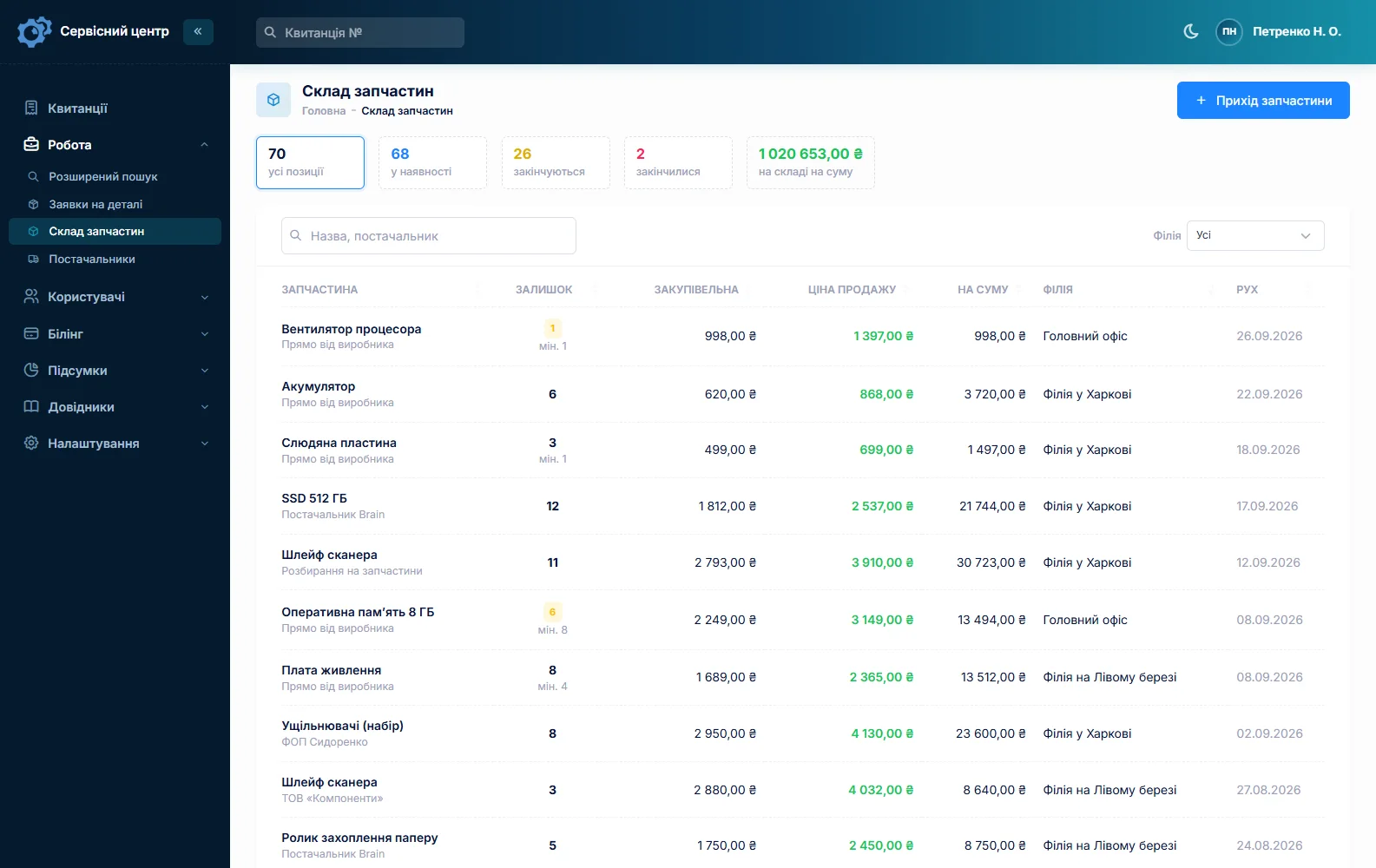
Displays, cores and lenses are usually ordered for a specific model. A parts request is raised from the ticket and emailed to the supplier from the software; the “Awaiting parts” status shows which units are held up. Take a deposit for an expensive part — a ticket can have several payments, and the card shows “received” and “balance due”.
Small items live in stock: batteries, eyecups, protective windows, buttons, caps, mounts. Stock is a movement log — receipts with purchase price, parts used on a job as quote lines, a minimum level and a “running low” filter. More on spare parts tracking.
Hunting season rush
Before the season opens, the workload doubles and everyone wants their unit by the weekend. Mark a ticket urgent and set a promised date; overdue tickets turn red and gather under the “overdue” filter. When a unit is ready, the customer gets an email or a Telegram message — re-sendable at most once a day; setup is on the customer notifications page. Each finished unit shows how many days it has been waiting, and a “past the free storage period” filter catches the forgotten ones.
Contractors and industrial customers
Customers have a “Company” field for contractors, utilities and maintenance teams. Several cameras from one site? Fill in the first ticket and copy it for the rest — customer, device, fault and accessories carry over; the serial number doesn’t, because every unit has its own. Some thermal imaging models may be subject to export or shipping restrictions; if you send units abroad, check with a lawyer — the software does not track this.
Typical repair prices
A rough guide, not a price list — it depends on the model, parts availability and your market: diagnosis €40–100, battery €30–90, buttons and encoder €40–120, display or eyepiece €100–350, power board €80–300, lens or protective window €80–400, calibration and test €50–200. A core replacement often costs half the price of the unit. You set your own prices in the device list and quote lines.
What it doesn’t do
- no separate calibration certificate;
- no photos or file attachments on tickets;
- no SMS, mobile app or online payment by customers;
- no supplier integrations.
Pricing
One price for the whole workshop — no extra charge for staff or branches.
Monthly
Paid every month, cancel whenever you like.
Yearly
Cheaper than paying monthly. Invoice or card payment.
Custom work
Changes tailored to the way you work — hourly, by agreement.
Off-the-shelf not enough — your own forms, roles, reports or workflow? We will build a program for you. How it works
Try it without signing up in the demo: book in a thermal imager with its serial number, set a diagnostic fee and send a quote for approval.

We are very happy working with servicecentersoft.com: they built everything we asked for, even though our request was unusual, since we deal with medical devices. Everything was done precisely and on the agreed schedule. Thank you for the cooperation — we keep working together.

I tried the ServiceCenterSoft demo and came away with a good impression. The program is simple and easy to understand, yet it has everything you need for the job: customers, repairs, devices, spare parts, statuses and statistics.
I especially liked the dark theme and the responsive design — working from a phone is perfectly comfortable. Another plus is the instant search that works as you type, so you don't have to press a separate "Search" button every time.
You can tell the program was built specifically for service centers rather than being a generic CRM adapted for the repair business. The interface has no unnecessary frills; everything is logical and to the point.
A good, practical tool for the day-to-day work of a service center.

I liked that you get a free 14-day trial and that they are willing to handle my special requests — setting things up exactly the way I need them.
I also liked how payment works. You can simply pay the monthly fee by card online — basically the same as a regular Spotify subscription or any other service. No separate contracts to sign and no invoices to pay manually.
And there's no feeling of strict limits on the number of employees. One service center is one account, and inside it you can organize the work of your technicians and run several branches.
For me this is far more convenient than plans where you have to pay for every single user or keep counting how many employees are working today.

My business is fairly specific, so the program's standard features weren't enough — I needed my own custom fields, my own sorting options and search by additional parameters. The work completion certificate and the printed repair receipt also needed some changes to fit the way we work.
I contacted technical support. To be honest, I expected changes like these to take a long time, but everything was done within a single day. The team quickly understood exactly what we needed, suggested the right solution and did everything properly.
I'd especially like to mention the support: they get straight to the point, with no unnecessary bureaucracy, and they genuinely help instead of just sending you off to read the documentation.
For me this is a big advantage of the program: it isn't just sold "as is" — it can be adapted to how you actually work. Thanks to the team for the quick response and for treating the customer right.
Highly recommended!
In short
- Serial number with search, date of sale — warranty status at a glance.
- Lens window, seals and accessories on the signed ticket.
- Diagnostic fee, quotes approved by link, clean refusals.
- Calibration as a quote line and on the completion report.
- Parts requests, deposits, stock with minimum levels.
- €20 a month for the whole workshop.
See also
Hearing aid repair software
For hearing care practices with an in-house repair desk and for hearing aid repair labs: one ticket per device, manufacturer warranty by serial number, a status for units sent to the manufacturer, and stock of receivers, domes and tubes.
Read moreGuitar repair shop software
For guitar repair shops and luthiers: quick setups alongside slow fret and crack work, humidity season, pickups and wiring — one ticket per instrument, estimates the customer approves by link, history by serial number, and stock of strings and fret wire.
Read moreStarting your own repair shop: where to begin
For people who can fix phones and laptops and want to work for themselves: what a small repair business needs on day one, the paperwork that protects you from the first customer, and how to run a shop in a country whose language is not your own.
Read moreSee how it works
The demo is open — go in and try it. Ask us anything by email, Telegram or the form on this site.