Starting your own repair shop: where to begin
For people who can fix phones and laptops and want to work for themselves: what a small repair business needs on day one, the paperwork that protects you from the first customer, and how to run a shop in a country whose language is not your own.

Repairing electronics is one of the few trades where you can still start small. You need skill, a bench, decent tools and a few spare parts. You do not need staff, a warehouse or a large loan. That is why so many people turn to it when they need an income of their own — at home, or after moving to a new country.
This page is for someone who has not started yet: you can replace a screen, a charging port or a keyboard, and you are thinking about doing it for paying customers. Below is what the first months actually involve, what you can take from us for free today, and — last, because it matters least at the start — when software becomes worth it.
Start smaller than you think
Most one-person repair businesses begin at a kitchen table or in a corner of a shared space, not in a shopfront. That is fine. What you need on day one is short:
- A bench and tools you already know how to use: a good soldering station, a hot-air station or a separator for screens, drivers, a microscope or a magnifier, a bench power supply, a multimeter.
- A small parts float for the repairs you will do most — batteries, screens and charging ports for the models people around you actually own. Do not stock everything; order the rest per job.
- A place customers can reach, even if it is only by appointment.
- Money to live on for a few months while word of mouth builds. This is the line people skip, and it is the one that closes most new shops.
Customers come slowly at first, mostly through recommendations. One returned device in perfect condition, with a clear bill and a warranty, does more for you than any advertisement.
The legal side: ask locally, early
Every country has its own rules for registering a small business, paying tax, charging VAT and whether repair work counts as a regulated trade. We make software; we do not give legal or tax advice, and we will not guess at the rules of a country we have not checked.
What is worth doing in any country, before the first paid repair:
- ask a local accountant or tax adviser which form of self-employment suits a one-person repair business, and what you must put on a receipt or invoice;
- ask your local chamber of commerce or small-business advice centre whether repair work needs a registration or qualification where you live — many run free sessions for new founders;
- ask an insurer about liability insurance: you will be holding other people’s expensive devices, and one dropped laptop can cost more than a month of work.
Paperwork from the very first device
The classic beginner’s mistake is taking a phone in on a handshake. You agree on a price verbally, do the job, and at pickup the customer remembers a different amount, a different date and a scratch that was never there. The argument is not won by whoever is right; it is won by whoever has it in writing.
So the first thing to set up is an intake form (a repair ticket). It records three things: the condition the device arrived in, what came with it (case, charger, SIM card), and what you agreed — the fault as described, an estimated price and a deadline.
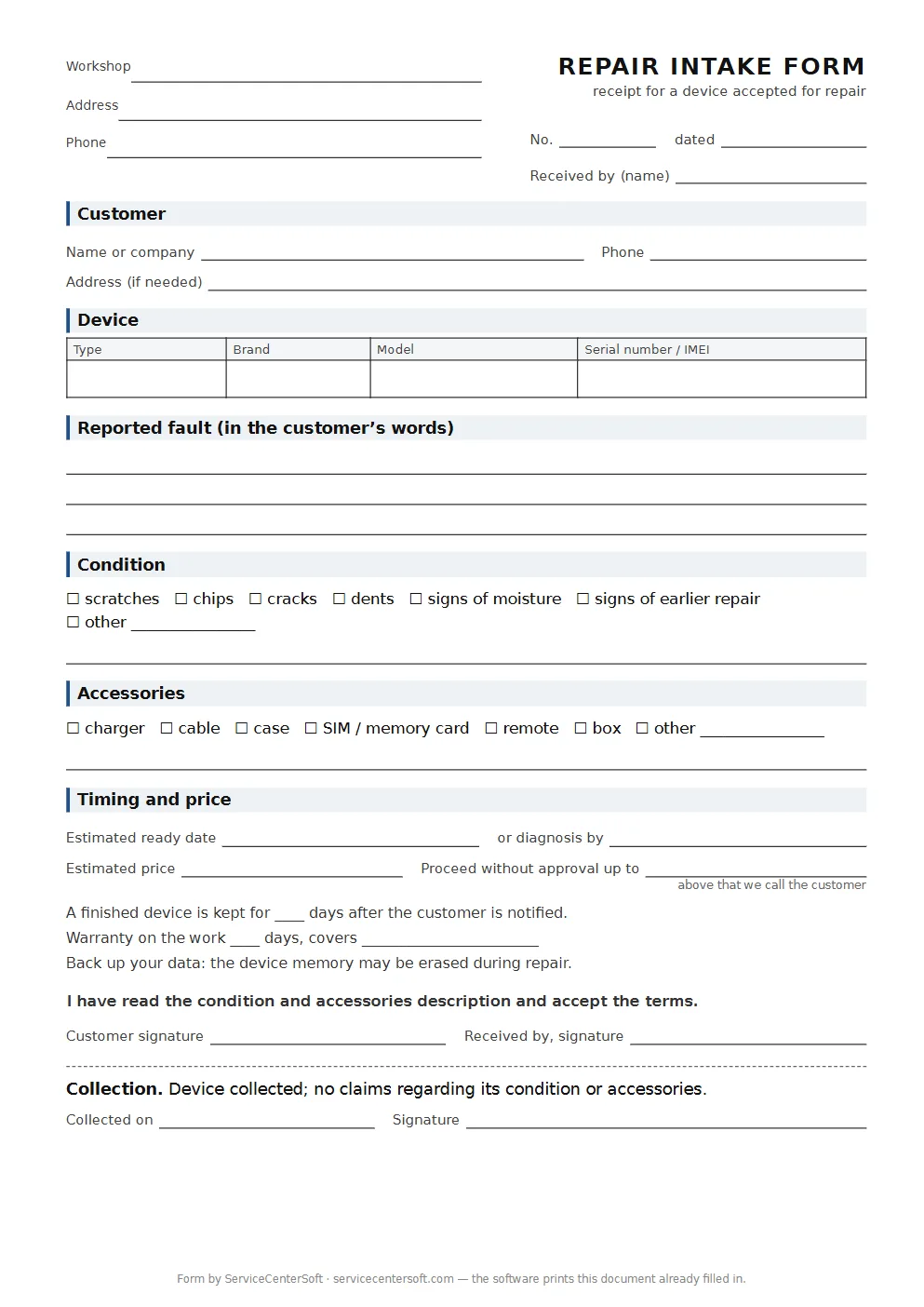
The form is free, no sign-up. If you want your shop name, address and terms printed in the header, run it through the intake form generator: fill in the fields and download a ready PDF. Nothing you type is stored.
Three lines to add straight away
These are not formalities — they are what most disputes are about.
- The amount above which you call first. “We carry out work up to this amount without asking” — one sentence that removes half the arguments about price.
- How long you keep a finished device. How many days a repaired device stays with you after you have told the customer it is ready. Without this line, every phone nobody collects becomes your problem for good.
- What the warranty covers. Not “the device”, but the work done and the parts fitted, and for how long. Otherwise a month later someone will bring in a completely different fault and call it a warranty claim.
When the local language is not your first language
A common story: a skilled technician moves abroad, speaks the local language well enough to talk to customers, but not well enough to write a tidy ticket, a cost estimate or a warranty text every single time. The repairs are not the problem — the paperwork is.
This is where we differ from most repair shop software: the language of your documents is set separately from the language you work in. Each person in the shop picks their own interface language, and the customer receives the intake ticket, the completion report, the “ready for pickup” email and the Telegram message in the document language you chose. You write your terms once, in the customer’s language — with a friend’s help or a careful translation — and from then on every ticket prints with them.
To be honest about the limits: both lists currently cover four languages — English, German, Ukrainian and Russian. If your customers read French or Polish, the printed documents will not be in their language yet.
Will it pay?
A repair shop is not quick money. It gives a predictable income if you keep three things under control: a steady flow of customers, the time each repair takes, and a record of what you have done and what you are owed. Where the profit usually leaks — and it is rarely the prices — is covered in how to tell whether your repair shop is really making money. Read it before you set your prices, not after the first quiet month.
When software starts to make sense
Honestly: not on day one. While you have a few repairs a week, a stack of printed forms and a notebook are enough, and we will be the first to say so. Software starts paying for itself when:
- you no longer remember what state each device is in and keep saying “let me check”;
- customers call asking “what’s happening with mine” and you have no quick answer;
- at the end of the month you cannot tell what you earned and where the money went;
- a second pair of hands joins, and you need to see who did what.
At that point have a look at software for a small repair shop. ServiceCenterSoft runs in the browser and covers the daily loop: an intake ticket printed with your terms, statuses from “accepted” to “handed over”, an estimate built line by line from your services and parts, several payments per job so a deposit and the balance are both recorded, a parts log that shows what is left in stock, an email or Telegram message when the device is ready, and a printed completion report at pickup.
What it does not do, so there are no surprises: no SMS, no mobile app, no online payment by the customer, no photos or file attachments on a job, no integrations with parts suppliers, and it is not a cash register.
The price is around €18–20 a month for the whole shop, depending on whether you pay monthly or yearly, with no extra charge per user; the current figures are always on the pricing page. You can try everything first in the demo, no sign-up needed.
In short
- Start small: a bench, the tools you know, a small parts float and money for a few slow months.
- Ask a local accountant or tax adviser and your chamber of commerce about registration and tax; get liability insurance.
- Never take a device without a written intake form — the free form and generator are above.
- Put three lines on it: the no-ask amount, the storage period and what the warranty covers.
- If the local language is not your own, write your terms once in the customer’s language and let every ticket carry them.
- Software can wait until you lose track; when that happens, the demo is open.
See also
Software for home appliance service
Contents recorded at intake, warranty at the brand price list, callouts, slow parts and partner shops.
Read morePhone repair shop software
Intake in a minute, screens and batteries tracked, a ready-for-pickup email, output per technician.
Read moreTV repair software
For a workshop repairing TVs and monitors: diagnosis and price approval before ordering a panel, a description of the screen at intake, and refusals that do not turn into disputes.
Read moreSee how it works
The demo is open — go in and try it. Ask us anything by email, Telegram or the form on this site.