Pump repair software for well and pump service shops
For well and pump service shops: submersible well pumps, jet and booster pumps, pressure tanks, pressure switches and control boxes — the well call-out and the bench on one ticket, the spring and summer rush, and warranty checks by serial number.
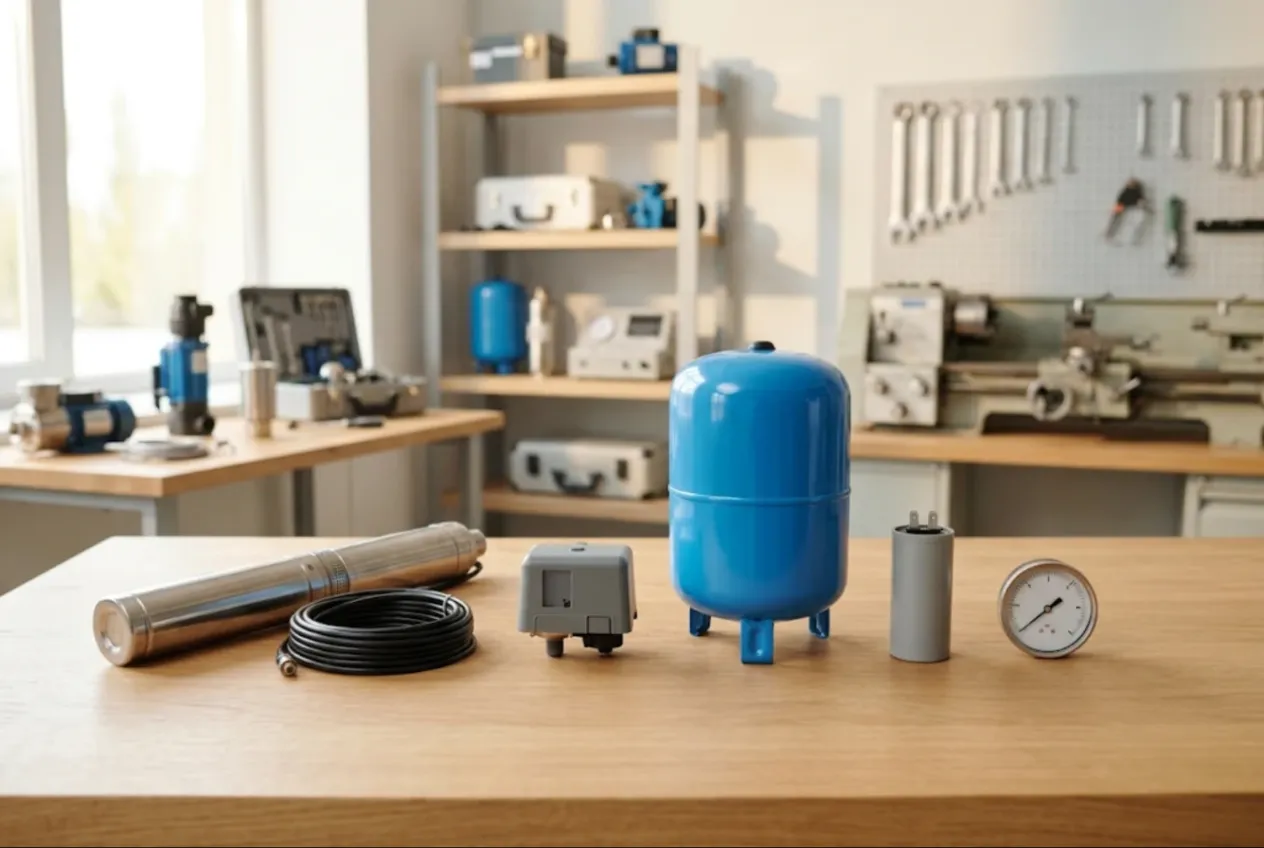
ServiceCenterSoft is job-tracking software for pump repair shops and well service contractors: submersible well pumps, sump pumps, jet and booster pumps, and the controls around them — pressure switches, dry-run protection, pressure tanks, control boxes. The call-out and the bench work stay on one ticket, the customer approves the estimate by link, and the serial number tells you whether a pump is back under warranty. It runs in the browser, on the shop PC and on your phone at the wellhead.
If your core trade is motor rewinding — winding data, copper wire, bake ovens — the electric motor repair software page is closer to you. Hydraulic cylinders and pumps on plant and machinery have their own page: hydraulics repair software. This one is about water: homes, cabins, farms and small businesses.
A trade with a season
Most calls start with “we have no water” — homeowners on a private well, cabins, farms, greenhouses. Nobody waits a week for water, so almost every job is urgent.
Winter is quiet. Spring brings cabins reopening and pumps started after months of standing. In summer, wells run all day for irrigation, the water level drops, pumps draw sand and overheat. Open jobs double within weeks, and that is when things slip.
Where it usually goes wrong:
- the pump came out of the well, but nobody noted the cable length, the rope or the check valve;
- “you rewound this last year” — and nobody can say when or what was done;
- a rewind price agreed by phone was “supposed to be less” at collection;
- your most-used capacitors and pressure switches run out in July;
- the customer rings, and nobody knows whether the pump is still down the well or on the bench.
One pump, one ticket — with everything that came up with it
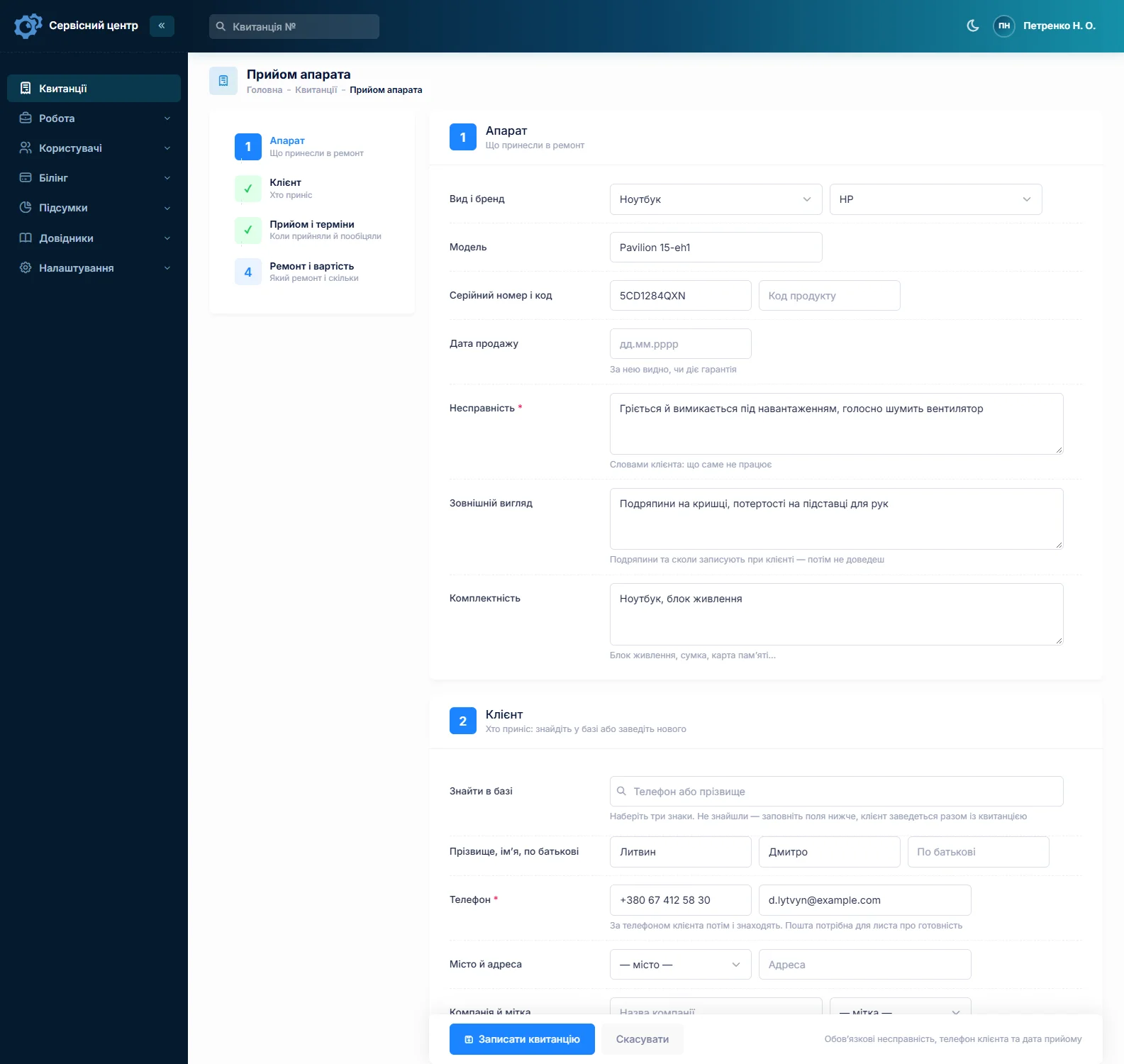
Each pump or control unit is a ticket with a number, status and price. Find the customer by phone number or add a new one; the address lives on the customer card. Device types follow your work: “Submersible well pump”, “Sump pump”, “Jet pump”, “Booster set”, “Pressure switch and controls”, “Pressure tank”, “Control box”. The model field takes make and model from the nameplate, the serial number has its own field, and the fault is written the way the customer says it: “hums but doesn’t pump”, “trips the breaker”, “short cycling every few seconds”, “sand in the water”.
For pumps, the “Accessories” field matters more than anywhere: feet of drop cable, safety rope, torque arrestor, check valve, float switch, capacitor box, pressure gauge. “Condition” records corrosion, heat marks, cracked housings. It all prints on the ticket the customer signs. Well depth, water level and setting depth go into the technician notes, hidden from the customer; there are no dedicated “well record” fields — it is plain text.
You cannot attach photos to a ticket. If you photograph the wellhead or the pump, keep the pictures on your side and note on the ticket that photos were taken.
Call-out and bench on the same ticket
A tech drives out, pulls the pump, checks the controls on site — sometimes swapping a pressure switch there and then — and takes the pump to the bench. Then a second visit to set it, wire it and adjust the pressure. In the software that stays one ticket.
You define your own statuses, for example “Call-out booked”, “Pump on the bench”, “Waiting for parts”, “Awaiting approval”, “Reinstall at well”, “Done”. Any status can sit as a tile above the list, so one click shows everything on the bench or everything waiting to go back down a well. Each status change with a comment — “pulled from 125 ft, cable OK” — goes into the history with date and name.
To be clear: there is no dispatch calendar or route map. In the morning you filter tickets by technician and “Call-out booked”; the tech sees the address and notes on the ticket on their phone and navigates with the app they already use.
Keeping the rush under control
“No water” gets the urgent flag and a promised date. Urgent jobs stand out in the list, overdue ones turn red and gather under the “overdue” filter. A third call from the same customer? Search by phone number shows the ticket and the latest comment.
Repair or replace: the customer decides, on record
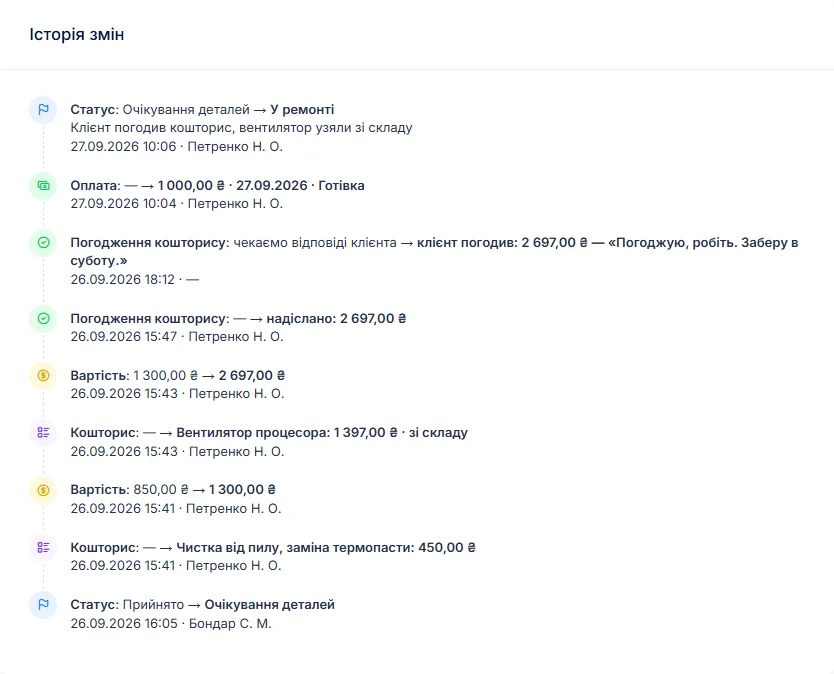
Rewinding a submersible motor with new bearings and a seal can cost half the price of a new pump. The customer should see that before you open the motor. The ticket moves to “awaiting approval”, and the itemised estimate goes out by email or Telegram. The link shows every line with “I agree” and “I decline” buttons; the answer and date land in the history. Turns out the impeller stack needs replacing too? Add a line and send it for approval again.
If you charge for diagnosis even when the customer buys a new pump instead, give the device type a diagnostics price and switch the ticket’s base to “diagnostics only” — the amount is on the ticket from day one.
Warranty on rewinds and repairs
July, and the pump is back: “you fixed this in April”. The serial number brings up the earlier ticket — the date it went out, the estimate, the work log: what was rewound, what was replaced, which capacitor went in. The handover date shows whether your warranty still applies. The “Repeat repair” type from the starter set keeps such returns separate in the reports.
Your warranty wording — how long, and what voids it, such as running dry — goes into the completion report form under “Print forms”, and you edit it yourself. The “Recommendations” field carries advice for the customer: “fit dry-run protection”, “check the pressure tank air charge once a season”, “do not set the pump deeper than the manufacturer allows”. They print on the report with the estimate lines and the work log. See the completion report page for how it looks.
Deposits, farms and balances
A ticket can take several payments: a deposit for parts at intake, the balance after reinstallation. The ticket shows “received” and “balance due”, the “unpaid” filter lists completed work that has not been paid, and the customer card shows what they owe across all tickets. For a farm or a business paying by bank transfer, there is a “Company” field.
Stock up before spring
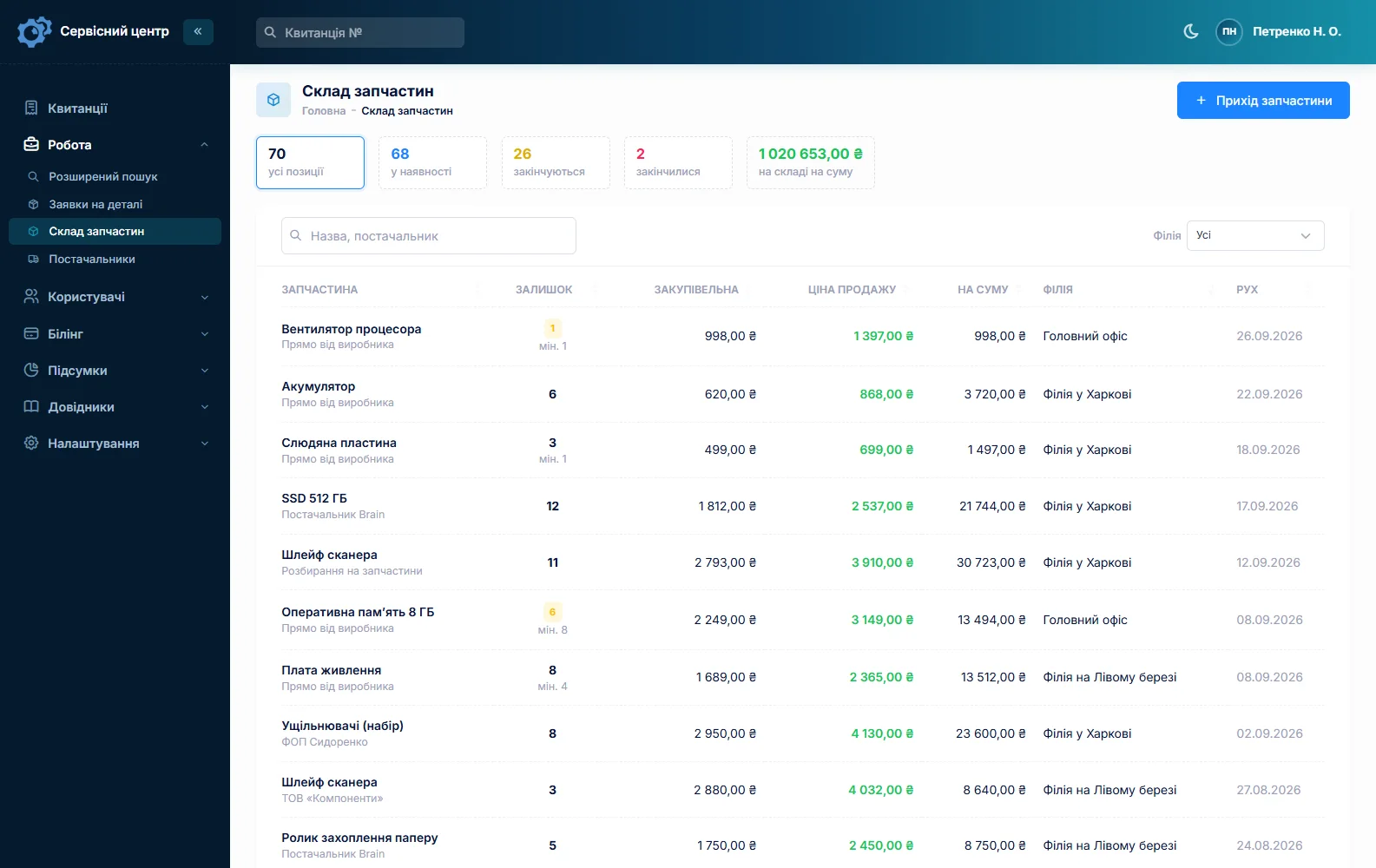
Stock is a movement journal: receipts with cost price and supplier, items used on a job as estimate lines, returns, stocktakes. Typical lines: capacitors in several sizes, pressure switches, dry-run sensors, tank bladders, mechanical seals, bearings, impellers, check valves, splice kits. A minimum level and the “running low” tile tell you to reorder before spring. Quantities are whole numbers, so count cable in whole feet or metres. A rare part is requested from the supplier by email straight from the ticket, which sits in “Waiting for parts”.
Ready for collection
When a pump is ready, the customer gets an email or a Telegram message; you can resend it, at most once a day. Details are on the customer notifications page. Customers can also check the status in the customer area. Every finished pump shows how many days it has been waiting, and the counter turns red once the free storage period from your settings has passed.
Electrical work, work on drinking water supplies, and what you may do with an uncollected pump are governed by the rules where you trade and by the terms the customer accepted. The software does not track any of that; if in doubt, ask a lawyer.
What pump repairs typically cost
A rough guide only — prices vary by region, well depth and the state of the pump: diagnosis €30–60, pulling and reinstalling a well pump €150–450, submersible motor rewind €200–500, capacitor replacement €30–70 plus the part, pressure switch replacement €50–120, pressure tank bladder €60–150, mechanical seal on a surface pump €70–150. You set your own prices in the “Works” list and in the estimate lines.
What it does not have
- a dispatch calendar or route map;
- dedicated well record fields or test reports;
- photos or file attachments on a ticket;
- SMS, a mobile app, or online payment by the customer;
- integrations with suppliers.
What it costs
One price for the whole business — no extra charge for staff or branches.
Monthly
Paid every month, cancel whenever you like.
Yearly
Cheaper than paying monthly. Invoice or card payment.
Custom work
Changes tailored to the way you work — hourly, by agreement.
Off-the-shelf not enough — your own forms, roles, reports or workflow? We will build a program for you. How it works
Try it without signing up in the demo: book in a submersible pump with its cable and check valve, move it to “Pump on the bench” and send the estimate for approval.

We are very happy working with servicecentersoft.com: they built everything we asked for, even though our request was unusual, since we deal with medical devices. Everything was done precisely and on the agreed schedule. Thank you for the cooperation — we keep working together.

I tried the ServiceCenterSoft demo and came away with a good impression. The program is simple and easy to understand, yet it has everything you need for the job: customers, repairs, devices, spare parts, statuses and statistics.
I especially liked the dark theme and the responsive design — working from a phone is perfectly comfortable. Another plus is the instant search that works as you type, so you don't have to press a separate "Search" button every time.
You can tell the program was built specifically for service centers rather than being a generic CRM adapted for the repair business. The interface has no unnecessary frills; everything is logical and to the point.
A good, practical tool for the day-to-day work of a service center.

I liked that you get a free 14-day trial and that they are willing to handle my special requests — setting things up exactly the way I need them.
I also liked how payment works. You can simply pay the monthly fee by card online — basically the same as a regular Spotify subscription or any other service. No separate contracts to sign and no invoices to pay manually.
And there's no feeling of strict limits on the number of employees. One service center is one account, and inside it you can organize the work of your technicians and run several branches.
For me this is far more convenient than plans where you have to pay for every single user or keep counting how many employees are working today.

My business is fairly specific, so the program's standard features weren't enough — I needed my own custom fields, my own sorting options and search by additional parameters. The work completion certificate and the printed repair receipt also needed some changes to fit the way we work.
I contacted technical support. To be honest, I expected changes like these to take a long time, but everything was done within a single day. The team quickly understood exactly what we needed, suggested the right solution and did everything properly.
I'd especially like to mention the support: they get straight to the point, with no unnecessary bureaucracy, and they genuinely help instead of just sending you off to read the documentation.
For me this is a big advantage of the program: it isn't just sold "as is" — it can be adapted to how you actually work. Thanks to the team for the quick response and for treating the customer right.
Highly recommended!
In short
- One ticket per pump, with cable, rope and check valve listed and signed for.
- The well call-out and the bench work on one ticket, with your own statuses.
- “No water” jobs flagged urgent, with promised dates and an overdue filter.
- Rewinds and expensive parts — estimate approval by link.
- Warranty checks by serial number and handover date; your terms on the report.
- Capacitors, switches and bladders in stock with minimum levels.
- €20 a month for the whole business.
See also
Starting your own repair shop: where to begin
For people who can fix phones and laptops and want to work for themselves: what a small repair business needs on day one, the paperwork that protects you from the first customer, and how to run a shop in a country whose language is not your own.
Read moreSoftware for home appliance service
Contents recorded at intake, warranty at the brand price list, callouts, slow parts and partner shops.
Read morePhone repair shop software
Intake in a minute, screens and batteries tracked, a ready-for-pickup email, output per technician.
Read moreSee how it works
The demo is open — go in and try it. Ask us anything by email, Telegram or the form on this site.