CCTV and security system repair software
For security integrators and repair benches handling NVRs, DVRs, IP cameras, PoE switches, intercoms and alarm panels: several units from one site, installation warranty by date, power supplies and batteries in stock, call-outs as estimate lines.
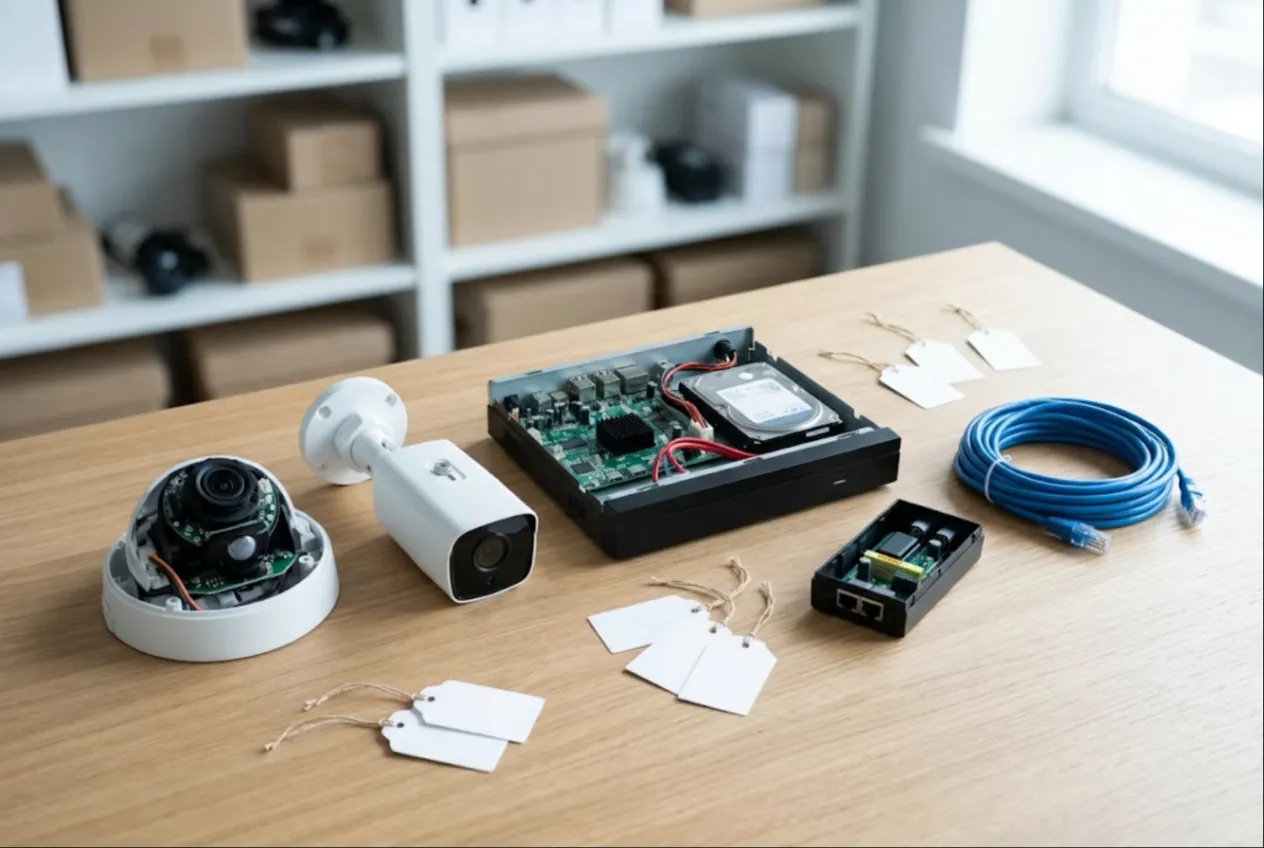
ServiceCenterSoft is repair-tracking software for security and low-voltage service work: NVRs and DVRs, IP and analogue cameras, PoE switches and injectors, power supplies, door entry and intercom systems, alarm panels, sounders and standby batteries. It suits an installer with an in-house repair bench as well as a shop that fixes equipment for installers. It runs in the browser — on the office PC and on your phone on site.
Who it is for
Security integrators, CCTV installers, alarm and access control companies, facilities teams, and the electronics shops they send kit to. The equipment runs around the clock, sits outdoors and in cold comms cabinets, and takes lightning surges and water. So it rarely fails alone: after a storm the same site sends in a recorder, three cameras and a switch with dead ports. And the installer gave the end customer a warranty on the system, so “is this warranty or chargeable?” comes up every time.
Where it usually goes wrong:
- seven cameras come back from a site in one box, and a week later nobody knows which covered the entrance and which the car park;
- the NVR was booked in “with drive”, and at pickup there is no drive in it;
- the system was installed two years ago — is the installation warranty still running? Someone digs through invoices;
- the installer dropped off five units, paid for two, and the total owed lives on a spreadsheet;
- 12 V power supplies run out exactly when half the queue needs one.
Several units from one site, one customer
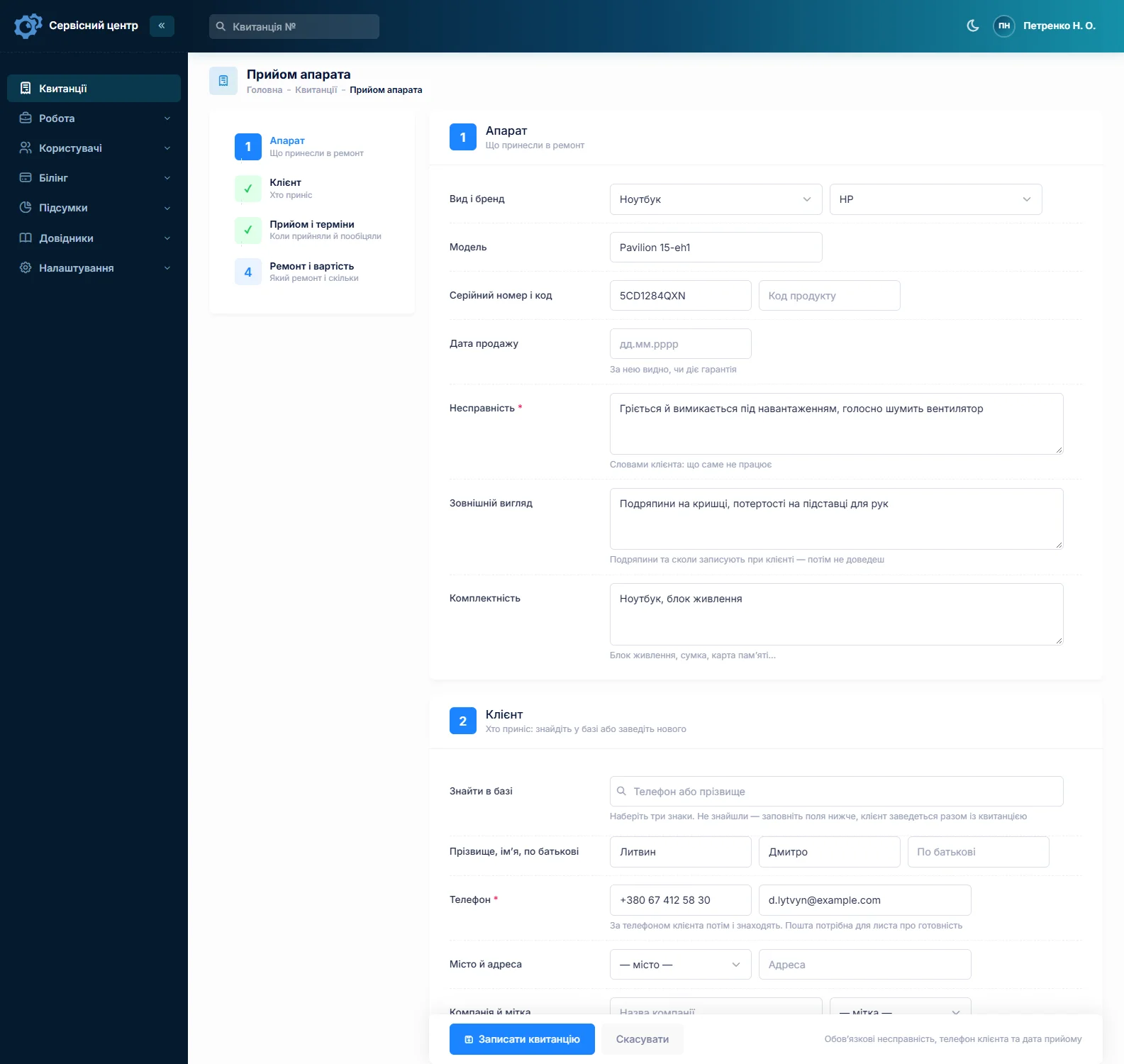
Each unit gets its own job — its own serial number, fault, status and price. Fill in the first one, then copy it for the rest: the customer, device type, model and fault carry over, and you enter each serial. Five identical cameras take a couple of minutes.
The “Product code” field is handy for the camera’s position on the site plan: “C-07, gate” or “Lobby, east”. It carries over to copies, and advanced search in “device” mode finds a camera by that code as well as by serial. The site name and address go into “Notes for the technician”, which the customer does not see and text search finds.
The “Company” field on the customer record makes an installer or a property manager one customer, whoever brings the kit in. The record shows every job and the balance owed. There is no sites or maintenance contracts module — a site lives in notes and product codes, not in a list of its own.
Installation warranty and repair warranty
Each job has a “date of sale”. Installers use it for the install date, so you can see at a glance whether the warranty they gave the end customer still applies. Those jobs get the “Warranty” repair type, and filtering the job list by repair type shows how much bench time went on warranty work this month.
A unit back after your own repair gets the “Repeat repair” type, and the serial brings up the earlier job. Your repair warranty terms go into the printed completion report template once and appear on every report.
Recorders: drives, power, boards
NVRs and DVRs usually come in with one of a few things: a failed hard drive, a dead power supply, a board that will not boot after a surge, cameras dropping off after a firmware update, or a forgotten password.
The drive is the sensitive part. Write it down with the customer present, in the accessories field: “with 4 TB drive” or “no drive — customer kept it”. Accessories print on the job sheet the customer signs.
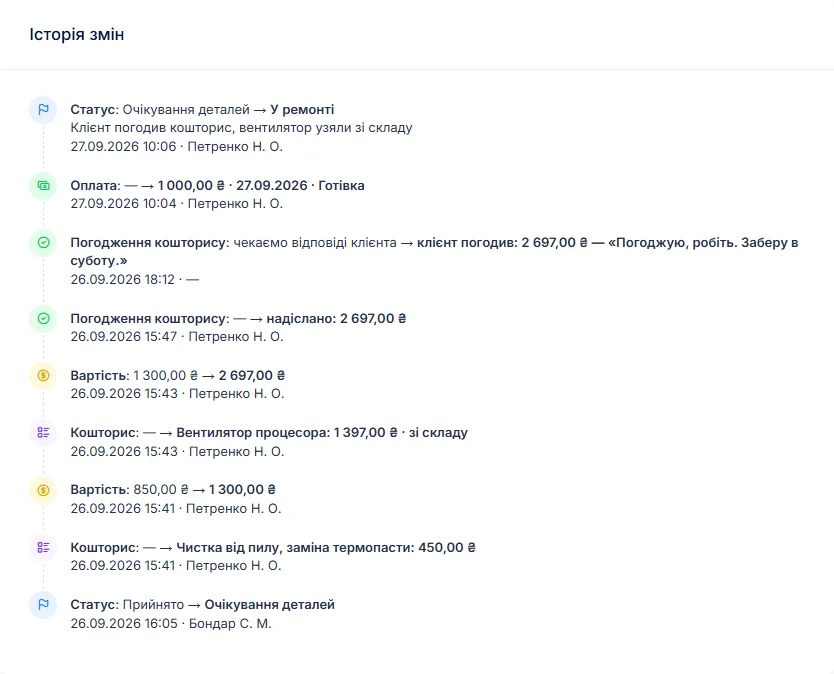
Log the diagnosis in the work log, move the job to “waiting for approval” and build an itemised estimate — a drive from stock, labour, a board on order. A button sends it by email or Telegram; the customer sees each line and presses “I agree” or “I decline”, and the answer is stored with the date. Declined jobs close as “repair refused” or “beyond repair”. Paid diagnosis is a price on the device type.
Cameras, PoE, intercoms, alarm panels
Cameras: IR illuminators out, a stuck IR-cut filter giving pink night images, condensation behind the dome, a burnt input after lightning. PoE switches and injectors: dead ports, failed supplies, overheating in the cabinet. Intercoms and door entry: vandalised or water-damaged door stations, indoor monitors, maglocks, power supplies. Alarm panels: the main board, keypads, sounders, and standby batteries that no longer hold charge.
Give each its own device type with a diagnosis price and its own labour items, so camera pricing never mixes with recorder pricing. For batteries and backup power, see power station and inverter repair.
Call-outs
Some work happens on site: a PSU in the cabinet, a frozen recorder, a camera swap on a pole. Set up “Site call-out” in the labour list with a price, and it goes onto the estimate as a line like any other. The address, the on-site contact and access notes go into the technician notes. If the fix fails on site, the unit comes back to the bench on the same job — only the status changes.
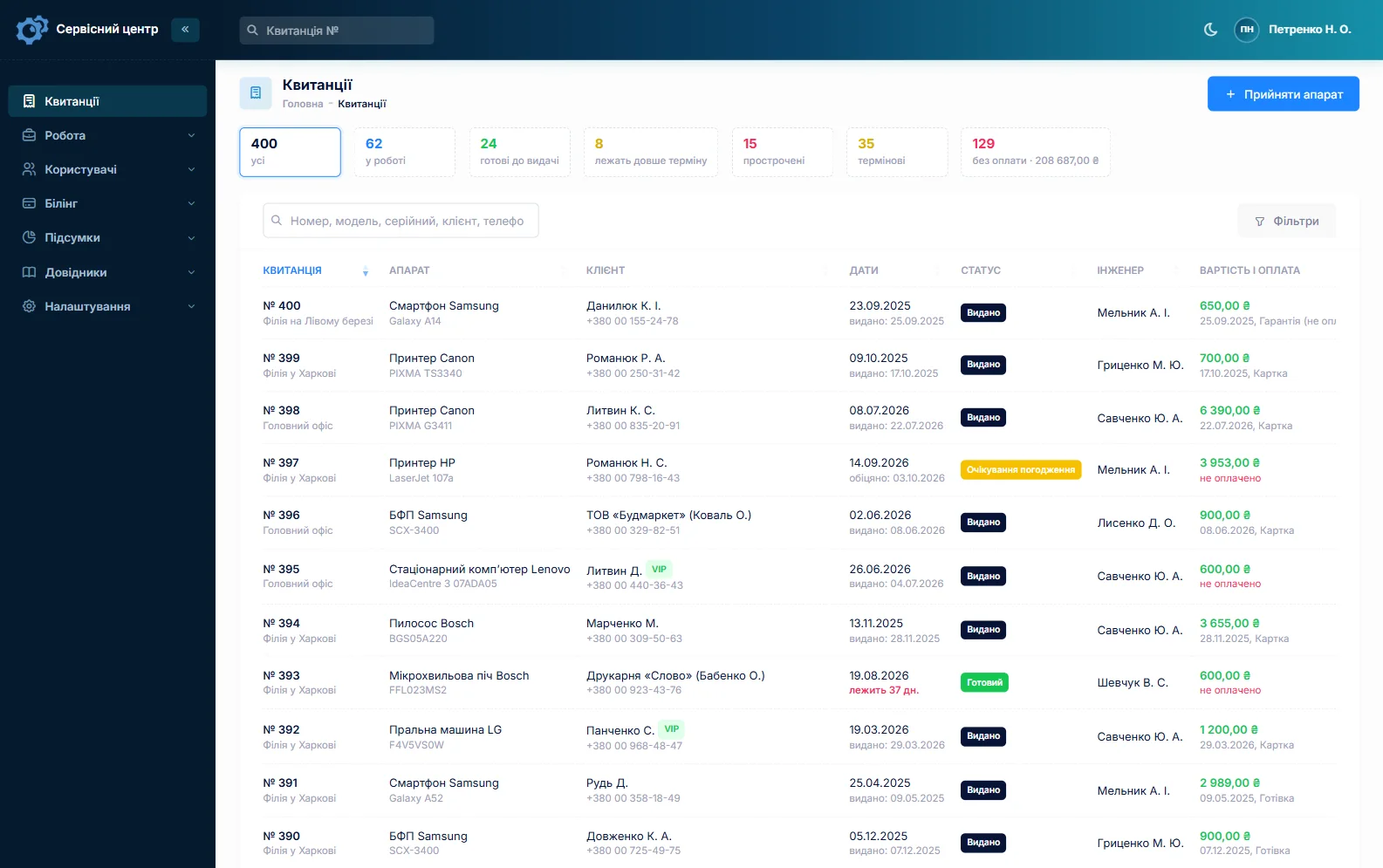
There is no dispatch or route scheduler. Every job does have a promised date: once it passes, the row turns red and the “overdue” filter gathers those jobs. The “Urgent” flag — for a shop with no camera over the till — shows in the list straight away.
Stock
Stock is a movement log: goods in with cost price and supplier, used on a job as an estimate line, returned, adjusted at stock-take. A PSU picked from stock reduces the balance automatically. A typical shelf: 12 V power supplies in several ratings, 12 V standby batteries, surveillance-grade drives, BNC and RJ45 connectors, IR boards, IR-cut filters, call buttons, PoE injectors. Quantities are whole numbers, and stock does not track serial numbers.
Minimum levels and the “running low” tile tell you when to reorder. A board for a specific recorder is ordered from the job: the request is emailed to your supplier, and the job sits in “waiting for parts”. More on spare parts tracking.
Billing the installer
A job can take several payments — a deposit at drop-off, the rest at pickup — and the software shows what is still owed. The “unpaid” filter collects units handed back but not paid for. The completion report lists estimate lines, the work log, recommendations and the amount due; it is one report per job, with no monthly roll-up. For batches of identical units from industrial customers, see industrial electronics repair.
Ready — the customer knows right away
When the job is done the customer gets an email or a Telegram message (they subscribe with a QR code on the job sheet). Every finished unit shows how many days it has been waiting, and once the free storage period runs out the counter turns red. More on customer notifications.
What stays outside the software
Footage on a recorder’s drive may contain personal data, and the rules on video surveillance and handling such data depend on your country. The software does not store recordings and does not deal with those questions. Only reset a password for someone entitled to the device. Licensing and standards for installing security systems also vary by country.
What repairs typically cost
As a rough guide only — prices vary with region, model and condition: diagnosis €30–60, power supply repair €30–90, drive replacement in a recorder €30–60 labour plus the drive, recorder board repair €80–250, camera repair (IR, IR-cut filter, moisture) €40–150, PoE switch repair €50–180, door station repair €50–180, intercom monitor €50–160, alarm panel €60–200, site call-out €50–120. You set your own prices: per device type, in the labour list and as estimate lines.
What it does not do
- a sites or maintenance contracts module;
- dispatch scheduling or routes;
- a monthly roll-up report — one report per job;
- photos or file attachments on jobs;
- SMS, a mobile app, online payment by the customer;
- supplier integrations.
What it costs
One price for the whole shop — no extra charge for staff or branches.
Monthly
Paid every month, cancel whenever you like.
Yearly
Cheaper than paying monthly. Invoice or card payment.
Custom work
Changes tailored to the way you work — hourly, by agreement.
Off-the-shelf not enough — your own forms, roles, reports or workflow? We will build a program for you. How it works
Try it without signing up in the demo: book in a recorder and two cameras from the same site, put the camera positions in the product code and send the estimate to the customer.

We are very happy working with servicecentersoft.com: they built everything we asked for, even though our request was unusual, since we deal with medical devices. Everything was done precisely and on the agreed schedule. Thank you for the cooperation — we keep working together.

I tried the ServiceCenterSoft demo and came away with a good impression. The program is simple and easy to understand, yet it has everything you need for the job: customers, repairs, devices, spare parts, statuses and statistics.
I especially liked the dark theme and the responsive design — working from a phone is perfectly comfortable. Another plus is the instant search that works as you type, so you don't have to press a separate "Search" button every time.
You can tell the program was built specifically for service centers rather than being a generic CRM adapted for the repair business. The interface has no unnecessary frills; everything is logical and to the point.
A good, practical tool for the day-to-day work of a service center.

I liked that you get a free 14-day trial and that they are willing to handle my special requests — setting things up exactly the way I need them.
I also liked how payment works. You can simply pay the monthly fee by card online — basically the same as a regular Spotify subscription or any other service. No separate contracts to sign and no invoices to pay manually.
And there's no feeling of strict limits on the number of employees. One service center is one account, and inside it you can organize the work of your technicians and run several branches.
For me this is far more convenient than plans where you have to pay for every single user or keep counting how many employees are working today.

My business is fairly specific, so the program's standard features weren't enough — I needed my own custom fields, my own sorting options and search by additional parameters. The work completion certificate and the printed repair receipt also needed some changes to fit the way we work.
I contacted technical support. To be honest, I expected changes like these to take a long time, but everything was done within a single day. The team quickly understood exactly what we needed, suggested the right solution and did everything properly.
I'd especially like to mention the support: they get straight to the point, with no unnecessary bureaucracy, and they genuinely help instead of just sending you off to read the documentation.
For me this is a big advantage of the program: it isn't just sold "as is" — it can be adapted to how you actually work. Thanks to the team for the quick response and for treating the customer right.
Highly recommended!
In short
- Units from one site as copied jobs, each with its serial and position on the plan.
- An installer or property manager is one customer via the company field, with the balance on the record.
- Installation warranty by date; warranty jobs as their own repair type.
- The recorder’s drive noted in accessories and signed for.
- Call-outs as estimate lines, the address in notes.
- Power supplies and batteries in stock with minimum levels.
- €20 a month for the whole shop.
See also
Forklift repair software
Forklift service management for shops that repair electric forklifts, walkie stackers, reach trucks and pallet jacks: one job per truck in the field, asset numbers, traction batteries and chargers, controllers and hydraulics through approved estimates, and fleet customers with balances and completion reports.
Read moreBeauty salon equipment repair software
Job tracking for shops that repair hair clippers, trimmers, hair dryers, flat irons, nail drills, UV/LED lamps and sterilizers: high-volume small repairs, blade sharpening as estimate lines with quantities, and salons and barbershops as regular accounts with balances and completion reports.
Read moreHydraulic repair shop software
Job tracking for hydraulic repair shops working on construction, agricultural and municipal equipment: cylinders, pumps, motors, valves and hose assemblies. One job per component, teardown and test bench results in the work log, estimates approved by link, seal kits in stock, rush jobs in plain sight, and fleet customers with balances and completion reports.
Read moreSee how it works
The demo is open — go in and try it. Ask us anything by email, Telegram or the form on this site.