Commercial kitchen equipment repair software
For service companies that fix combi ovens, commercial dishwashers, reach-in and display refrigeration, fryers and ranges: urgent calls and due dates everyone can see, site visits on record, elements and thermostats in stock, and restaurant accounts with balances and service reports.
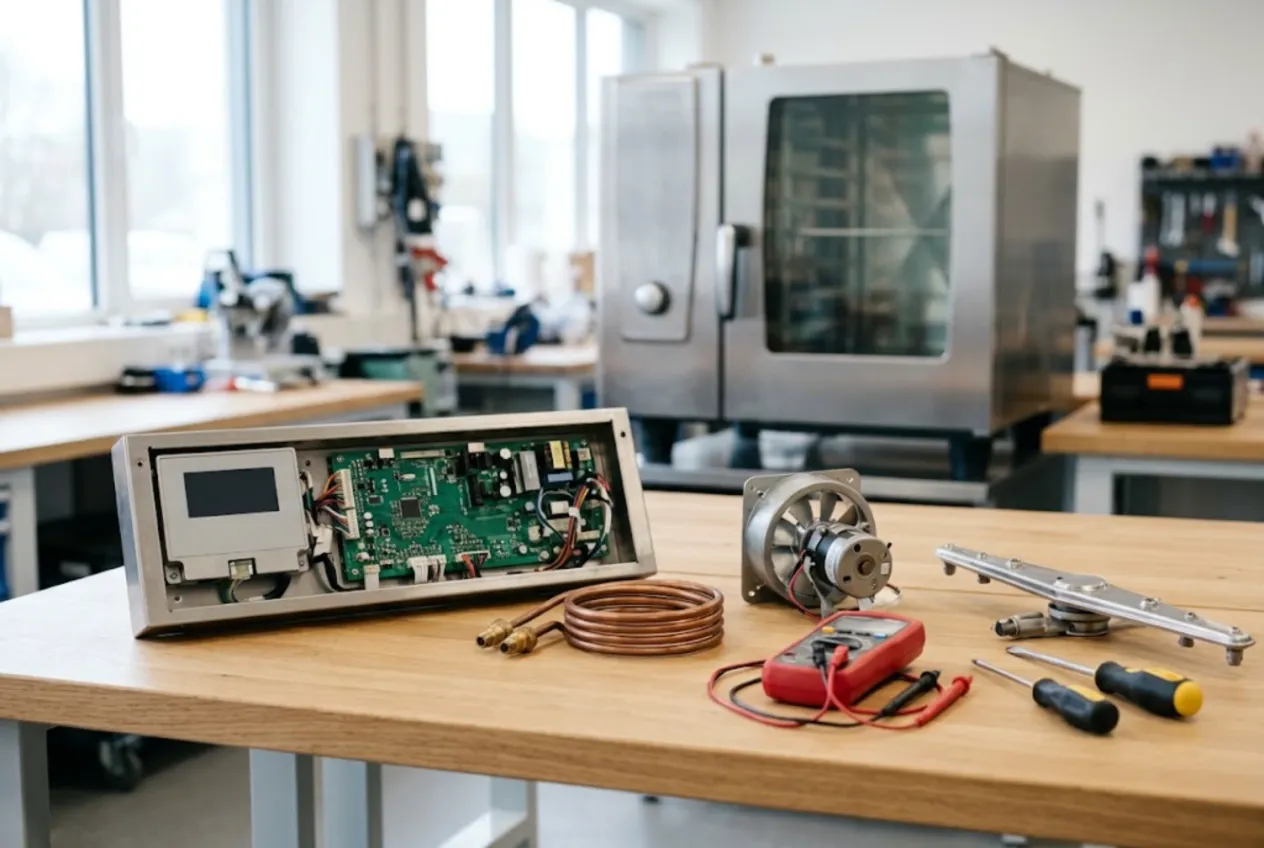
ServiceCenterSoft is job-tracking software for companies that service commercial kitchens: combi ovens, undercounter and hood-type dish machines, reach-in coolers, display cases and prep tables, fryers, griddles and ranges. Urgent calls and promised dates are visible to the whole team, site visits are logged on the job, heating elements and thermostats sit in stock with reorder levels, and a restaurant group is one account with every job and the balance on its record. It runs in the browser — at the office and on your phone in the customer’s kitchen.
Who it is for
Your customers are food businesses, and in a kitchen a broken unit costs money by the hour. The bistro whose combi oven throws an error on a Friday night. The café whose dish machine stopped reaching rinse temperature, so plates run out before lunch. The school or factory canteen you look after on a service agreement. The bakery whose display case is holding 54°F instead of 38°F with a week of cakes inside.
For them it is lost covers, product in the bin and an inspector who will ask about fridge temperatures. Where it usually goes wrong:
- the chef called at 9 a.m., the tech said “before service”, and the only record is in the tech’s head;
- the restaurant has three identical fryers and nobody knows which one was fixed last month;
- the element for your most common combi oven is out of stock, and the kitchen runs a week without it;
- an account customer asks what they owe for the quarter, and adding it up takes an afternoon of emails;
- you replaced a compressor, and the owner insists they only agreed to a recharge.
On site and at the bench
Most of this equipment is fixed where it stands — nobody brings a ten-tray combi oven to the workshop. The site address lives on the customer record, and the “Company” field makes a restaurant one customer, whoever calls: the chef, the kitchen manager or the owner. For field work, create your own repair type such as “Site visit” and add a “Call-out” line with your rate to the labour list; it goes onto the estimate, and the job list filters by repair type.
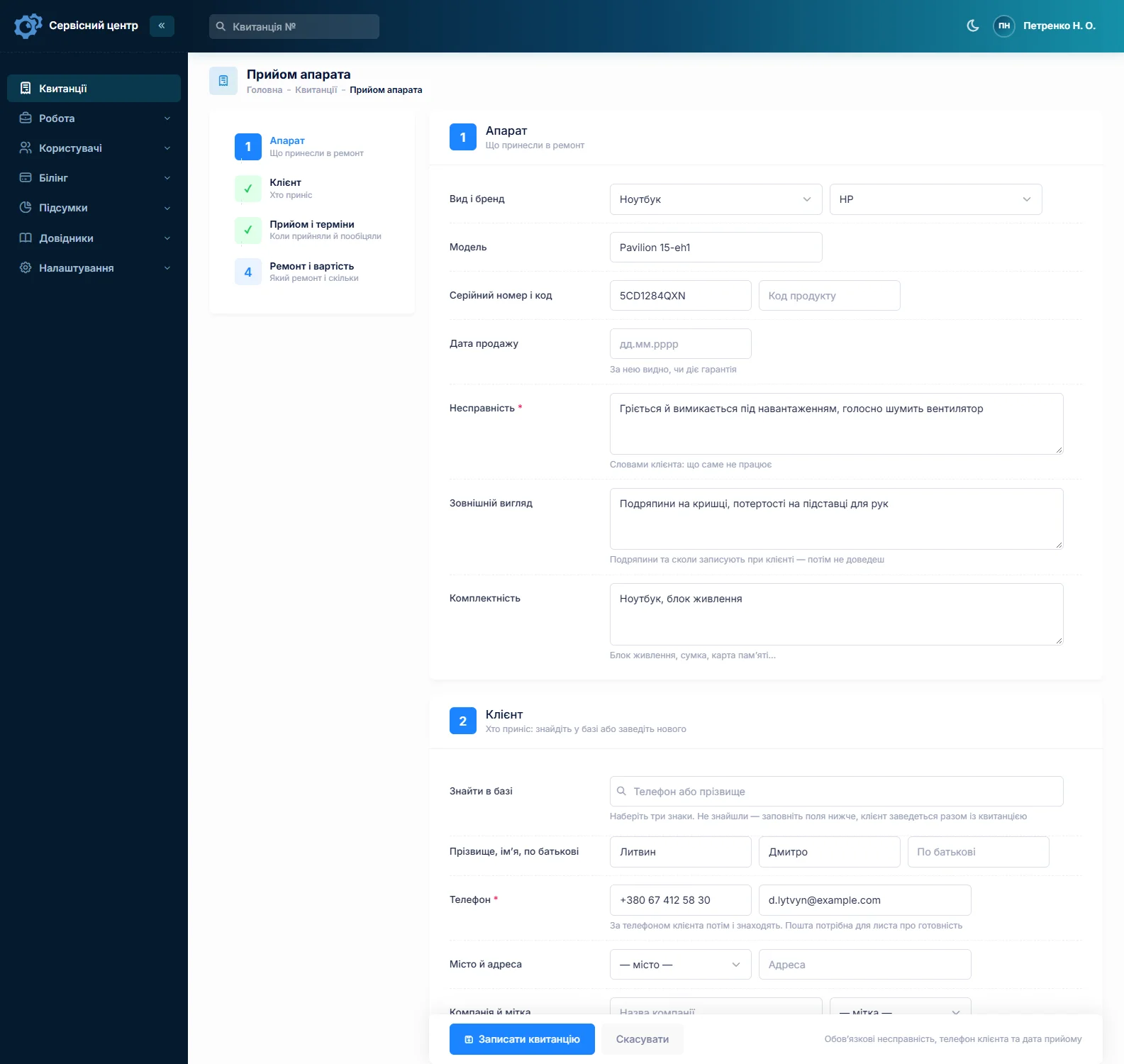
Model and serial number are separate fields, searchable from the top of the job list, and the date of sale shows whether the dealer warranty still applies. Write the fault in the kitchen’s words: “error code, no steam”, “plates come out warm and streaky”, “display case ices up at the back”, “oil won’t hold temperature”, “burner only works on high”. Advanced search in “text” mode finds it a year later. For units brought in — a countertop fryer, a griddle, a slicer — the accessories field records baskets, lids and racks, and the condition field covers dents, chipped enamel and baked-on grease. Both print on the job sheet the customer signs.
When the line is down
Every job can be flagged “Urgent”, and the tile above the list shows how many urgent jobs are open. Every job has a promised date: once it passes, the row turns red and the “overdue” filter pulls those jobs together. “When is the tech coming?” is answered by the list.
Statuses are a list you control. Add your own with a colour — “Tech on site”, “Return visit needed”, “Temperature check” for a cooler that has to hold temperature for a day before the job is closed.
Account customers and service agreements
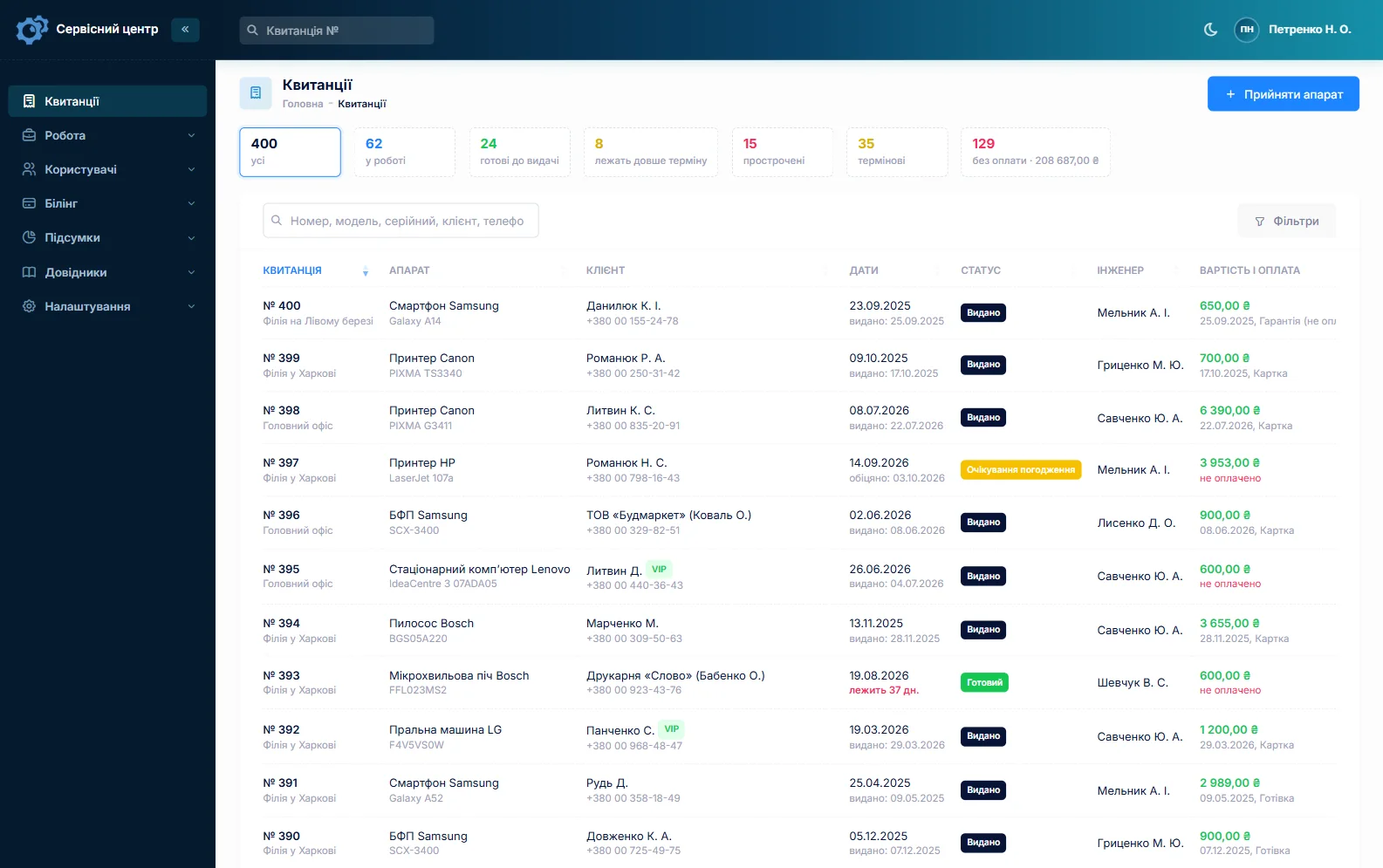
To be straight about it: there is no separate module for service agreements or planned maintenance reminders. Regular accounts are still easy to run with what is there. Give the customer a label such as “Contract” and filter the customer list by it. The customer notes hold the terms — what is covered, who signs off in the kitchen, when you can get in. “Notes for the technician” on the job carry what matters for this visit, and the customer does not see that field.
The customer record shows every job for the site, the total and the balance across unpaid jobs, so “what do we owe you?” takes a minute. Two identical dish machines? Fill in the first job completely, copy it for the second and type in its serial number. A unit back after your repair gets the “Repeat repair” type, and its serial brings up the earlier job.
Elements, thermostats and pumps in stock
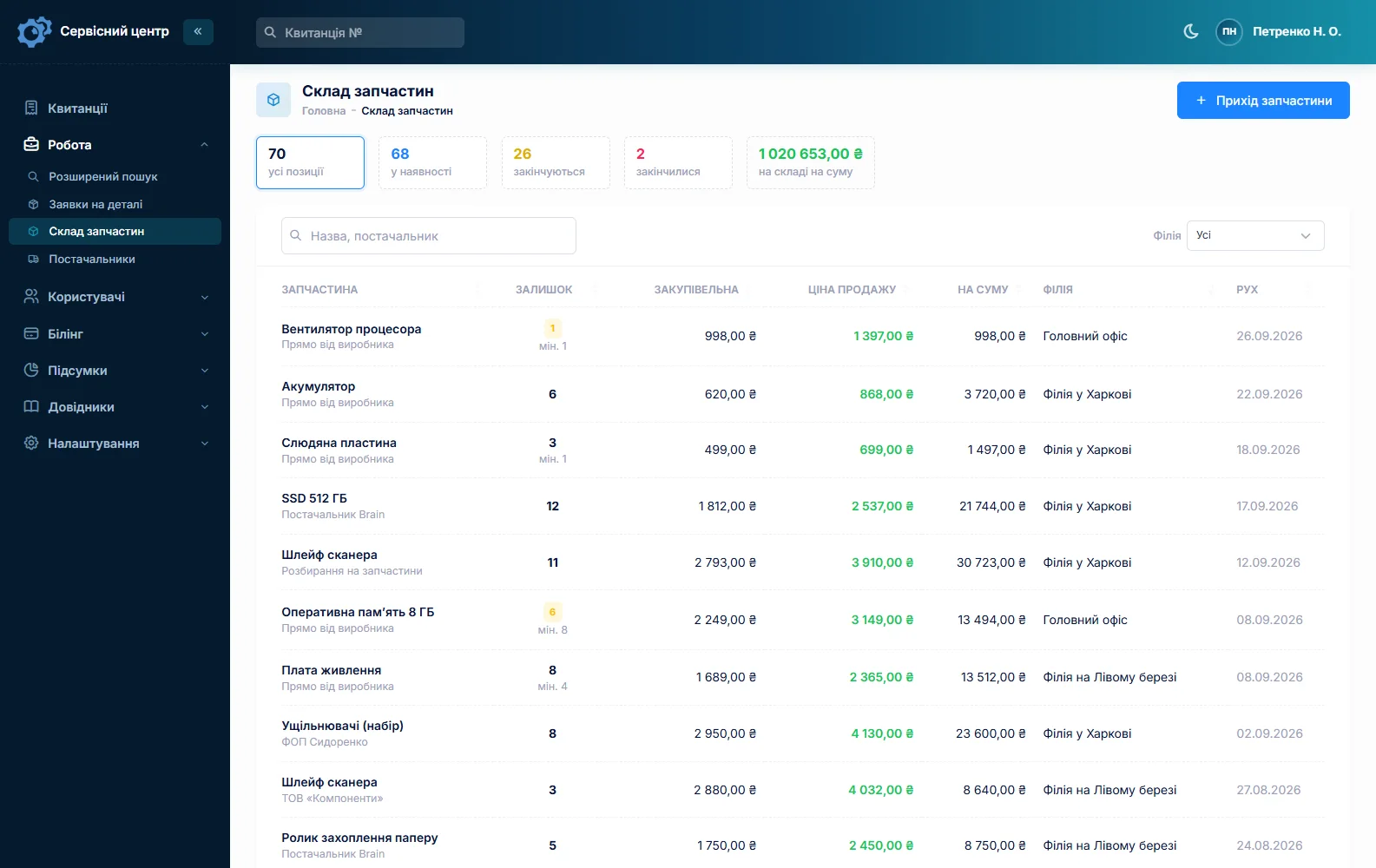
A kitchen service van uses the same parts again and again: heating elements for combi ovens, boilers and fryers, thermostats and thermocouples, level sensors, solenoid valves, wash and drain pumps, fan motors, door gaskets, relays, control boards. Stock is a movement log: goods in with cost and supplier, used on a job as an estimate line, returned, adjusted at stock-take. A part picked from stock on an estimate reduces the balance automatically.
Each item can have a minimum level, and the “running low” tile tells you to reorder before a kitchen waits a week. A board for an unusual model is ordered from the job: the request is emailed to the supplier, and the job sits in “waiting for parts”. More on spare parts tracking.
Estimate first, expensive part second
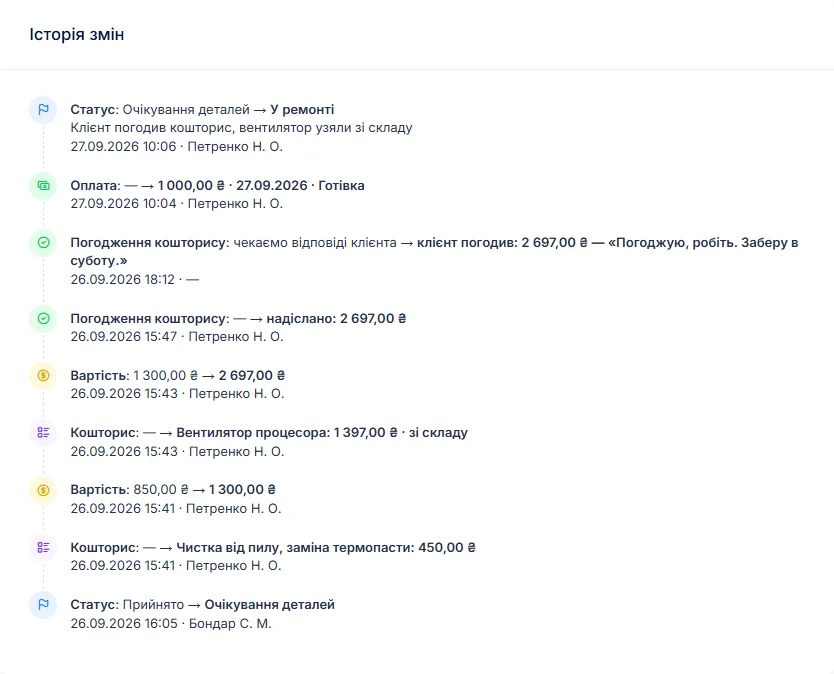
An owner watches margins: a compressor for an old display case can cost half a new one, and a combi oven control board is a real number. So diagnose, log what you found, and build the estimate line by line from your labour list or from stock. A button on the job sends it by email or Telegram; the customer sees each line and the total and presses “I agree” or “I decline”. The answer and the date go into the job history.
If they decline, “repair refused” closes the job; if the unit cannot be saved, “beyond repair”. If the call-out and diagnosis are charged either way, set a diagnostics price for the device type and it sits on the job from day one.
Payments and the service report
A job can take several payments: a deposit for the compressor, the rest after start-up or by transfer later. The software shows what is still owed, and the “unpaid” filter gathers finished jobs that are not paid. “Recommendations for the customer” is for advice the kitchen can actually follow — “clean the condenser coil monthly”, “fit a water softener ahead of the combi”, “change fryer oil on schedule” — and it prints on the completion report with the estimate lines, the work log and the amount due. More on the completion report.
When a unit brought to the shop is ready, the customer gets an email or a Telegram message (they subscribe with a QR code on the job sheet), and every finished unit shows how many days it has been waiting.
Refrigerants and gas
Recovering and charging refrigerant or replacing a compressor requires certification in many countries, and work on gas appliances usually needs its own qualification. Who may do what depends on the rules where you work — check them up front. The software only records what was done and when.
If you also service espresso machines in cafés, see coffee machine repair software; household fridges and dishwashers in people’s homes are covered on the home appliance service page.
What repairs typically cost
As a rough guide only — prices vary with region, model and parts: call-out and diagnosis €60–150, combi oven element replacement €150–400 labour plus the part, steam generator descaling €150–350, dish machine repair (pump, boiler element, dosing) €120–350 labour, condenser fan replacement on a display case €80–200, leak search and refrigerant recharge €200–600, compressor replacement €600 to €1,500 including the part, fryer thermostat or element €80–250, range burner or hotplate repair €80–250. You set your own prices: per device type and as estimate lines.
What it does not do
- dispatch, a visit calendar or route planning — only the repair type, the site address and the due date;
- service agreements or planned maintenance reminders — only a customer label and notes;
- a pool of loaner equipment;
- photos or file attachments on jobs — keep site pictures on your own drive;
- SMS, a mobile app, online payment by the customer;
- supplier integrations, invoices and contracts for companies, or one combined report for the month.
What it costs
One price for the whole company — no extra charge for technicians or branches.
Monthly
Paid every month, cancel whenever you like.
Yearly
Cheaper than paying monthly. Invoice or card payment.
Custom work
Changes tailored to the way you work — hourly, by agreement.
Off-the-shelf not enough — your own forms, roles, reports or workflow? We will build a program for you. How it works
Try it without signing up in the demo: book in a combi oven, mark it urgent, set a due date and send the estimate to the customer.

We are very happy working with servicecentersoft.com: they built everything we asked for, even though our request was unusual, since we deal with medical devices. Everything was done precisely and on the agreed schedule. Thank you for the cooperation — we keep working together.

I tried the ServiceCenterSoft demo and came away with a good impression. The program is simple and easy to understand, yet it has everything you need for the job: customers, repairs, devices, spare parts, statuses and statistics.
I especially liked the dark theme and the responsive design — working from a phone is perfectly comfortable. Another plus is the instant search that works as you type, so you don't have to press a separate "Search" button every time.
You can tell the program was built specifically for service centers rather than being a generic CRM adapted for the repair business. The interface has no unnecessary frills; everything is logical and to the point.
A good, practical tool for the day-to-day work of a service center.

I liked that you get a free 14-day trial and that they are willing to handle my special requests — setting things up exactly the way I need them.
I also liked how payment works. You can simply pay the monthly fee by card online — basically the same as a regular Spotify subscription or any other service. No separate contracts to sign and no invoices to pay manually.
And there's no feeling of strict limits on the number of employees. One service center is one account, and inside it you can organize the work of your technicians and run several branches.
For me this is far more convenient than plans where you have to pay for every single user or keep counting how many employees are working today.

My business is fairly specific, so the program's standard features weren't enough — I needed my own custom fields, my own sorting options and search by additional parameters. The work completion certificate and the printed repair receipt also needed some changes to fit the way we work.
I contacted technical support. To be honest, I expected changes like these to take a long time, but everything was done within a single day. The team quickly understood exactly what we needed, suggested the right solution and did everything properly.
I'd especially like to mention the support: they get straight to the point, with no unnecessary bureaucracy, and they genuinely help instead of just sending you off to read the documentation.
For me this is a big advantage of the program: it isn't just sold "as is" — it can be adapted to how you actually work. Thanks to the team for the quick response and for treating the customer right.
Highly recommended!
In short
- Urgent flags, due dates and red overdue jobs — no kitchen waits on a forgotten call.
- Site visits as their own repair type and a call-out line, the address on the customer record.
- Account customers: label, company, notes, every job and the balance in one place.
- Elements, thermostats and pumps in stock with minimum levels.
- An itemised estimate accepted by link before the compressor or board goes in.
- Deposits, several payments, a completion report with advice for the kitchen.
- €20 a month for the whole company.
See also
Outboard motor repair software
For marine engine service shops working on gas and electric outboards: winterization and winter storage, the spring commissioning rush with due dates, engine hours and service in the work log, lower units and water pump impellers through approved estimates, and special-order parts.
Read moreStarting your own repair shop: where to begin
For people who can fix phones and laptops and want to work for themselves: what a small repair business needs on day one, the paperwork that protects you from the first customer, and how to run a shop in a country whose language is not your own.
Read moreSoftware for home appliance service
Contents recorded at intake, warranty at the brand price list, callouts, slow parts and partner shops.
Read moreSee how it works
The demo is open — go in and try it. Ask us anything by email, Telegram or the form on this site.