Coffee machine repair software
For a coffee machine service: home bean-to-cup machines and the commercial machines of cafés and offices. Urgent jobs, descaling and brew group work from a labour price list, estimates sent for approval, site visits, seals and pumps in stock.
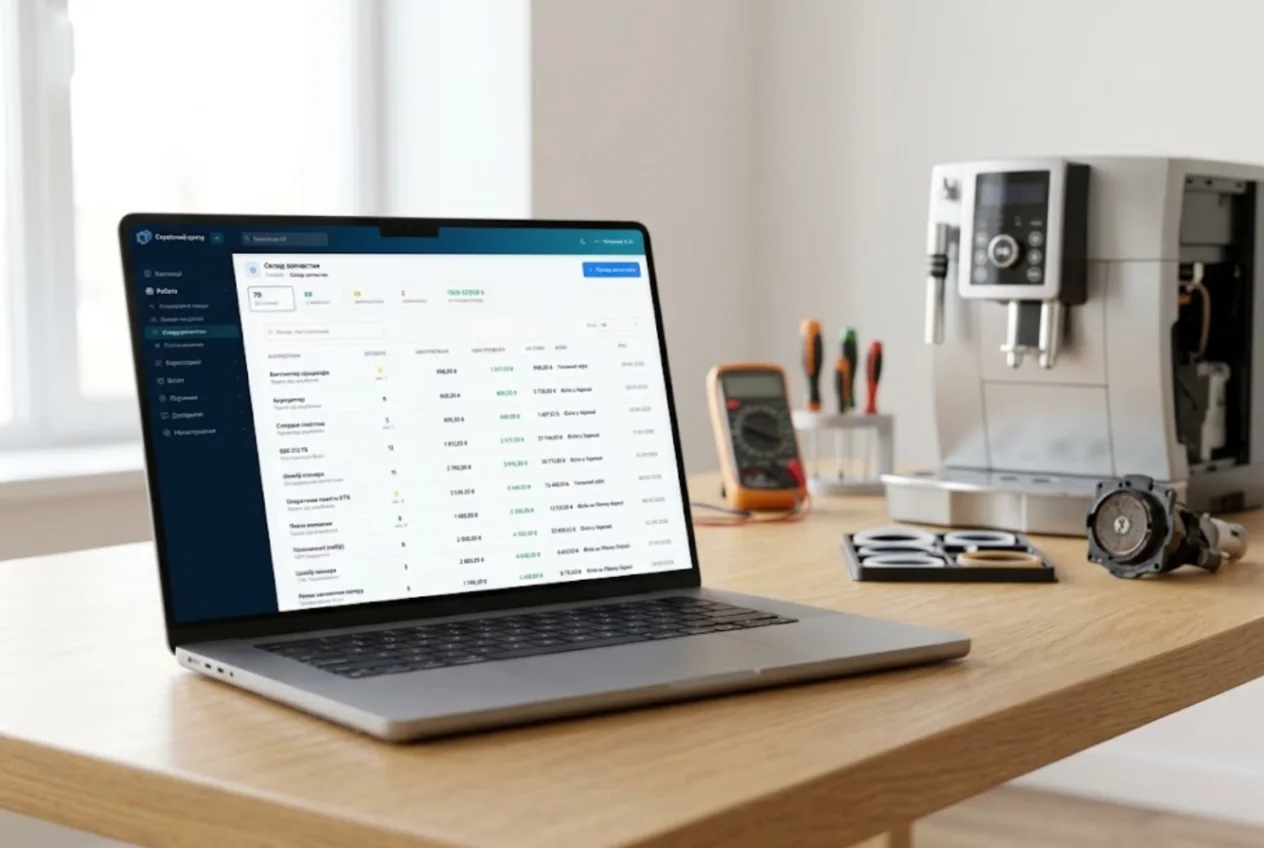
ServiceCenterSoft is repair tracking software for a coffee machine workshop — whether the machine arrives in a carrier bag from someone’s kitchen or is a two-group espresso machine built into a café counter that you have to go out to. It runs in the browser, on a computer or a phone.
Two kinds of customer, two different clocks
A home machine comes in with its owner, who can manage without it for a week but is doing the maths: if the repair costs half the price of a new one, the answer is no. A diagnosis fee and a price agreed after diagnosis are part of everyday work.
A café or an office runs on a different clock. Every hour the machine is down is coffee not sold, the barista keeps calling, and the bill goes to a company, on account, often for several machines. If you also fix washing machines and fridges, see the software for home appliance service.
Booking in: what actually came through the door
The intake form records device type, brand, model, serial number, fault, condition, accessories and date of sale. For a coffee machine, accessories means the drip tray, grounds container, water tank, milk frother and water filter. What is written down in front of the customer prints on the job sheet they sign, so “there was a milk jug too” never becomes an argument.
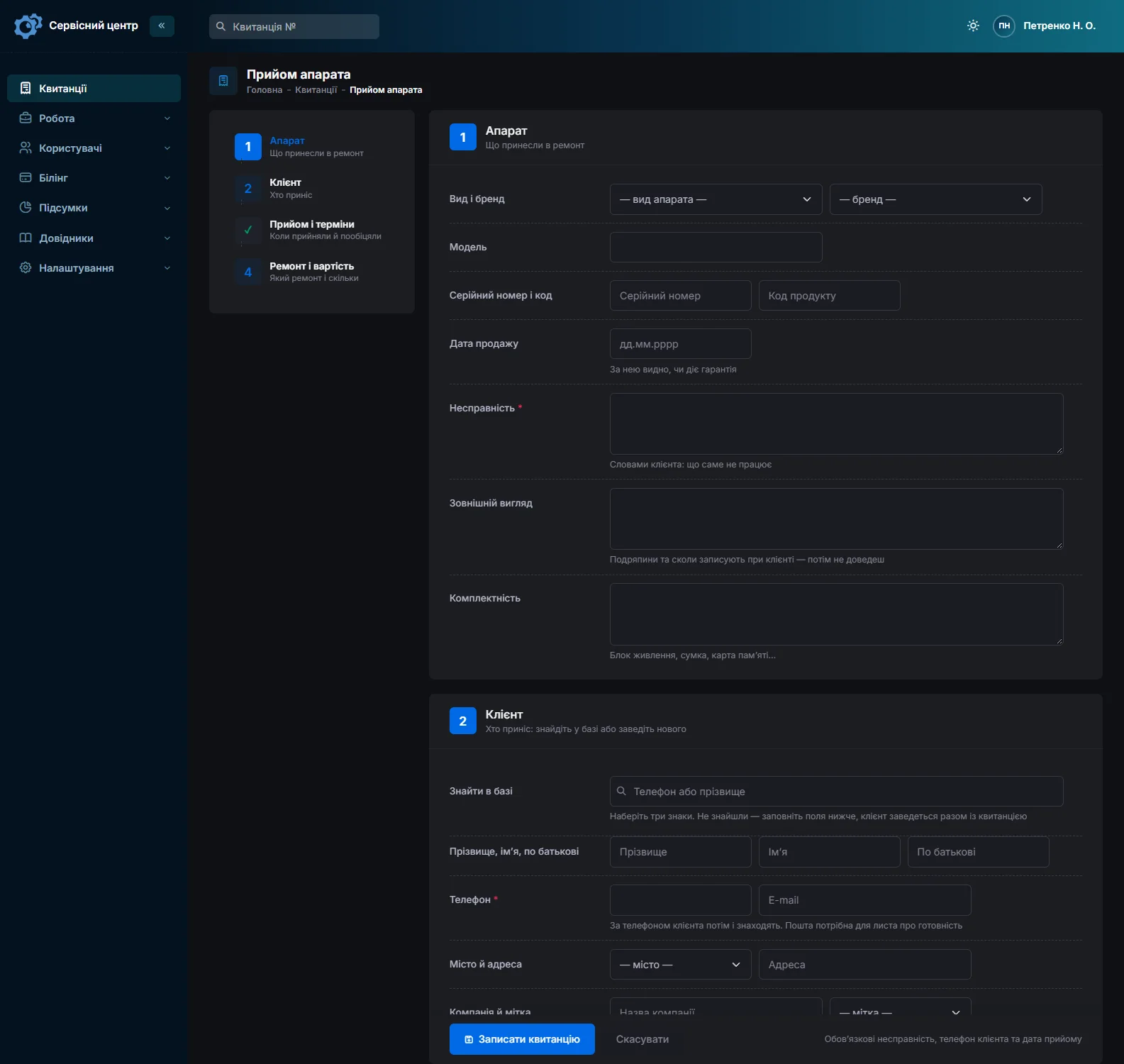
A café as a customer: one company, one account, several machines
A customer can be a business: the card has a company field, phone numbers, an address and notes such as “pays on invoice by the 10th”. It lists every repair, the total and the balance owed. Each of the café’s machines is its own job with its own serial number, and all of them sit on one card.
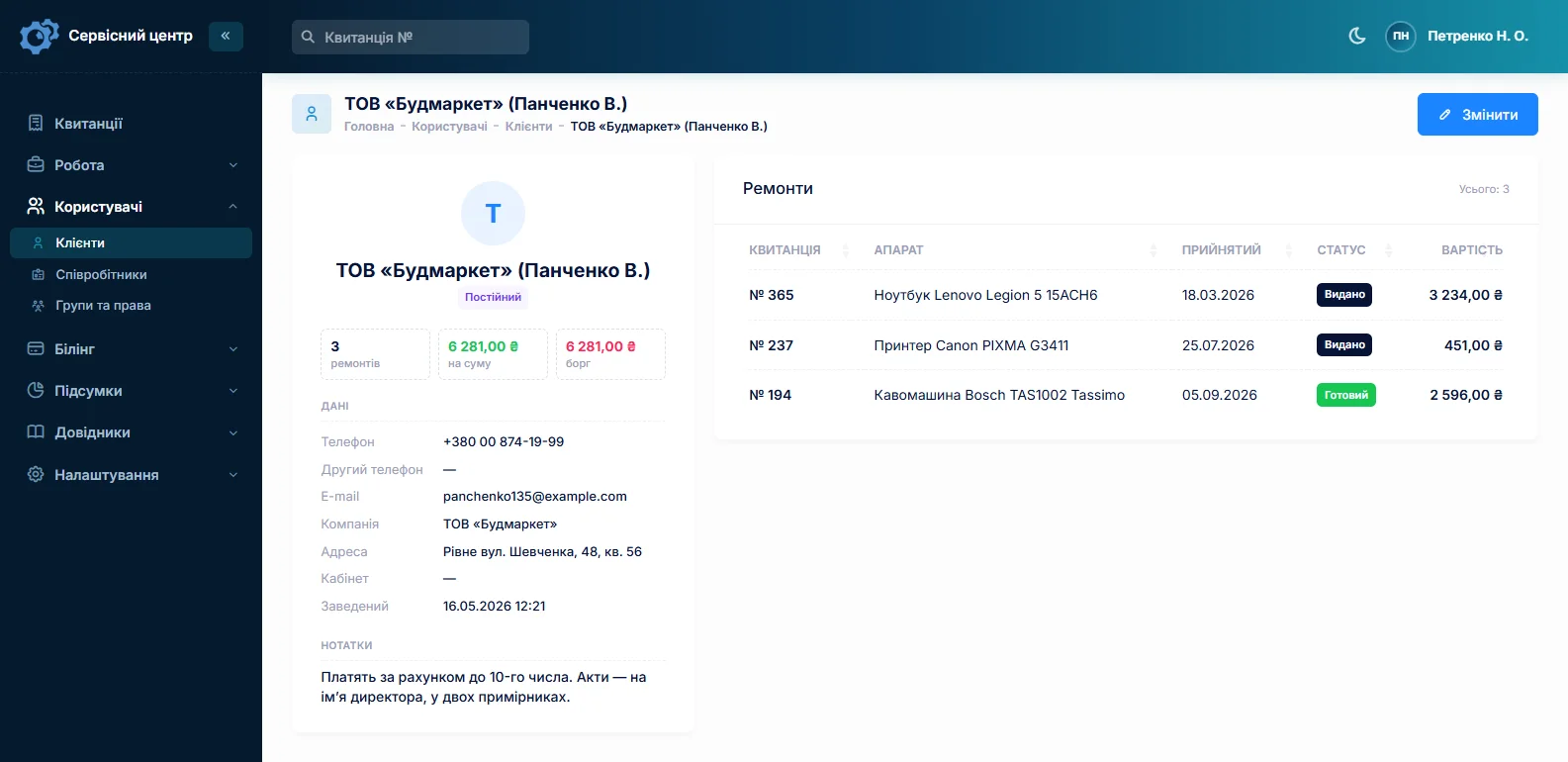
When the machines stand in cafés but a coffee roaster pays for them, the customer is whoever pays, and the café’s address goes into the job notes.
Urgent: the machine behind the bar is down
Mark a commercial machine’s job as urgent and it stands out in the list; the “Urgent” filter shows all such jobs together. Overdue promised dates turn red and have a filter of their own.
To be straight about loan machines: there is no loan-machine pool. Workshops write in the job notes which machine they lent out, with its serial number. Advanced search by text covers the notes, so you can always find out who has the loan machine.
Descaling, brew groups, pumps — from the labour price list
Coffee machine work repeats itself: descaling, cleaning and greasing the brew group, new seals, a pump or thermoblock swap, burr adjustment. These go into the “Labour” list with a price, for every device type or for one in particular. An estimate line is picked from the list, and its price can still be changed.
Home and commercial machines are priced apart through the device type: “Bean-to-cup machine” and “Commercial espresso machine”, each with its own repair price, diagnosis price and labour items. There is no price per model — adjust the line instead. If the customer declines after diagnosis, the job’s base switches to “Diagnostics only”.
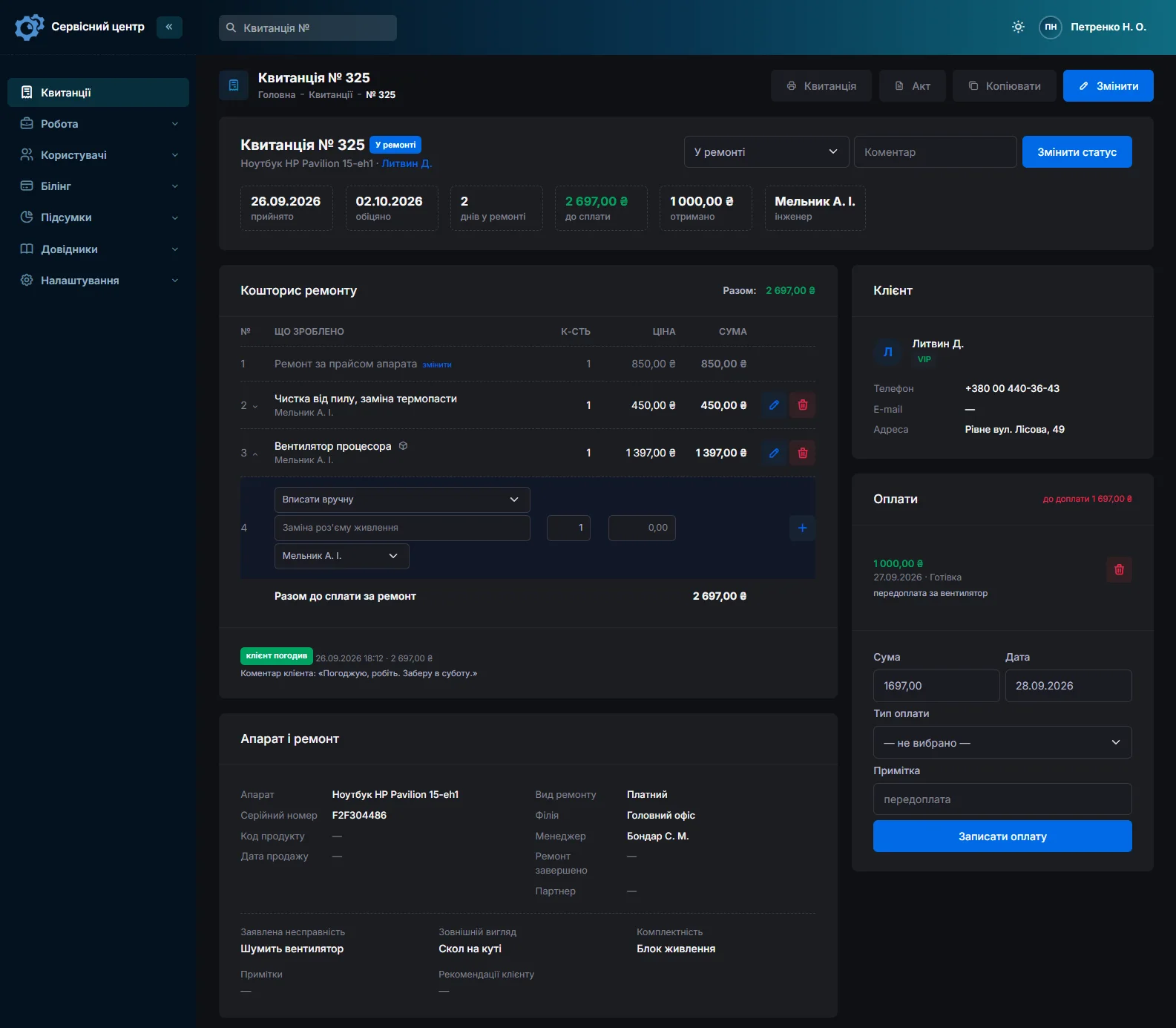
The estimate can go to the customer for approval by email or Telegram. They open a link, accept or decline and may leave a comment. The job records what was approved and when.
Going out to the café
A machine plumbed into a counter does not travel; the technician does. A visit is booked as its own repair type, and a “Call-out” line from the labour list goes on the estimate. The address is on the customer card, and on site the technician opens the job on a phone, logs the work and changes the status.
Honestly: there is no visit calendar or route planning. The job list filtered by technician shows who is going where; the schedule is yours.
Seals, valves, pumps, thermoblocks
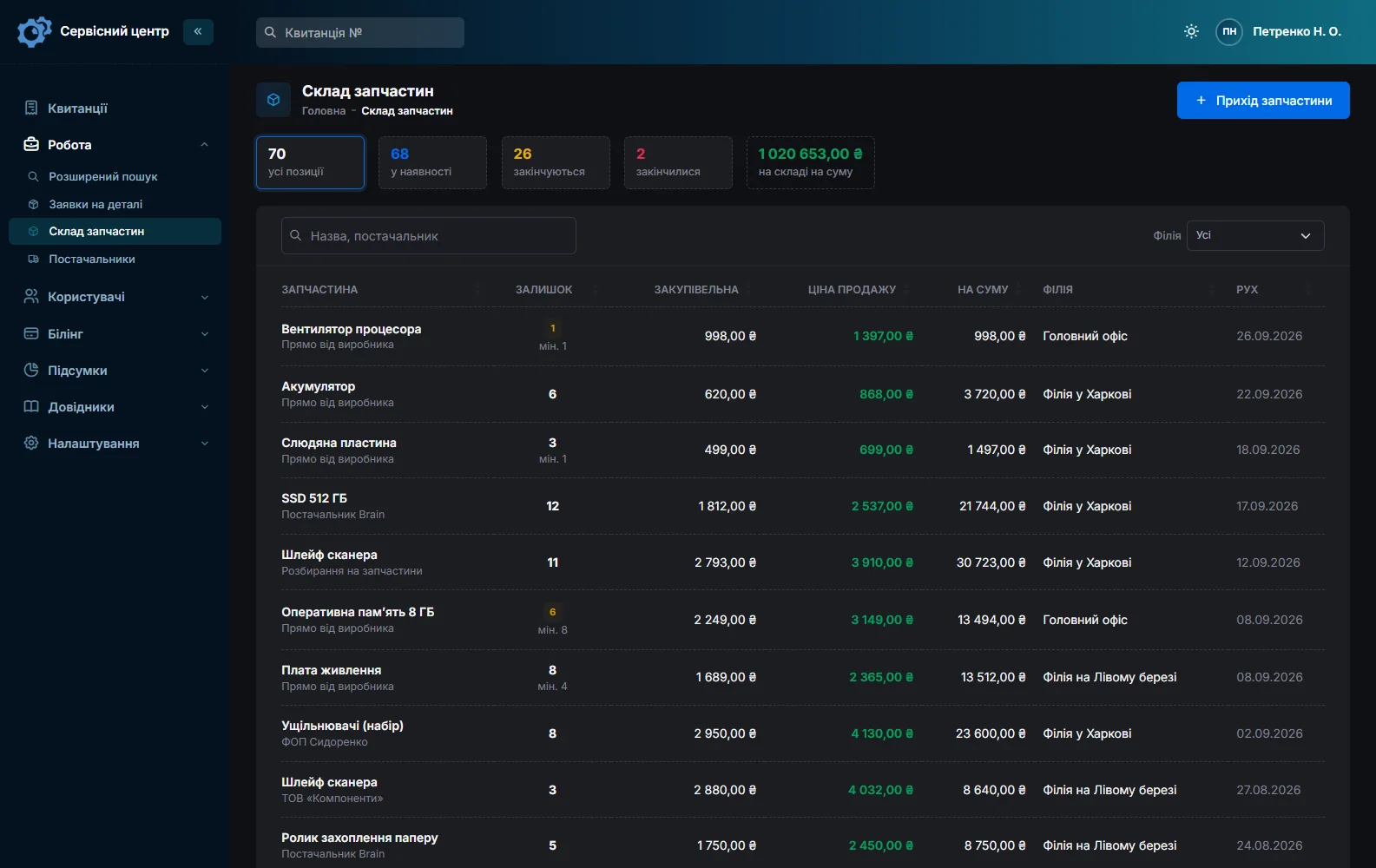
Stock is a ledger: deliveries with purchase price and supplier, parts written off into a repair as estimate lines, returns and stocktakes, with the quantity on hand worked out automatically. Fast-moving items get a minimum level; once stock falls to it, the item shows under “running low”.
Anything not on the shelf is ordered from the job itself: the request is emailed to the supplier, and when the part arrives it is booked into stock from the same request. More on spare parts accounting.
Retailer and manufacturer warranty
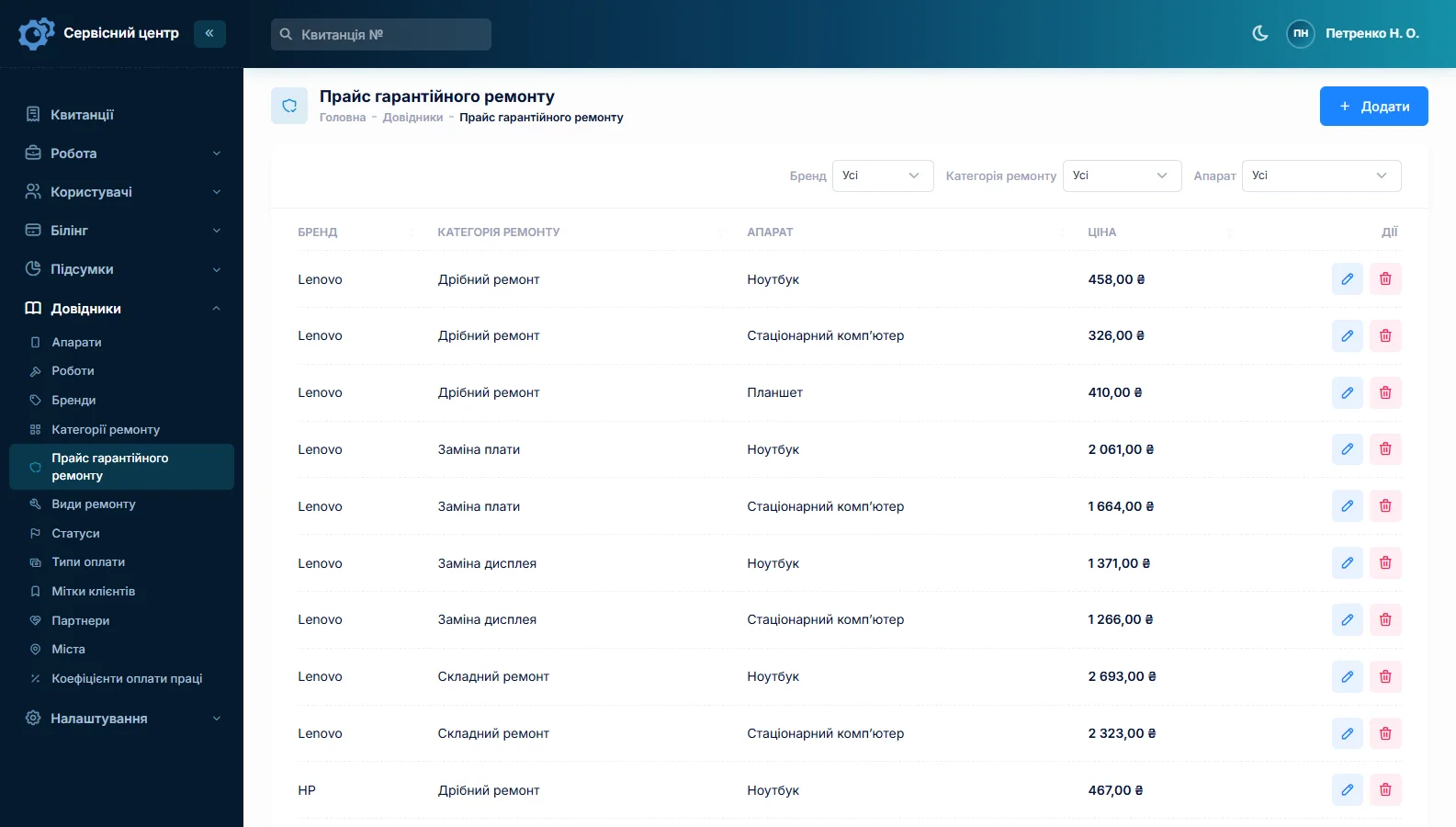
Some machines come back under warranty: the shop takes them from the buyer and the manufacturer pays. A warranty repair type and a warranty price list cover this — the price follows brand, repair category and device type and fills into the job by itself. The completion certificate prints from the same job.
A shop or coffee supplier that sends machines in can be set as the job’s partner, and the list filtered by it; the partner field is switched on separately — ask us if you need it.
Routine servicing
Café machines are serviced on a schedule, and each service is an ordinary job. “Copy from job” brings over the customer, device, accessories and notes; the serial number is typed in again. It then shows when the machine was last descaled and what has been replaced. Advice such as “fit a water filter” or “next service in March” goes into the recommendations and prints on the certificate.
Honestly: the software does not handle service contracts or send service reminders.
What it does not have
- A loan-machine pool — use the job notes.
- Service contracts or reminders — the next date goes into the recommendations.
- A visit calendar or route planning.
- Prices per model — prices are per device type, the rest is done on the estimate line.
- SMS, a mobile app or online payment by the customer. Customers hear the machine is ready by email and Telegram (customer notifications), and the software opens in a phone’s browser.
What you get
- Home and commercial machines in one list, priced differently.
- Urgent café jobs in a filter of their own.
- Descaling and brew group work as lines from the labour list.
- Estimates sent for approval by email or Telegram.
- Business customers with all repairs and the balance on one card.
- Seals and pumps in stock with minimum levels.

I tried the ServiceCenterSoft demo and came away with a good impression. The program is simple and easy to understand, yet it has everything you need for the job: customers, repairs, devices, spare parts, statuses and statistics.
I especially liked the dark theme and the responsive design — working from a phone is perfectly comfortable. Another plus is the instant search that works as you type, so you don't have to press a separate "Search" button every time.
You can tell the program was built specifically for service centers rather than being a generic CRM adapted for the repair business. The interface has no unnecessary frills; everything is logical and to the point.
A good, practical tool for the day-to-day work of a service center.

I liked that you get a free 14-day trial and that they are willing to handle my special requests — setting things up exactly the way I need them.
I also liked how payment works. You can simply pay the monthly fee by card online — basically the same as a regular Spotify subscription or any other service. No separate contracts to sign and no invoices to pay manually.
And there's no feeling of strict limits on the number of employees. One service center is one account, and inside it you can organize the work of your technicians and run several branches.
For me this is far more convenient than plans where you have to pay for every single user or keep counting how many employees are working today.

My business is fairly specific, so the program's standard features weren't enough — I needed my own custom fields, my own sorting options and search by additional parameters. The work completion certificate and the printed repair receipt also needed some changes to fit the way we work.
I contacted technical support. To be honest, I expected changes like these to take a long time, but everything was done within a single day. The team quickly understood exactly what we needed, suggested the right solution and did everything properly.
I'd especially like to mention the support: they get straight to the point, with no unnecessary bureaucracy, and they genuinely help instead of just sending you off to read the documentation.
For me this is a big advantage of the program: it isn't just sold "as is" — it can be adapted to how you actually work. Thanks to the team for the quick response and for treating the customer right.
Highly recommended!
What it costs
One price for the whole service — nothing extra per technician or per branch.
Monthly
Paid every month, cancel whenever you like.
Yearly
Cheaper than paying monthly. Invoice or card payment.
Custom work
Changes tailored to the way you work — hourly, by agreement.
Off-the-shelf not enough — your own forms, roles, reports or workflow? We will build a program for you. How it works
Try it without signing up in the demo: book in a coffee machine, add descaling to the estimate and take the job through to collection. How the software keeps customer records is covered on the CRM for repair shops page.
Frequently asked questions
Does the software keep track of loan machines?
No, there is no loan-machine pool. Workshops note in the job which machine was lent to the customer, with its serial number. Advanced search by text also covers the notes, so the loan machine’s serial number shows which job it belongs to and who has it now.
Does it remind me when a machine is due for descaling or a service?
No, the software does not manage service contracts or send reminders. Each service is its own job, and “Copy from job” brings over the customer, device, accessories and notes from the previous visit. The next service date goes into the recommendations, which print on the certificate, and the serial number shows when the machine was last serviced.
How do I price home and commercial machines differently?
Through the device type. Set up, say, “Bean-to-cup machine” and “Commercial espresso machine”: each has its own repair price, diagnosis price and its own items in the “Labour” list — descaling, brew group service, pump replacement. There is no separate price per model; for a particular machine you adjust the price on the estimate line.
How do I handle a site visit to a café’s commercial machine?
Create a “Site visit” repair type and a priced “Call-out” item in the “Labour” list. The job is opened as usual with that repair type, and the call-out line goes onto the estimate, so it is part of the total. The address is on the customer card, and on site the technician works on the job from their phone. There is no visit calendar or route planning.
A café has several machines and pays on invoice — how do I keep track?
Set the customer up as a business, with the name in the company field and payment terms in the card’s notes. Each machine is its own job with its own serial number, and the customer card shows every repair, the total and the balance owed. Payments are recorded on each job, and there can be several — a deposit and the rest. The software does not print one invoice for several repairs; a certificate prints for each job.
Are seals and pumps written off stock when I use them in a repair?
Yes. On the job’s estimate you pick the line “From stock”: the name and sale price fill in, and the quantity cannot exceed what is on hand. The part is written off, and the item card shows which job it went into; delete the line and the part goes back. When stock reaches its minimum level, the item appears under “running low”.
See also
Software for home appliance service
Contents recorded at intake, warranty at the brand price list, callouts, slow parts and partner shops.
Read morePhone repair shop software
Intake in a minute, screens and batteries tracked, a ready-for-pickup email, output per technician.
Read moreTV repair software
For a workshop repairing TVs and monitors: diagnosis and price approval before ordering a panel, a description of the screen at intake, and refusals that do not turn into disputes.
Read moreSee how it works
The demo is open — go in and try it. Ask us anything by email, Telegram or the form on this site.