Boiler repair and heating service software
For heating engineers servicing gas and electric boilers, water heaters and heat pumps: the call-out and the board on the bench in one job, the autumn rush, annual services on the same boilers, and quotes for expensive parts.
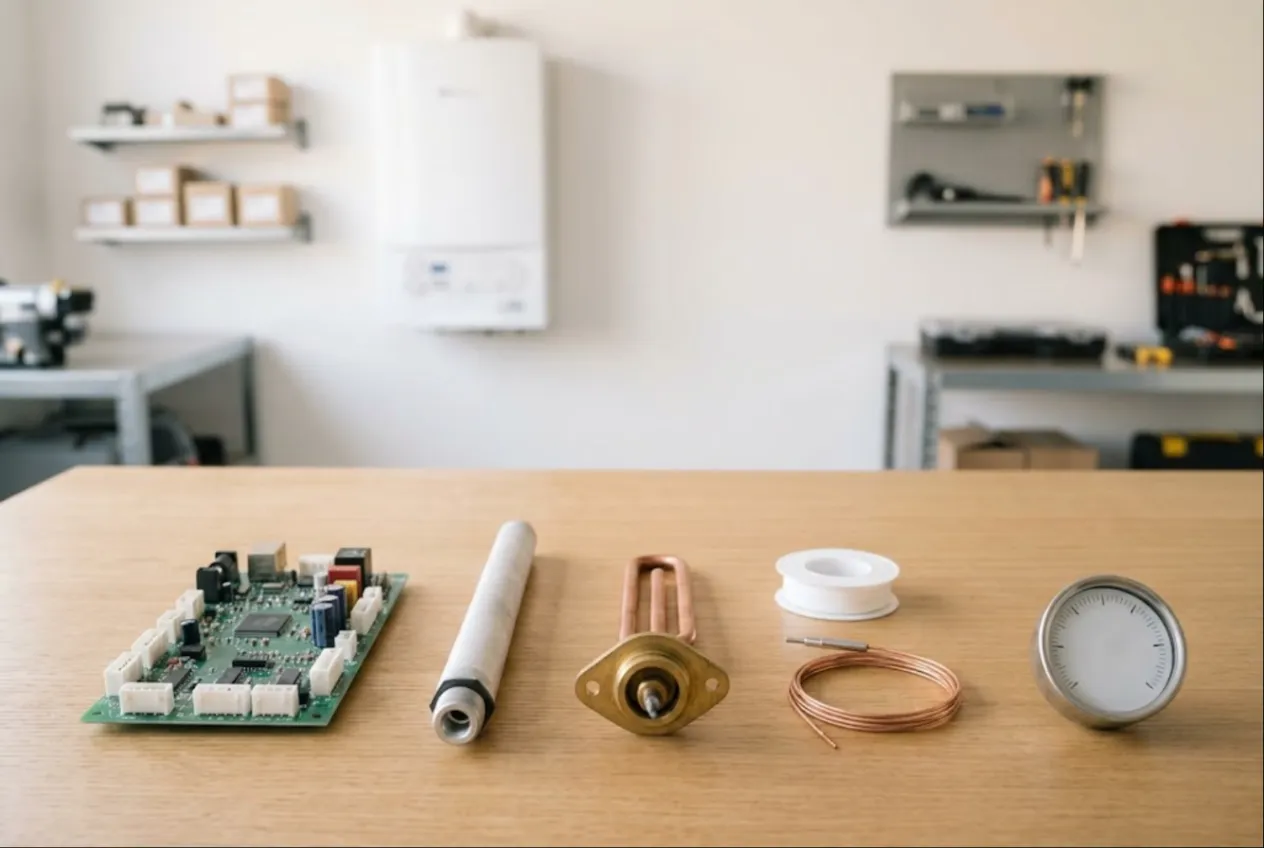
ServiceCenterSoft is job-tracking software for heating engineers and small firms that repair and service gas and electric boilers, water heaters, cylinders and heat pumps. The call-out and the board repaired on the bench live in one job, every boiler keeps its history, and expensive parts go to the customer as a quote before you order them. It runs in the browser — on the office computer and on the engineer’s phone in the airing cupboard.
Who this is for
A boiler never comes to your counter. It is plumbed into gas, water and the heating, so most of the work happens at the customer’s address: cleaning the burner and heat exchanger, swapping a sensor, setting up. But part of the job still comes back to the workshop. A PCB is taken out and tested on the bench, a water heater goes away for descaling, a leaking heat exchanger is repaired on the workbench. One fault, two places, several days.
Then there is the season. In September and October everyone remembers their heating at once: fire it up after the summer, get it serviced, find out why it keeps locking out. And all year round there is the steady stream of annual services on boilers you already know.
- The board is on the bench, the job is “out on site”. The customer calls and nobody can say whether their PCB has been looked at.
- Autumn call-outs slip through. Booked over a messaging app, promised “this week”, forgotten.
- An expensive part without a yes. The heat exchanger is ordered, and the customer decides a new boiler makes more sense.
- Nobody remembers last year. Which model, what was replaced, when it was last serviced.
One job from call-out to refit
A call-out is booked as an ordinary job: the customer with phone number and address (the address is kept on the customer record), the boiler, model and serial number, the fault, and a note such as “boiler in the loft, ladder needed”. The job gets an engineer and a promised date.
You define the statuses yourself, and for boilers it pays to split them by where the work is: “Visit booked”, “Board on bench”, “Awaiting part”, “Awaiting approval”, “Refit visit”, “Completed”. When the engineer takes the PCB away, the job moves to “Board on bench” with a note of what was removed. Any status can sit as a tile above the job list, so one click shows every board in the workshop, or every boiler waiting for its repaired part to go back in. Each status change, with comment, date and name, stays in the job history.
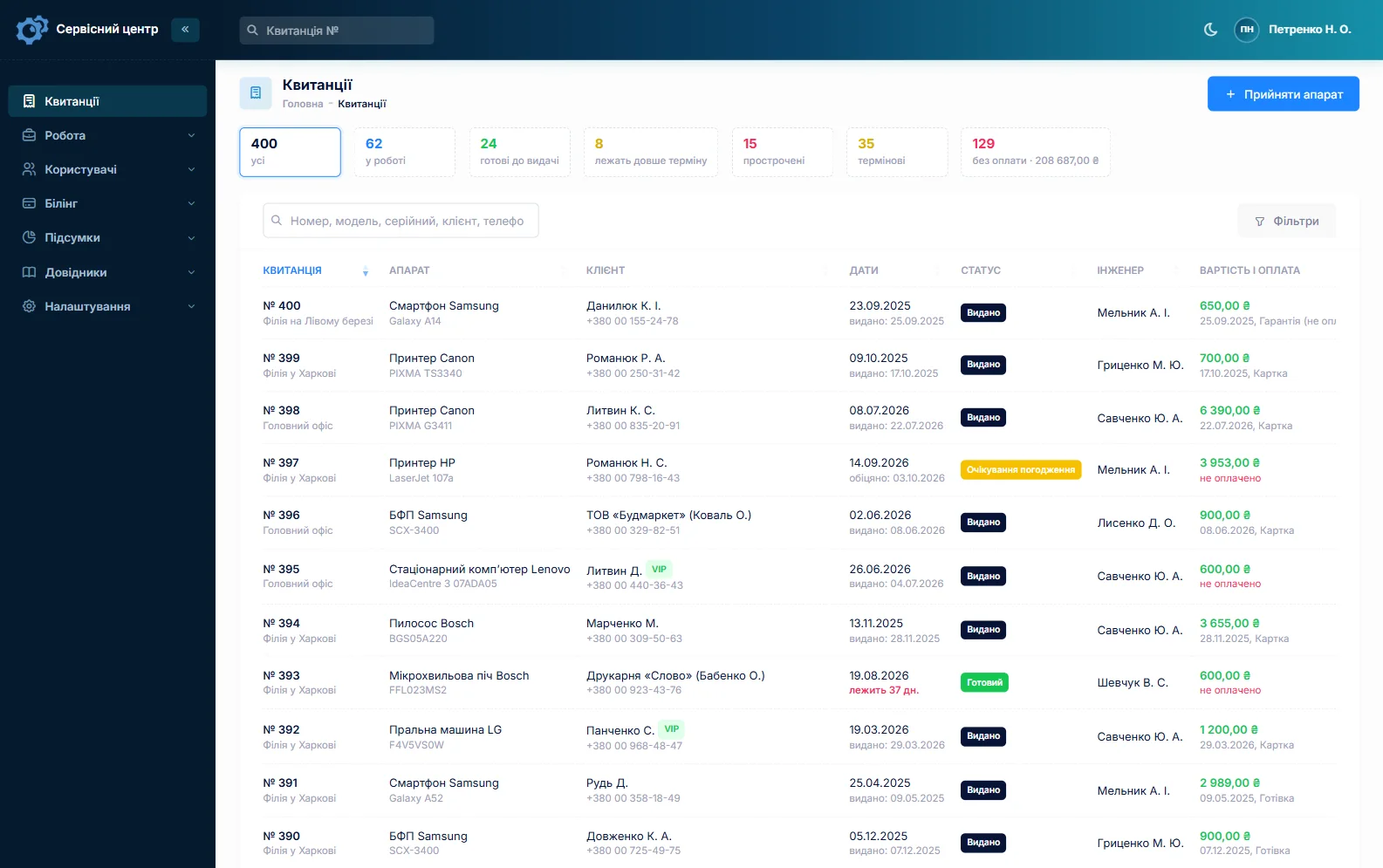
To be straight with you: there is no scheduling calendar and no route map. In the morning you filter jobs by engineer and “Visit booked”; the engineer opens the job on their phone for the address and notes and uses their usual sat-nav. The general side of field work is covered on the home appliance service page.
The autumn rush
In the busy weeks the point is not how many calls you take but that none gets lost. Overdue promised dates turn red and an “overdue” tile gathers them; an “urgent” flag marks households with no heating or hot water; searching by phone number brings up the job of someone calling for the third time; a filter by engineer shows who has how many visits.
When things quieten down, the report for the period shows how many first fires, services and repairs were done, for how much, and by whom. Air conditioning runs the other way round, with the peak in summer — if you do both, see air conditioner service.
Annual services on the same boilers
The customer record lists every job: when the boiler was serviced, what was replaced, what it cost. You can also find a job by part of the serial number — handy when a customer has two boilers, or when the house has been sold and the boiler stayed.
An annual service can be copied from last year’s job: customer, boiler, job type, accessories and notes carry over, while serial number, dates and payment are new. Job types such as “First fire”, “Annual service”, “PCB repair” and “Descaling” are yours to set up.
What it does not do: there is no service schedule and no automatic reminder to the customer that their boiler is due. The workaround: at the start of the season, filter last year’s “Annual service” jobs by intake date and ring round from that list; keep the dates of maintenance contracts in your own calendar.
Expensive parts only after a yes
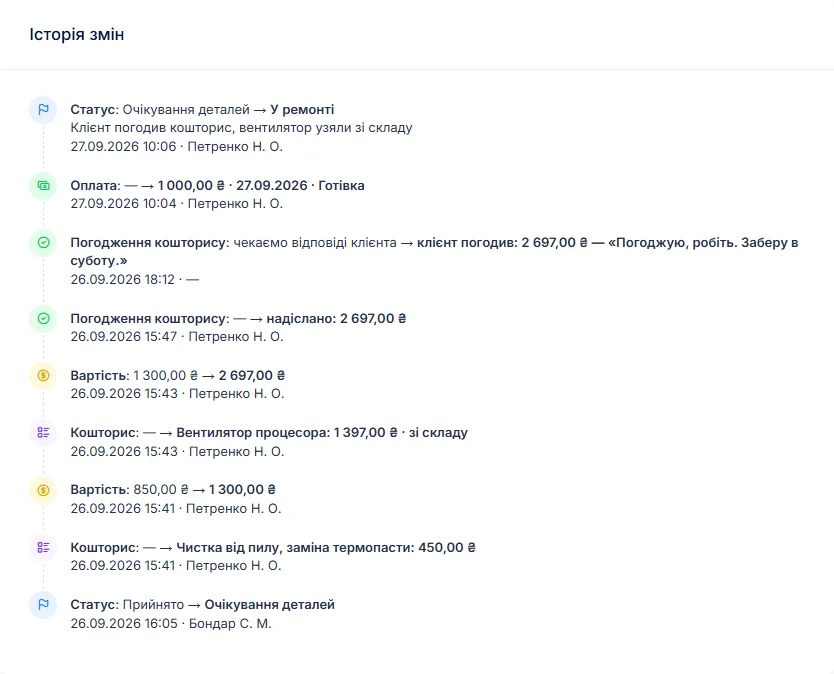
A PCB, fan, gas valve or heat exchanger can cost a third of a new boiler. After diagnosis the engineer writes in the work log what was found and builds a quote line by line: part, quantity, price, labour. A button sends it to the customer by email or Telegram; they see every line and the total and press “I agree” or “I decline”. The answer and date go into the job history.
A job can take several payments — a deposit for the part, the balance after fitting. You can see what has been received and what is still owed, and the “unpaid” filter gathers finished jobs that have not been paid. Customers cannot pay online through the software; you take money as you always do and record it. If a repair makes no sense, the job is closed as “Repair refused” or “Beyond repair”.
Anodes, elements and seals in stock
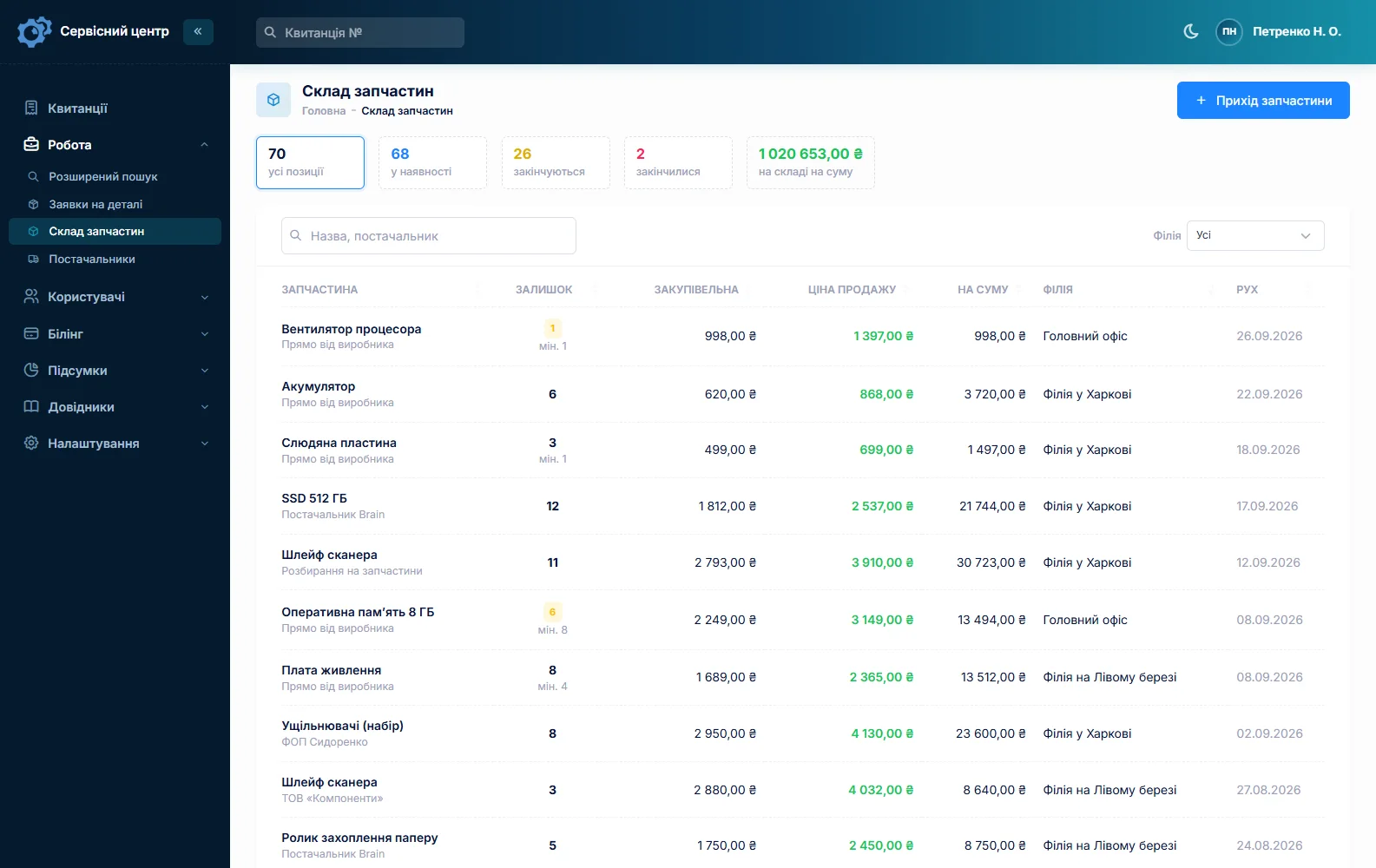
Stock is a movement log: goods in with cost price and supplier, parts used on a job as a quote line, stocktakes. The balance updates itself. Set a minimum quantity and the “running low” tile tells you to reorder magnesium anodes before descaling season. Quantities are whole numbers, so everything is tracked by the piece or kit: anodes, immersion elements, thermocouples, ignition electrodes, washers, pressure sensors. Model-specific boards and heat exchangers are ordered with a parts request from the job, which can be emailed to the supplier. More on spare parts tracking.
Ready means the customer knows
A repaired board or a descaled water heater waits to be collected or refitted. Once the job is ready, the customer can get an email or a Telegram message (they subscribe with the QR code on their job sheet), and the email can be sent again. Every finished item shows how many days it has been waiting; once the free storage period runs out, the counter turns red and a tile gathers those items. There are no text messages and no mobile app. See customer notifications.
The intake receipt and the completion report are printed from the software, the report with the quote as a table, the work log and recommendations. Photos and files cannot be attached to a job: keep flue gas analyser printouts and pictures yourself, and write the readings in the work log.
A word on gas work
Gas work is regulated by law in most countries: engineers need the right registration or qualifications, and keeping them current is the business’s own responsibility. The software tracks repairs; it does not keep statutory gas safety records or produce certificates.
What jobs typically cost
As a rough guide only — prices vary a lot by region, model and parts: call-out and diagnosis €60–120, annual gas boiler service €90–180, PCB repair €150–400 including parts, water heater descale with new anode €100–220, heat exchanger clean on a gas water heater €80–160. You set your own prices in the device list and as quote lines.
What it costs
One price for the whole business — no extra charge for engineers or branches.
Monthly
Paid every month, cancel whenever you like.
Yearly
Cheaper than paying monthly. Invoice or card payment.
Custom work
Changes tailored to the way you work — hourly, by agreement.
Off-the-shelf not enough — your own forms, roles, reports or workflow? We will build a program for you. How it works
Try it without signing up in the demo: book a boiler call-out, move it to “Board on bench” and build a quote.

We are very happy working with servicecentersoft.com: they built everything we asked for, even though our request was unusual, since we deal with medical devices. Everything was done precisely and on the agreed schedule. Thank you for the cooperation — we keep working together.

I tried the ServiceCenterSoft demo and came away with a good impression. The program is simple and easy to understand, yet it has everything you need for the job: customers, repairs, devices, spare parts, statuses and statistics.
I especially liked the dark theme and the responsive design — working from a phone is perfectly comfortable. Another plus is the instant search that works as you type, so you don't have to press a separate "Search" button every time.
You can tell the program was built specifically for service centers rather than being a generic CRM adapted for the repair business. The interface has no unnecessary frills; everything is logical and to the point.
A good, practical tool for the day-to-day work of a service center.

I liked that you get a free 14-day trial and that they are willing to handle my special requests — setting things up exactly the way I need them.
I also liked how payment works. You can simply pay the monthly fee by card online — basically the same as a regular Spotify subscription or any other service. No separate contracts to sign and no invoices to pay manually.
And there's no feeling of strict limits on the number of employees. One service center is one account, and inside it you can organize the work of your technicians and run several branches.
For me this is far more convenient than plans where you have to pay for every single user or keep counting how many employees are working today.

My business is fairly specific, so the program's standard features weren't enough — I needed my own custom fields, my own sorting options and search by additional parameters. The work completion certificate and the printed repair receipt also needed some changes to fit the way we work.
I contacted technical support. To be honest, I expected changes like these to take a long time, but everything was done within a single day. The team quickly understood exactly what we needed, suggested the right solution and did everything properly.
I'd especially like to mention the support: they get straight to the point, with no unnecessary bureaucracy, and they genuinely help instead of just sending you off to read the documentation.
For me this is a big advantage of the program: it isn't just sold "as is" — it can be adapted to how you actually work. Thanks to the team for the quick response and for treating the customer right.
Highly recommended!
In short
- Call-out and bench repair in one job with your own statuses; no calendar or route map.
- The autumn rush under control: tiles, overdue in red, urgent flagged.
- Boiler history by customer and serial number, last year’s job copied in a minute; no automatic service reminders.
- Expensive parts quoted for approval by link, with deposit and balance.
- Anodes, elements and thermocouples in stock with minimum levels.
- €20 a month for the whole business.
See also
Electric motor repair shop software
For motor rewind shops and one-person motor repairers: inspection and an approved estimate before rewinding, winding data in the work log and searchable, copper and bearings in stock, and each motor’s history by serial number.
Read moreStarting your own repair shop: where to begin
For people who can fix phones and laptops and want to work for themselves: what a small repair business needs on day one, the paperwork that protects you from the first customer, and how to run a shop in a country whose language is not your own.
Read moreSoftware for home appliance service
Contents recorded at intake, warranty at the brand price list, callouts, slow parts and partner shops.
Read moreSee how it works
The demo is open — go in and try it. Ask us anything by email, Telegram or the form on this site.