Air conditioner service software
HVAC repair software for small air-conditioning contractors: call-outs in peak season, installations quoted line by line with deposits, refrigerant and parts in stock, and the same units serviced year after year.
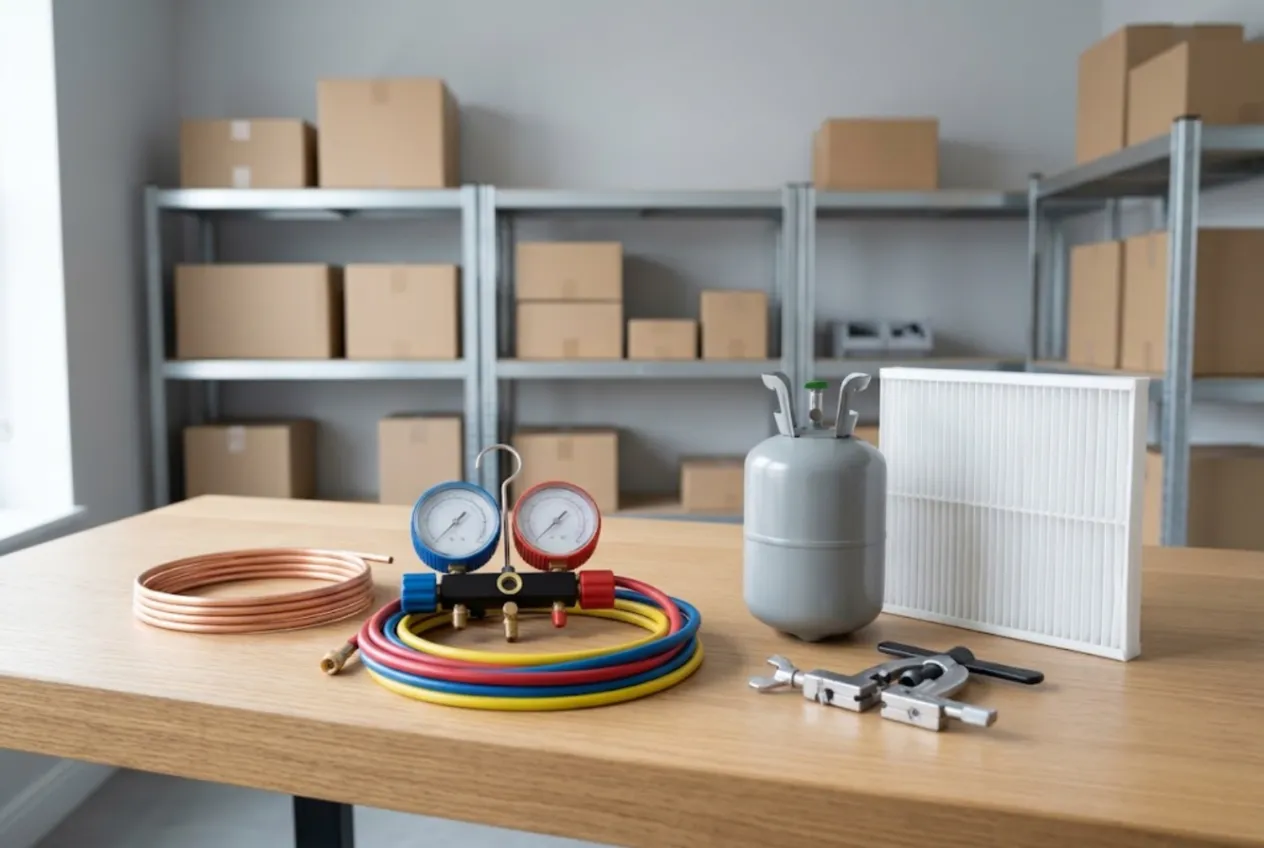
ServiceCenterSoft is job-tracking software for small air-conditioning and HVAC service businesses: split systems, ductless units, and heat pumps alongside them. Service calls, recharges, cleaning, installs and removals, quotes with deposits, refrigerant and copper in stock, and every customer’s history. It runs in the browser — on the office PC and on the technician’s phone.
Who this is for
An owner-operator or a small crew of two to six technicians who install and service residential and light-commercial AC. Most of your work happens at the customer’s address, not at a bench. Summer is a flood of “not cooling” calls, spring is maintenance season, and winter is quiet — unless you also do heat pumps.
Where it usually goes wrong is not the equipment but the paperwork:
- calls taken on a Friday evening are forgotten by Monday;
- after an install, nobody can prove whether the extra line set was in the quote;
- the refrigerant runs out in the middle of a heatwave;
- a tech arrives at a regular customer’s house with no idea what was done last year.
The general side of field service — on-site visits as a job type, manufacturer warranty pricing, parts that take weeks — is covered on the home appliance service page. This page is about what is specific to air conditioning.
A service call is a job ticket
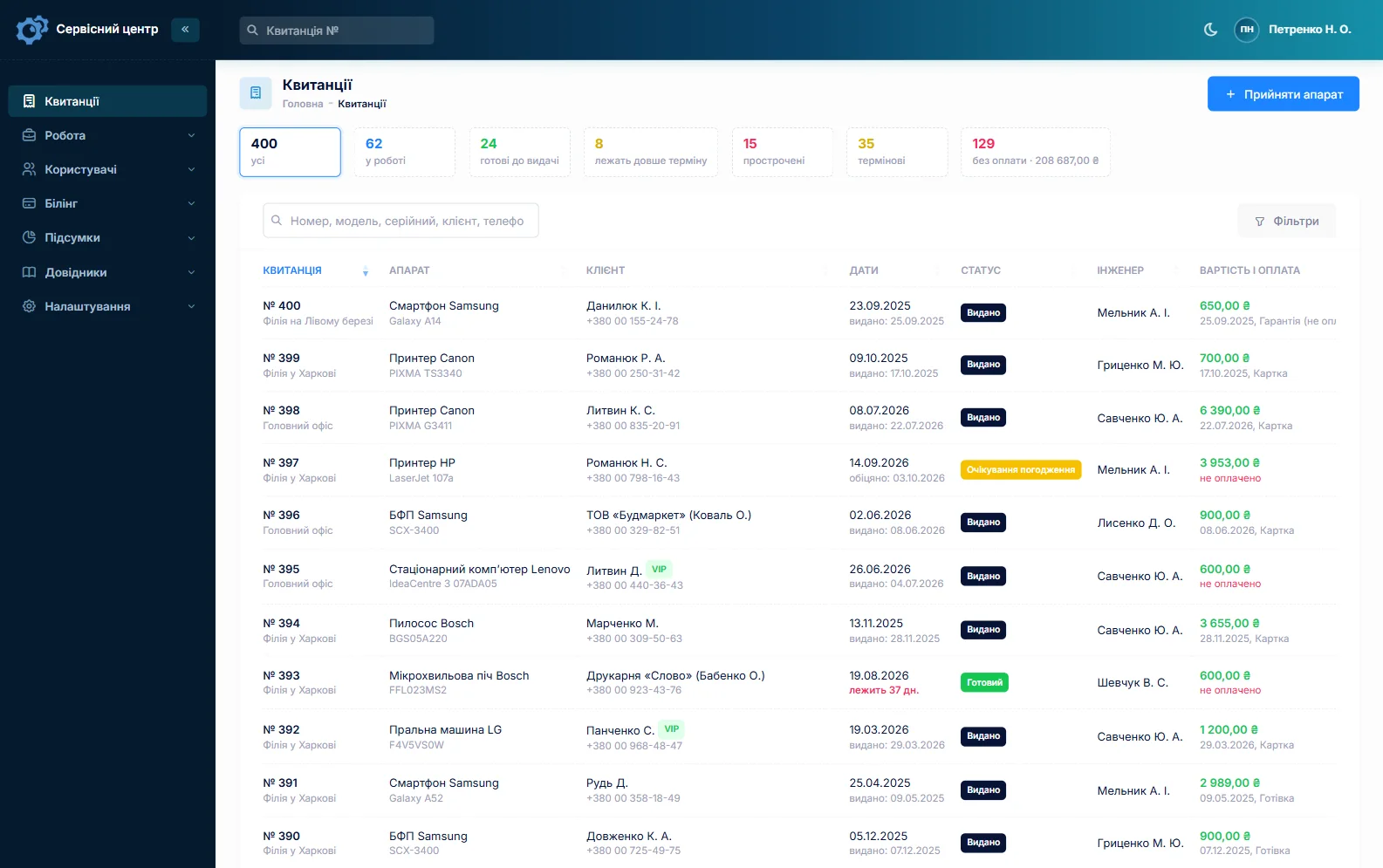
There is no separate “dispatch” module. A call becomes an ordinary job: the customer with phone number and address (stored on the customer record, so you don’t retype it next time), the unit and model, the complaint, a note like “condenser on the roof, ladder needed”, a promised date and an assigned technician.
You define the statuses yourself — for example “New call”, “Visit booked”, “Waiting for part”, “Awaiting approval”, “Done”. Any status can be pinned as a tile above the job list with a count, so one click shows every booked visit that is still open.
Being upfront: this is not a scheduling board. There is no drag-and-drop calendar, no GPS tracking and no route planning. Small crews handle it like this: in the morning the list is filtered by technician and “Visit booked”, each tech opens their jobs on the phone, and the navigation app does the driving. If you run a dispatch desk with ten trucks, you will want a dedicated routing tool next to it — better to know that now.
Surviving the summer rush
What actually helps in peak season is a few plain things on the job list:
- a promised date that has passed turns red, and an “overdue” tile gathers those jobs in one place;
- an “urgent” flag for the server room without cooling or the home with a newborn;
- filters by technician and job type show who is overloaded;
- search by phone number — when a customer calls for the third time, their job is on screen in a second.
At the end of the season, the report for the period shows how many recharges, cleanings and installs you did, for how much, and who did what.
Installs: a line-item quote and a deposit
An installation is quoted line by line: the indoor and outdoor unit, line set by the metre, wall brackets, condensate pump, standard labour, extra metres. Each line has a quantity, a price and the technician who does it. The quote can be sent as a link by email or Telegram; the customer sees every line and the total and clicks “I agree” or “I decline”. The answer is saved in the job history with the date.
A deposit for the equipment and the final payment after the install are simply two payments on the same job; the job shows what has been received and what is still due, and the printed completion sheet lists the quote and the balance. Customers cannot pay online through the software — you take the money as you always do and record it.
Removals, relocations and seasonal start-ups are your own job types in the list of repair types, so you can filter and count them later.
Refrigerant, copper and filters in stock
Stock is a movement log: receipts with purchase price and supplier, parts used on a job as a quote line, write-offs with a reason, and stock counts. The balance is calculated, never typed in. Set a minimum for each item and the “running low” tile becomes your reorder list before the next heatwave.
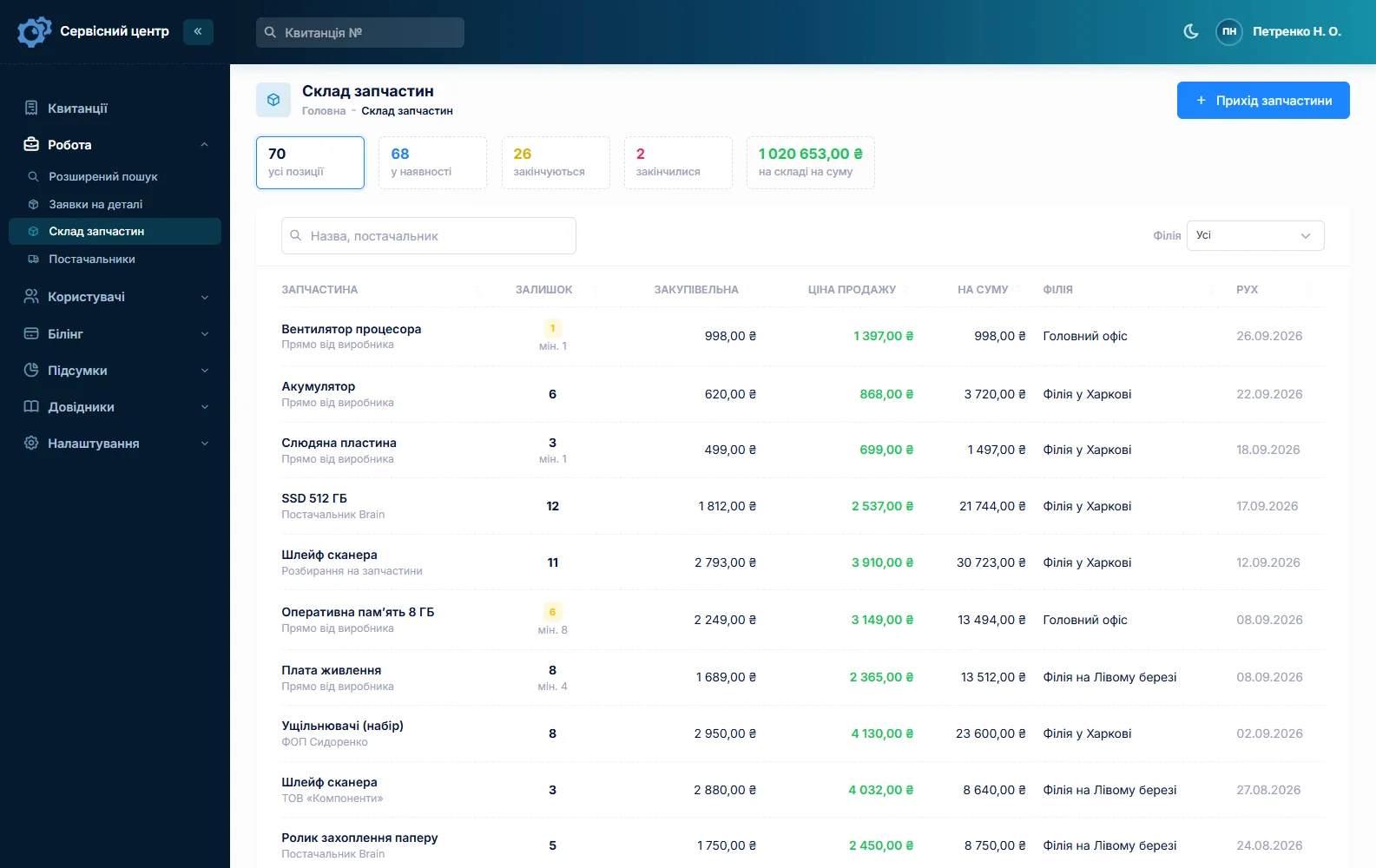
One detail worth knowing: stock quantities are whole numbers. So refrigerant is easiest to track in fixed portions (say, 100 g or 1/4 lb) or by the cylinder, line set by the metre or foot, and filters and pumps by the piece. Write the refrigerant type on the job — next year’s tech will thank you. More on spare parts tracking.
Repeat customers and maintenance agreements
The customer record lists every job: when the units were cleaned, what was recharged, what was replaced and what was paid. A new job can be copied from last year’s — customer, unit, job type and notes carry over, dates and payments start fresh.
Maintenance agreements with offices, shops or restaurants work the same way: the business is the customer, a “contract” label shows right in the job list, and the job type is “planned maintenance”. What it does not do: it does not keep a maintenance calendar and does not remind you when a visit is due. Keep the schedule in your own calendar; the software keeps the record of what was done.
When a job is finished, the customer can get an email or a Telegram message (they subscribe with the QR code on their ticket). There are no text messages and no mobile app. See customer notifications.
Technicians and their pay
Each quote line has the technician who did it. The report for the period calculates each tech’s share of their own lines using their rate; parts and refrigerant at cost do not count towards pay. Two techs on one install — the lines are split between them. Details on technician pay.

Typical prices and certification
As a rough guide only — prices vary a lot by region and system: a maintenance visit with cleaning around €80–150, a recharge €100–300 depending on refrigerant and amount, a standard split-system install €400–1,000 plus equipment. You set your own prices, per unit type in the device list or as quote lines.
In most countries, handling refrigerants requires certified technicians, and some systems come with record-keeping duties. The rules depend on where you work and what you service, so check what applies to you. The software has no dedicated refrigerant logbook, but every recharge with refrigerant type and quantity stays on the job’s quote.
What it costs
One price for the whole business — no per-technician or per-location fees.
Monthly
Paid every month, cancel whenever you like.
Yearly
Cheaper than paying monthly. Invoice or card payment.
Custom work
Changes tailored to the way you work — hourly, by agreement.
Off-the-shelf not enough — your own forms, roles, reports or workflow? We will build a program for you. How it works
Try it without signing up in the demo: book a service call, build an installation quote and record a deposit.

We are very happy working with servicecentersoft.com: they built everything we asked for, even though our request was unusual, since we deal with medical devices. Everything was done precisely and on the agreed schedule. Thank you for the cooperation — we keep working together.

I tried the ServiceCenterSoft demo and came away with a good impression. The program is simple and easy to understand, yet it has everything you need for the job: customers, repairs, devices, spare parts, statuses and statistics.
I especially liked the dark theme and the responsive design — working from a phone is perfectly comfortable. Another plus is the instant search that works as you type, so you don't have to press a separate "Search" button every time.
You can tell the program was built specifically for service centers rather than being a generic CRM adapted for the repair business. The interface has no unnecessary frills; everything is logical and to the point.
A good, practical tool for the day-to-day work of a service center.

I liked that you get a free 14-day trial and that they are willing to handle my special requests — setting things up exactly the way I need them.
I also liked how payment works. You can simply pay the monthly fee by card online — basically the same as a regular Spotify subscription or any other service. No separate contracts to sign and no invoices to pay manually.
And there's no feeling of strict limits on the number of employees. One service center is one account, and inside it you can organize the work of your technicians and run several branches.
For me this is far more convenient than plans where you have to pay for every single user or keep counting how many employees are working today.

My business is fairly specific, so the program's standard features weren't enough — I needed my own custom fields, my own sorting options and search by additional parameters. The work completion certificate and the printed repair receipt also needed some changes to fit the way we work.
I contacted technical support. To be honest, I expected changes like these to take a long time, but everything was done within a single day. The team quickly understood exactly what we needed, suggested the right solution and did everything properly.
I'd especially like to mention the support: they get straight to the point, with no unnecessary bureaucracy, and they genuinely help instead of just sending you off to read the documentation.
For me this is a big advantage of the program: it isn't just sold "as is" — it can be adapted to how you actually work. Thanks to the team for the quick response and for treating the customer right.
Highly recommended!
In short
- A service call is a job with an address, a technician, a status and notes.
- Your own statuses, count tiles and red overdue dates keep the summer rush under control.
- Installs are quoted line by line, approved by link, paid with a deposit and a balance.
- Refrigerant, copper and filters are in stock with a “running low” list.
- Full customer history and copy-last-year jobs; no scheduling board and no maintenance reminders.
- €20 a month for the whole business.
See also
Software for home appliance service
Contents recorded at intake, warranty at the brand price list, callouts, slow parts and partner shops.
Read morePhone repair shop software
Intake in a minute, screens and batteries tracked, a ready-for-pickup email, output per technician.
Read moreTV repair software
For a workshop repairing TVs and monitors: diagnosis and price approval before ordering a panel, a description of the screen at intake, and refusals that do not turn into disputes.
Read moreSee how it works
The demo is open — go in and try it. Ask us anything by email, Telegram or the form on this site.