Software for a small repair shop
For a workshop run by one or two people: intake with a printed job sheet, a list of repairs, the month’s takings. Set up in an evening.
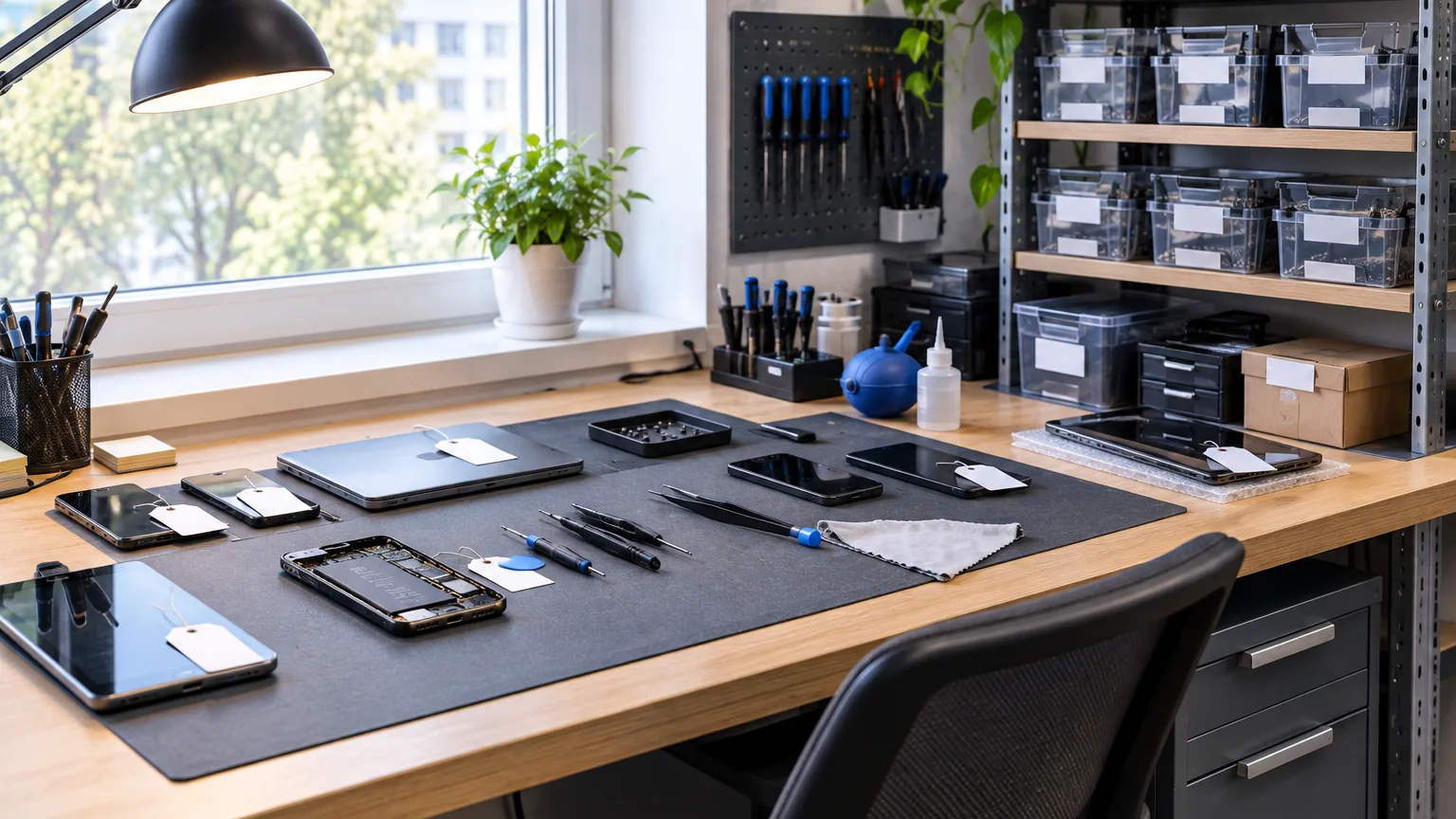
ServiceCenterSoft works for a workshop with a single person in it. You book the device in, print the job sheet, repair it, hand it back, and at the end of the month you see what you earned. No week-long setup and no features you will never use.
When the workshop is you
In a small workshop one person is the front desk, the technician and the owner. A customer waits at the counter while a laptop lies open on your bench. The phone rings in the middle of soldering. Records live in a notebook, in phone notes or just in your head — and while there are few repairs, that works.
It breaks down gradually. First you cannot find when a device came in or what you promised. Then a customer says the scratch on the lid was not there. Then someone comes for a phone you handed back a week ago and argues about whether they paid. None of this is a disaster, but each one costs time and nerves, which a one-person shop is already short of.
Do you need software at all?
Honestly: with a few repairs a week and customers you all know, a notebook copes. Software starts to pay off when there are more devices in the shop at once than you can hold in your head — usually from ten to fifteen — or the first time you argue with a customer about the condition of a device at intake.
Another reason is the printed job sheet. A customer who leaves with a page showing a number, a description of the device and your terms trusts the workshop more than one whose name went into a notebook. For a small shop that is a noticeable difference.
What to set up on the first evening
The software opens with its lists already filled in: repair statuses, repair types, payment types, customer labels. What is left is short:
- enter the workshop name, address and phone number — they go onto the job sheet;
- put your logo and terms into the printed form;
- add the kinds of devices you repair and, if you like, your usual price for each — it will fill in on new job sheets by itself;
- book in your first device.
You can leave everything else alone. Brands, towns and customers fill in as you work.
Intake while the customer waits
The intake form is one page: device, model, serial number, fault, condition, accessories, due date and price. You look the customer up by phone number; if they are not in the database, the fields for a new one are right there. One button and the job sheet is printed.
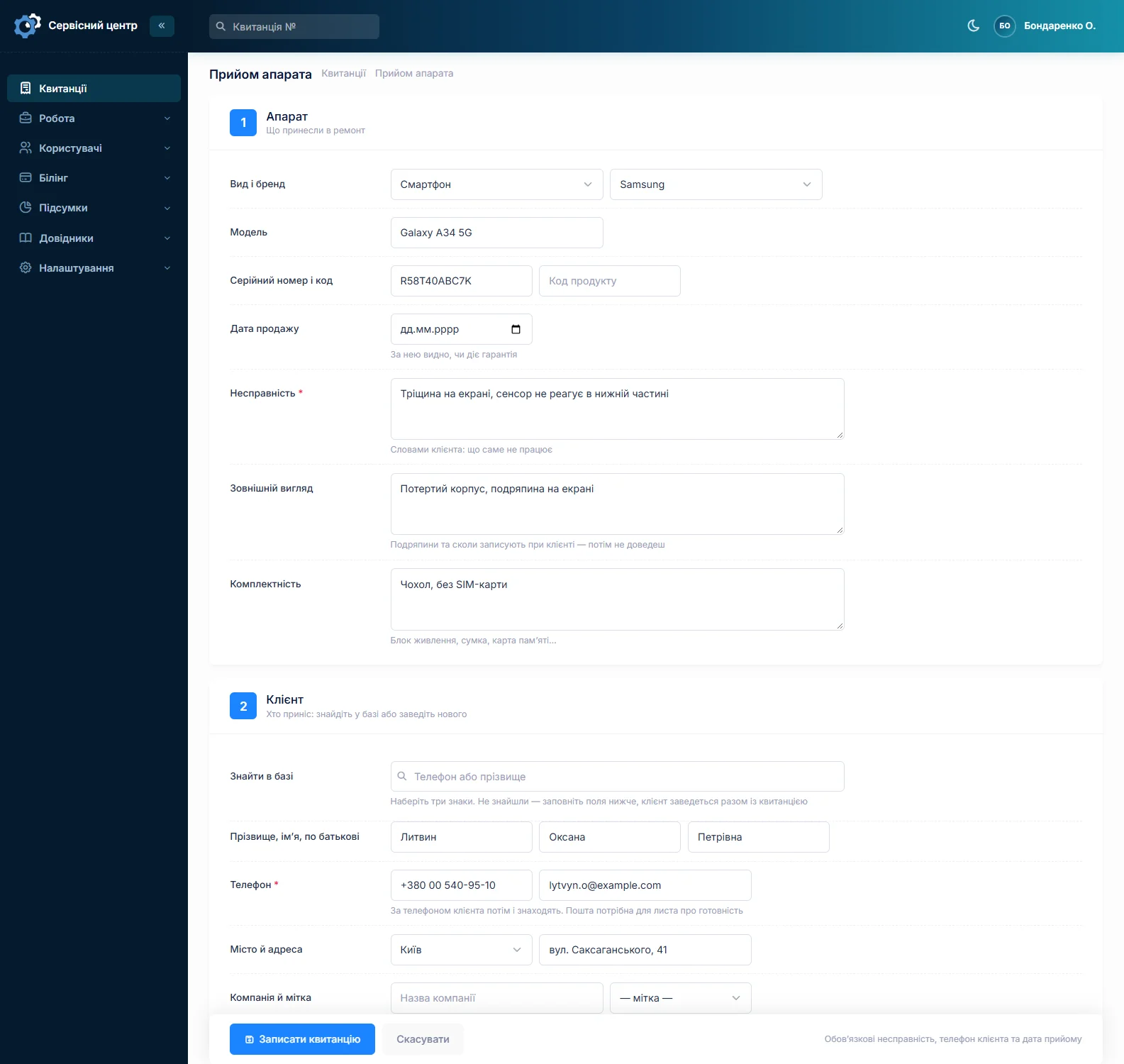
For identical jobs there is “copy the last one”: customer, device and branch carry over from the previous job sheet.
Nothing to keep in your head
All devices are in one list. Overdue dates show in red, status is shown by colour, and buttons at the top narrow the list to “in progress”, “ready for collection” or “unpaid”.
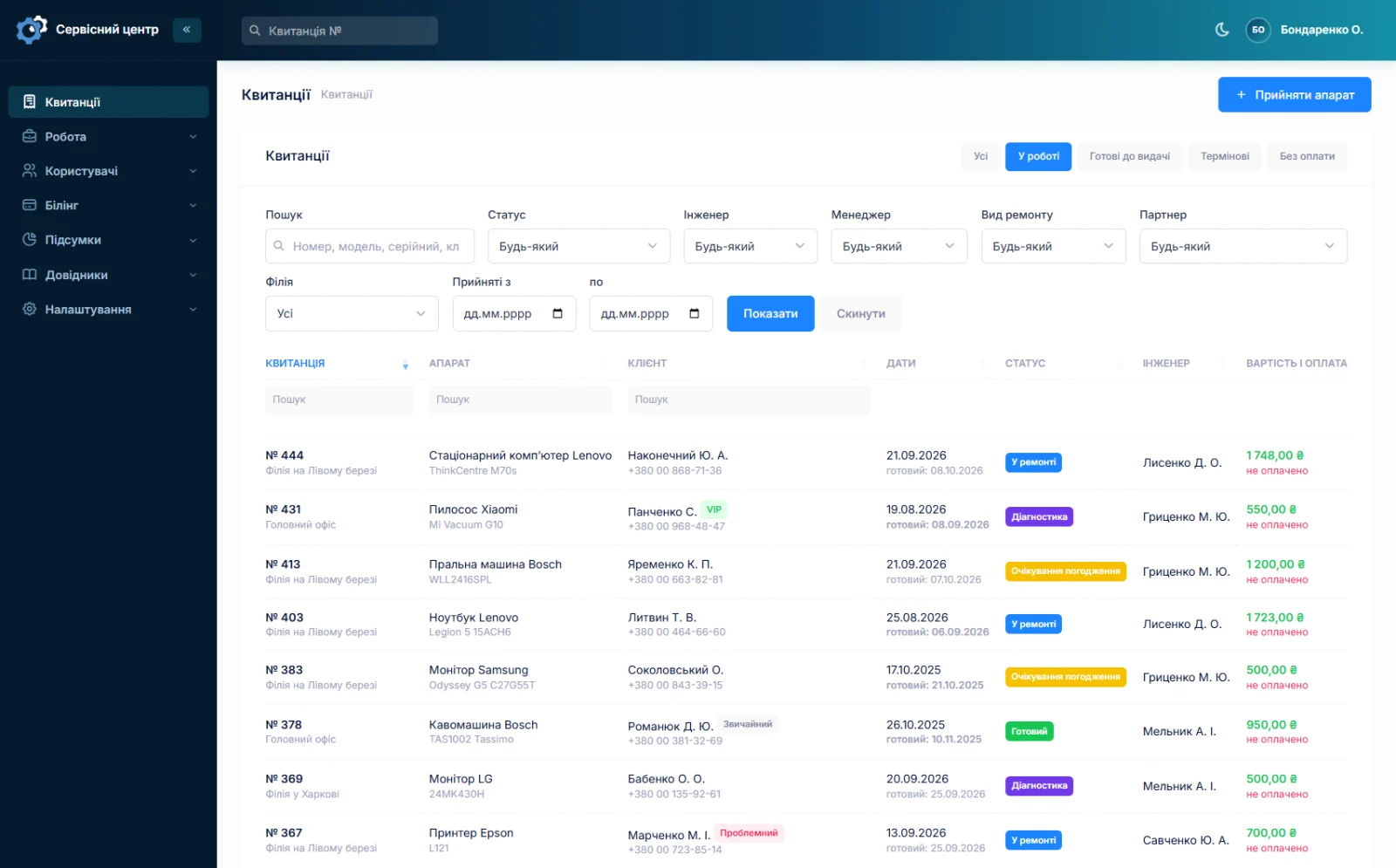
The serial number finds a device even if it was here a year ago: you see what was done and what it cost. Comments on a repair — say, “customer approved a board replacement by phone” — stay on the job sheet rather than on a sticky note by the monitor.
Devices nobody collects
A small workshop is short of space, and there are always a few finished devices on the shelf that nobody comes for in months. The “ready for collection” button shows them all with the date they were ready, so you can see who has waited a week and who half a year. The ready-for-collection email can be sent again, and your free storage period can go into the terms on the job sheet — the customer sees it at intake, and the later conversation about disposal goes quite differently.
What you earned this month
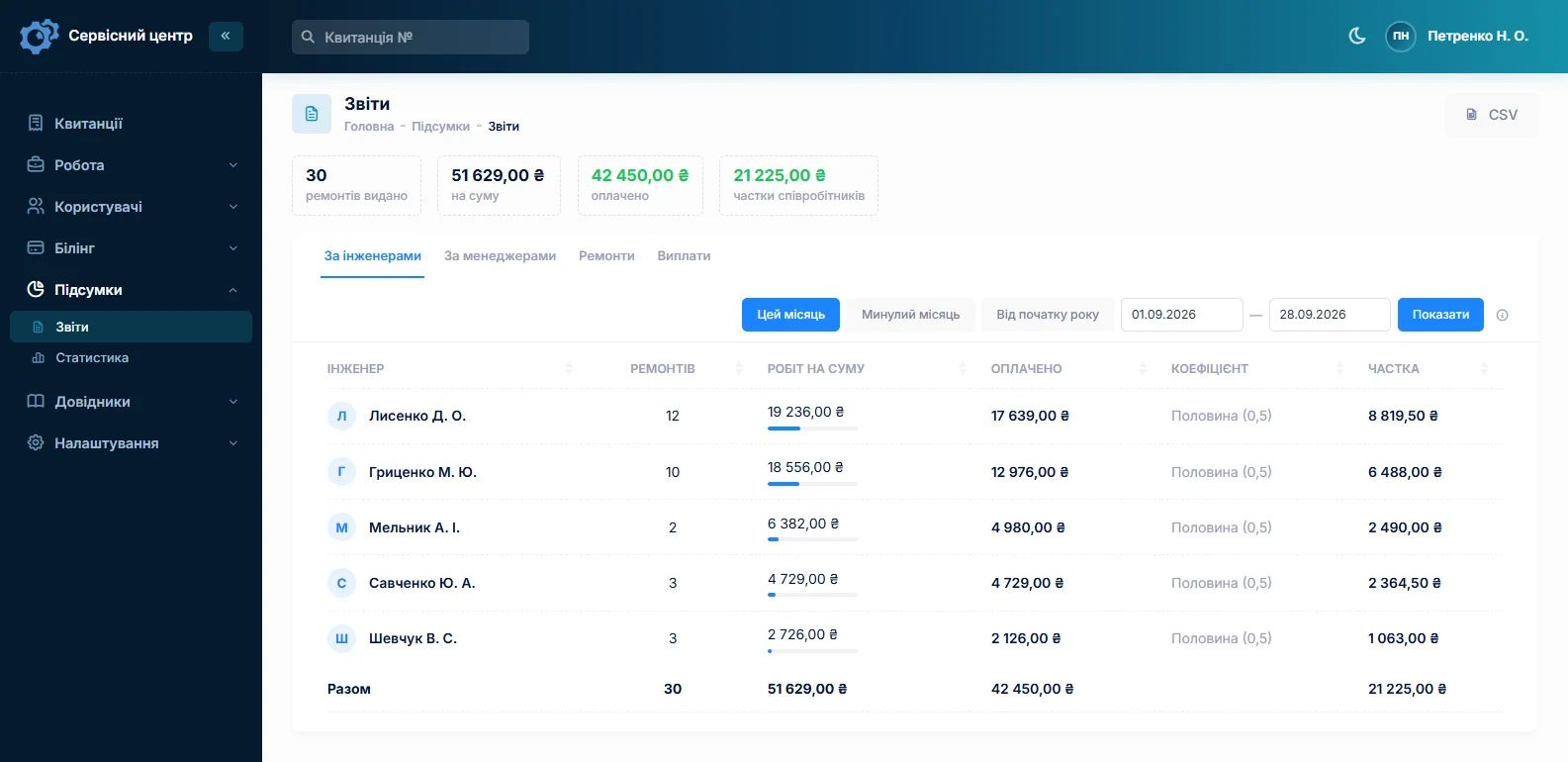
The report shows how many repairs were handed back in a period, for what amount and how much of it has been paid. The “unpaid” filter in the list is everyone who still owes you. For one person, that is the workshop’s bookkeeping: no Excel and no calculator on a Sunday evening.
From your phone, when you are out
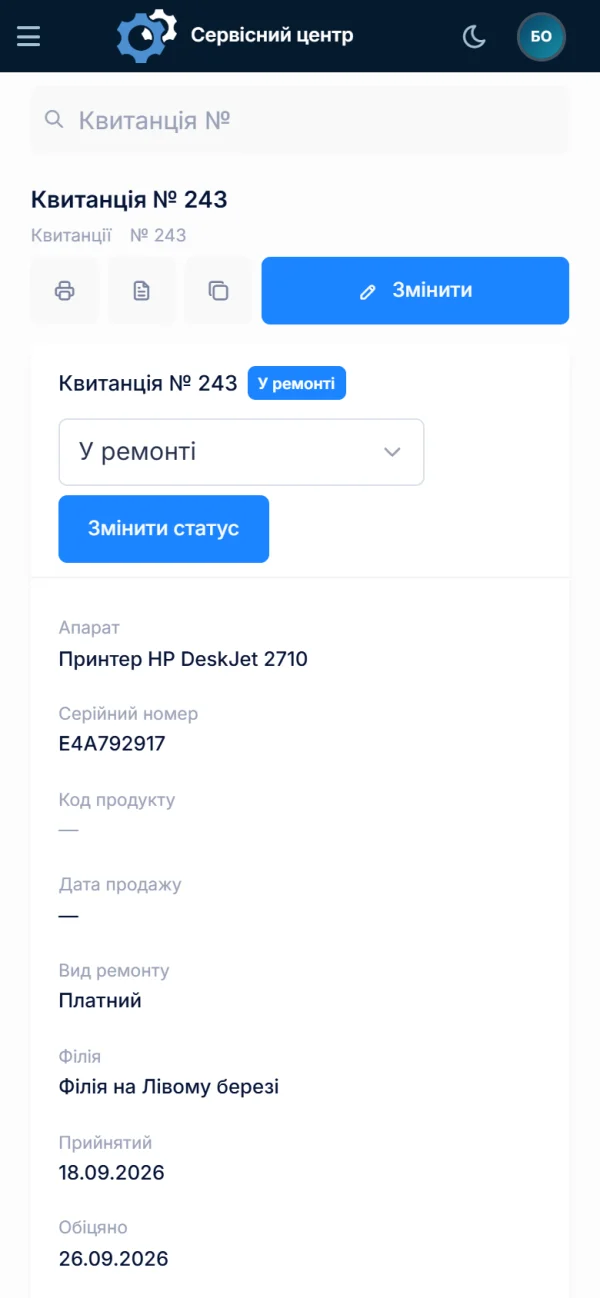
The software runs in a browser, so from your phone you can check the list, find a customer or change a status — for instance, answer an “any news?” call while queuing at the post office. There is nothing to install, and your data does not sit on a single computer that might fail.
When you take on help
Hire someone for the front desk or a second technician, add them as a user and tick their permissions: intake and the list for the front desk, no reports or money. There is no other product or plan to move to, and the price stays the same. Open a second location and it appears as a branch in the same software (branches and permissions).
What is not here
- A till or fiscal receipts. The software records that a repair is paid but does not print fiscal receipts.
- Online booking. Customers cannot book a repair from your website.
- SMS. None, and none planned; customers hear that the device is ready by email or in Telegram.
What you get
- A printed job sheet describing the device’s condition — and fewer arguments at collection.
- Every device in one list, overdue ones in red.
- The history of a device by serial number.
- A list of who has not paid yet, and of who has not collected.
- The month’s total without adding it up by hand.
- Access from your phone, and backups that do not depend on your computer.
What it costs
The price is the same as for a ten-person workshop: we have no separate plan for one technician, but there are no per-user charges either. If the software does not suit you, your money is refunded within 14 days of the first payment (refund terms).
Monthly
Paid every month, cancel whenever you like.
Yearly
Cheaper than paying monthly. Invoice or card payment.
Custom work
Changes tailored to the way you work — hourly, by agreement.
Try it without signing up in the demo: book a device in there the way you do in your shop.
Frequently asked questions
What equipment do I need?
Any computer or laptop with a browser and an ordinary A4 printer for job sheets. There is nothing to install: the software opens at your workshop’s own address, and the data is kept on our server rather than on your computer.
Can I work from my phone only?
Checking the list, finding a customer, changing a status and writing comments work well on a phone — the software adapts to a small screen. Booking devices in and printing job sheets is still easier at a computer with a printer. There is no separate mobile app.
Do I have to copy my old notebook records over?
No. Most workshops simply start with new repairs: old devices are handed back from the notebook, new ones are booked into the software, and within a few weeks the notebook is no longer needed. If your records are in a spreadsheet and there are many, we can move them — get in touch.
Is there a cheaper plan for a single technician?
Not a separate one: the price is per workshop, however many people work there. It comes out cheaper if you pay yearly rather than monthly — current amounts are on the pricing page.
What changes when I take on a helper?
Only that another user appears in the software. You tick their permissions — say, intake and the job list without reports or money — and they work under their own name: you can see who booked a device in and who changed a status. The price stays the same.
How long does setting up take?
Usually an evening. The lists — statuses, repair types, payment types — are already filled in. You enter the workshop name and address, put your logo and terms on the job sheet, add the kinds of devices you repair and book in the first one. The rest fills in as you work.
See also
Computer repair shop software
Diagnosis in the work log, agreeing the price after opening the device, your own statuses, recommendations for the customer.
Read moreSoftware for an authorised service centre
Warranty repairs at the brand price list, date of sale, a certificate the maker accepts, partner accounts.
Read moreSoftware for home appliance service
Contents recorded at intake, warranty at the brand price list, callouts, slow parts and partner shops.
Read moreSee how it works
The demo is open — go in and try it. Ask us anything by email, Telegram or the form on this site.