Game console repair software
Software for console repair shops working on PlayStation, Xbox, Nintendo Switch and controllers: serial numbers and accessories at check-in, quotes the customer approves online before an HDMI or board job, stock of sticks and ports, deposits and ready notices.
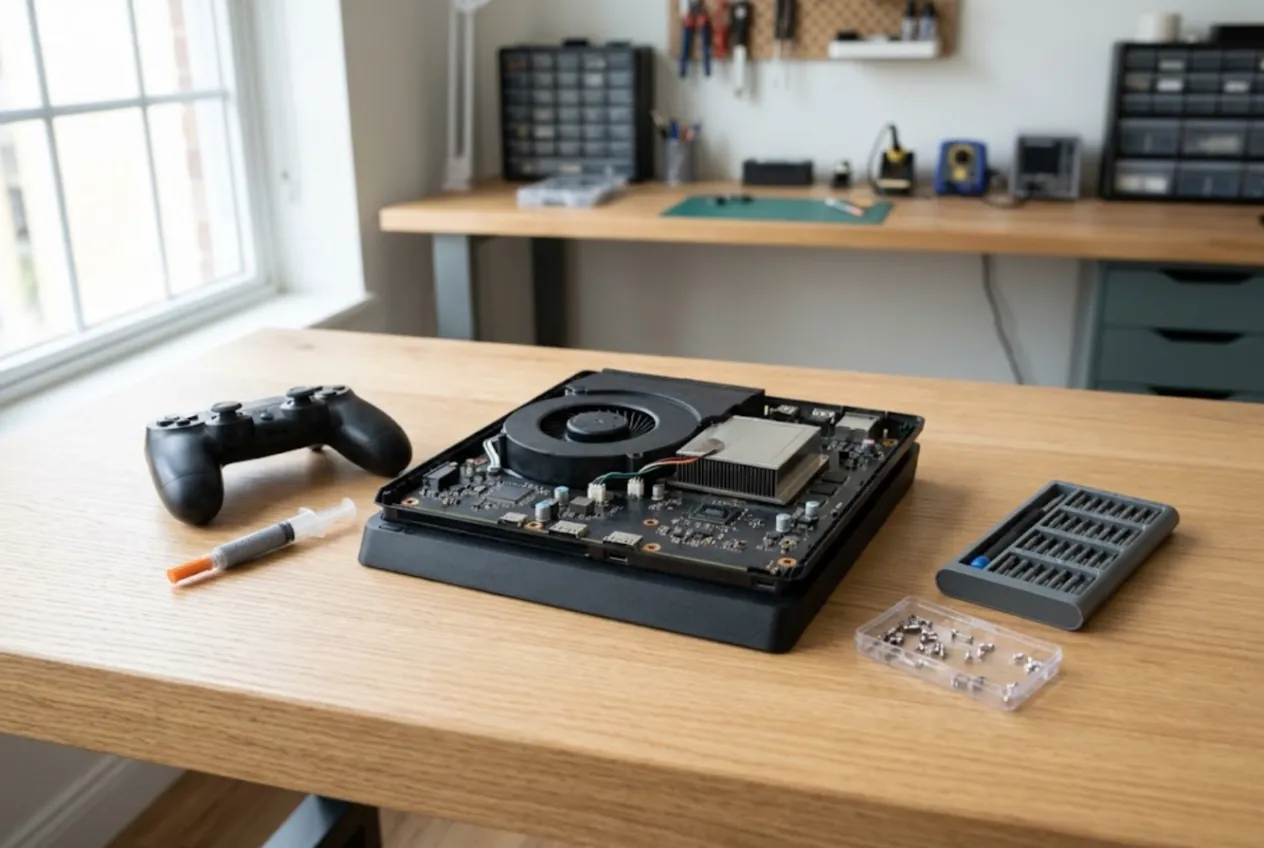
ServiceCenterSoft is job-tracking software for a console repair shop: PlayStation, Xbox, Nintendo Switch and their controllers. Check-in with the serial number and a list of what was left with you, quotes the customer approves before an expensive repair, parts stock, deposits on ordered parts and a message when the console is ready.
Two kinds of work on one bench
A console repair shop runs two very different streams of work. One is small and constant: controllers with stick drift, consoles that need dust cleaning and fresh thermal paste, sticky buttons. The jobs look alike, and the risk is mixing up whose controller is whose. The other is expensive and unpredictable: an HDMI port torn off with pads lifted from the board, a power supply that will not start, a Switch that no longer charges. Nobody can quote those honestly before the console is open, and the part often has to be ordered.
Many shops also take consoles in by post or from a drop-off counter, so the customer is not standing next to the device when the bad news arrives. That makes a written record of what came in, and of what the customer agreed to, even more important.
Check-in: serial number, controllers and signs of earlier repairs
The classic dispute at collection is “I left two controllers” or “that crack wasn’t there”. So three fields are filled in at check-in. “Accessories”: console, two controllers, power cable, no HDMI cable, no stand. “Condition”: scratches on gloss panels, cracks, a broken warranty seal, any sign the case has been opened before. “Fault”, in the customer’s words: “picture gone after someone tripped on the cable”, “loud fan, shuts down after half an hour”.
The console’s serial number goes into its own field, so you can see whether it has been in before and what was done. The date of sale shows whether a store warranty might still apply. All of it is printed on the repair receipt the customer signs.
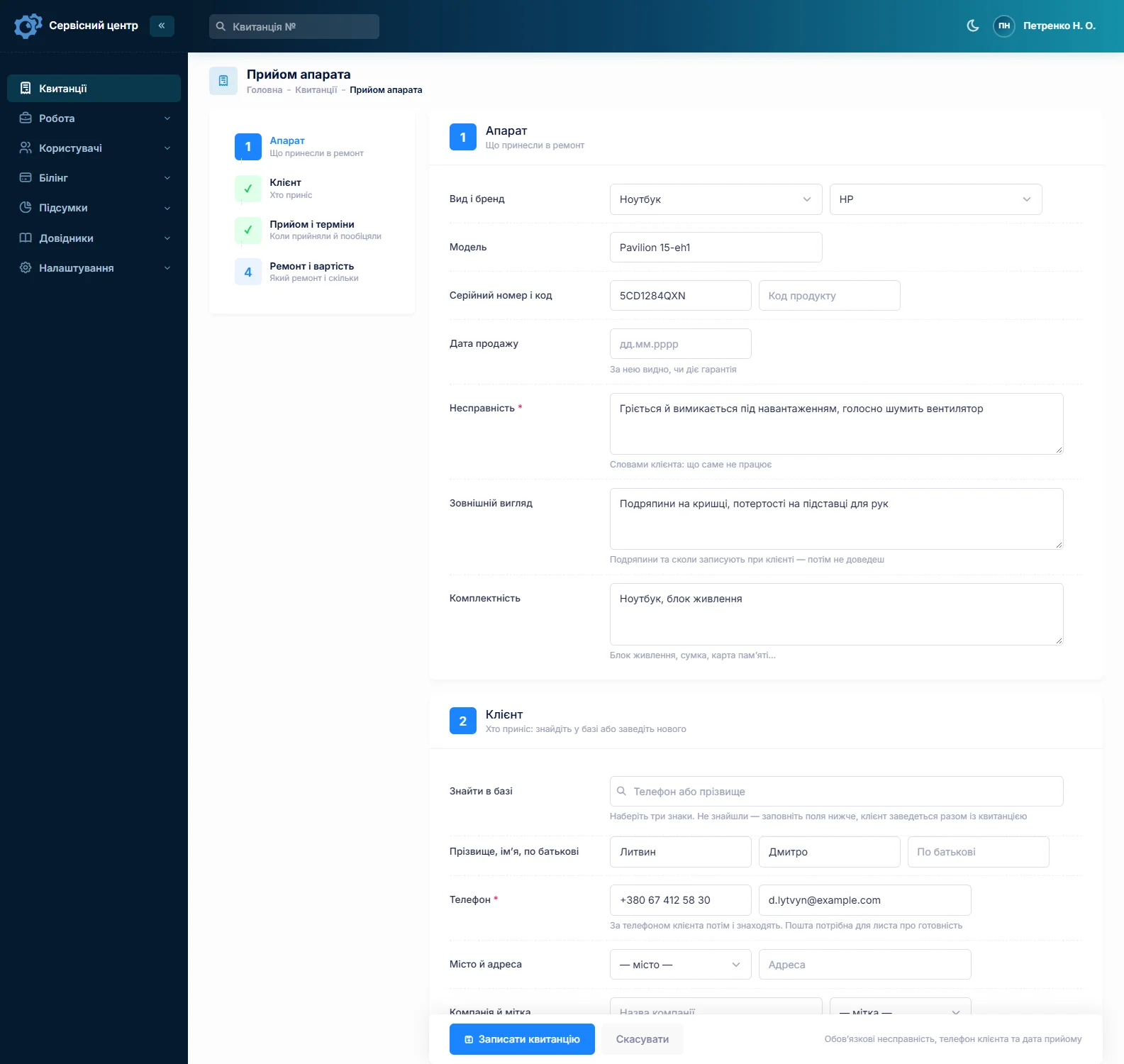
If the console is still under the manufacturer’s warranty, it is worth telling the customer that an independent repair may affect it, and noting on the job that you did. This is general practice, not legal advice: the rules depend on the country and the manufacturer.
Typical repairs and rough prices
Prices vary a lot by country, city, model and the part you fit. As a rough guide to the market, not a recommendation:
- HDMI port replacement — around €70–150 if the board is intact; more with pad or trace repair.
- Cleaning and new thermal paste — around €50–100; more with a fan replacement.
- Stick drift — around €30–60 per stick, depending on the module.
- Power supply repair — around €60–150, depending on what failed.
- Switch charging port — around €60–120.
None of these figures is built into the software. You set your own prices in the device and work lists. Create “PlayStation”, “Xbox”, “Nintendo Switch” and “Controller” as separate device types, and each gets its own repair price and its own diagnosis price.
Board-level jobs: diagnose first, then quote
“Just replace the HDMI port” rarely stays that simple: under a torn port, half the pads may be gone. So expensive jobs go step by step. The console is booked in as “Diagnostics”, the technician writes the findings in the work log, and the job moves to “Awaiting approval”. The job list shows every console waiting for the customer’s answer.
The quote is built line by line from the work list or from stock: “HDMI port — 1”, “port replacement”, “trace repair”. A button on the job sends it to the customer by email or Telegram. The customer opens the link, sees each line and the total, and clicks “I agree” or “I decline”; the answer and date stay in the job history. If the customer agreed on the phone, record it as a comment on the status change.
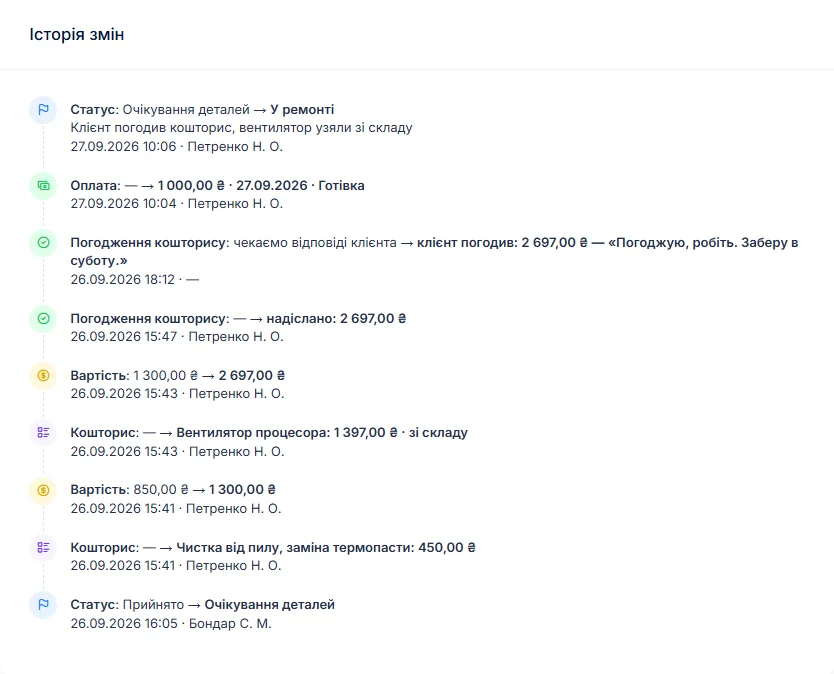
If the customer declines, close the job with the “Repair declined” status and switch the cost to “Diagnostics only”, which applies the diagnosis price you set for that device type.
Controllers as a steady flow
Stick drift is the most common reason anyone walks in. Book each controller as its own job, with its own fault, price and status. When a customer brings a console and two controllers, create the second and third jobs by copying the first: the customer, model and notes carry over, the serial number does not, because every device has its own.
Which module to fit — original, aftermarket or Hall-effect — is the customer’s choice, since it changes both the price and how long the repair lasts. The choice goes on the quote as a line, so at collection everyone can see what was agreed.
Parts stock for a console shop
A console shop keeps the everyday parts on hand: stick modules, HDMI ports for common models, fans, thermal paste and pads, buttons. Stock in the software works as a log: what came in, at what price, and which job each part went into. A part added to a quote from stock is taken off the quantity automatically.
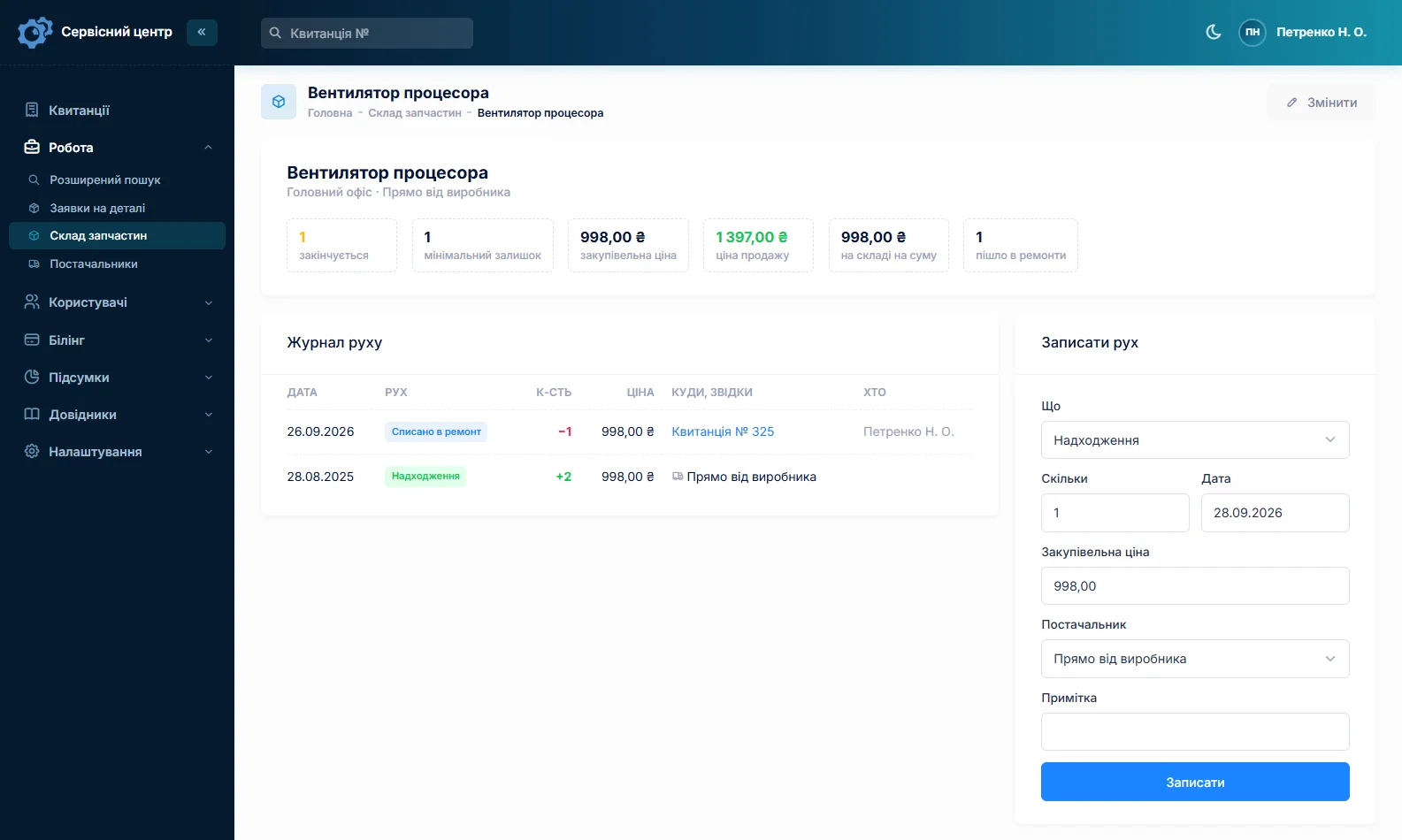
Give sticks and ports a minimum quantity and the “running low” filter tells you when to reorder. Quantities are whole numbers, so count thermal paste in syringes rather than grams. A part you do not have is ordered from the job, and the order can be emailed to your supplier. More on spare parts tracking.
Deposits, ready notices and the shelf
Many shops take a deposit before ordering an expensive part. A job can have several payments: a deposit on approval, the rest at collection. The job shows how much has been received and how much is still due, and the “unpaid” filter collects jobs not yet settled.
When the console is ready, the customer gets an email or a Telegram message from one button on the job. If nobody comes, a finished job shows how many days it has been waiting; once the free storage period from your settings has passed, the counter turns red and the “past free storage” filter gathers those devices. Notifications are covered on the customer notifications page.
What it does not do
- Photos and attachments on a job. Condition is described in words; keep any photos separately.
- SMS or a mobile app. Notices go by email and Telegram; the software runs in a browser, including on a phone.
- Online payment by the customer. You record payments on the job yourself.
- Barcodes or supplier integrations. Parts are picked by name; orders go out as ordinary emails.
- Point of sale or console sales. It tracks repairs, it is not a shop till.

We are very happy working with servicecentersoft.com: they built everything we asked for, even though our request was unusual, since we deal with medical devices. Everything was done precisely and on the agreed schedule. Thank you for the cooperation — we keep working together.

I tried the ServiceCenterSoft demo and came away with a good impression. The program is simple and easy to understand, yet it has everything you need for the job: customers, repairs, devices, spare parts, statuses and statistics.
I especially liked the dark theme and the responsive design — working from a phone is perfectly comfortable. Another plus is the instant search that works as you type, so you don't have to press a separate "Search" button every time.
You can tell the program was built specifically for service centers rather than being a generic CRM adapted for the repair business. The interface has no unnecessary frills; everything is logical and to the point.
A good, practical tool for the day-to-day work of a service center.

I liked that you get a free 14-day trial and that they are willing to handle my special requests — setting things up exactly the way I need them.
I also liked how payment works. You can simply pay the monthly fee by card online — basically the same as a regular Spotify subscription or any other service. No separate contracts to sign and no invoices to pay manually.
And there's no feeling of strict limits on the number of employees. One service center is one account, and inside it you can organize the work of your technicians and run several branches.
For me this is far more convenient than plans where you have to pay for every single user or keep counting how many employees are working today.

My business is fairly specific, so the program's standard features weren't enough — I needed my own custom fields, my own sorting options and search by additional parameters. The work completion certificate and the printed repair receipt also needed some changes to fit the way we work.
I contacted technical support. To be honest, I expected changes like these to take a long time, but everything was done within a single day. The team quickly understood exactly what we needed, suggested the right solution and did everything properly.
I'd especially like to mention the support: they get straight to the point, with no unnecessary bureaucracy, and they genuinely help instead of just sending you off to read the documentation.
For me this is a big advantage of the program: it isn't just sold "as is" — it can be adapted to how you actually work. Thanks to the team for the quick response and for treating the customer right.
Highly recommended!
What it costs
One price for the whole shop — no extra charge for staff or branches.
Monthly
Paid every month, cancel whenever you like.
Yearly
Cheaper than paying monthly. Invoice or card payment.
Custom work
Changes tailored to the way you work — hourly, by agreement.
Off-the-shelf not enough — your own forms, roles, reports or workflow? We will build a program for you. How it works
Try it without signing up in the demo: check in a console with two controllers, quote an HDMI port replacement and take the job through to collection.
In short
- Serial number, controllers and condition on a receipt the customer signs.
- Expensive repairs only after diagnosis and a quote the customer approves.
- Separate repair and diagnosis prices for each platform and for controllers.
- Stick modules, ports and thermal paste in stock, with reorder levels.
- Deposits, ready notices by email and Telegram, and a storage day counter.
See also
Bike repair shop software
Bicycle repair software for bike shops and e-bike service: tune-up packages, special-order parts with deposits, consumables stocked before spring, winter storage and seasonal mechanics.
Read moreAir conditioner service software
HVAC repair software for small air-conditioning contractors: call-outs in peak season, installations quoted line by line with deposits, refrigerant and parts in stock, and the same units serviced year after year.
Read moreSoftware for home appliance service
Contents recorded at intake, warranty at the brand price list, callouts, slow parts and partner shops.
Read moreSee how it works
The demo is open — go in and try it. Ask us anything by email, Telegram or the form on this site.