Audio repair software
For shops repairing amplifiers, receivers, speakers, powered monitors, vintage hi-fi and live sound gear: itemised quotes approved before a restoration, a parts stock with low-stock alerts, deposits, and due dates that respect the gig.
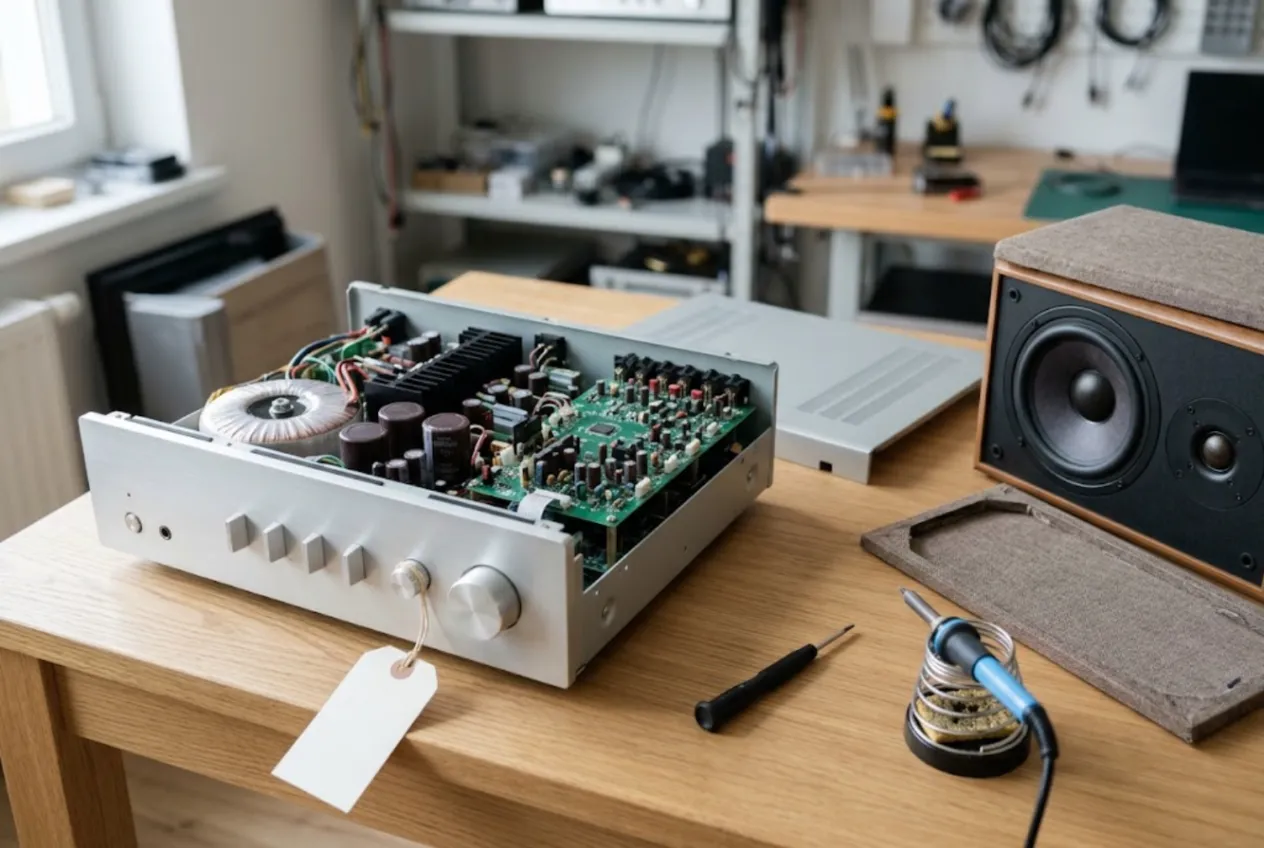
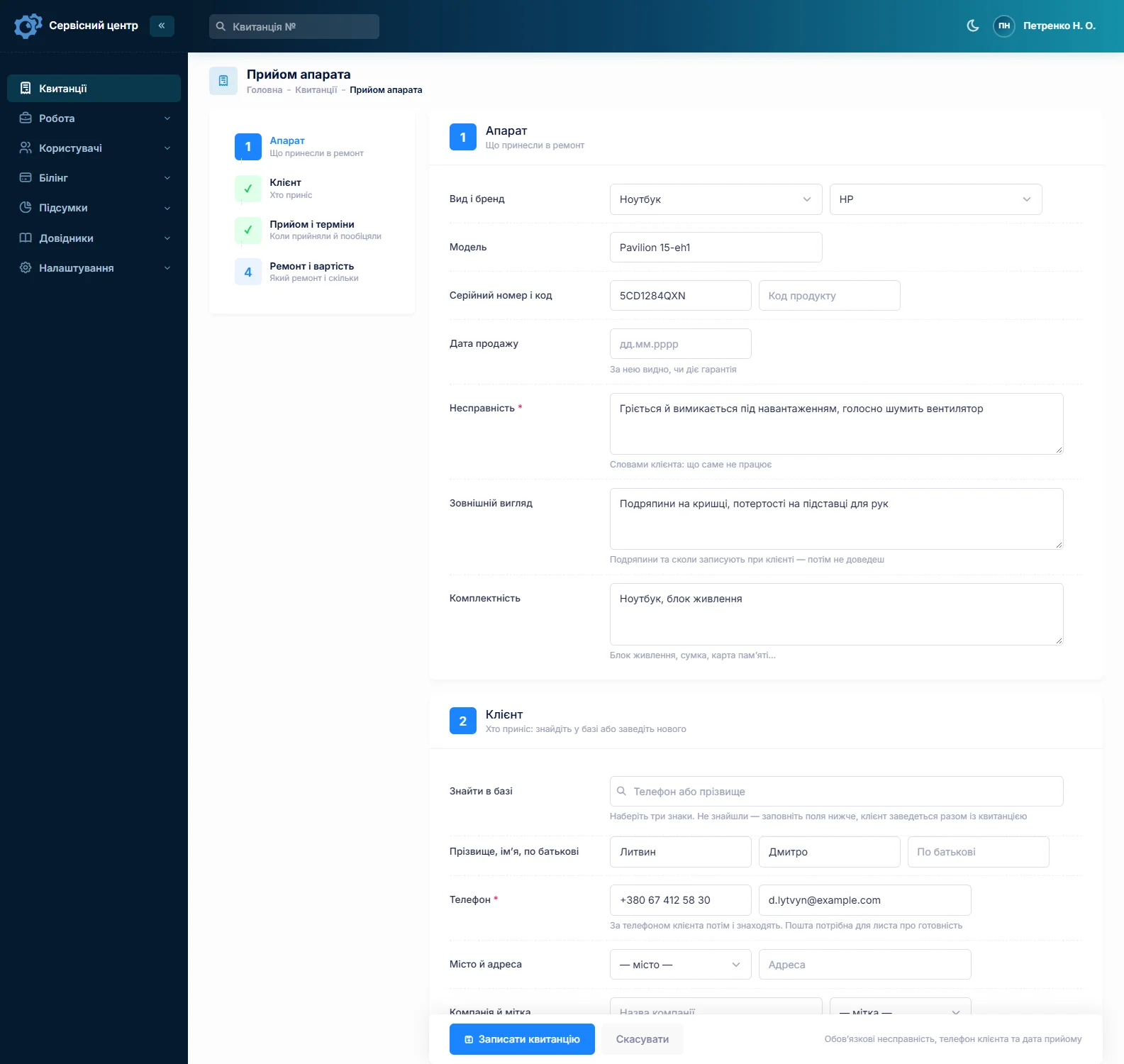
ServiceCenterSoft is repair-tracking software for audio repair shops: amplifiers and AV receivers, passive and powered speakers, subwoofers, vintage hi-fi, turntables and tape decks, mixing desks and the power amps that live in a touring rack. Book-in with a full accessory list, itemised quotes the customer approves before you start, a parts stock that tells you when to reorder, deposits on expensive parts, and due dates you can actually see. It runs in the browser, on the bench PC and on your phone.
Who walks through your door
An audio repair shop serves three very different customers from the same shelf. Home listeners bring a receiver that will not power on, a speaker that distorts, a sub that went quiet — they care about price and turnaround. Vintage enthusiasts bring a 1970s integrated amp they hunted down for months; they want it to sound right and they do not want surprises on the bill. And musicians, sound engineers and PA hire companies bring a powered monitor or a rack amp they need for Friday’s show.
The usual headaches:
- a “quick look” at a vintage amp turns into a full recap, new output transistors and a bias adjustment — and the price talk happens after the work;
- “ready before the weekend” was said at the counter and never written down;
- at collection: “there was a remote”, “it had four valves, not three”;
- a pair of floorstanders blocks the back room for months.
Booking in: the amp and everything that came with it
Receivers arrive with a remote and an aerial, turntables with a cartridge and dust cover, valve amps with their valves, stage gear in a flight case with power leads. The “accessories” field is filled in with the customer at the counter and printed on the job ticket they sign. Be specific: “4 valves, fitted”, “dust cover cracked”, “no mains lead”.
The “condition” field covers what anyone can see: scratched fascia, missing knobs, dented grilles, a torn cone, signs of liquid. Model and serial number have their own fields, so the next time the unit comes in you can see what was done to it — useful for a collector’s amp and for a hire company’s ten identical monitors.
Write the fault the way the customer describes it, with detail: “left channel drops out after an hour”, “hum on every input”, “relay clicks, stays in protect”.
Honestly about photos. You cannot attach photos, audio clips or other files to a job. If you take pictures at book-in, keep them on your own phone or drive and note on the ticket that they exist.
Vintage restorations: quote first, recap second
An old amp rarely needs just one part. Dried-out electrolytics, scratchy pots, dirty selector switches, matched output transistors, a bias and offset adjustment, sometimes a protection relay or a transformer. Each is a line; together they add up to a number the owner should see before you pick up the iron.
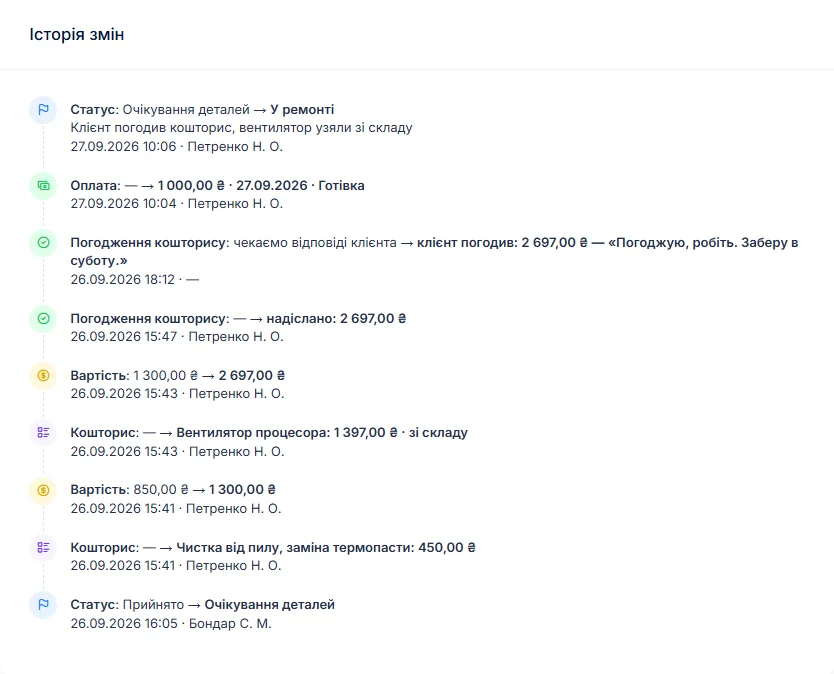
So the workflow is: diagnose, write the findings in the work log, then build an itemised quote — “electrolytic capacitors, full set”, “output transistors × 4”, “clean pots and switches”, “bias adjustment”. A line can come from your labour list or straight from stock, in which case the price fills in and the part is deducted from the quantity on hand.
A button on the job sends the quote by email or Telegram. The customer opens the link, sees every line and the total, and clicks “I agree” or “I decline”. The answer and the date are stored in the job history. Find something else once the case is open? Add a line and send it for approval again.
Restorations can take weeks: parts on order, a soak test under load, a second round of adjustment. The work log shows what was done and when; the status shows where the unit is. If the owner decides it is not worth it, set “repair refused”; if it cannot be saved, “beyond repair”. Charge for diagnosis? Set a diagnostic price for the device type and switch the job to “diagnostics only” — the customer sees that amount from the start. The same quote-before-parts approach is described for TV repair.
The gig is on Friday: due dates and rush jobs
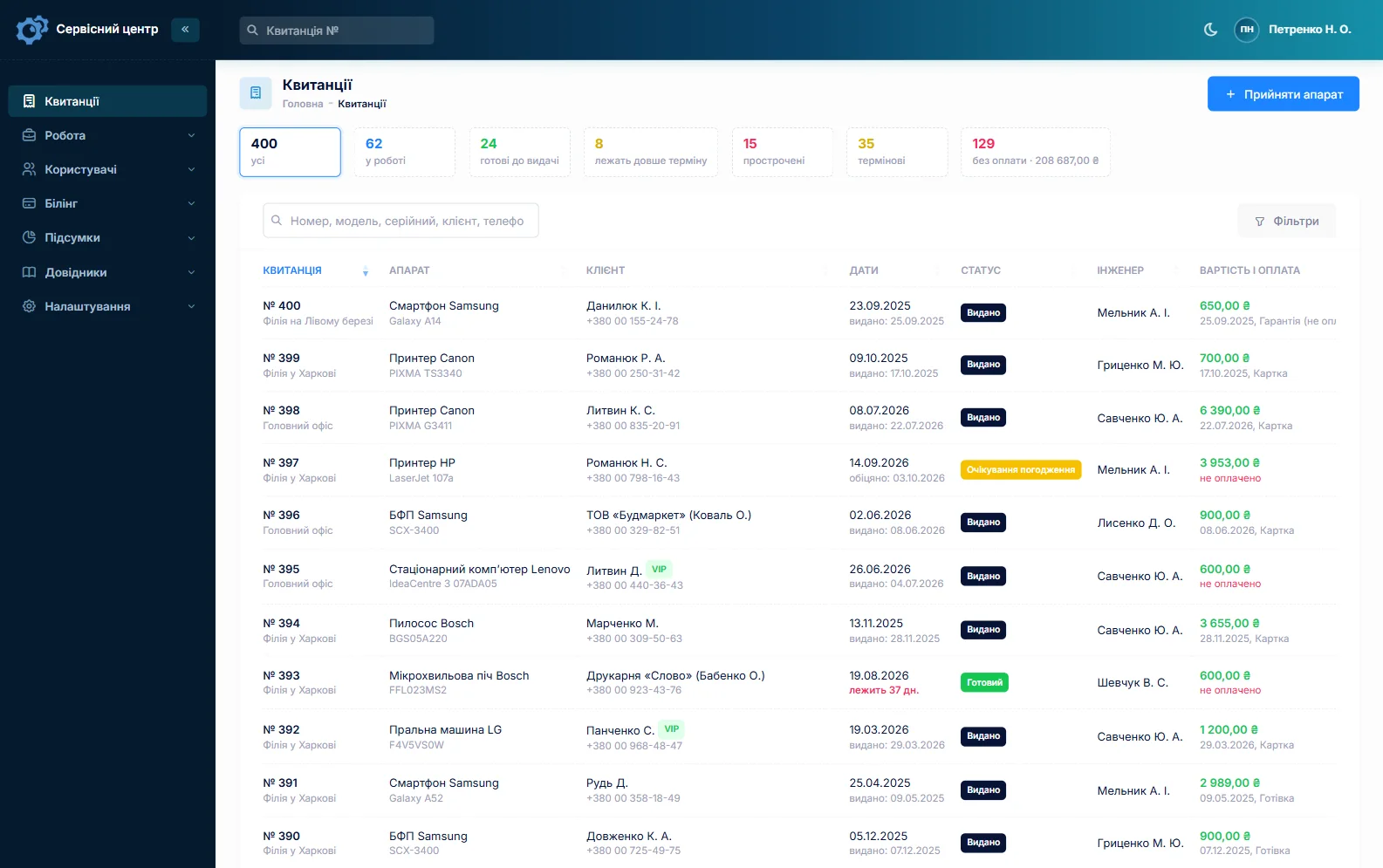
For a band or a hire company, a repair is tied to an event. Every job has a promised date; once it passes, the row turns red and the “overdue” filter gathers those jobs in one list. A rush flag shows directly in the list, and a tile above it counts how many rush jobs are open. Filter by technician to see who has what on the bench.
You set up your own statuses. The starter set includes “diagnostics”, “waiting for parts”, “awaiting approval”, “repair refused” and “beyond repair”; add a “soak test” status if you want units running in after repair to show up separately.
Parts: output devices, caps, valves and surrounds
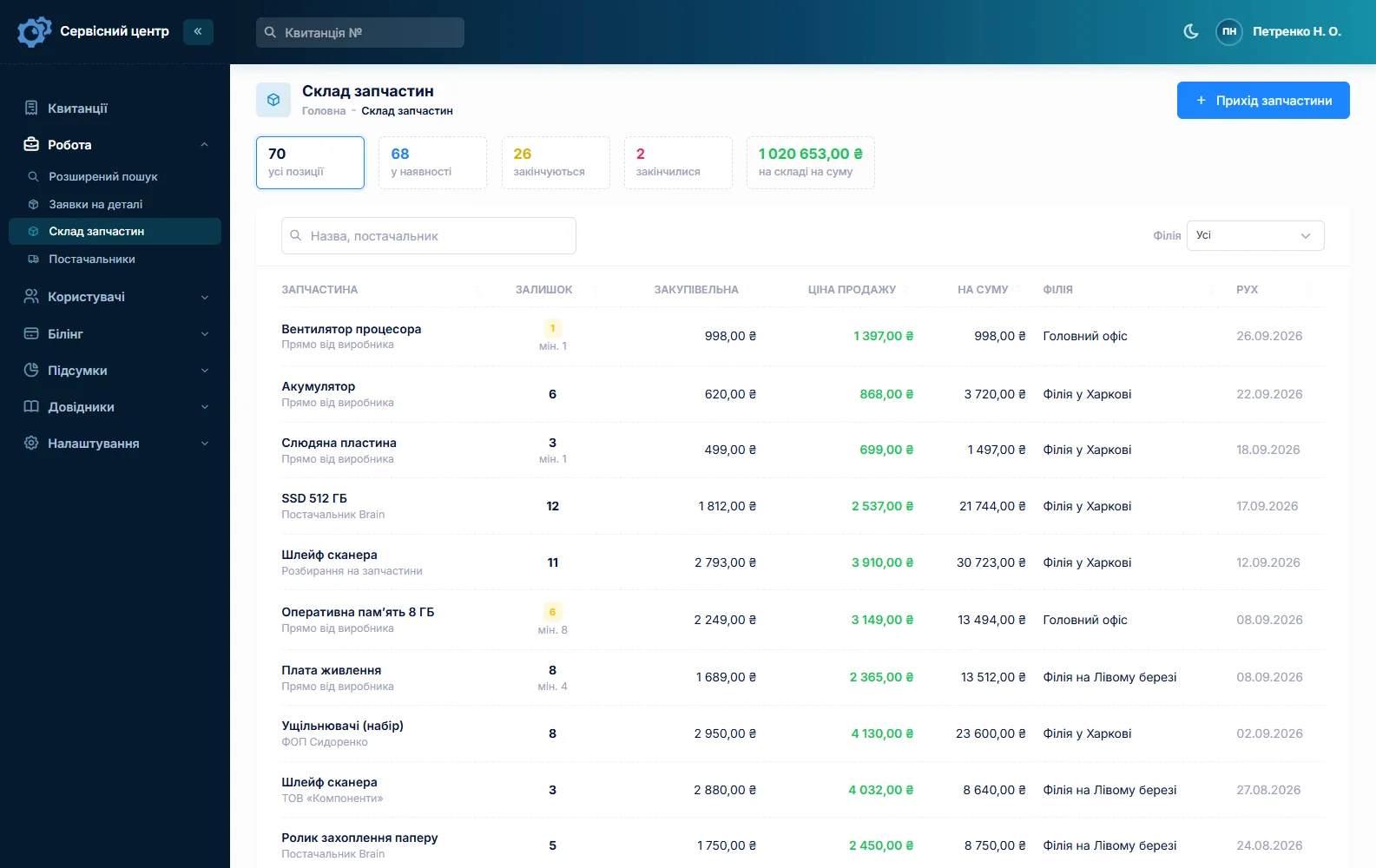
Stock works as a movement log: goods in with price and supplier, parts used as quote lines, write-offs with a reason, and stocktakes. Quantities update themselves. Set a minimum for the parts you burn through — output transistors, amplifier ICs, electrolytics, protection relays, fuses, valves, speaker surrounds — and the “running low” tile becomes your shopping list. Quantities are whole units, so a matched pair works best as its own stock item.
When a part is missing, create a parts request from the job and email it to the supplier; mark it received and book it in when it arrives. You can see which unit is waiting on which part. There is no barcode scanning and no supplier catalogue integration. More on spare parts tracking.
Hire companies, studios and venues
Customers have a “company” field, so a PA hire firm or a studio is one customer no matter how many units it sends. The customer card lists every job, the total spent and the balance outstanding. Four identical monitors? Fill in the first job fully and copy it for the rest — customer, device type, model and notes carry over; you only type the new serial number.
A unit back after your repair gets the “repeat repair” job type, and the serial number brings up the earlier job. A job can take several payments — a deposit for an output transformer or a set of valves, the balance at collection — and the software shows what is still due. The printed completion report carries the work log, your recommendations and the amount to pay. Invoices with full company details and bookkeeping are outside its scope.
Advice, safety and collection
Plenty of repeat faults come from how gear is used: an amp in a closed cabinet, speakers below the rated impedance, clipping at a party, valves at the end of their life. Write it in the “recommendations” field — it is printed on the report and stays in the unit’s history.
Many shops run an electrical safety check before mains-powered gear goes back to the customer, and some customers expect one. The software keeps no test certificates or measurement records; note the result in the work log. Which checks apply to you depends on your country and your insurer — this is general information, not legal advice.
When a job is ready, the customer gets an email or a Telegram message (they subscribe via the QR code on the ticket). There are no text messages and no app. Every finished unit shows how many days it has been waiting, and the counter turns red once your free storage period runs out. See customer notifications.
What audio repairs typically cost
A rough guide only — it varies with region, the class of equipment and parts: diagnosis €30–70, an amplifier output stage repair €80–250 with parts, a powered speaker or sub amp module €100–300, speaker refoaming €60–150 per pair, a full vintage receiver restoration from €250 to €800 or more. Your own prices go into device types and quote lines.
What it does not do
- no photos, audio clips or files on a job;
- no text messages, no app, no online payment by the customer;
- no measurement reports or safety test certificates;
- no supplier integrations or barcodes;
- no loan equipment pool — a loaner can only be noted on the job.
Pricing
One price for the whole shop — no charge per user or per location. Everything the software does is on the features page.
Monthly
Paid every month, cancel whenever you like.
Yearly
Cheaper than paying monthly. Invoice or card payment.
Custom work
Changes tailored to the way you work — hourly, by agreement.
Off-the-shelf not enough — your own forms, roles, reports or workflow? We will build a program for you. How it works
Try it without signing up in the demo: book in a receiver, build a quote and send it for approval.

We are very happy working with servicecentersoft.com: they built everything we asked for, even though our request was unusual, since we deal with medical devices. Everything was done precisely and on the agreed schedule. Thank you for the cooperation — we keep working together.

I tried the ServiceCenterSoft demo and came away with a good impression. The program is simple and easy to understand, yet it has everything you need for the job: customers, repairs, devices, spare parts, statuses and statistics.
I especially liked the dark theme and the responsive design — working from a phone is perfectly comfortable. Another plus is the instant search that works as you type, so you don't have to press a separate "Search" button every time.
You can tell the program was built specifically for service centers rather than being a generic CRM adapted for the repair business. The interface has no unnecessary frills; everything is logical and to the point.
A good, practical tool for the day-to-day work of a service center.

I liked that you get a free 14-day trial and that they are willing to handle my special requests — setting things up exactly the way I need them.
I also liked how payment works. You can simply pay the monthly fee by card online — basically the same as a regular Spotify subscription or any other service. No separate contracts to sign and no invoices to pay manually.
And there's no feeling of strict limits on the number of employees. One service center is one account, and inside it you can organize the work of your technicians and run several branches.
For me this is far more convenient than plans where you have to pay for every single user or keep counting how many employees are working today.

My business is fairly specific, so the program's standard features weren't enough — I needed my own custom fields, my own sorting options and search by additional parameters. The work completion certificate and the printed repair receipt also needed some changes to fit the way we work.
I contacted technical support. To be honest, I expected changes like these to take a long time, but everything was done within a single day. The team quickly understood exactly what we needed, suggested the right solution and did everything properly.
I'd especially like to mention the support: they get straight to the point, with no unnecessary bureaucracy, and they genuinely help instead of just sending you off to read the documentation.
For me this is a big advantage of the program: it isn't just sold "as is" — it can be adapted to how you actually work. Thanks to the team for the quick response and for treating the customer right.
Highly recommended!
In short
- Accessories and condition recorded at book-in, on a ticket the customer signs.
- Itemised quotes approved by link before a restoration starts.
- Promised dates, rush flags and red overdue rows — the gig is not at risk.
- Stock of output devices, caps, valves and surrounds with a running-low list.
- Hire companies and studios as one customer, with every job, balance and deposit.
- €20 a month for the whole shop.
See also
Watch repair software
Watch repair software for independent watchmakers and repair counters: a precise condition record at check-in signed by the customer, battery and strap jobs booked in seconds, quotes approved by link before a service, and stock of cells, straps and crystals.
Read moreCamera repair software
Software for camera and lens repair shops: body and lens serial numbers, the condition of the glass on the signed job ticket, estimates the customer approves by link, back-ordered parts and deposits, care advice after fungus cleaning.
Read moreSoftware for home appliance service
Contents recorded at intake, warranty at the brand price list, callouts, slow parts and partner shops.
Read moreSee how it works
The demo is open — go in and try it. Ask us anything by email, Telegram or the form on this site.