With parts the software answers two different questions: what is on the shelf and what has been ordered for a specific repair. These are two sections and they should not be mixed up.
Parts stock
Booking a part in takes a name, a quantity, a price and a source (who you bought it from). When the part goes into a job, that is written into the "where it was used" field in your own words: "job 1841", "returned as faulty". The quantity does not go down by itself — stock here is a log, not balances (why it works that way is on the spare parts accounting page). If you run several shops, stock is kept per branch and the list can be filtered by branch. Below the list there is a total across everything filtered.
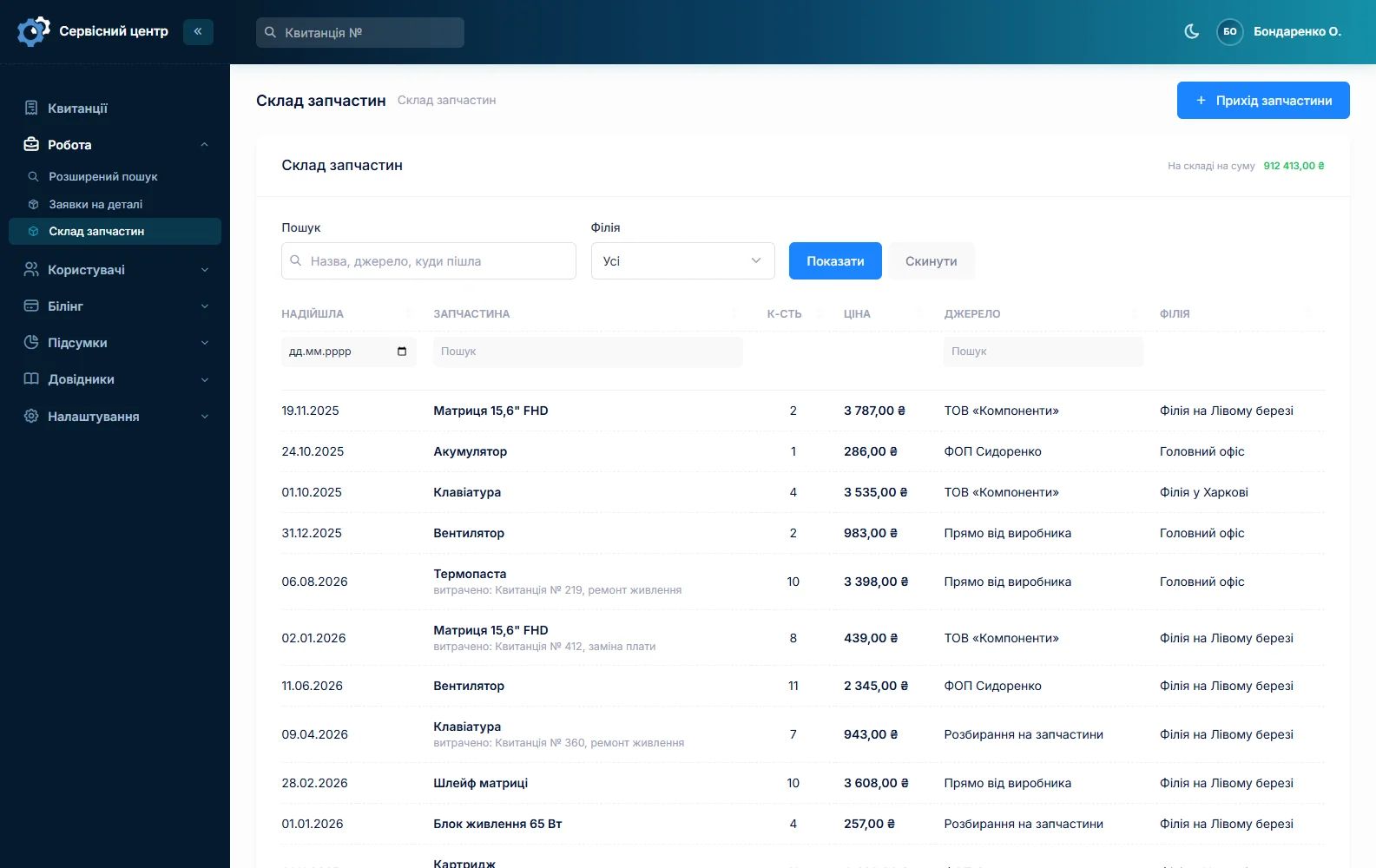
The purchase price is not there for accounting, it is there for the conversation with the customer: you can see what the part cost and what the shop made on it.
Ordering a part
When a part is missing, the order is created straight from the job card and stays tied to it. So a job always shows what it is waiting for, and on the list it sits under the "waiting for a part" status.
The "Parts orders" section
All orders in one list — the workplace of whoever does the ordering. When a part arrives you mark it as received, and the technician sees that work can continue.
Emailing the supplier
An order can be emailed to the supplier straight from the software, instead of retyping it by hand in your mailbox.
Haven’t found the answer?
Check the questions and answers or write to us — we will reply and fill the gap in the documentation.