Paper log book and receipt pad: when to move to software
An honest look at keeping repairs on paper: what the log book and receipt pad do well, where they let you down, how to keep them properly and how to move to software without losing anything.
Plenty of workshops still run on paper: a carbon receipt pad, a log book on the counter, the job number written on the device with a marker. And it works — otherwise workshops would have dropped it long ago. This page is not about paper being old-fashioned. It is about keeping it properly, where it starts to cost you money and how to move to software when the time comes.
What paper does well
- It always works. No internet, no power, no updates needed.
- The customer signs on the spot, and the copy stays with you.
- It costs nothing but the pads.
- Nobody needs training. A new counter clerk fills in a receipt correctly on day one.
For a one-person workshop with a few repairs a week, that is enough. Switching just because “everything is on computers now” is not a good reason.
Where paper lets you down
- The copy is unreadable. Through carbon paper, names and phone numbers are hard to make out — and after six months, impossible. Exactly when the customer comes back under warranty.
- Searching means leafing. The customer rings asking about their phone, and their number is somewhere on page thirty. If they don’t remember the job number either, that is ten minutes gone.
- Overdue jobs are invisible. To see which deadlines have passed you have to reread the whole log. In practice you find out from the customer.
- One book for everyone. While one person books a device in, nobody else can check a repair. With two locations there are two logs, and nobody sees both.
- Lose it and it’s gone. Coffee spilt, taken home, burnt — there is no copy.
- Money by calculator. What each technician earned this month is worked out in the evening, matching the log against the till.
If you stay on paper: how to keep the log properly
- A pad with printed numbers. A job number never repeats and is never handwritten. Don’t tear out a spoilt form — cross it out, or the numbers will have gaps.
- A form with your terms. Diagnostics, free storage period, warranty — printed on the form, not said out loud. A ready-made form can be downloaded on the intake receipt page.
- The log separate from the pad. One line per repair: number, date, customer, phone, device, promised date, technician, date collected. The pad is for the customer, the log is for you.
- A tag on the device with the same number. A device without a number is the first candidate for a dispute.
- A weekly review of the log: what is overdue, what is ready but not collected, what is waiting for a part.
- A photo of the log every month on your phone or in the cloud. That is your backup.
If you keep the log in a spreadsheet rather than a notebook, spreadsheets have their own rules: tracking repairs in Excel.
What changes with software
- the receipt prints on a plain A4 sheet — with your logo, branch details and terms — and the customer signs it just like a paper one;
- the number is assigned automatically and never repeats; handwriting no longer matters;
- a repair is found by any digits of the customer’s phone, and all their repairs are on one card;
- status shows as a colour and overdue deadlines in red, without rereading anything;
- every job keeps a history: who changed what and when — status, price, technician, dates;
- the customer can check the stage of their repair in their own portal;
- the monthly report per technician is calculated from the jobs themselves;
- the database is backed up every day, so the log cannot be lost.
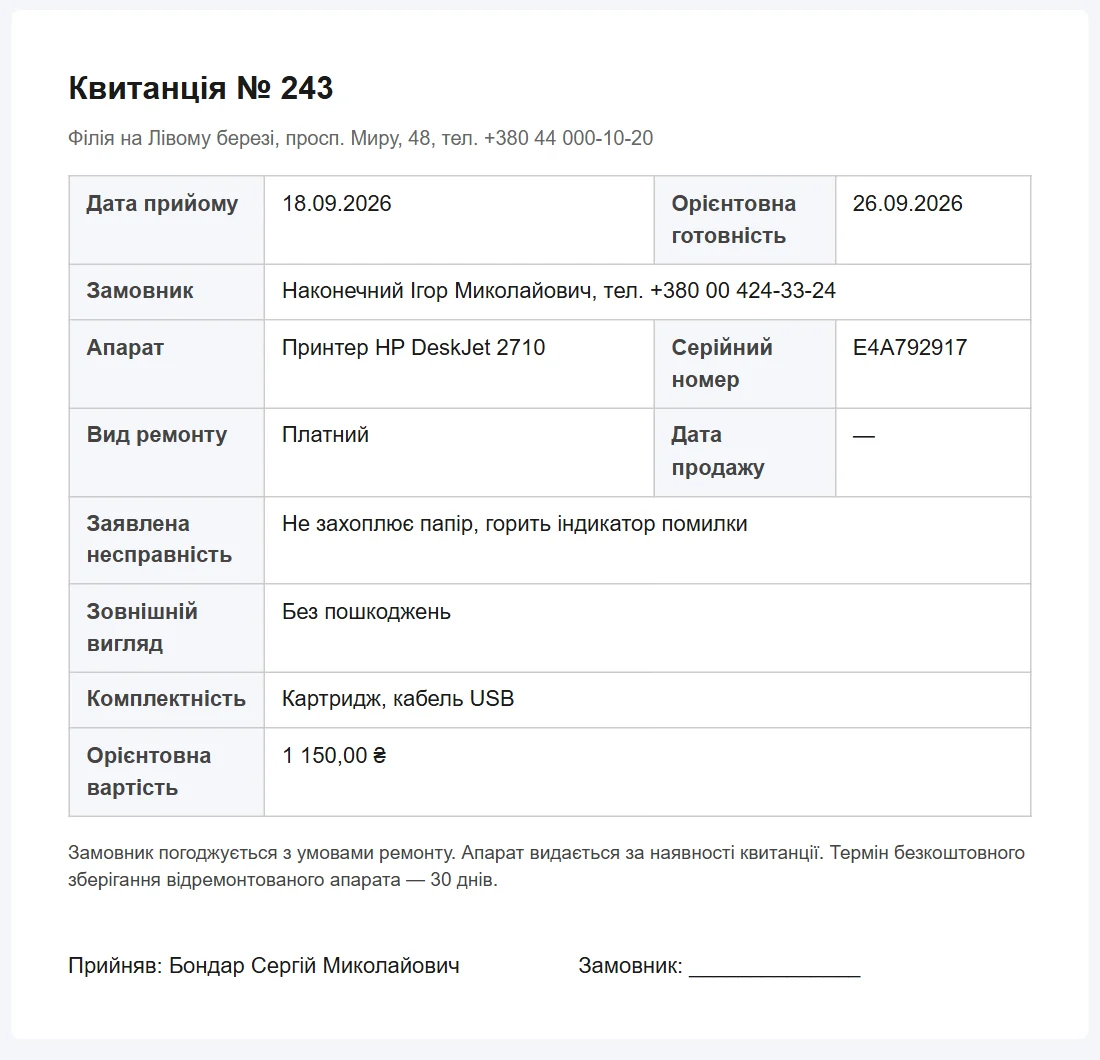
What paper has and the software doesn’t: it runs in a browser and will not open without internet. You can’t attach a photo of the device to a job, and the customer signs the printed sheet, not a screen.
How to move off paper
A handwritten log can’t be imported automatically, and that is fine. The simplest way: from Monday, book new devices in the software and finish the old ones from the pad. Repairs still in progress can be entered by hand in an evening — then everything open is in one place and the pad becomes an archive.
You can try the software without registering in the demo: book in a device the way you do at your shop. Prices are on the pricing page.
Frequently asked questions
Customers are used to signing the receipt. Will that stay?
Yes. The receipt prints on a plain A4 sheet, the customer signs it with a pen just like a paper one and takes their copy. There is no on-screen signature in the software — and most workshops don’t need one.
What if the internet goes down?
The software runs in a browser and will not open without internet. Mobile data from a phone often saves the day. As a last resort, keep a few blank forms at the counter (a ready-made form is on the intake receipt page): book the device in on paper, and when the connection is back, enter the repair in the software and print the customer a numbered receipt.
Can old entries from the paper log be moved over?
Not automatically — the software can’t read a handwritten log. Repairs still in progress are entered by hand, usually an evening’s work. Closed ones stay in the log as an archive; keep it for warranty returns.
Do I need a printer?
For the receipt and the work certificate, yes — any printer that prints A4. You can also show the document to the customer without printing: it opens on a phone and reads fine on screen.
See also
An alternative to Gincore and RO App: an honest comparison
How ServiceCenterSoft differs from Gincore and RO App: prices from their websites, where they are stronger, where we are, and who each one suits.
Read moreTracking repairs in Excel: when the spreadsheet stops working
An honest comparison of a spreadsheet and repair-tracking software: what Excel does well, where it breaks, and how to keep the spreadsheet in good shape if you stay with it.
Read more